

Cybersecurity

Ahmed Raza Sagarwala

  • Digital Experience Manager at the Future Skills Centre
  • Lecturer at Ryerson University for about 10 years
  • I.T. consultant
  • A computer doctor

Today's Goals

  • Improve your online security
  • Understand how digital technologies work
  • Detect when you might be taken advantage of
  • Stop criminals before they get in
  • Help others if they aren't protecting themselves

Do you know someone that...

lost money to cyber-criminals?

Do you know someone that...

uses the same password everywhere?

Do you know someone that...

had their credit card details stolen?

Do you know someone that...

received a call from someone claiming to be from CRA?

Who here...

uses a different password for each login?

Who here...

uses a password database?

Who here...

uses multi-factor authentication (MFA)?

Who here...

checks links before clicking on them?

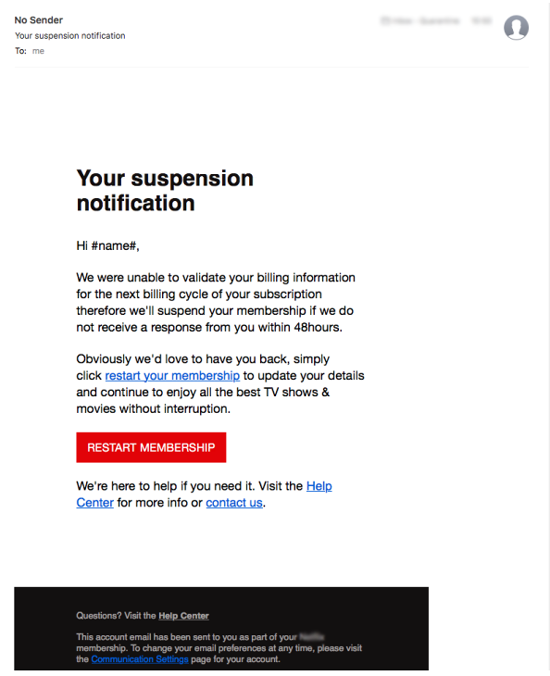
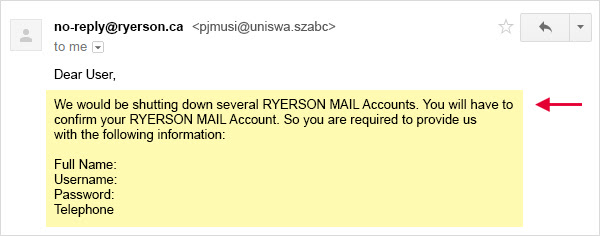
Avoid Phishing Emails

  • Something urgent? Call the company!
  • Look for spelling errors
  • Check links before clicking
  • Don't click on account login links
  • Is it personalized?

Companies and Standards

  1. They will never ask for information they have,
    unless trying to verify who you are.
  2. Banks will not provide links to a login page.
  3. They verify who you are. You can do the same.
  4. Always use multi-factor authentication if available.

Communication

Exercise

77,000 credit cards with details stolen [Oct-26]

100 million Capital One accounts

What are you worth?

  • $10: Uber, Airbnb, Spotify and Netflix accounts
  • $500: Paypal account
  • $6: Facebook account
  • $1: Gmail account (was $500)
  • 10% of your available credit: Financial accounts

What to do?

  1. Check if you're on the list
    https://monitor.firefox.com/
  2. Change your password(s)
  3. Ask for a replacement card
  4. Check your account activity

Multi-Factor Authentication

Something you have + something you know

Strong Passwords

Basic Passwords

  • Common words make it easy (dictionary attack)
  • Short passwords (brute force)
  • Something guessable (vacations, names, dates, etc)

Sagarwala786

Complex Passwords

  • Mixed case
  • Alphanumeric
  • Special characters
  • More than 8 characters
  • Not based on dictionary

H.4.r.d-Passwerd!~

Passphrases

  • Mixed case
  • Based on a sentence
  • Very long

Example, this is *1 passphrase!

Heuristics

  • A process to make the password
  • Use the website's name
  • Add special or characters

jaffari.org becomes Jaffari.org-community*

Use a Password Manager

  1. One password to unlock everything
  2. Use with Multi-Factor Authentication
  3. Install the browser plugin
  4. Store your backup code in a safe
  5. Put recovery details in your will

Checking Links

  1. Hover on the link, don't click
  2. Look at the first part for https
  3. Does the domain appear legitimate?
  4. Look for unique tracking codes

http://google.com.tk.
domain.net
/file/?d=421

https://google.com/drive/filename.html

https://mail.google.com/mail/u/0/#inbox/FMfcgxwDsFgnGzxGNTrQLlRVwGtQcWph

https://t.co/hFqh3mvpCn

Questions?

Cybersecurity Seminar

By Am Sagarwala

Cybersecurity Seminar

Nov 8, 2019

  • 585