JavaScript Architecture
Understanding production patterns

Alec Ortega
Front End Engineer
HubSpot

alecortega
Follow along at:
slides.com/alecortega/javscript-architecture/live
First off
Production can be scary
When I started coding for a company with a large codebase I couldn't figure out how everything pieced together.
Since I didn't know what exactly was happening, I felt incompetent, I felt like I couldn't really do my job.
How did I get over this?
Well I didn't.....
Being a successful programmer is about understanding that the uncomfortable feeling means that there's a potential to learn more and grow as a developer.
But...
The best thing you can do is understand your basics really well.
No matter what framework, library, or application you're working with the best thing you can ever learn is...
Context
Context?
The circle is how much framework specific knowledge you can have at any one point.
Instead of thinking about whether you need to learn 100% of React, Angular, jQuery, Backbone, etc for your next job...
Focus on getting really really good at your core JavaScript skills.
If you understand how JavaScript works at a fundamental level and common ways to organize your code. You'll know 70% of any framework right off the bat.
Experience and context is not knowing how to code every single task that's given to you right off the bat.
Experience and context is just knowing what the good questions to Google for are and recognizing how to solve a problem because you've solved it before.
Take aways
How to organize your code on a production level
How to use the "this" keyword
When and why frameworks are needed once your application gets to a certain scale.
What modules are and what a module bundler is
Let's quickly review a few core Javascript concepts
Scope
var greeting = 'hello';var greeting = 'hello';
function greet () {
console.log(greeting);
};
greet();=> 'hello'What will this show?
function greet () {

};
function greet () {
var greeting = 'hello';
console.log(greeting)
};
greet()function greet () {
var greeting = 'hello';
console.log(greeting)
};
greet()
console.log(greeting);=> 'hello'=> 'hello'
=> undefinedWhat will this show?
Every variable within a function cannot be accessed or is not "visible" outside of that function.
The only thing that creates a new scope, is a function.
function greet () {
  var greeting = 'hello';
};
var human = 'hello';
var dog = 'woof';
var cow = 'moo';

function greet () {
  console.log(human);
};

function bark () {
  console.log(dog);
};

function moo () {
  console.log(cow);
};
Variables that aren't contained within any function can be accessed anywhere in your program and are considered within the...
Global Scope
Objects as Interfaces
We have a function called "greet" that logs "hello" right now.
var human = 'hello';

function greet () {
  console.log(human);
};
Let's create another function called "getFavoriteFood" that logs this person's favorite food.
function getFavoriteFood () {
  console.log('cheeseburger');
}

getFavoriteFood();
// 'cheeseburger'
Now we have something that looks like this...
function greet () {
  console.log('hello');
}

function getFavoriteFood () {
  console.log('cheeseburger');
}
Is this really how we think of functionality in the real world? How do we group things in our heads?

Person
getFavoriteFood
greet
You already know how objects work and how to access their values.
var person = {
  firstName: 'Alec',
  lastName: 'Ortega',
};
var person = {
firstName: 'Alec',
lastName: 'Ortega',
};
console.log(person.firstName);
// 'Alec'function greet () {
console.log('hello');
}
function getFavoriteFood () {
console.log('cheeseburger');
}var person = {
greet: function() {
console.log('hello');
},
getFavoriteFood: function() {
console.log('cheeseburger');
}
};var person = {
greet: function() {
console.log('hello');
},
getFavoriteFood: function() {
console.log('cheeseburger');
}
};
person.greet();
=> 'hello'var person = {
};Where have we seen this pattern before?
You can store a function as a value in an object the same way you would a string or an integer.
Use objects to organize code that shares commonalities.
Let's get started
How many of you have one huge JavaScript file with functions that are 50-100+ lines long?
How many of you have files where most of your variables are within the "global scope", not within any function?
How could this cause problems when your app gets to be 10,000s of lines of code?
Module Pattern
Let's start simple

Remember our corgi counter example?
var currentNumber = 0;
var $counterEl = $('.js-counter');

var incrementCounter = function() {
  currentNumber++;
  $counterEl.text(currentNumber)
}

$('.js-image').on('click', incrementCounter);
Workshop One
Create two different counters, each counter should only increment when the corresponding image is clicked.
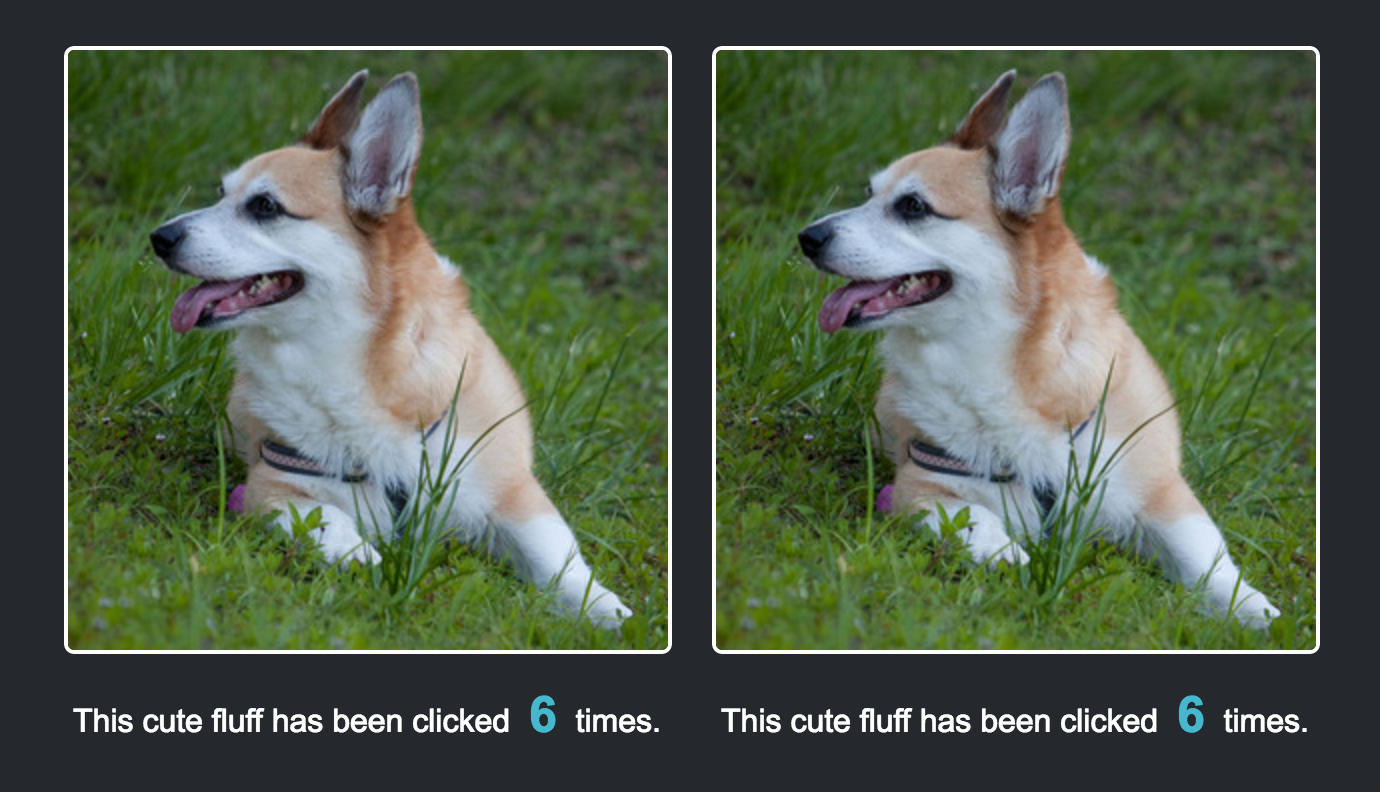
How many of you copy and pasted the code then changed the variable names?
What if I told you that now I didn't want just 2 counters, I wanted 50?
First let's ask ourselves a few questions so we know how what the best solution might look like.
What's the functionality that's SIMILAR across all counters?
What's the functionality that's DIFFERENT across all counters?
Like the "person" example let's start organizing this code.
var currentNumber = 0;
var $counterEl = $('.js-counter');

var incrementCounter = function() {
  currentNumber++;
  $counterEl.text(currentNumber)
}

$('.js-image').on('click', incrementCounter);
Like the "person" example I'm going to add an object to organize our code.
var currentNumber = 0;
var $counterEl = $('.js-counter');

var counter = {
};

var incrementCounter = function() {
  currentNumber++;
  $counterEl.text(currentNumber)
}

$('.js-image').on('click', incrementCounter);
Now I'm going to move all functionality that's going to be similar across all our counters into the object.
var currentNumber = 0;
var $counterEl = $('.counter');

var counter = {
  incrementCounter: function() {
    currentNumber++;
    $counterEl.text(currentNumber);
  },
  init: function () {
    $('.js-image').on('click', incrementCounter);
  }
};
var currentNumber = 0;
var $counterEl = $('.counter');
var counter = {
incrementCounter: function() {
currentNumber++;
$counterEl.text(currentNumber);
},
init: function () {
$('.js-image').on('click', incrementCounter);
}
};
counter.init();Ok so we have the functions in the object. But something is still wrong. We still need to store the currentNumber for our counter somewhere...
We don't want to make a bunch of differently named variables to hold our state for each counter. So how do we solve this?
What can we use so that the variable has limited visibility, and can only be seen by THAT instance of the counter.
var currentNumber = 0;
var $counterEl = $('.counter');

var counter = {
  incrementCounter: function() {
    currentNumber++;
    $counterEl.text(currentNumber);
  },
  init: function () {
    $('.js-image').on('click', incrementCounter);
  }
};
var currentNumber = 0;
var $counterEl = $('.counter');
var counter = function() {
return {
incrementCounter: function() {
currentNumber++;
$counterEl.text(currentNumber);
},
init: function () {
$('.js-image').on('click', incrementCounter);
}
}
};var counter = function() {
var currentNumber = 0;
var $counterEl = $('.counter');
return {
incrementCounter: function() {
currentNumber++;
$counterEl.text(currentNumber);
},
init: function () {
$('.js-image').on('click', incrementCounter);
}
}
};Workshop Two
There's two problems with this code right now:
1) It won't run
2) It's only binding the event to the one class ".js-image"
First fix the fact that it won't run.
Workshop Two
Call the init method. Open up your browser's inspector and go to the "console" tab. If you see an error you've called the function successfully.


In English, it's telling you that it can't find a function anywhere that's called "incrementCounter"
var counter = function() {
var currentNumber = 0;
var $counterEl = $('.js-counter');
return {
incrementCounter: function() {
currentNumber++;
$counterEl.text(currentNumber);
},
init: function () {
$('.js-image').on('click', incrementCounter);
}
}
};
It's yelling at you because it's looking for a variable or function called "incrementCounter".
We need to access the function that's the value of the key "incrementCounter"
var counter = function() {
  var currentNumber = 0;
  var $counterEl = $('.counter');

  return {
    incrementCounter: function() {
      currentNumber++;
      $counterEl.text(currentNumber);
    },
    init: function () {
      $('.js-image').on('click', incrementCounter);
    }
  }
};So how do we do access "incrementCounter"?
this
var counter = function() {
  var currentNumber = 0;
  var $counterEl = $('.counter');

  return {
    incrementCounter: function() {
      currentNumber++;
      $counterEl.text(currentNumber);
    },
    init: function () {
      $('.js-image').on('click', this.incrementCounter);
    }
  }
};
What do you think is happening here?
You might be inclined to think that "this" is a way to access other functions or values on the same object, and technically that's correct but...
"this"
The best way to think of "this" is that it's a reference to whatever is to the "left" of the "dot"
Let me explain...
var person = {
  greet: function () {
    console.log('hello');
  }
  getFavoriteFood: function () {
    console.log('cheeseburger');
  }
};
var person = {
  greet: function () {
    console.log('hello');
  }
  getFavoriteFoodAndGreet: function () {
    console.log('cheeseburger');
  }
};
var person = {
  greet: function () {
    console.log('hello');
  }
  getFavoriteFoodAndGreet: function () {
    console.log('cheeseburger');
    console.log('hello');
  }
};
var person = {
  greet: function () {
    console.log('hello');
  }
  getFavoriteFoodAndGreet: function () {
    console.log('cheeseburger');
    this.greet();
  }
};
Here's how it works under the hood...
var person = {
  greet: function () {
    console.log('hello');
  }
  getFavoriteFoodAndGreet: function () {
    console.log('cheeseburger');
    this.greet();
  }
};
person.getFavoriteFoodAndGreet()var person = {
greet: function () {
console.log('hello');
}
getFavoriteFoodAndGreet: function () {
console.log('cheeseburger');
person.greet();
}
};
So kind of like how a function parameter is a placeholder for whatever you pass into it,
"this" is just a placeholder for whatever is to the left of the dot.
If you want to learn more about the "this" keyword and how it refers to objects check this out:
Now let's get our example running...
Workshop Two
Add the "this" keyword into your code. When you click on either of the photos, both counters should start incrementing.
Looking at the code why are both counters incrementing?
What was different about each counter?
The selectors
Workshop Two
Change your HTML so that each counter and image has a different class, then modify your JS so that your function takes in these classes as arguments, you'll be passing in strings.
Why is only one counter changing if we only have one variable declaration?
How is it keeping track of each variable?
var counter = function(imageSelector, counterSelector) {
  var currentNumber = 0;
  var $counterEl = $(counterSelector);

  return {
    incrementCounter: function() {
      currentNumber++;
      $counterEl.text(currentNumber);
    },
    init: function () {
      $(imageSelector).on('click', this.incrementCounter);
    }
  }
};
var counter = function('.js-image-one', '.js-counter-one') {
  var currentNumber = 0;
  var $counterEl = $(counterSelector);

  return {
    incrementCounter: function() {
      currentNumber++;
      $counterEl.text(currentNumber);
    },
    init: function () {
      $(imageSelector).on('click', this.incrementCounter);
    }
  }
};
var counter = function('.js-image-one', '.js-counter-one') {
  var currentNumber = 0;
  var $counterEl = $(counterSelector);

  return {
    incrementCounter: function() {
      currentNumber++;
      $counterEl.text(currentNumber);
    },
    init: function () {
      $(imageSelector).on('click', this.incrementCounter);
    }
  }
};
var counter = function('.js-image-one', '.js-counter-one') {
  var currentNumber = 0;
  var $counterEl = $('.js-counter-one');

  return {
    incrementCounter: function() {
      currentNumber++;
      $counterEl.text(currentNumber);
    },
    init: function () {
      $(imageSelector).on('click', this.incrementCounter);
    }
  }
};
var counter = function('.js-image-one', '.js-counter-one') {
  var currentNumber = 0;
  var $counterEl = $('.js-counter-one');

  return {
    incrementCounter: function() {
      currentNumber++;
      $counterEl.text(currentNumber);
    },
    init: function () {
      $('.js-image-one').on('click', this.incrementCounter);
    }
  }
};
var counterOne = counter.init()
var currentNumber =
0
var counterTwo = counter.init()
var currentNumber =
0
1
new function() / scope
new function() / scope
1
2
var counter = function(imageSelector, counterSelector) {
  var currentNumber = 0;
  var $counterEl = $(counterSelector);

  return {
    incrementCounter: function() {
      currentNumber++;
      $counterEl.text(currentNumber);
    },
    init: function () {
      $(imageSelector).on('click', this.incrementCounter);
    }
  }
};
This function wraps around our variables and creates a new scope.
We call this a "closure"
(very important to know)
Closure
Closures are functions that refer the variables that were created when the function was called. When you call a a function with a variable in it, the variable will be stored in a new place in memory for every new call. In other words, these functions 'remember' the environment in which they were created.
var counter = function(imageSelector, counterSelector) {
  var currentNumber = 0;
  var $counterEl = $(counterSelector);

  return {
    incrementCounter: function() {
      currentNumber++;
      $counterEl.text(currentNumber);
    },
    init: function () {
      $(imageSelector).on('click', this.incrementCounter);
    }
  }
};
This pattern is what we call a...
Module
What's a module?
Any piece of code that is encapsulated in a function that has some interface on how to access it's private data.
Any piece of code that is encapsulated in a function...
var counter = function(imageSelector, counterSelector) {
  var currentNumber = 0;
  var $counterEl = $(counterSelector);

  return {
    incrementCounter: function() {
      currentNumber++;
      $counterEl.text(currentNumber);
    },
    init: function () {
      $(imageSelector).on('click', this.incrementCounter);
    }
  }
};
...that has some interface on how to access it's data or functions.
var counter = function(imageSelector, counterSelector) {
  var currentNumber = 0;
  var $counterEl = $(counterSelector);

  return {
    incrementCounter: function() {
      currentNumber++;
      $counterEl.text(currentNumber);
    },
    init: function () {
      $(imageSelector).on('click', this.incrementCounter);
    }
  }
};
var counter = function(imageSelector, counterSelector) {
  var currentNumber = 0;
  var $counterEl = $(counterSelector);

  return {
    incrementCounter: function() {
      currentNumber++;
      $counterEl.text(currentNumber);
    },
    init: function () {
      $(imageSelector).on('click', this.incrementCounter);
    }
  }
};

counter.init();
We made a module!
How can we optimize this even more?
var counter = function(imageSelector, counterSelector) {
  var currentNumber = 0;
  var $counterEl = $(counterSelector);

  return {
    incrementCounter: function() {
      currentNumber++;
      $counterEl.text(currentNumber);
    },
    init: function () {
      $(imageSelector).on('click', this.incrementCounter);
    }
  }
};
We're returning two different functions from this module. Does a consumer of this module need both of these functions to use it?
var counter = function(imageSelector, counterSelector) {
  var currentNumber = 0;
  var $counterEl = $(counterSelector);

  return {
    incrementCounter: function() {
      currentNumber++;
      $counterEl.text(currentNumber);
    },
    init: function () {
      $(imageSelector).on('click', this.incrementCounter);
    }
  }
};
We can think of functions that we export from modules like "public" methods on a class in other languages.
var counter = function(imageSelector, counterSelector) {
  var currentNumber = 0;
  var $counterEl = $(counterSelector);

  return {
    incrementCounter: function() {
      currentNumber++;
      $counterEl.text(currentNumber);
    },
    init: function () {
      $(imageSelector).on('click', this.incrementCounter);
    }
  }
};
So how would we make "incrementCounter" private to this module?
var counter = function(imageSelector, counterSelector) {
  var currentNumber = 0;
  var $counterEl = $(counterSelector);

  return {
    incrementCounter: function() {
      currentNumber++;
      $counterEl.text(currentNumber);
    },
    init: function () {
      $(imageSelector).on('click', this.incrementCounter);
    }
  }
};
var counter = function(imageSelector, counterSelector) {
var currentNumber = 0;
var $counterEl = $(counterSelector);
var _incrementCounter = function () {
currentNumber++;
$counterEl.text(currentNumber);
}
return {
init: function () {
$(imageSelector).on('click', _incrementCounter);
}
}
};Nailed it.

Questions?
So what do frameworks do?
Frameworks help you write this exact same pattern but give you a lot of helper functions and some opinionated organizational patterns.
import React from 'react';

class Counter extends React.Component {
  constructor: function(props) {
    super(props);

    this.state = {
      currentNumber: 0
    }
  }
  incrementCounter: function() {
    var oldNumber = this.state.currentNumber;
    this.setState({currentNumber: oldNumber++});
  }
  render: function() {
    return (
      <img onClick={this.incrementCouter} src="..." />
      <p>
        This has been clicked {this.state.currentNumber} times.
      </p>
    );
  }
})
export default Counter;
React
How do you include JavaScript onto a website?
Include a script tag before the body tag.
  <script src="path/to/javascript/file.js" />
</body>
In production code bases do you only have one file?
How would you include multiple files natively in a browser?
  ...
  <script src="path/to/javascript/Counter.js" />
  <script src="path/to/javascript/Navigation.js" />
  <script src="path/to/javascript/Sidebar.js" />
  <script src="path/to/javascript/Parallax.js" />
  <script src="path/to/javascript/main.js" />
</body>
Here's how the this actually works in production codebases.
var Counter = function () {
...
  return {
    init: function () {
      // initialize our event handlers
    }
  }
}
var Counter = function () {
...
return {
init: function () {
// initialize our event handlers
}
}
}
export default Counter;import Counter from './path/to/Counter.js';
Counter.init();
Counter.js
main.js
main.js
Counter.js
Navigation.js
increment.js
Entry point into your app
Webpack takes resolves all of these imports and exports and puts them all into one file.
  ...
  <script src="path/to/javascript/Counter.js" />
  <script src="path/to/javascript/Navigation.js" />
  <script src="path/to/javascript/Sidebar.js" />
  <script src="path/to/javascript/Parallax.js" />
  <script src="path/to/javascript/main.js" />
</body>
<script src="path/to/bundle.js" />
</body>Webpack is a module bundler that takes all concatenates and minifies all your files into a single file that you require from your HTML.
Webpack can not only bundle JavaScript but CSS, images, etc. You can make it transform your files into anything you want.
This is why whenever you open some websites and look at the source tab to look at their JavaScript it looks like a garbled mess.
This is actually Webpack minifying the JavaScript and trying to make the file size smaller.
You can even make it do cool stuff to your CSS like automatically add vendor prefixes to your CSS properties so that it will automatically support older browsers.
Webpack is the asset pipeline for the front end.
Are there any other patterns?
Factory
var modalFactory = (name) {
  return {
    selector: name
    isOpen: false,
    hasContent: true,
  }
}

var myModalState = modalFactory('modal-one');
Use this when you need to create multiple objects where only one or a few properties change.
Decorator
var modalDecorator = (stateObject) {
  var newObject = stateObject

  newObject.isClosed = false
  newObject.hasContent = true

  return newObject;
}

var myModalState = modalDecorator({
   selector: 'modal-one'
});
Use this when you need to mutate an object with consistent properties.
Recap
It's totally ok not to fully understand 100% of all the JavaScript we've gone over. It's actually expected that you don't know everything.
As you grow as an engineer you'll be able to identify when patterns should be used and why they're useful.
Incompetence as a developer isn't not knowing...
...it's not caring enough to try and seek out the answer.
Companies know that you won't know 100% of this, but they are expecting to hire a passionate developer that's going to continue to make learning a #1 priority.
Thank you!
JavaScript Architecture
By Alec Ortega
JavaScript Architecture
Understanding production patterns.