Redux

A Predictable State Container for JS Apps
Installation
npm install --save redux <script src="https://unpkg.com/redux@latest/dist/redux.min.js"></script>
Basic concept
- The whole state of your app is stored in an object tree inside a single store.
- The only way to change the state tree is to emit an action, an object describing what happened.
- To specify how the actions transform the state tree, you write pure reducers.
- That's it! 😃
<!DOCTYPE html>
<html>
  <head>
    <title>Redux basic example</title>
  </head>
  <body>
    <div>
      <p>
        Clicked: <span id="value">0</span> times
        <button id="increment">+</button>
        <button id="decrement">-</button>
        <button id="incrementIfOdd">Increment if odd</button>
        <button id="incrementAsync">Increment async</button>
      </p>
    </div>
  </body>
</html>
Example
<!DOCTYPE html>
<html>
  <head>
    <title>Redux basic example</title>
    <script src="https://unpkg.com/redux@latest/dist/redux.min.js"></script>
  </head>
  <body>
    <div>
      <p>
        Clicked: <span id="value">0</span> times
        <button id="increment">+</button>
        <button id="decrement">-</button>
        <button id="incrementIfOdd">Increment if odd</button>
        <button id="incrementAsync">Increment async</button>
      </p>
    </div>
    <script>
      function counter(state, action) {
        if (typeof state === 'undefined') {
          return 0
        }

        switch (action.type) {
          case 'INCREMENT':
            return state + 1
          case 'DECREMENT':
            return state - 1
          default:
            return state
        }
      }

      var store = Redux.createStore(counter)
      var valueEl = document.getElementById('value')

      function render() {
        valueEl.innerHTML = store.getState().toString()
      }

      render()
      store.subscribe(render)

      document.getElementById('increment')
        .addEventListener('click', function () {
          store.dispatch({ type: 'INCREMENT' })
        })

      document.getElementById('decrement')
        .addEventListener('click', function () {
          store.dispatch({ type: 'DECREMENT' })
        })

      document.getElementById('incrementIfOdd')
        .addEventListener('click', function () {
          if (store.getState() % 2 !== 0) {
            store.dispatch({ type: 'INCREMENT' })
          }
        })

      document.getElementById('incrementAsync')
        .addEventListener('click', function () {
          setTimeout(function () {
            store.dispatch({ type: 'INCREMENT' })
          }, 1000)
        })
    </script>
  </body>
</html>
Example code
Action
Actions are payloads of information that send data from your application to your store. They are the only source of information for the store. You send them to the store using store.dispatch()
const ADD_TODO = 'ADD_TODO'

{
  type: ADD_TODO,
  text: 'Build my first Redux app'
}
Actions are plain JavaScript objects. Actions must have a type property that indicates the type of action being performed. Types should typically be defined as string constants.
Action creator
Action creators are exactly that—functions that create actions.
const ADD_TODO = 'ADD_TODO';

function addTodo(text) {
  return {
    type: ADD_TODO,
    text
  }
}
Pass the result of the function to store.dispatch() to change the app state.
dispatch(addTodo(text))

//or
const boundAddTodo = text => dispatch(addTodo(text))
boundAddTodo(text)
Reducer
Reducers specify how the application's state changes in response to actions sent to the store.
⚠️ ⚠️
Remember that actions only describe what happened, but don't describe how the application's state changes.
⚠️ ⚠️
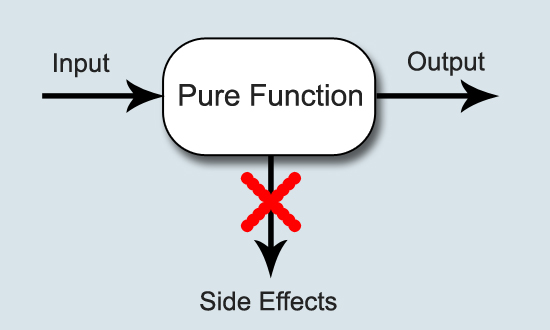
The reducer is a pure function that takes the previous state and an action, and returns the next state.
(previousState, action) => nextStateThings you should never do inside a reducer:
- Mutate its arguments;
- Perform side effects like API calls and routing transitions;
- Call non-pure functions, e.g. Date.now() or Math.random()
Pure Function
is a function where the return value is only determined by its input values, without observable side effects. This is how functions in math work: Math. cos(x) will, for the same value of x , always return the same result. Computing it does not change x
Example of reducer
import { SHOW_ALL } from './actions'

const initialState = {
  visibilityFilter: SHOW_ALL,
  todos: []
}

function todoApp(state, action) {
  if (typeof state === 'undefined') {
    return initialState
  }

  // For now, don't handle any actions
  // and just return the state given to us.
  return state
}

// or just use ES6 default argument syntax

function todoApp(state = initialState, action) {
  return state
}
Example of reducer, add action handler
function todoApp(state = initialState, action) {
  switch (action.type) {
    case SET_VISIBILITY_FILTER:
      return {
      	...state,
        visibilityFilter: action.filter
      }
    default:
      return state
  }
}
Note that:
- We don't mutate the state.
- We return the previous state in the default case. It's important to return the previous state for any unknown action.
combineReducers(reducers)
function reducer(state = {}, action) {
  return {
    a: doSomethingWithA(state.a, action),
    b: processB(state.b, action),
    c: c(state.c, action)
  }
}
const reducer = combineReducers({
a: doSomethingWithA,
b: processB,
c: c
})All combineReducers() does is generate a function that calls your reducers with the slices of state selected according to their keys, and combines their results into a single object again.
Store
The store has the following responsibilities:
- Holds application state;
- Allows access to state via getState();
- Allows state to be updated via dispatch(action);
- Registers listeners via subscribe(listener);
- Handles unregistering of listeners via the function returned by subscribe(listener).
It's important to note that you'll only have a single store in a Redux application. When you want to split your data handling logic, you'll use reducer composition instead of many stores.
To create a store just pass your reducer (or the result of combineReducers function) to createStore() Redux function
import { createStore } from 'redux'
import todoApp from './reducers'
const store = createStore(todoApp)
You may optionally specify the initial state as the second argument to createStore(). This is useful for hydrating the state of the client to match the state of a Redux application running on the server.
const store = createStore(todoApp, window.STATE_FROM_SERVER)

// or use your localStorage

const store = createStore(todoApp, localStorage.appStore)
Three Principles, details
- Single source of truth:
The global state of your application is stored in an object tree within a single store. - State is read-only
The only way to change the state is to emit an action, an object describing what happened. - Changes are made with pure functions
To specify how the state tree is transformed by actions, you write pure reducers.
Usage with React
For usage Redux with React we will use the React Redux lib.
npm install --save react-reduxProvider
import React from 'react'
import ReactDOM from 'react-dom'

import { Provider } from 'react-redux'
import store from './store'

import App from './App'

const rootElement = document.getElementById('root')
ReactDOM.render(
  <Provider store={store}>
    <App />
  </Provider>,
  rootElement
)
React Redux provides <Provider />, which makes the Redux store available to the rest of your app:
connect
import { connect } from 'react-redux'
import { increment, decrement, reset } from './actionCreators'

// const Counter = ...

const mapStateToProps = (state /*, ownProps*/) => {
  return {
    counter: state.counter
  }
}

const mapDispatchToProps = (dispatch /*, ownProps*/) => {
  return {
    increment: () => dispatch(increment()),
    decrement: () => dispatch(decrement()),
    reset: () => dispatch(reset()),
  }
}

export default connect(
  mapStateToProps,
  mapDispatchToProps
)(Counter)
React Redux provides a connect function for you to connect your component to the store.
Redux itself is synchronous, so how the async operations like network request work with Redux?
Redux middleware
Middleware is a way to extend Redux with a configurable functions.
A middleware function is a function that returns a function that returns a function. The first function takes the store as a parameter, the second takes a next function as a parameter, and the third takes the action dispatched as a parameter.
Syntax:
({ getState, dispatch }) => next => actionCustom logger
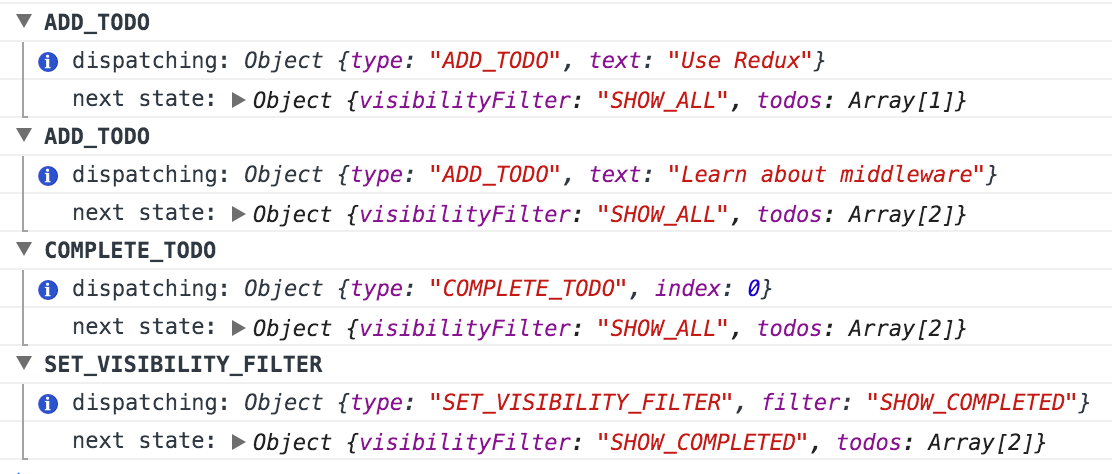
const logger = store => next => action => {
  console.group(action.type)
  console.info('dispatching', action)
  let result = next(action)
  console.log('next state', store.getState())
  console.groupEnd()
  return result
}
Add middleware to redux
import { createStore, applyMiddleware } from 'redux'
import reducers from './reducers'

const store = createStore(
  reducers,
  applyMiddleware(middleware1, middleware1)
)
Redux thunk, details
function fetchSecretSauce() {
  return fetch('https://www.google.com/search?q=secret+sauce');
}

// Meet thunks.
// A thunk in this context is a function that can be dispatched to perform async
// activity and can dispatch actions and read state.
// This is an action creator that returns a thunk:
function makeASandwichWithSecretSauce(forPerson) {
  // We can invert control here by returning a function - the "thunk".
  // When this function is passed to `dispatch`, the thunk middleware will intercept it,
  // and call it with `dispatch` and `getState` as arguments.
  // This gives the thunk function the ability to run some logic, and still interact with the store.
  return function(dispatch) {
    return fetchSecretSauce().then(
      (sauce) => dispatch(makeASandwich(forPerson, sauce)),
      (error) => dispatch(apologize('The Sandwich Shop', forPerson, error)),
    );
  };
}

// Thunk middleware lets me dispatch thunk async actions
// as if they were actions!

store.dispatch(makeASandwichWithSecretSauce('Me'));


// These are the normal action creators you have seen so far.
// The actions they return can be dispatched without any middleware.
// However, they only express “facts” and not the “async flow”.

function makeASandwich(forPerson, secretSauce) {
  return {
    type: 'MAKE_SANDWICH',
    forPerson,
    secretSauce,
  };
}

function apologize(fromPerson, toPerson, error) {
  return {
    type: 'APOLOGIZE',
    fromPerson,
    toPerson,
    error,
  };
}
Debugging
import { createStore, applyMiddleware, compose } from 'redux'
import thunk from 'redux-thunk'
import reducers from './reducers'

const isDevMode = process.env.NODE_ENV !== 'production';

let enhancer
if (isDevMode && window.__REDUX_DEVTOOLS_EXTENSION__) {
  enhancer = compose(
    applyMiddleware(thunk),
    window.__REDUX_DEVTOOLS_EXTENSION__({ trace: true }),
  );
} else {
  enhancer = compose(applyMiddleware(thunk));
}

const store = createStore(
  reducers,
  enhancer
)

export default storeRedux
By Aleh Lipski