DOM
Shadow DOM
Virtual DOM
DOM
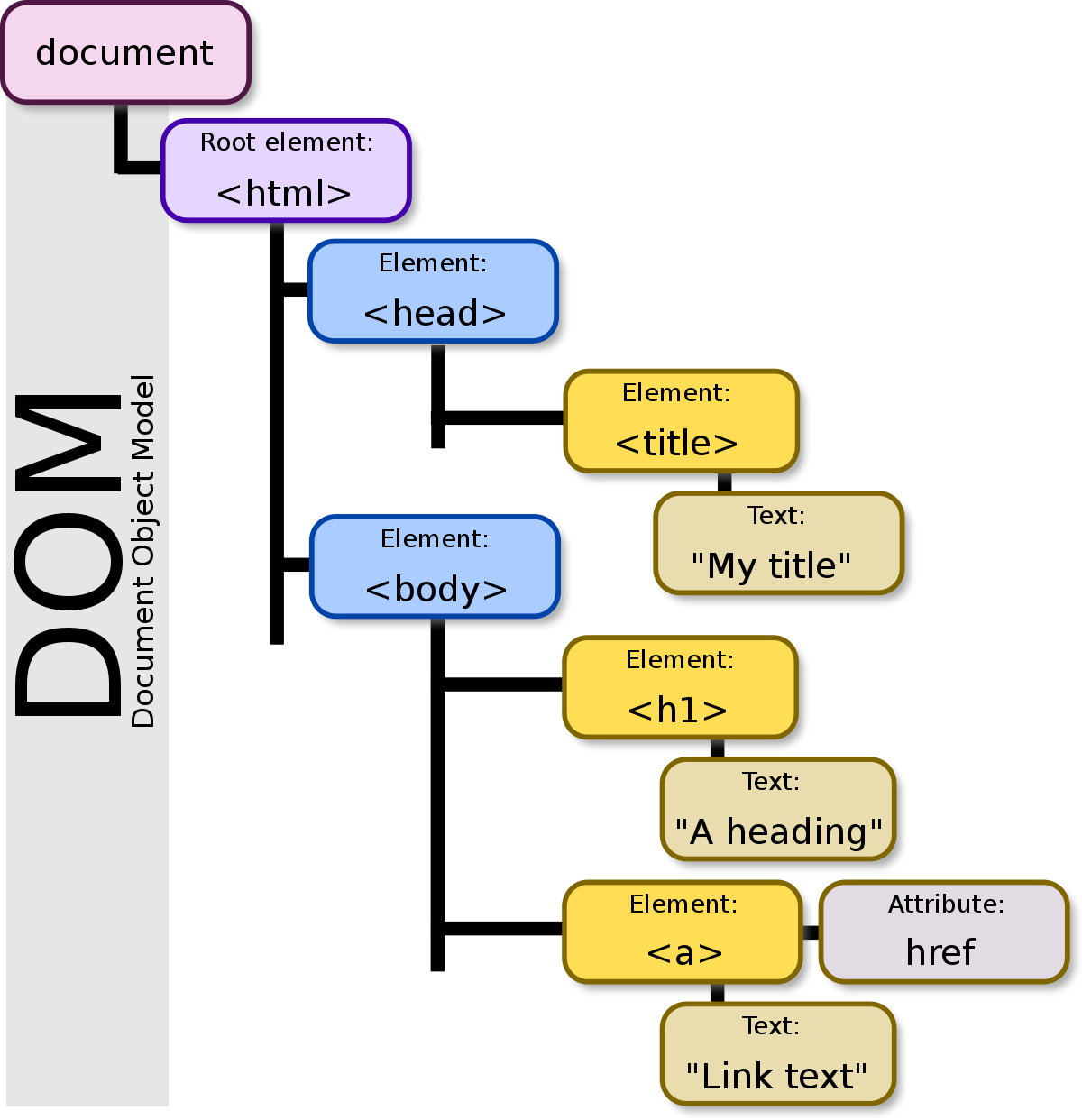
<!DOCTYPE html>
<html lang="en">
<head>
  <title>My title</title>
</head>
<body>
  <h1>A heading</h1>
  <a href="">Link text</a>
</body>
</html>
DOM NODE
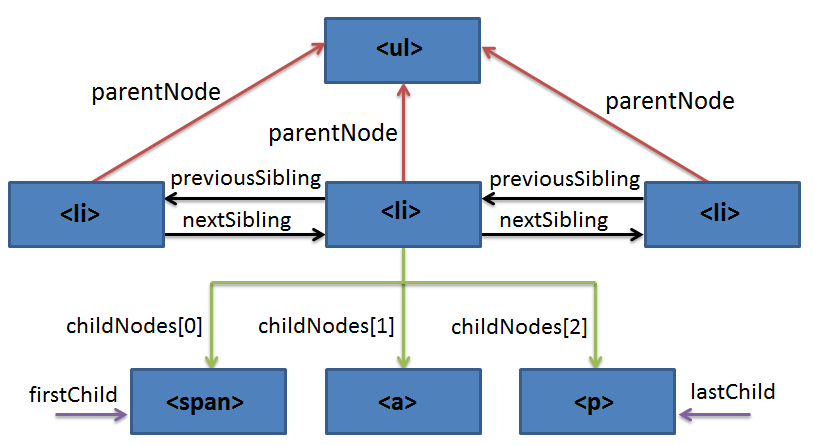
A node is a generic name for any type of object in the DOM hierarchy. A node could be one of the built-in DOM elements such as a document or document.body, it could be an HTML tag specified in the HTML such as <input> or <p> or it could be a text node that is created by the system to hold a block of text inside another element. So, in a nutshell, a node is any DOM object.
An element is one specific type of node as there are many other types of nodes (text nodes, comment nodes, document nodes, etc...).
DOM NODE
Shadow DOM
An important aspect of web components is encapsulation — being able to keep the markup structure, style, and behavior hidden and separate from other code on the page so that different parts do not clash, and the code can be kept nice and clean. The Shadow DOM API is a key part of this, providing a way to attach a hidden separated DOM to an element
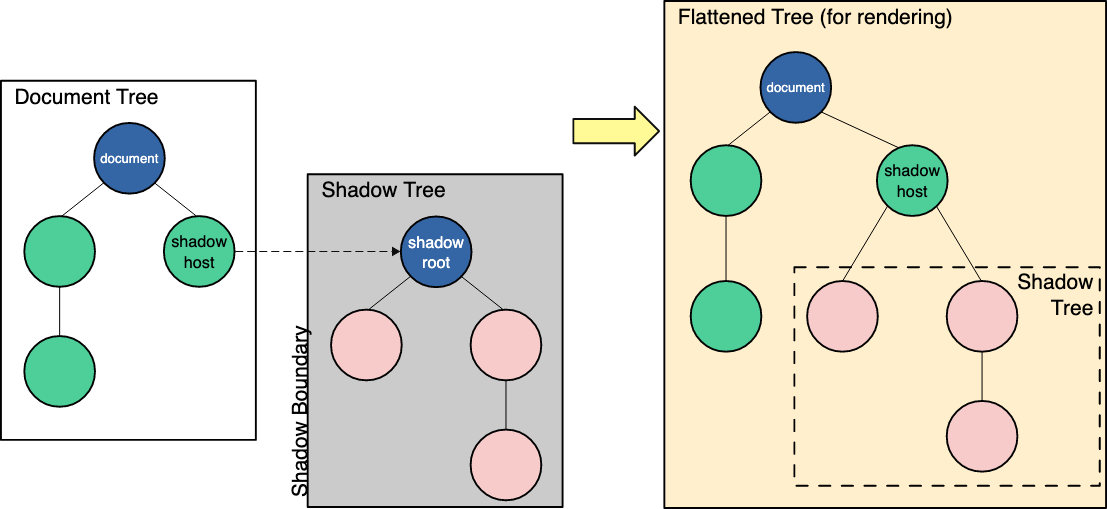
- Shadow host: The regular DOM node that the shadow DOM is attached to.
- Shadow tree: The DOM tree inside the shadow DOM.
- Shadow boundary: the place where the shadow DOM ends, and the regular DOM begins.
- Shadow root: The root node of the shadow tree.
Virtual DOM
The virtual DOM (VDOM) is a programming concept where an ideal, or “virtual”, representation of a UI is kept in memory and synced with the “real” DOM by a library such as ReactDOM. This process is called reconciliation.
React implementation
React Fiber
is the new reconciliation engine in React 16. Its main goal is to enable incremental rendering of the virtual DOM.
Since “virtual DOM” is more of a pattern than a specific technology, people sometimes say it to mean different things.
In React world, the term “virtual DOM” is usually associated with React elements since they are the objects representing the user interface.
React, however, also uses internal objects called “fibers” to hold additional information about the component tree. They may also be considered a part of “virtual DOM” implementation in React.
React element:
const element = (
  <h1 className="greeting">
    Hello, world!
  </h1>
);

// The same
const element = React.createElement(
  'h1',
  {className: 'greeting'},
  'Hello, world!'
);
React.createElement() creates an object like this:
const element = {
  type: 'h1',
  props: {
    className: 'greeting',
    children: 'Hello, world!'
  }
};
Fiber element:
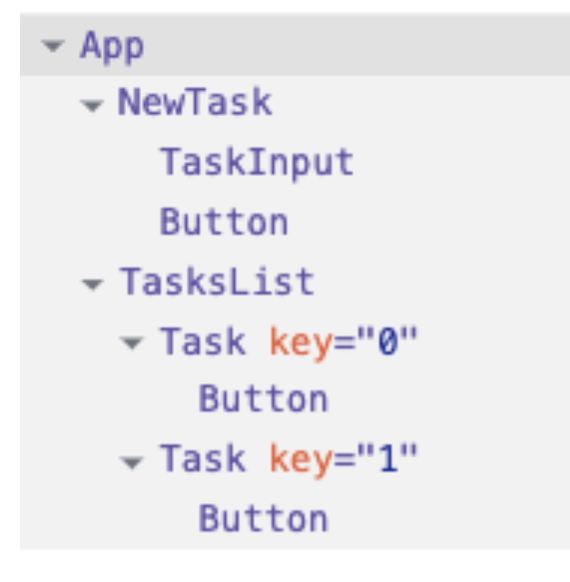
{
 type: App,
  child: {
    type: NewTask,
    child: {...},
    sibling: {
      type: TasksList,
      child: {...},
      sibling: null,
    },
  },
  sibling: null
}
They also contain properties to reference back to parent (`return` property) and state/prop (`memoizedState`,`memoizedProps`). It also references back to the actual corresponding DOM node. And more ...
Reconciliation process
When diffing two trees, React first compares the two root elements. The behavior is different depending on the types of the root elements.
Reconciliation process
Elements Of Different Types
Whenever the root elements have different types, React will tear down the old tree and build the new tree from scratch. Going from <a> to <img>, or from <Article> to <Comment>, or from <Button> to <div> - any of those will lead to a full rebuild.
When tearing down a tree, old DOM nodes are destroyed. Component instances receive componentWillUnmount().
When building up a new tree, new DOM nodes are inserted into the DOM. Component instances receive componentDidMount().
Any state associated with the old tree is lost.
Reconciliation process
DOM Elements Of The Same Type
When comparing two React DOM elements of the same type, React looks at the attributes of both, keeps the same underlying DOM node, and only updates the changed attributes.
When updating style, React also knows to update only the properties that changed.
Reconciliation process
Component Elements Of The Same Type
When a component updates, the instance stays the same, so that state is maintained across renders. React updates the props of the underlying component instance to match the new element, and calls componentDidUpdate() on the underlying instance.
Reconciliation process, Recursing On Children
By default, when recursing on the children of a DOM node, React just iterates over both lists of children at the same time and generates a mutation whenever there’s a difference.
<ul>
  <li>first</li>
  <li>second</li>
</ul>

<ul>
  <li>first</li>
  <li>second</li>
  <li>third</li>
</ul>
Add item to the end
<ul>
  <li>Duke</li>
  <li>Villanova</li>
</ul>

<ul>
  <li>Connecticut</li>
  <li>Duke</li>
  <li>Villanova</li>
</ul>
Add item to the beginning
React will mutate every child instead of realizing it can keep the <li>Duke</li> and <li>Villanova</li> subtrees intact.
Reconciliation process, Recursing On Children (KEY)
In order to solve this issue, React supports a key attribute. When children have keys, React uses the key to match children in the original tree with children in the subsequent tree. For example, adding a key to our inefficient example above can make the tree conversion efficient:
<ul>
  <li key="2015">Duke</li>
  <li key="2016">Villanova</li>
</ul>

<ul>
  <li key="2014">Connecticut</li>
  <li key="2015">Duke</li>
  <li key="2016">Villanova</li>
</ul>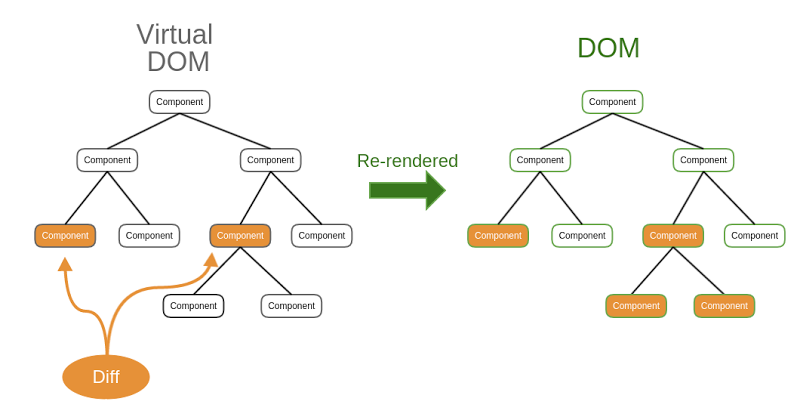
Virtual Dom
By Aleh Lipski