Angular 2
formally Angular 5

Angular
features
Features, or advantages
Cross platform network
Angular > AngularJS
Angular is faster and easier than AngularJS
Speed up
It will speed up the initial load through server side rendering
Mobile
Angular is mainly focused on mobile apps
IE9+ , Android 4.1+
It supports both latest version of browsers, and also old browsers including IE9+ and Android 4.1+
Components
Everything will be the component based approach
DI
It uses Dependency Injection to maintain applications without writing too long code
Server side rendering
It uses server side rendering for fast views on mobile
Key differences with AngularJS
Angular is not upgrade of AngularJS. Angular is completely rewritten
Typescript
Angular is mobile oriented
Mobile
AngularJS core concept was $scope. You will not find $scope in Angular
$scope
AngularJS controllers are gone. We can say that controllers are replaced with "Components" in Angular
Controller
now it is ngFor
ng-repeat
In Angular local variables are defined using hash(#) prefix
#
Two-way data binding: ng-model is replaced with [(ngModel)]
[(ngModel)]
Hierarchical DI system is major performance booster
Hierarchical DI
Angular implements unidirectional tree based change detection which again increases performance
Change detection
Angular file size is 20kb less than AngularJS
File size
Filtering functionality is called pipes
Pipes
Angular uses camelCase syntax for built-in directives. ng-class is now ngClass
camelCase
In AngularJS we can define a service via 5 different ways
Services
- Factory
- Service
- Provider
- Constant
- Values
In Angular, class is the only way to define a service
Angular CLI
@Component
import { Component } from '@angular/core';

@Component({
    selector: 'my-app',
    template: `<label>Name:</label>
               <input [(ngModel)]="name" placeholder="name">
               <h1>Welcome {{name}}!</h1>`
})
export class AppComponent {
    name= '';
}
@Component
@Component({
  changeDetection?: ChangeDetectionStrategy
  viewProviders?: Provider[]
  moduleId?: string
  templateUrl?: string
  template?: string
  styleUrls?: string[]
  styles?: string[]
  animations?: any[]
  encapsulation?: ViewEncapsulation
  interpolation?: [string, string]
  entryComponents?: Array<Type<any>|any[]>
})
@Component: Metadata Properties
- animations - list of animations of this component
- changeDetection - change detection strategy used by this component
- encapsulation - style encapsulation strategy used by this component
- entryComponents - list of components that are dynamically inserted into the view of this component
- exportAs - name under which the component instance is exported in a template
- host - map of class property to host element bindings for events, properties and attributes
- inputs - list of class property names to data-bind as component inputs
- interpolation - custom interpolation markers used in this component's template
- moduleId - ES/CommonJS module id of the file in which this component is defined
@Component: Metadata Properties
- outputs - list of class property names that expose output events that others can subscribe to
- providers - list of providers available to this component and its children
- queries - configure queries that can be injected into the component
- selector - css selector that identifies this component in a template
- styleUrls - list of urls to stylesheets to be applied to this component's view
- styles - inline-defined styles to be applied to this component's view
- template - inline-defined template for the view
- templateUrl - url to an external file containing a template for the view
- viewProviders - list of providers available to this component and its view children
Templates
templateUrl?: string
Specifies a template URL for an Angular component.
template?: string
Specifies an inline template for an Angular component.
@Component({
    selector: 'my-app',
    template: `<label>Name:</label>
               <input [(ngModel)]="name" placeholder="name">
               <h1>Welcome {{name}}!</h1>`,
    styleUrls: ["app/app.component.css"]
})
//app.component.ts
@Component({
selector: 'my-app',
templateUrl: "app/app.component.html",
styleUrls: ["app/app.component.css"]
})//app.component.html
<label>Name:</label>
<input [(ngModel)]="name" placeholder="name">
<h1>Welcome {{name}}!</h1>Only one of templateUrl or template can be defined per Component.
Styles
The styles property takes an array of strings that contain CSS code
@Component({
    selector: 'my-app',
    template: `<label>Name:</label>
               <input [(ngModel)]="name" placeholder="name">
               <h1>Welcome {{name}}!</h1>`,
    styles: ['h1 { color: red; }']
})
You can load styles from external CSS files by adding a styleUrls attribute into a component's @Component decorator
//app.component.ts
@Component({
    selector: 'my-app',
    template: `<label>Name:</label>
               <input [(ngModel)]="name" placeholder="name">
               <h1>Welcome {{name}}!</h1>`,
    styleUrls: ["app/app.component.css"]
})
//app.component.css
h1 {
    color: red;
}
:host
The :host selector is the only way to target the host element. You can't reach the host element from inside the component with other selectors because it's not part of the component's own template. The host element is in a parent component's template.
//app.component.css
:host {
    display: block;
    border: 1px solid black;
}

h1 {
    color: red;
}
/deep/
Use the /deep/ shadow-piercing descendant combinator to force a style down through the child component tree into all the child component views. The /deep/ combinator works to any depth of nested components, and it applies to both the view children and content children of the component.
//app.component.css
/deep/ .some-cls {
    background: yellow;
}
Data binding
| Data direction | Syntax | Type |
|---|---|---|
| One-way from data source to view target |
Interpolation Property Attribute Class Style |
|
| One-way from view target to data source |
Event | |
| Two-way |
|
Two-way |
{{expression}}
[target]="expression"
bind-target="expression"
(target)="statement"
on-target="statement"[(target)]="expression"
bindon-target="expression"Binding targets
The target of a data binding is something in the DOM. Depending on the binding type, the target can be an (element | component | directive) property, an (element | component | directive) event, or (rarely) an attribute name.
<img [src]="heroImageUrl">
<hero-detail [hero]="currentHero"></hero-detail>
<div [ngClass]="{'special': isSpecial}"></div>-
Element property
-
Component property
-
Directive property
-
Element event
-
Component event
-
Directive event
<button (click)="onSave()">Save</button>
<hero-detail (deleteRequest)="deleteHero()"></hero-detail>
<div (myClick)="clicked=$event" clickable>click me</div>
Event and property
<input [(ngModel)]="name">class/stye property
<button
    [attr.aria-label]="help">
        help
</button>
Attribute
<div
    [class.special]="isSpecial">
        Special
</div>
<button
[style.color]="isSpecial ? 'red' : 'green'">
Examples
Component Interaction
Pass data from parent to child with input binding
//parent tempalte
<child
        [inputData]="setData"
        [specialInputName]="setSpecialData"
></child>
//child component
import { Component, Input } from '@angular/core';
@Component({
selector: 'child',
template: `
<p>Input data: {{inputData}}</p>
<p>Input data with special name: {{special}}</p>
`,
})
export class ChildComponent{
@Input()
public inputData:string;
@Input("specialInputName")
public special: string;
}//parent component
import { Component } from '@angular/core';
@Component({
selector: 'my-app',
templateUrl: "app/app.component.html",
styleUrls: ["app/app.component.css"]
})
export class AppComponent {
public setData: string = "bla-bla";
public setSpecialData: string = "special bla-bla";
}Component Interaction
Intercept input property changes with a setter
import { Component, Input } from '@angular/core';

@Component({
    selector: 'child',
    template: `
        <p>Input data: {{inputData}}</p>
    `,
})
export class ChildComponent{
    private inputDataPR: string;

    @Input()
    public set inputData(value: string) {
        //some code
        this.inputDataPR = value
    };

    public get inputData(): string {
        return this.inputDataPR;
    }
}
Component Interaction
Parent listens for child event
//child component
import {
    Component,
    Output,
    EventEmitter
} from '@angular/core';

@Component({
    selector: 'child',
    template: `
        <button (click)="sendEvent()">
            Emmit event
        </button>
    `,
})
export class ChildComponent{
    @Output()
    public outputEvent: EventEmitter =
        new EventEmitter<string>();

    public sendEvent(): void {
        this.outputEvent.emit("emited event");
    }
}
//parent template
<child
        (outputEvent)="showEvent($event)"
></child>
//parent component
import { Component } from '@angular/core';
@Component({
selector: 'my-app',
templateUrl: "app/app.component.html",
styleUrls: ["app/app.component.css"]
})
export class AppComponent {
public showEvent(str: string):void {
console.log(str);
}
}Component Interaction
Parent interacts with child via local variable
//child component
import {
    Component,
} from '@angular/core';

@Component({
    selector: 'child',
    template: `
        <p>{{sharedStr}}</p>
    `,
})
export class ChildComponent {
    public sharedStr: string = "shared string";
}
//parent component
import { Component } from '@angular/core';
@Component({
selector: 'my-app',
templateUrl: "app/app.component.html",
styleUrls: ["app/app.component.css"]
})
export class AppComponent {
}//parent template
<child #sharedVar ></child>
<button
(click)="sharedVar.sharedStr = 'new shared string'"
> Change shared variable
</button>Lifecycle Hooks
-
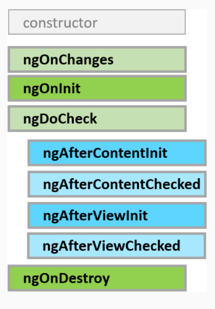
ngOnChanges: вызывается до метода ngOnInit() при начальной установке свойств, которые связаны механизмом привязки, а также при любой их переустановке или изменении их значений. Данный метод в качестве параметра принимает объект класса SimpleChanges, который содержит предыдущие и текущие значения свойства.
-
ngOnInit: вызывается один раз после установки свойств компонента, которые участвуют в привязке. Выполняет инициализацию компонента
-
ngDoCheck: вызывается при каждой проверке изменений свойств компонента сразу после методов ngOnChanges и ngOnInit
-
ngAfterContentInit: вызывается один раз после метода ngDoCheck() после вставки содержимого в представление компонента кода html
-
ngAfterContentChecked: вызывается фреймворком Angular при проверке изменений содержимого, которое добавляется в представление компонента. Вызывается после метода ngAfterContentInit() и и после каждого последующего вызова метода ngDoCheck().
-
ngAfterViewInit: вызывается фреймворком Angular после инициализации представления компонента, а также представлений дочерних компонентов. Вызывается только один раз сразу после первого вызова метода ngAfterContentChecked()
-
ngAfterViewChecked: вызывается фреймворком Angular после проверки на изменения в представлении компонента, а также проверки представлений дочерних компонентов. Вызывается после первого вызова метода ngAfterViewInit() и после каждого последующего вызова ngAfterContentChecked()
-
ngOnDestroy: вызывается перед тем, как фреймворк Angular удалит компонент.
ViewChild & ContentChild
import {
    Component,
    ViewChild,
    ChangeDetectionStrategy,
    AfterViewInit
} from '@angular/core';
import { ChildComponent } from "app/child.component";

@Component({
    selector: 'my-app',
    templateUrl: "app/app.component.html",
    styleUrls: ["app/app.component.css"],
    changeDetection: ChangeDetectionStrategy.OnPush
})
export class AppComponent implements AfterViewInit{
    @ViewChild(ChildComponent)
    private childCmp: ChildComponent;

    ngAfterViewInit() {
        console.log(this.childCmp);
    }
}
ViewChild & ContentChild
//component
import {
    Component,
    ViewChild,
    ChangeDetectionStrategy,
    AfterViewInit
} from '@angular/core';

@Component({
    selector: 'my-app',
    templateUrl: "app/app.component.html",
    styleUrls: ["app/app.component.css"],
    changeDetection: ChangeDetectionStrategy.OnPush
})
export class AppComponent implements AfterViewInit{
    @ViewChild("childCmp")
    private childCmp: HTMLElement;

    ngAfterViewInit() {
        console.log(this.childCmp);
    }
}
//template
<child #childCmp></child>
ViewChild & ContentChild
//child component
import {
    Component,
    ContentChild,
    AfterContentInit
} from '@angular/core';

@Component({
    selector: 'child',
    template: `
        <ng-content></ng-content>
        <p>{{sharedStr}}</p>
    `,
})
export class ChildComponent implements AfterContentInit{
    public sharedStr: string = "shared string";

    @ContentChild("content")
    private currentContent: HTMLElement;

    ngAfterContentInit(): void {
        console.log(this.currentContent);
    }
}
//parent template
<child>
    <p #content>This's ng-content</p>
</child>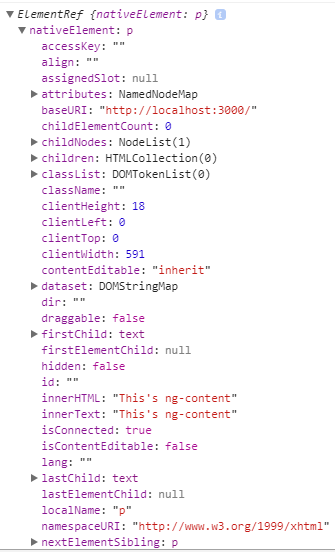
@NgModule
import { NgModule }      from '@angular/core';
import { BrowserModule } from '@angular/platform-browser';
import { FormsModule }   from '@angular/forms';
import { AppComponent }   from './app.component';

@NgModule({
    imports:      [ BrowserModule, FormsModule ],
    declarations: [ AppComponent ],
    bootstrap:    [ AppComponent ]
})
export class AppModule { }
Every Angular app has a root module class. By convention, the root module class is called AppModule and it exists in a file named app.module.ts
@NgModule
-
NgModule: функциональность декоратора NgModule, без которой мы не сможем создать модуль
-
BrowserModule: модуль, необходимый для работы с браузером
-
FormsModule: модуль, необходимый для работы с формами html и, в частности, с элементами input. (Так как класс компонента работает с подобными элементами, то мы обязаны также импортировать этот модуль)
-
AppComponent: функциональность корневого компонента приложения
import { NgModule }      from '@angular/core';
import { BrowserModule } from '@angular/platform-browser';
import { FormsModule }   from '@angular/forms';
import { AppComponent }   from './app.component';

@NgModule({
    imports:      [ BrowserModule, FormsModule ],
    declarations: [ AppComponent ],
    bootstrap:    [ AppComponent ]
})
export class AppModule { }
@NgModule
-
declarations: классы представлений (view classes), которые принадлежат модулю. Angular имеет три типа классов представлений: components, directives, pipes
-
exports: набор классов представлений, которые должны использоваться в шаблонах компонентов из других модулей
-
imports: другие модули, классы которых необходимы для шаблонов компонентов из текущего модуля
-
providers: классы, создающие сервисы, используемые модулем
-
bootstrap: корневой компонент, который вызывается по умолчанию при загрузке приложения
import { NgModule }      from '@angular/core';
import { BrowserModule } from '@angular/platform-browser';
import { FormsModule }   from '@angular/forms';
import { AppComponent }   from './app.component';

@NgModule({
    imports:      [ BrowserModule, FormsModule ],
    declarations: [ AppComponent ],
    bootstrap:    [ AppComponent ]
})
export class AppModule { }
@Directive
В Angular есть три типа директив:
-
Компоненты: компонент по сути также является директивой, а декоратор @Component расширяет возможности декоратора@Directive с помощью добавления функционала по работе с шаблонами.
-
Атрибутивные: они изменяют поведение уже существующего элемента, к которому они применяются. Например, ngModel, ngStyle, ngClass
-
Структурные: они изменяют структуру DOM с помощью добавления, изменения или удаления элементов hmtl. Например, это директивы ngFor и ngIf
ngClass
<some-element [ngClass]="'first second'">...</some-element>

<some-element [ngClass]="['first', 'second']">...</some-element>

<some-element [ngClass]="{'first': true, 'second': true, 'third': false}">...</some-element>

<some-element [ngClass]="stringExp|arrayExp|objExp">...</some-element>

<some-element [ngClass]="{'class1 class2 class3' : true}">...</some-element>
How To Use
Attribute Directives
import { Directive, ElementRef, Input } from '@angular/core';

@Directive({ selector: '[myHighlight]' })
export class HighlightDirective {
    constructor(el: ElementRef) {
       el.nativeElement.style.backgroundColor = 'yellow';
    }
}
How To Use
Example: (let's switch on my local example)
HostListener
Декоратор @HostListener позволяет связать события DOM и методы директивы. В частности, в декоратор передается название события, по которому будет вызываться метод.
import {
    Component,
    HostListener,
    Renderer2,
    ElementRef
} from '@angular/core';

@Component({
    selector: 'child',
    template: `
        <input type="text" [(ngModel)]="textInput">
        <br/>
        <p *ngIf="textInput === '1'; else elseBlock">{{sharedStr}}</p>
        <ng-template #elseBlock>
            Alternate text while primary text is hidden
        </ng-template>
    `,
})
export class ChildComponent{
    private renderer: Renderer2;
    private element: ElementRef;
    public sharedStr: string = "shared string";

    constructor(renderer: Renderer2, element: ElementRef){
        this.renderer = renderer;
        this.element = element;
    }
    @HostListener("mouseenter") onMouseEnter() {
        this.renderer.setStyle(this.element.nativeElement, "color","red");
    }

    @HostListener("mouseleave") onMouseLeave() {
        this.renderer.removeStyle(this.element.nativeElement, "color");
    }
}
HostBinding
Декоратор @HostBinding позволяет связать обычное свойство класса со свойством элемента, к которому применяется директива
import {
    Component,
    HostBinding,
    HostListener,
    Renderer2,
    ElementRef
} from '@angular/core';

@Component({
    selector: 'child',
    template: `
        <input type="text" [(ngModel)]="textInput">
        <br/>
        <p *ngIf="textInput === '1'; else elseBlock">{{sharedStr}}</p>
        <ng-template #elseBlock>
            Alternate text while primary text is hidden
        </ng-template>
    `,
})
export class ChildComponent{
    private renderer: Renderer2;
    private element: ElementRef;
    private color = "yellow";
    public sharedStr: string = "shared string";

    constructor(renderer: Renderer2, element: ElementRef){
        this.renderer = renderer;
        this.element = element;
    }

    @HostBinding("style.color")
    private get getColor(){
        return this.color;
    }

    @HostBinding("style.cursor")
    private get getCursor(){
        return "pointer";
    }
@HostListener("mouseenter")
private onMouseEnter() {
this.renderer.setStyle(this.element.nativeElement, "color","red");
}
@HostListener("mouseleave")
private onMouseLeave() {
this.renderer.removeStyle(this.element.nativeElement, "color");
}
}Host
Вместо применения декораторов HostListener и HostBinding для реагирования директивы на действия пользователя мы можем определить обработчики событий в декораторе Directive с помощью его свойства host.
import {Directive, ElementRef, Renderer2} from '@angular/core';

@Directive({
    selector: '[bold]',
    host: {
        '(mouseenter)': 'onMouseEnter()',
        '(mouseleave)': 'onMouseLeave()'
    },
})
export class BoldDirective{
    private elementRef: ElementRef;
    private renderer: Renderer2;

    constructor(elementRef: ElementRef, renderer: Renderer2){
        this.elementRef = elementRef;
        this.renderer = renderer;
    }

    public onMouseEnter(){
        this.renderer.setStyle(this.elementRef.nativeElement, "font-size", "40px");
    }

    public onMouseLeave() {
        this.renderer.removeStyle(this.elementRef.nativeElement, "font-size");
    }
}
Structural Directives
Structural directives are responsible for HTML layout. They shape or reshape the DOM's structure, typically by adding, removing, or manipulating elements.
import {
    Directive,
    Input,
    TemplateRef,
    ViewContainerRef
} from '@angular/core';

@Directive({
    selector: '[if]'
})
export class IfDirective {
    private templateRef: TemplateRef<any>;
    private viewContainer: ViewContainerRef;

    constructor(templateRef: TemplateRef<any>,
                viewContainer: ViewContainerRef) {
        this.templateRef = templateRef;
        this.viewContainer = viewContainer;
    }

    @Input()
    public set if(condition: boolean) {
        if (condition) {
            this.viewContainer.createEmbeddedView(this.templateRef);
        } else {
            this.viewContainer.clear();
        }
    }
}
import { NgModule } from '@angular/core';
import { BrowserModule } from '@angular/platform-browser';
import { FormsModule } from '@angular/forms';
import { AppComponent } from './app.component';
import { ChildComponent } from "./child.component";
import { BoldDirective } from "./bold.directive";
import { IfDirective } from "./if.directive";
@NgModule({
imports: [ BrowserModule, FormsModule ],
declarations: [
AppComponent,
ChildComponent,
BoldDirective,
IfDirective
],
bootstrap: [ AppComponent ]
})
export class AppModule { }<p *if="condition">With true</p>
<p *if="!condition">With false</p>export class AppComponent {
public condition: boolean = true;
}Let's look at local example (if.directive.ts)
ngIf
import {
    Component
} from '@angular/core';

@Component({
    selector: 'child',
    template: `
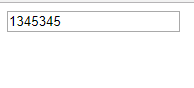
        <input type="text" [(ngModel)]="textInput">
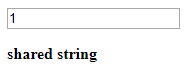
        <p *ngIf="textInput === '1'" bold>{{sharedStr}}</p>
    `,
})
export class ChildComponent{
    public sharedStr: string = "shared string";
}
//Only for Angular4!!!!!!
import {
    Component
} from '@angular/core';

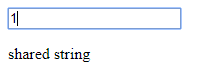
@Component({
    selector: 'child',
    template: `
        <input type="text" [(ngModel)]="textInput">
        <p *ngIf="textInput === '1'; else elseBlock">
            {{sharedStr}}
        </p>
        <ng-template #elseBlock>
            Alternate text while primary text is hidden
        </ng-template>
    `,
})
export class ChildComponent{
    public sharedStr: string = "shared string";
}
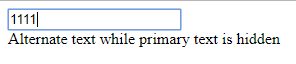
Директива ngIf позволяет удалить или, наоборот, отобразить элемент при определенном условии.
ngFor
import { Component} from '@angular/core';

@Component({
    selector: 'my-app',
    template: `
        <ul>
            <li *ngFor="let item of items">{{item}}</li>
        </ul>`
})
export class AppComponent {

    items =[
        "Apple iPhone 7",
        "Huawei Mate 9",
        "Samsung Galaxy S7",
        "Motorola Moto Z"
    ];
}
Директива ngFor позволяет перебрать в шаблоне элементы массива.
В качестве значения директива принимает значение перебора аля-foreach: let item of items. Каждый перебираемый элемент помещается в переменную item, которую можно вывести на страницу.
При переборе элементов доступен текущий индекс элемента через переменную index, которую мы можно использовать.
<div>
    <p *ngFor="let item of items;
        let i = index">{{i+1}}.{{item}}</p>
</div>
ngSwitch
С помощью директивы ngSwitch можно встроить в шаблон конструкцию switch..case и в зависимости от ее результата выполнения выводить тот или иной блок
import { Component} from '@angular/core';

@Component({
    selector: 'my-app',
    template: `<div [ngSwitch]="count">
                  <template [ngSwitchCase]="1">{{count * 10}}</template>
                  <template [ngSwitchCase]="2">{{count * 100}}</template>
                  <template ngSwitchDefault>{{count * 1000}}</template>
                </div>`
})
export class AppComponent {
    public count: number = 5;
}
Директива ngSwitch в качестве значения принимает некоторое выражение. В данном случае это свойство count. В элемент templateпомещается инструкция ngSwitchCase, которая сравнивает значение выражения из ngSwitch с другим выражением. Если оба выражения равны, то используется данный элемент template. Иначе выполнение переходит к следующим инструкциям ngSwitchCase. Если же ни одна из инструкций ngSwitchCase не была выполнена, то вызывается инструкция ngSwitchDefault.
@Service
Стандартные задачи сервисов:
-
Предоставление данных приложению. Сервис может сам хранить данные в памяти, либо для получения данных может обращаться к какому-нибудь источнику данных, например, к серверу.
-
Сервис может представлять канал взаимодействия между отдельными компонентами приложения
-
Сервис может инкапсулировать бизнес-логику, различные вычислительные задачи, задачи по логгированию, которые лучше выносить из компонентов. Тем самым код компонентов будет сосредоточен непосредственно на работе с представлением. Кроме того, тем самым мы также можем решить проблему повторения кода, если нам потребуется выполнить одну и ту же задачу в разных компонентах и классах
Planets
Jupiter
Earth
Saturn
radius: number
turnaround() { ... }
radius: number
turnaround() { ... }
vortexAccelerate() { ... }radius: number
turnaround() { ... }
interiorRadius: numberDRY
-
Single source of truth
-
Reusability
-
Maintainability
-
Testability
Example
Earth
Jupiter
Saturn
SERVICE


radius: number
turnaround() { ... }
SERVICE
vortexAccelerate() { ... }SERVICE
interiorRadius: numberSERVICEExample
Earth
Jupiter
Saturn
SERVICE


radius: number
turnaround() { ... }
SERVICE
vortexAccelerate() { ... }SERVICE
interiorRadius: numberSERVICEHow to inject Service into Component?
- Create Service class
- Add @Injector() decorator to Service
- Add Service to providers
- Inject Service into Component
@Pipes
"|"
Bult in pipes
Custom pipes
Pure / Impure
Async
Data
date: Date = new Date(2017, 7, 9);
// '09/07/2017'

user: Object = {
    name: "John"
}
// '{"name":"john"}'
// Sat Aug 09 2017 00:00:00 GMT+0300 (Belarus Standard Time)
[object Object]
Data
date = formattedDate(date);
// formattedDate is not built-in function,

user = JSON.stringify(user);
'09/08/2017'
'{"name":"john"}'
Data
<p>{{ date | date: "dd/MM/yyyy"}}</p>

<p>{{ user | json }}</p>
'09/08/2017'
'{"name":"john"}'
Pipe
{{ value | pipe[:param1[:param2...]] }}Pipe
{{ value | pipe[:param1[:param2...]] }}single
chaining
{{ value | pipe1[:param1] | pipe2[:param2] }}Pipe
export interface PipeTransform {
    transform(value: any, ...args: any[]): any;
}
How it works
Pipe
import { UpperCasePipe } from 'angular/common'

@Component...

export class myComponent {
    text: string = 'little pony';
    upperCaseText: string = new UpperCasePipe().transform(this.text);
}
What is transform
Pipe
import { Component } from '@angular/core';

@Component({
  selector: 'hero-birthday',
  template: `<p>The hero's birthday is {{ birthday | date }}</p>`
})

export class HeroBirthdayComponent {
  birthday = new Date(1988, 3, 15); // April 15, 1988
}@Routing
The browser is a familiar model of application navigation:
- Enter a URL in the address bar and the browser navigates to a corresponding page.
- Click links on the page and the browser navigates to a new page.
- Click the browser's back and forward buttons and the browser navigates backward and forward through the history of pages you've seen.
structure
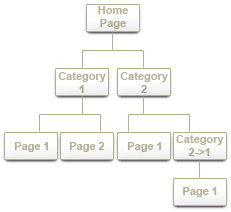
https://home/category1/page2
https://home/about
benefits
-
Separate different areas of the app
-
Maintain the state in the app
-
Protect areas of the app based on certain rules
- refresh
- bookmark
- share state
- browser history
base
<head>
    <base href="/">
</head>
<head>
<script>document.write('<base href="' + document.location + '" />');</script>
</head>server-side
single page application
/about
server
about.html
#about
JUMP
<a name="about"><h1>About</h1></a>/about
angular/router
import { RouterModule, Routes } from '@angular/router';const appRoutes: Routes = [
{ path: 'planetarium', component: PlanetsListComponent },
{ path: 'planet/:id', component: PlanetDetailComponent },
];
@NgModule({
imports: [
RouterModule.forRoot(
appRoutes,
{ enableTracing: true } // <-- debugging purposes only
)
// other imports here
],
...
})
export class AppModule { }RouterModule.forRoot()
routerLink
<a routerLink="/planetarium" routerLinkActive="active">Planetarium</a>
<a routerLink="/planets" routerLinkActive="active">Planets</a><router-outlet></router-outlet>redirectTo, pathMatch
{ path: '', redirectTo: '/planets', pathMatch: 'full' }{ path: '**', component: PageNotFoundComponent } { path: '', redirectTo: '/planets', pathMatch: 'prefix' }Feature areas
@NgModule({
  imports: [
    RouterModule.forChild(planetsRoutes)
  ],
  exports: [
    RouterModule
  ]
})
export class PlanetRoutingModule { }@testing
Что такое unit tests?
- проверяет наименьшие тестируемые части ПО - methods/modules/objects
- делается разработчиками

Польза от unit tests
- Ошибки находятся на начальном этапе
- Unit testing помогает отлаживать и менять код
- Т.к. баги находятся на раннем этапе перед выходом в продакшн, то это уменьшает стоимость таких багов
- Упрощает процесс дебагинга. Т.к. тест упал в каком-то из кейсов, значит надо дебажить только последнюю часть кода, и мы можем оперативно найти источник пробемы
- Документация и use cases которые не нужно прописывать отдельно
Польза от unit tests
- Ошибки находятся на начальном этапе
- Unit testing помогает отлаживать и менять код
- Т.к. баги находятся на раннем этапе перед выходом в продакшн, то это уменьшает стоимость таких багов
- Упрощает процесс дебагинга. Т.к. тест упал в каком-то из кейсов, значит надо дебажить только последнюю часть кода, и мы можем оперативно найти источник пробемы
- Документация и use cases которые не нужно прописывать отдельно
Принцип FIRST
1) Fast
- Чем меньше время загрузки тем лучше
- Никто не будет делать тесты, которые выполняются целый час
2) Isolated
- Только одна причина падения
3) Repeated
- Результат всегда одинаков, если не было никаких изменений
5) Timely
- Писать тесты нужно только тогда, когда они вам действительно нужны
- Лучше всего делать это как можно раньше
4) Self-verifying
- Тесты должны подтверждать правильность кода
- Тесты должны быть "утвердительными"
Покрытие
Should
Should not
- Единственный компонент
- Поведение бизнесс логики
- Сторонние библиотеки
- DBs и другие storage
- Внешние ресурсы (в том числе вызовы сервера http)
- обычный тривиальный код (getter, setter)
- недетрменированные результаты
Tools, Frameworks


Angular,
Angular 2
- Karma - раннер тестов
- Jasmine - синтаксис
Установка
1) Angular CLI
2) Manual setup (karma, karma-jasmine, karma-webpack)
Конфигурация
1) karma init (karma.config.js - имя файла по умолчанию)
2) Изменение конфигурационного файла с использованием http://karma-runner.github.io/1.0/config/configuration-file.html
Запуск
1) npm test
2) karma start
Запуск
1) npm test
2) karma start
Что нужно, чтобы написать unit test
1) Setup
- Создать контекст теста (test fixture) включая тестируемый юнит
- Инициализировать что-то, что необходимо для тестовго юнита для задуманного поведения
2) Excercise
- Взаимодействовать с тестируемым юнитом
- Постоянный вызов одного метода
3) Verify
- Проверить совпадает ли результат на выходе с тем, что мы ожидаем
- Написать утверждения для проверки состояния юнита или возвращаемого результата
- Определить поведение которое вы ожидали с использованием mock данных
4) Teardown
- Подчищаем все то, что может перейти в следующий тест
- Тесты должны быть изолированы
Doubles - ngMock
- Dummy - пустой объект, который отправляется в качестве параметра или dependency
- Fake - упрощенный объект (getter/setter), его не проверяем
- Stub - проверка состояния, вносит логику в тест. Объект с функциями, которые возвращают значения. Замена dependency. Например getLibraries.
- Mock - проверка поведения, что что-то было вызвано.
- Spy - Stub + Mock, что было вызвано, с какими параметрами, что при это вернуло
Jasmine syntax
describe - описание компонента, может иметь древовидную структуру
describe('name', ()=>{})it - сам наш тест, листья дерева
it('should be', ()=>{})- beforeEach - сетап компонента, выполняется перед каждым тестом, делает чтобы код от теста к тесту не дублировался.
- beforeAll - независимые блоки получают одно значение. Вызывается один раз в начале всех тестов
beforeEach, beforeAllafterEach, afterAll- afterEach - сетап компонента, выполняется после каждого теста, подчищает код.
- afterAll - Вызывается один раз в конце всех тестов
expect - что-то должно выполнять наши ожидания
expect(something).toBe(0);expect(someObject).not.toEqual(otherObject);expect.not - противополжное expect
spyOn(object, 'methodName').and.returnValue() ||
.and.callThrough() || ...
spuOn - шпионы вешаются на методы, можем пускать вызов и смотреть как он пройдет, какие значния вернет, сколько раз был вызван, с какими параметрами.
Angular 2 syntax
TestBed.configureTestingModule().overrideComponent().compileComponents()ComponentFixture = TestBed.createComponent()TestBed - утилита, которая предоставляет возможность создать модуль, переписать компоненты, скомпилировать.
Service = TestBed.get()То, с чем мы рабтаем
ComponentFixture.componentInstanceComponentFixture.debugElementComponentFixture.nativeElementasyncinjectBDD - Jasmine
Test
Behavior
assert.equal(6, factorial(3));

assert.lengthOf(bevarages.tea, 3,
 'bevarages has 3 types of tea');
factorial(3).should.equal(6);
expect(factorial(3)).toBe(6);
beverages.should.have.property('tea')
.with.length(3);
expect(beverages.tea.length).toEqual(3);Tricks
describe
it
xdescribe

fdescribe
xit
fitImports
@amgular/core/testing
import { ComponentFixture, TestBed } from '@angular/core/testing'@amgular/platform-browser
import { By } from '@amgular/platform-browser'@amgular/core
import { DebugElement } from '@angular/core'Component with inner template
describe('BannerComponent (inline template)', () => {

  let comp:    BannerComponent;
  let fixture: ComponentFixture<BannerComponent>;
  let de:      DebugElement;
  let el:      HTMLElement;

  beforeEach(() => {
    TestBed.configureTestingModule({
      declarations: [ BannerComponent ], // declare the test component
    });

    fixture = TestBed.createComponent(BannerComponent);

    comp = fixture.componentInstance; // BannerComponent test instance

    // query for the title <h1> by CSS element selector
    de = fixture.debugElement.query(By.css('h1'));
    el = de.nativeElement;
  });
});
Component lifecycle
it('should display original title', () => {
  fixture.detectChanges();
  expect(el.textContent).toContain(comp.title);
});

it('should display a different test title', () => {
  comp.title = 'Test Title';
  fixture.detectChanges();
  expect(el.textContent).toContain('Test Title');
});
Component with external template
import { Component } from '@angular/core';

@Component({
  selector: 'app-banner',
  templateUrl: './banner.component.html',
  styleUrls:  ['./banner.component.css']
})
export class BannerComponent {
  title = 'Test Tour of Heroes';
}
// async beforeEach
beforeEach(async(() => {
TestBed.configureTestingModule({
declarations: [ BannerComponent ], // declare the test component
})
.compileComponents(); // compile template and css
}));import { async } from '@angular/core/testing';Component with dependencies
beforeEach(() => {
  // stub UserService for test purposes
  userServiceStub = {
    isLoggedIn: true,
    user: { name: 'Test User'}
  };

  TestBed.configureTestingModule({
     declarations: [ WelcomeComponent ],
     providers:    [ {provide: UserService, useValue: userServiceStub } ]
  });

  fixture = TestBed.createComponent(WelcomeComponent);
  comp    = fixture.componentInstance;

  // UserService from the root injector
  userService = TestBed.get(UserService);

  //  get the "welcome" element by CSS selector (e.g., by class name)
  de = fixture.debugElement.query(By.css('.welcome'));
  el = de.nativeElement;
});
Component with input
// async beforeEach
beforeEach( async(() => {
  TestBed.configureTestingModule({
    declarations: [ DashboardHeroComponent ],
  })
  .compileComponents(); // compile template and css
}));

// synchronous beforeEach
beforeEach(() => {
  fixture = TestBed.createComponent(DashboardHeroComponent);
  comp    = fixture.componentInstance;
  heroEl  = fixture.debugElement.query(By.css('.hero')); // find hero element

  // pretend that it was wired to something that supplied a hero
  expectedHero = new Hero(42, 'Test Name');
  comp.hero = expectedHero;
  fixture.detectChanges(); // trigger initial data binding
});
Component with output
it('should raise selected event when clicked', () => {
  let selectedHero: Hero;
  comp.selected.subscribe((hero: Hero) => selectedHero = hero);

  heroEl.triggerEventHandler('click', null);
  expect(selectedHero).toBe(expectedHero);
});
Directive
import { Component } from '@angular/core';
@Component({
  template: `
  <h2 highlight="skyblue">About</h2>
  <twain-quote></twain-quote>
  <p>All about this sample</p>`
})
export class AboutComponent { }
beforeEach(() => {
fixture = TestBed.configureTestingModule({
declarations: [ AboutComponent, HighlightDirective],
schemas: [ NO_ERRORS_SCHEMA ]
})
.createComponent(AboutComponent);
fixture.detectChanges(); // initial binding
});
it('should have skyblue <h2>', () => {
const de = fixture.debugElement.query(By.css('h2'));
const bgColor = de.nativeElement.style.backgroundColor;
expect(bgColor).toBe('skyblue');
});Service
describe('DependentService without the TestBed', () => {
  let service: DependentService;

  it('#getValue should return real value by way of the real FancyService', () => {
    service = new DependentService(new FancyService());
    expect(service.getValue()).toBe('real value');
  });

  it('#getValue should return faked value by way of a fakeService', () => {
    service = new DependentService(new FakeFancyService());
    expect(service.getValue()).toBe('faked value');
  });

  it('#getValue should return faked value from a fake object', () => {
    const fake =  { getValue: () => 'fake value' };
    service = new DependentService(fake as FancyService);
    expect(service.getValue()).toBe('fake value');
  });

  it('#getValue should return stubbed value from a FancyService spy', () => {
    const fancy = new FancyService();
    const stubValue = 'stub value';
    const spy = spyOn(fancy, 'getValue').and.returnValue(stubValue);
    service = new DependentService(fancy);

    expect(service.getValue()).toBe(stubValue, 'service returned stub value');
    expect(spy.calls.count()).toBe(1, 'stubbed method was called once');
    expect(spy.calls.mostRecent().returnValue).toBe(stubValue);
  });
});
Pipe
import { Pipe, PipeTransform } from '@angular/core';

@Pipe({name: 'titlecase', pure: false})
/** Transform to Title Case: uppercase the first letter of the words in a string.*/
export class TitleCasePipe implements PipeTransform {
  transform(input: string): string {
    return input.length === 0 ? '' :
      input.replace(/\w\S*/g, (txt => txt[0].toUpperCase() + txt.substr(1).toLowerCase() ));
  }
}
describe('TitleCasePipe', () => {
// This pipe is a pure, stateless function so no need for BeforeEach
let pipe = new TitleCasePipe();
it('transforms "abc" to "Abc"', () => {
expect(pipe.transform('abc')).toBe('Abc');
});
it('transforms "abc def" to "Abc Def"', () => {
expect(pipe.transform('abc def')).toBe('Abc Def');
});
// ... more tests ...
});Angular 2+
By alexandrscherbak
Angular 2+
Angular 2 full presentation