Application
Layer
Dr. Alexios Louridas
Today

Domain Name System
- Human Readable IP addresses
- Practical
- Can change IP address transparently
- Move premises / locations
- Security
DNS Look up Process
Stub Resolver
Process to map a name to an IP address.
gethostbyname("www.gre.ac.uk");Sends a query to the local DNS Resolver
Local Recursive Resolver
This is the local DNS resolver
Recursive Look-up
Send queries for each part :
1. gre
2. ac
3. uk
Caches answers for a period of time called Time To Live
Authorative nAME sERVER
Always correct
-
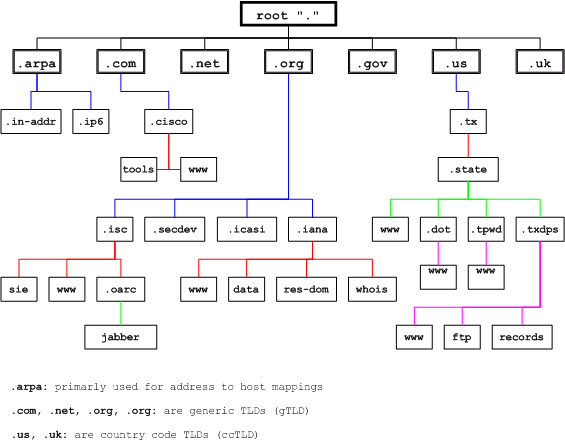
ICANN (Internet Corporation for Assigned Names and Numbers)
-
Generic Top Level Domain (gTLD)
-
Country Code TLD (ccTLD)
-
...
-
More than 1000 gTLDs
DNS Name Hierarchy
1
Client Queries the local resolver
2
Local DNS Server
Checks Cache
3
Root DNS Server
Checks Cache
5
Authoritative DNS server (Organisations Servers)
SEND IP
4
Top Level Domain (TLD) DNS Server
Checks Cache
6
TLD, Root, Local DNS servers and Client might cache answer for some time
World Wide Web (WWW)
1989 CERN used web to share documents, experiments, photos...
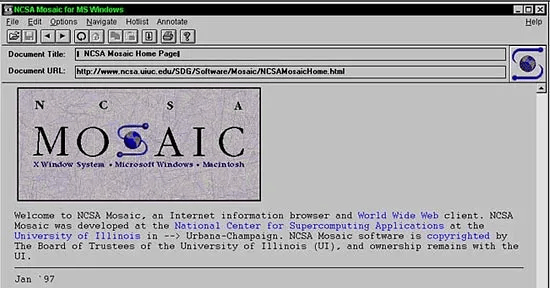
1993 First GUI - Mosaic
1994-2000 the browser war
Real Life to Websites
1994 - Bookstore to Amazon
1995 - Flea market to eBay
1998 - Web Library Search to Google

DOT COM ERA
-
Client send a request on a text based protocol called
-
HyperText Transfer Protocol (HTTP)
-
Secure HTTP (HTTPS)
-
Object (page) retrieval via Uniform Resource Locators (URLs)
Architectural OVerview
1
User clicks on a link
Browser finds the URL
2
Browser asks DNS for the IP address
DNS Replies
3
Browser opens a connection to that IP address via a protocol called TCP
5
Server replies and send index.html together with other possible objects that are needed to display index.html
4
Send HTTP / HTTPS request message to return the index.html file
6
Browser displays image and TCP connections are released

- User Interfaces
- Message Transfer Protocols
- Message Format Protocols
EMAIL COMPONENTS
User
Mail Reader
Composing, editing and reading e-mails
Outlook, google mail...
MAIL SERVER
Mailbox containing all incoming messages of users
Message queue of outgoing messages of users
PROTOCOL
SMTP - Simple Mail Transfer Protocol
Used by client to send emails
Used by Server to receive emails
SMTP
Uses TCP to send emails
ASCII text
3 Phase Transfer:
Hello - transfer - Goodbye
〞
Mail Access Protocols:
- Post Office Protocol (RFC 1939)
- Internet Mail Access Protocol (RFC 1730)
- HTTP
Transport Layer
Dr. Alexios Louridas
-
Guarantee Message Delivery
-
Deliver order of messages
-
Support arbitrarily message sizes
-
Support multiple application processes
-
Synchronisation between hosts
Transport Layer Responsibilities

-
Message dropping
-
Message reordering
-
Duplicate messages
-
Message sizes
-
Delays
Challenges

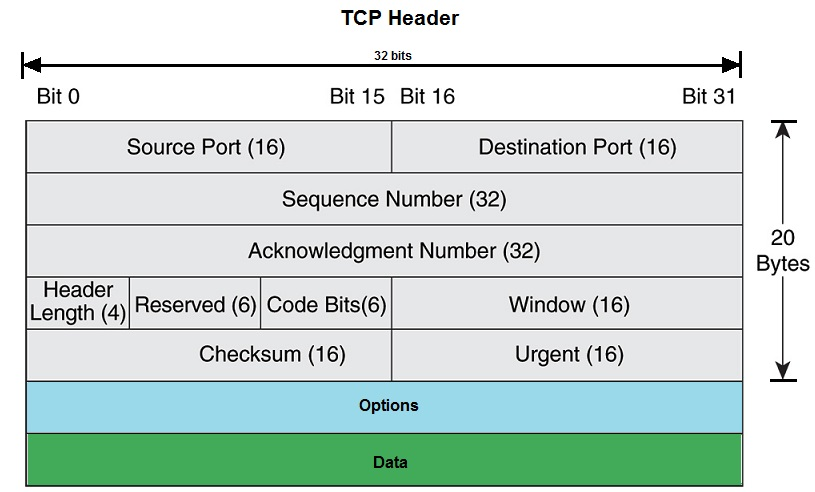
TCP- Transport Control Protocol
Biderectional data flow and maximum segment size (MSS)
Handshaking required. Establish connection before data can be send.
Flow control and reliable.
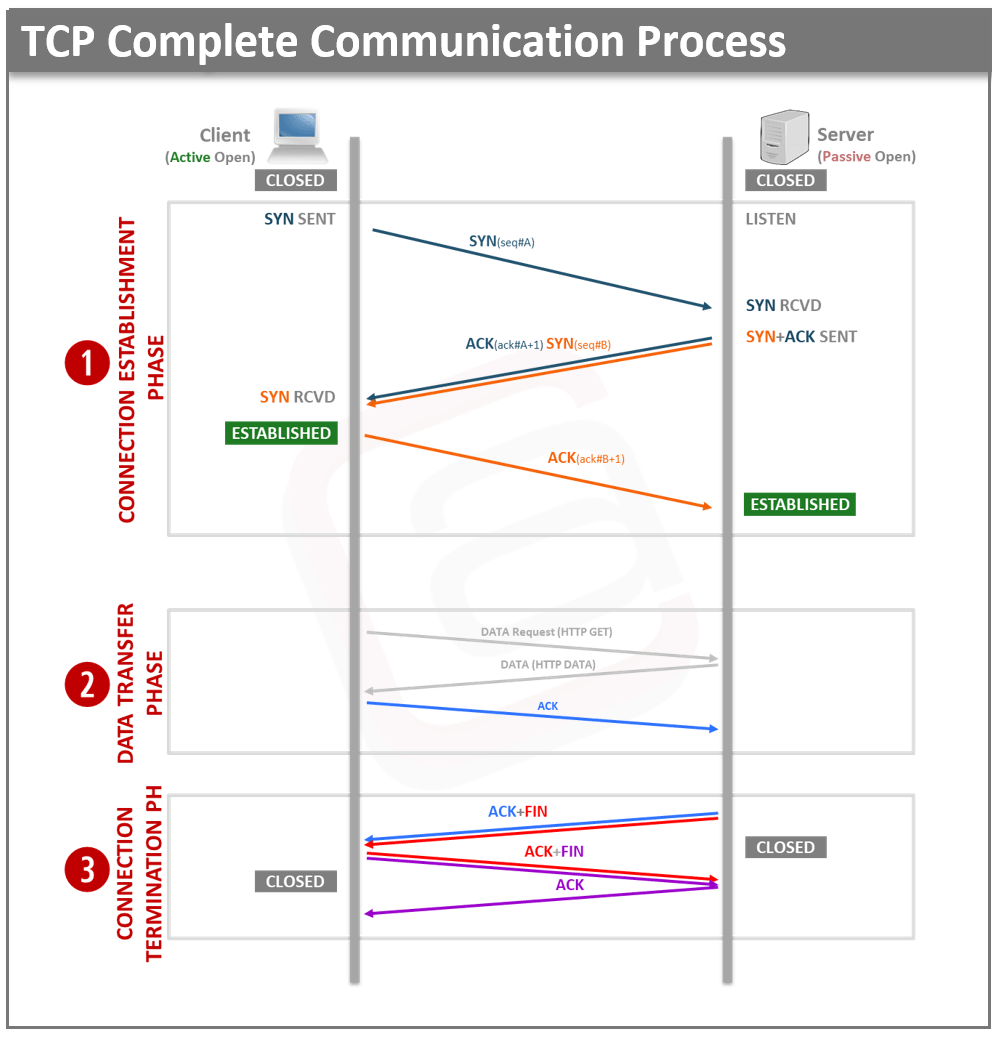
TCP - 3 way Handshake
- Establishing a connection: Before data can be transmitted, a connection must be established between the two devices. This process is known as the TCP handshake.
- Data transfer: Once the connection is established, data can be transmitted between the two devices. The data is divided into packets, and each packet is assigned a sequence number. The packets are sent from the client to the server, and the server acknowledges receipt of each packet.
- Error checking: TCP includes error checking to ensure that the data is transmitted correctly. When a packet is received, the receiver device checks its sequence number and compares it to the expected sequence number. If the sequence number is incorrect or a packet is missing, the receiver requests that the missing or damaged packet be retransmitted.
- Connection termination: When the data transfer is complete, the connection is terminated.
Flow control in TCP is achieved through a technique called "sliding window."
- Sender transmits a specified number of bytes to the receiver before receiving an acknowledgment.
- The sender can adjust the size of the window.
The sender maintains a buffer of data that it wants to transmit. As the data is transmitted, the sender adjusts the size of the window based on the number of bytes that have been acknowledged by the receiver. If the receiver cannot handle the data, it will reduce the size of the window, causing the sender to slow down its transmission rate.
Flow Control


Congestion Control
Slow start: TCP uses a slow start mechanism to gradually increase the amount of data sent over the network.
Congestion avoidance: TCP uses a congestion avoidance mechanism to detect and respond to congestion on the network. This mechanism is based on the detection of packet loss and the adjustment of the sender's transmission rate.
Congestion window: TCP uses a dynamic congestion window to limit the amount of data that can be sent over the network at any given time.
Fast retransmit and recovery: TCP uses a fast retransmit and recovery mechanism to quickly retransmit lost packets and recover from packet loss. Reduces duplicates.
Explicit congestion notification (ECN): TCP uses ECN to provide early notification of network congestion. ECN allows routers to mark packets with a congestion indication, which the receiver can use to adjust the sender's transmission rate.
-
Checksums
-
Acknowledgments
-
Retransmission
-
Flow control
-
Congestion control
Error Control

-
Video Streaming (Pre Recorded) - TCP
-
Needs to be Reliable
-
Buffering is essential
-
-
Live Video Streaming / Video Conferencing -UDP
-
Reduced Latency
-
Video and Audio
-
Multicast
-
-
Gaming -TCP and UDP
-
Real time action games depend on low latency thus UDP
-
Real time strategy games no need for low latency can use TCP
-
Streaming

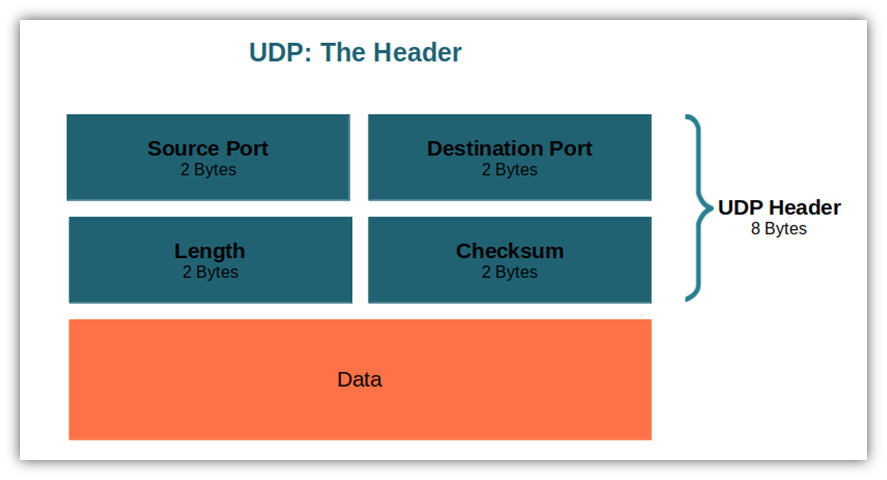
UDP - User Datagram Protocol
UDP Segments may be lost or delivered out of order.
No Handshaking required. Each UDP segment is independent from each other.
Reliability transferred in application layer.
- Reliable
- Connection-Oriented
- Flow Control
- Congestion Control
- Big Overhead
- Slower
- File Transfers, email, web browsing, error free communications
TCP
- Reliable only on certain situations
- Very Small Overhead
- Fast
- No Congestion of Flow Control
- Video Streaming, Online Gaming, VoIP
UDP
Conclusion

〞
Is there nothing better?
Google proposed and design QUIC
Quick UDP Internet Connections
-
Runs on UDP
-
Removing TCP initial Handshake
-
If QUIC is not supported then TCP
-
Very good reliability as TCP
-
Support multiple streams
-
YouTube and HTTP3
QUIC
Minimal
By Alexios Louridas