Layer 2 and 3 Addressing
Dr. Alexios Louridas
Index

How a NIC is identified?
- A MAC address (short for medium access control address) is a unique identifier assigned to a network interface controller (NIC).
- It serves as a hardware address for devices within a network segment.
- Commonly used in IEEE 802 networking technologies, including Ethernet, Wi-Fi, and Bluetooth.
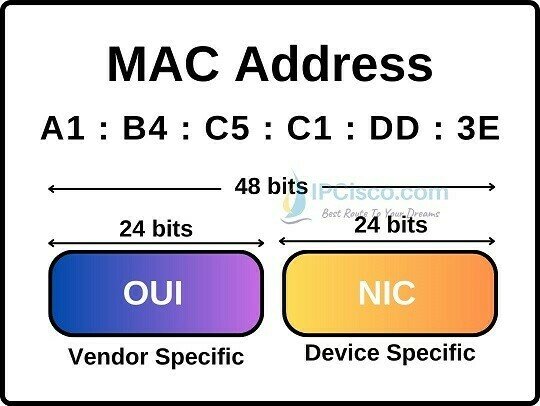
These addresses are hardcoded into the hardware by the manufacturer and serve as a permanent identifier for the device within a network segment.
Are MAC addresses UNIQUE?

-
Privacy and Security:
- Changing your MAC address can enhance privacy. By using a different address, you make it harder for others to track your device.
- Some public Wi-Fi networks may restrict access based on MAC addresses. Changing it allows you to bypass such restrictions.
-
Network Troubleshooting:
- If you encounter network issues, altering the MAC address can help diagnose problems.
- It allows you to simulate a different device on the network, which can reveal whether the issue is specific to your hardware.
-
Avoiding IP Conflicts:
- In some cases, multiple devices on the same network segment might accidentally have the same IP address.
- Changing the MAC address ensures that your device gets a unique IP address from the DHCP server.
-
Testing and Development:
- Developers and network administrators often need to test network configurations.
- Changing the MAC address allows them to simulate different devices without physically swapping hardware.
-
Spoofing and Anonymity:
- MAC address spoofing is used for anonymity or to bypass network restrictions
Reasons to change MAC Address

-
Device Identification:
- Each network interface controller (NIC) has a unique MAC address.
- It acts like a digital fingerprint for devices, allowing them to be identified within a network segment.
- When data packets travel across a network, routers and switches use MAC addresses to direct them to the correct destination.
-
Address Resolution:
- In local networks, devices communicate using MAC addresses.
- When a device wants to send data to another device, it first resolves the recipient’s IP address to its corresponding MAC address using the Address Resolution Protocol (ARP).
- ARP maintains a mapping between IP addresses and MAC addresses.
-
Access Control:
- Wi-Fi routers and switches use MAC addresses for access control.
- By filtering based on MAC addresses, network administrators can allow or deny specific devices from connecting to the network.
- This is useful for securing Wi-Fi networks and preventing unauthorized access
Reasons to change MAC Address

-
DHCP and IP Assignment:
- DHCP servers assign IP addresses dynamically to devices when they join a network.
- They use the device’s MAC address to ensure consistent IP assignments.
- This simplifies network management and prevents IP conflicts.
-
Troubleshooting:
- Network administrators use MAC addresses to diagnose issues.
- By tracking MAC addresses, they can identify faulty devices, monitor network traffic, and troubleshoot connectivity problems.
-
Virtualization and Cloning:
- In virtual environments, virtual machines (VMs) often share the same physical NIC.
- Each VM has a unique MAC address, allowing them to function independently.
- Cloning VMs involves changing their MAC addresses to avoid conflicts.
More Reasons to change MAC Address


Address Resolution Protocol (ARP)
- ARP connects an ever-changing Internet Protocol (IP) address to a fixed physical machine address, also known as a media access control (MAC) address, within a local-area network (LAN).
ARP operates between the data link layer (MAC address) and the network layer (IP address).


How does ARP work
- When a new computer joins a LAN, it receives a unique IP address.
- When data packets arrive at a gateway, the gateway asks ARP to find the matching MAC address for a given IP address.
- ARP maintains an ARP cache with IP-to-MAC address mappings.
- If the translation already exists, no new request is made. Otherwise, ARP performs the translation.
- ARP caches are dynamic and limited in size, ensuring privacy and security.


- Purpose: Static entries are manually configured and kept in the cache table on a permanent basis.
-
Use Case:
- Ideal for devices that need to communicate with other devices regularly within the same network.
- These entries remain unchanged unless explicitly modified by an administrator.
-
Reliability:
- Static entries serve as a reliable record of specific IP-MAC address mappings.
- They persistently link an IP address to a MAC address.
-
Management:
- Requires manual intervention to create and maintain.
- Useful for critical devices like servers or network infrastructure components.
STatic
ARP CACHING
- Purpose: Dynamic entries are automatically added by the network device (such as a router or switch) and have a limited lifespan in the cache.
-
Creation Process:
- When a device wants to communicate with an IP address, it performs an ARP request.
- The request broadcasts to the local LAN, asking, “Who has IP address X, and what is your Ethernet MAC address?”
- The responding device provides its MAC address, and the entry is added to the dynamic ARP cache.
-
Lifespan:
- Dynamic entries remain in the cache as long as they are actively used.
- If an entry remains unused for a certain period (the ARP cache timeout), it is removed.
-
Benefits:
- Dynamic entries adapt to network changes and are more flexible.
- They minimize management overhead compared to static entries.
Dynamic
Internetworking
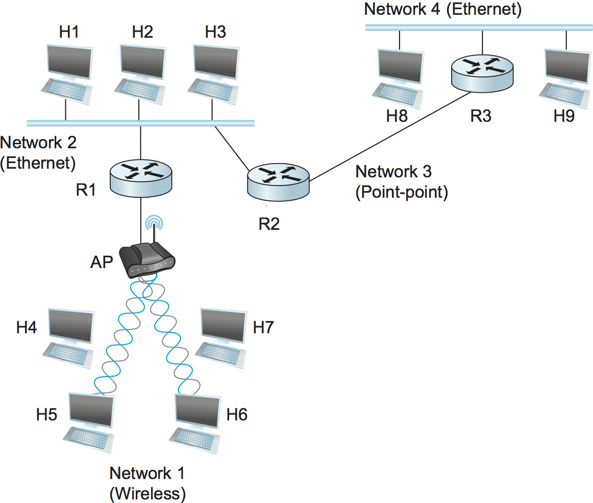
A collection of networks to provide data delivery of host-to-host.
H# are hosts
R# are routers
Store and Forward Packet Switching
IP and Routing
Internet Protocol (IP)
Governs the transmission of data over the internet.
Responsible for Routing data packets.
-
Sender
-
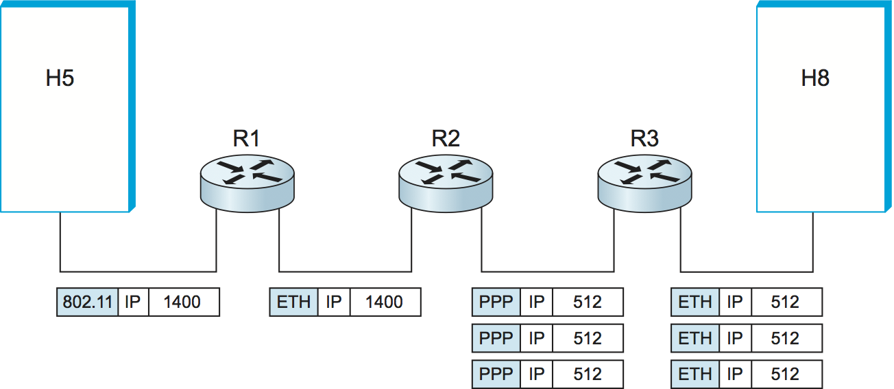
Encapsulates segments into datagrams and sends them from the sending host to the receiving host
-
-
Receiver
-
Datagrams are delivered to the transport layer
-
-
Every host and router
-
Network layer protocols that operate at the network, data link, and physical layers
-
-
A router examines the header fields in all IP datagrams that pass through it
Network Layer

Encapsulation
Message
Message
Message
Message
H_t
H_t
H_t
H_n
H_n
H_l
segment
datagram
frame
-
Routing Protocols
-
RIP, OSPF, BGP
-
-
IP Protocol
-
Address
-
Datagram Format
-
Packet handling
-
-
ICMP Protocol
-
Error reports
-
Router Signals
-
-
Forwarding Table
Internet network Layer (disassembled)

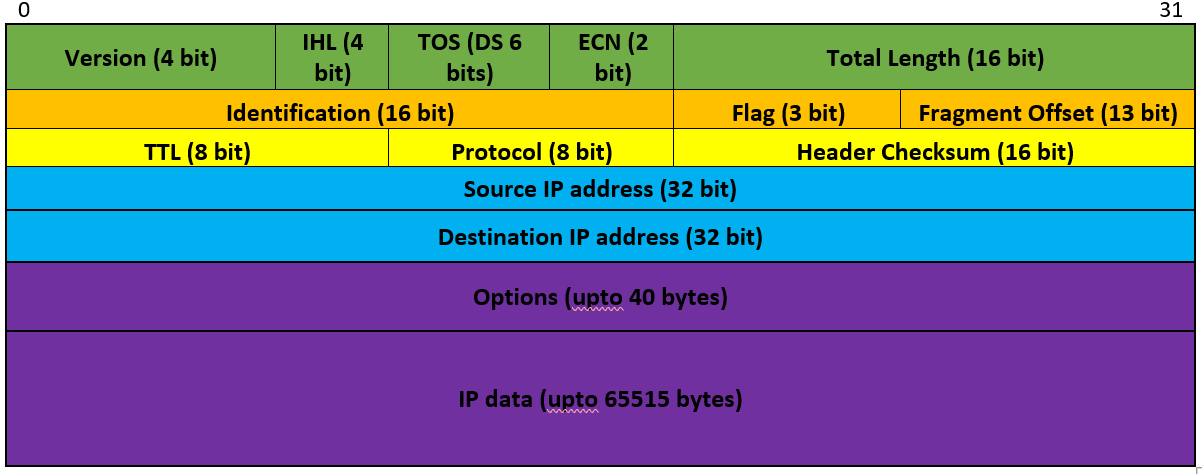
IP Datagram Format
- Internet Protocol Address
- Identification for a device using the Internet Protocol
- Location identification
- What are they?
- A 32 bit number (IPv4)
- A 128 bit number (IPv6)
- Who manages it?
- Internet Assigned Numbers Authority (IANA)
- Internet providers
- Local administrators for a business or YOU at home
- Internet Assigned Numbers Authority (IANA)
IP Address

- Human Readable notation
- In decimals
- Example: 169.198.5.1
- In decimals
- 4 Billion addresses
IPV4
- Human Readable notation
- In Hexadecimals
- Example:
1000:ab3:0:1234:0:567:
- 340 undecillion addresses
IPV6
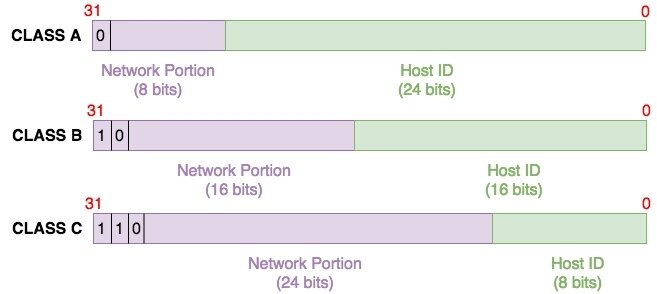
Address Classes
- IPv4 addresses divided in
- Network portion
- Host ID
- At the beginning of IP protocol addresses were designed based on classes:
- Class A
- Class B
- Class C
- Class D
- Multicasting
- Class E
- experimental
-
Class A network range
-
0-127
-
Really 0-126 as 127 is reserved
-
-
Class B network range
-
128-191
-
-
Class C network range
-
192-223
-
Network Ranges

- Class A supports 16777214 hosts
- Class B supports 65534 hosts
- Class C supports 254 hosts
- What if I only need 50 hosts or even worse 300?
- IP wastage
Calculate number of hosts
Number\space of \space usable \space IP \space addresses = 2^{host bits} -2


SUBNETting
-
To avoid IP wastage
-
Create smaller networks (sub networks; subnets) inside large networks
-
How?
-
Borrow bits from the Host ID
-
-
Still have wastage but a lot more reduced

SUBNETting
-
How do we know that 192.168.1.32 is an IP address or a subnet
- Subnet Masks
Class A: 255.0.0.0
Class B: 255.255.0.0
Class C: 255.255.255.0
- Subnet 192.168.1.32 is then represents as :
192.168.1.32 255.255.255.224 (or 192.168.1.32/27)

Classless Inter-Domain Routing (CIDR)
- Classes no longer apply, most networks are classless
- To slow down exhaustion of IPv4 addresses
- Introduced in 1993
- Now we only have a network represented by a network address and a prefix length (the number of 1s in the subnetmask)

Network layer
Forwarding
Connects one network to another network
Routing
Determines the best route to the destination before forwarding traffic to the next router along the path
Routers
Responsible for routing traffic between network
Efficient path
Routing table used to determine the most efficient path to reach the destination
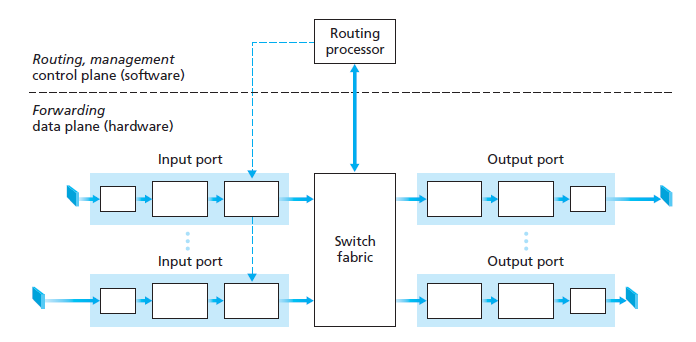
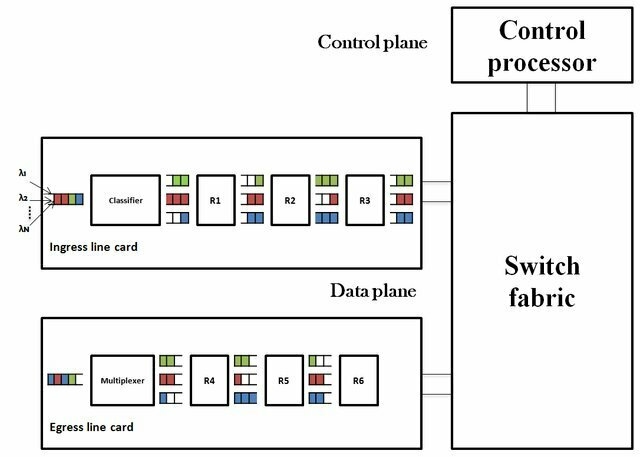
Router Architecture
datagrams journey
Buffering
Routers use buffers to temporarily store packets when the receiving interface is busy or congested. The buffer allows the router to hold onto packets until it can forward them to the next hop on the network. Without buffering, packets could be lost or dropped, resulting in data loss or network congestion.
Classifier
When a router receives a packet, it needs to determine which output interface to send the packet to. To make this determination, the router uses a classifier to examine the packet header and match it against predefined rules. The classifier can identify the source and destination addresses, protocol type, and other attributes of the packet to make the routing decision.
Scheduling
Once a router has classified a packet and determined the output interface, it needs to schedule the packet for transmission. The scheduling algorithm determines the order in which packets are sent, based on factors such as packet priority, available bandwidth, and network congestion. Scheduling algorithms can help ensure that high-priority packets are sent first, while still maintaining overall network performance
The concept of net neutrality is based on the idea that the internet should be an open and level playing field, where all users have equal access to information and online resources, regardless of their location, financial resources, or the type of device they use to access the internet.
If network neutrality is not enforced, ISPs could prioritize or block certain types of internet traffic, including specific websites, applications, or services. This could have significant implications for how routers function and how data is transmitted over the internet.
https://www.youtube.com/watch?v=fpbOEoRrHyU
https://worldpopulationreview.com/country-rankings/countries-without-net-neutrality
Network Neutrality
Minimal
By Alexios Louridas