Advanced Programming with C#
IUST
Fall 2018

Object Oriented Programming
TOC
- Object oriented programming concepts
- Class, Object, Property and Method.
- Interfaces
- Encapsulation concepts
- Implement and use first class in C#
- Instantiate object
- Status of object in memory
- Garbage collector
- Parameter passing
- Different parts of memory
Object oriented programming
- Machine language
- Assembly: Naming for numeric machine language commands
-
High level languages:
- such as C, Basic, Fortran
- Structures closer to human language
- such as loop, condition etc.
- From the machine and assembly language are higher levels
- This approach was a great advance
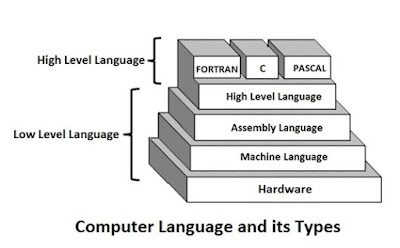
But the developer must still think of computer structures (even with a high level language)
It is better for the programmer to think about the problem structure than the structure of the computer
Problem space and solution space
Programming = Creating a software solution for a real issue
● Example: Software for managing books and members in a library

Problem space
- The space in which there is a problem: like a library
- The components of space of library problem : book, member, shelf and ...
Solution Space
- The space in which the solution is created: a C# program for managing the library
- Library space solution components: project, program, variable, function
Programming = An attempt to map the problem space and solution space
Object Oriented Approach
- Think about the library's problem:
- What are the elements of your program?
- We think about functions and variables ...
Objects in Library Problem:
A book,
A member
A shelf and ...


Object Oriented Approach
- Allows the programmer to display the elements of the problem space
- Use the concepts and terminology of the same problem in the program that it writes
Object:
entities that are in the space of the problem and in the solution space (programs) are also seen
Object Oriented Programming
- We write programs that match the language of the problem space
- The same problem with the help of adding new data types for objects
- Types of data are not limited to what the language provides
- In addition to simple types (such as "shelf" and "book" type int and char
- When you read the program, you see words that have meaning in the problem
- A book, a member, the barrow of a book to a member, and ...
- This abstraction makes language very flexible and powerful
Object Oriented languages
-
Smalltalk
- One of the first successful object-oriented languages
- One of the languages that inspired Java
- C++
- C#
- Java
- Scala
- Python





Object Oriented VS procedural approach
Object-Oriented Programming Elements: Objects + Message Exchange between Objects
Procedural programming elements: functions + variables + function call
-
The Difference Between Thinking at Programming Time:
-
Thinking about objects and the relationship between objects: the object-oriented method
-
Thinking about memory, computer structure and ...: procedural approach
Object-Oriented Programming Specs
Object-oriented programming summarizes in five main features: "Allan Key"
- Everything is an object
- A program is a set of objects
- By sending messages together,
- Tell each other what to do
- Each object has its own memory
- Which is made of other objects
- (Object mode)
4. Each object has one type
5. All objects of a particular type can receive similar messages

Description of the booch from the object
An object consisting of status, behavior, and identity
Booch has added a description of "identity".
Each object has its own characteristics That state determines the object
For example: A library member has features such as name, age, etc.
Each object has methods It shows behaviors
For example: behavior "borrowing the book" for the object "Member"
And each object is unique: it has a distinct identity
even if there are two objects have the same "status"
have unique address in memory
Class, Object, Property and Method
Object:
Existing objects in the problem space
Library:
Member Mr."Ali Alavi", "Shahnameh" Book.
Football game:
Ali Karimi, Farhad Majidi, Azadi Stadium, Ball
Banking Program:
Maryam Alavi (customer), Azadi Branch
Class
Type, category, or batch of objects that have similar "Behavior" and "Attributes"
Each class has several instances
- Library: Book, member, shelf
- Play football: player, team, stadium
- Banking program: customer, branch, account
Each class defines behavior and attributes (Property)
Any object in this class has these features and behaviors
- Example: Member of the library
Features: Name, age, occupation
Behaviors: borrowing books
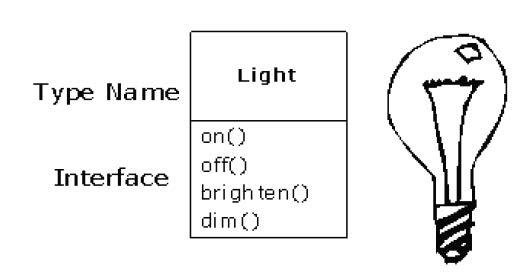
Light lt = new Light();
lt.On();
UML class diagram for light bulb
UML class diagram of person
Person personl = new Person();
personl.Name = "Taghi Taghavi";
personl.PhoneNumber = 66166601;
personl.ShowInformation();
| Person |
|---|
| -name : String -PhoneNumber : int |
| + ShowInformation() : void + Name.set() : void + Name.get() : String + PhoneNumber.set() : void + PhoneNumber.get() : String |
Access control
In class design: we can limit access to parts of the class
● Public and private in class
- The class user can only use its public section
- The general shows the interface class
- Private sections inside the same class can be use. But they are not necessarily used by other classes
● Private sections are hidden from the viewers (implementation hiding)

Encapsulation
Encapsulation: defining features and behaviors + hiding implementation
- Definition of a concept in the problem space in the form of a class of objects
- Define new classes with public interfaces and hidden implementations
- Encapsulation: Definition of type (class) + Definition of class interface (How to use the class)
- The class will be Black Box. It can only be used in a particular way
- Many commercial products are confined
- TV, mobile phone, ...
Why encapsulation?
- Operation and easier use
- The user involved in the details will not be implemented
- The open source may lead to misuse
- Hiding the implementation will reduce the error rate
- This design is more beautiful


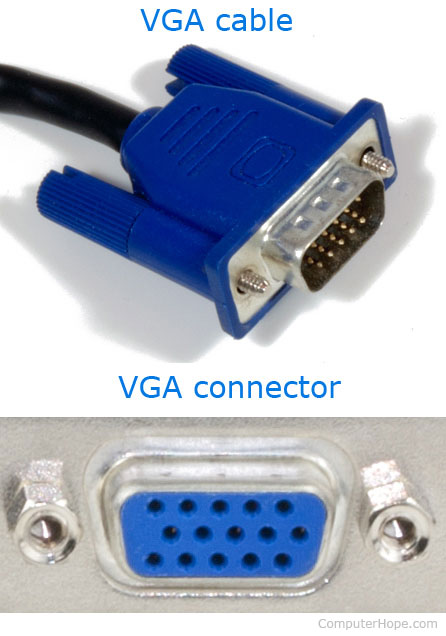
Interface
- Each object can exhibit certain behaviors
- Ask for specific requests
- Object Interface:
- A set of behaviors for a callable object
- Part of the class interface is "borrowed", for example
- Each book has a lending behavior
- Example: Behavior It will be called "Shahnameh" for the book "to be borrowed"
- Part of the class interface is "borrowed", for example
- The interface of each object in the class (type) is specified
Implement and use first class in C#
// Class Declaration
public class Dog
    {
        private String name;

        public void SetName(String n)
        {
            name = n;
        }

        public void Bark()
        {
            Console.WriteLine("Hop! Hop!");
        }
    }
Using Class
// Object Creation, Instantiation
Dog d = new Dog();

// Change state of object
d.SetName("Fido");

// Message passing
d.Bark();
What is variable "d"?
A reference to the object.
Use an Object
Person p = new Person();
p.SetName("Ali Hosseini");
Book b1 = new Book();
b1.SetTitle("Shahname");
p.Borrow(b1);
String s = p.name;
p.Age = 22;
Dot
- Before a dot, the object name comes
- usually after a dot, a method is called
- After the dot, one of the features of the object may come
- Provided that it is available. For example, public
Objects on program
Dog d1 = new Dog();
d1.Name = "Belle";
d1.Age = 3;
Dog d2 = new Dog();
d2.Name = "Fido";
d2.Age = 4;

| Belle |
|---|
| 3 |
| Fido |
| 4 |

Objects in memory

Reminder:
Every object has a state, behavior, and identity
- Each object is placed in memory
- Memory Content = Object state
- Object address in memory ≈ Object identity
- Object behavior: Defined in object class already
new operator
- Creates a new object of the specified class
- Returns the reference to the constructed object
- The new operator creates a memory in a part named Heap
String s = new String();
Dog d = new Dog();
Rectangle r = new Rectangle();
StreamReader sr = new StreamReader();
Data types
-
Primitive Data Types :
- byte, short, int, long, float, double, bool, char
- There are some limited and distinct data types available in C#
- Each variable of these types contains a value (not an object)
-
Reference Data Types:
- Like String, StreamReader, Dog or Book
- Some (like String) are available in the language and we define and some others (like Book)
- Each variable of these types is referenced to an object
The difference between a primitive variable (with an object)
- Primitive types do not have the ability to use new operator
- Not referenced
- Hold a value instead of keeping referencing an object
- They do not have the option to use dot
- Because they are not objects that have a feature or behavior
new int(); //ERROR
int a = 5;
a.value = 6; //ERROR
Reference to a object
- Referral is a concept as a pointer
- A somewhat similar point in the C ++ language
- When defining a variable, you actually create a referral, not an object
-
Exception:
- Variables of the primary data types
- These variables do not refer to an object, they hold the value themselves


Making objects
- This code does not create a new object:
- Only one referral, which still does not refer to an object
- You can not use the str variable at this time
- The value of the str variable is empty (null)
- NULL value: A reference that does not refer to an object
- Each variable (referral), must be connected to a real object (unless it is primitive)
- For example, with the new operator, point to a new object
- Or a non-empty variable inside it (with the = )
String str;str= new String(); //Refer to new object
str= name; //Refer objectThe effect of the assignment operator (equal to one reference)
String name = new String("Ali");Ali
name
name
Ali
AP9798-1
By ali4heydari