Provisioning Azure
Clicking, scripting, coding
something for everybody
Andrei Mustață
dotnet Iași
Cloud ☁
- computing power
- storage
- applications
Cloud ☁
- AWS, Azure, etc.
- plenty to choose from
- similar features (roughly)
Azure
- mmm Microsoft
- gaining up on AWS
- similar stuff, named differently
Azure portal
- Who likes mice?
- Who likes blades?
(clicking)
Azure portal
- Web-based console
- Point-and-shoot
- Build, manage, monitor
- Customise dashboards
Azure portal
- Who likes mice?
- Who likes blades?
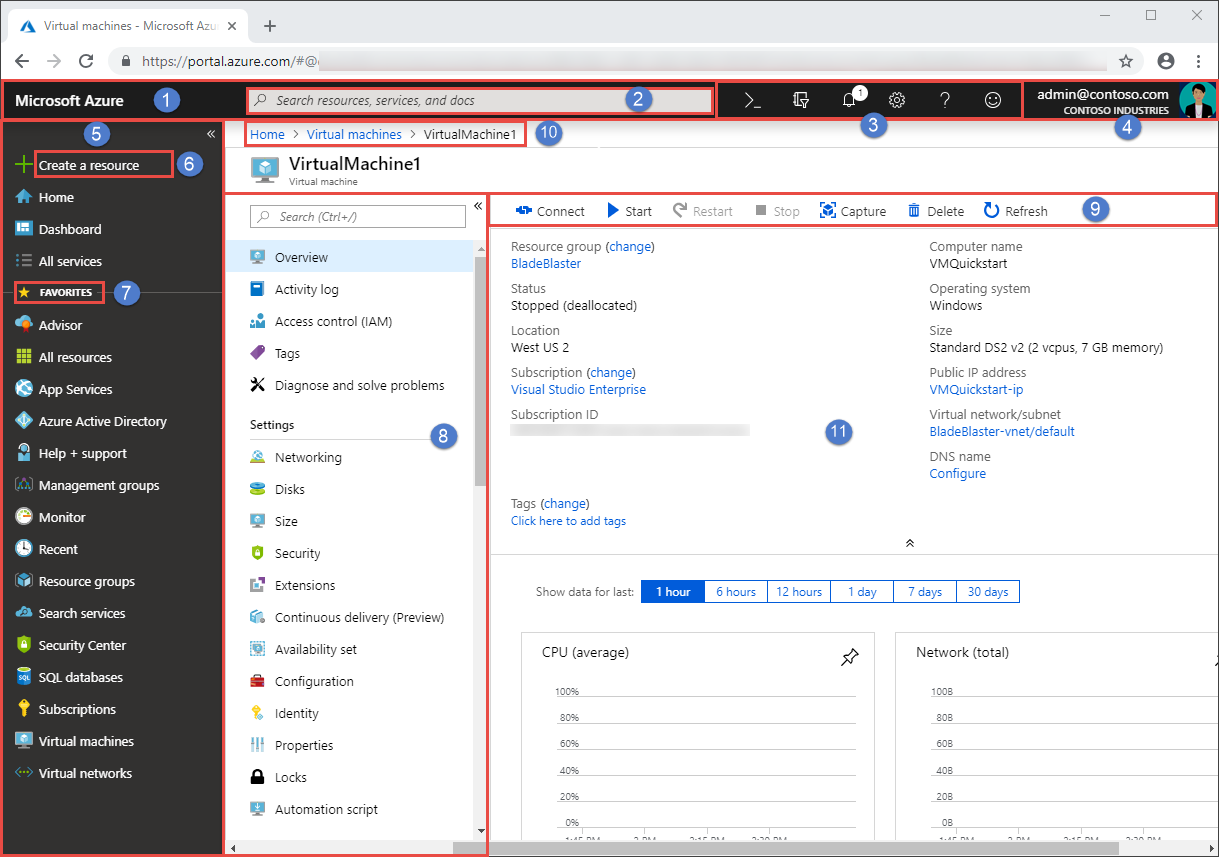
https://docs.microsoft.com/en-us/azure/azure-portal/azure-portal-overview#getting-around-the-portal
Portal
example
Creating a VM through the portal
Azure portal
- GUI, visual feedback
- Cool for exploring
- OK for few resources
Pros
Azure portal
- Careful with more resources
- Forgot what you clicked?
- Don't know who clicked?
- Recreate environment from scratch?
Cons
Azure CLI
- Who likes keyboards?
(scripting)
Azure CLI
- Cross-platform
- Open-source
- CLI
Azure CLI
(scripting)

https://github.com/Azure/azure-cli#highlights
CLI example
Creating a VM through the CLI
az vm create \
  --resource-group dni-rg \
  --name demo.buntu \
  --image UbuntuLTS \
  --admin-username andrei \
  --admin-password supersecretPassword123LOL


{
  "fqdns": "",
  "id": "/subscriptions/<guid>/resourceGroups/dni-rg/providers/Microsoft.Compute/virtualMachines/demo.buntu",
  "location": "eastus",
  "macAddress": "00-0D-3A-23-9A-49",
  "powerState": "VM running",
  "privateIpAddress": "10.0.0.4",
  "publicIpAddress": "40.68.254.142",
  "resourceGroup": "myResourceGroup"
}
Azure CLI
- Automate processes
- Compatible with other CLI
- Version control
- Documented
Pros
Azure CLI
- Still kinda like clicking
- CLI
Cons
Azure PS
- Who likes objects?
(moar scripting)
Azure PS
- Cross-platform
- Open-source
PS example
Creating a VM through the Azure PS
$vmParams = @{
  ResourceGroupName = 'dni-rg'
  Name = 'demo.buntu'
  Location = 'eastus'
  ImageName = 'Ubuntu16LTS'
  Credential = $cred
}

$newVM = New-AzVM @vmParams
Azure PS
- Same as CLI
- Object model
- dotnet framework
- Closer to C#
Pros
Azure PS
- Powershell ^_^
- Syntax
Cons
Azure mgmt SDK
- Who likes C#?
(coding)
Azure SDK
- NuGet packages
- Microsoft.Azure.Management.Compute.Fluent
SDK
example
Creating a VM through the Azure C# SDK
Console.WriteLine("Creating a Windows VM");

var windowsVM = azure.VirtualMachines.Define("demo.buntu")
    .WithRegion(Region.EUWest)
    .WithNewResourceGroup("dni-rg")
    .WithNewPrimaryNetwork("10.0.0.0/28")
    .WithPrimaryPrivateIPAddressDynamic()
    .WithNewPrimaryPublicIPAddress("mywindowsvmdns")
    .WithPopularWindowsImage(KnownWindowsVirtualMachineImage.WindowsServer2012R2Datacenter)
    .WithAdminUsername("andrei")
    .WithAdminPassword(password)
    .WithSize(VirtualMachineSizeTypes.StandardD3V2)
    .Create();

Console.WriteLine("Created a Windows VM: " + windowsVM.Id);
Azure SDK
- C#
- Typed
Pros
Azure SDK
- Compile every change?
- Feels weird, man
Cons
Provisioning Azure
- Portal
- az-cli
- Az-powershell
- mgmt SDK
Recap
Procedural
- ... procedural
- How to do something
- Is there a better way?
- There's a different way
Declarative
- What rather than how
- Define the desired end-state
- Let the tooling handle the how
Pros
Declarative
- Limited to what the language provides
- Not a "full" programming language
Cons
Infrastructure-as-code
- Version control
- Automation
- Reuse modules
Azure RM templates
- Who likes JSON?
(ARM)
{
  "easy": true,
  "fun": 1.2
}
Azure RM templates
(ARM)
{
  "$schema": "https://schema.management.azure.com/schemas/2015-01-01/deploymentTemplate.json#",
  "contentVersion": "",
  "apiProfile": "",
  "parameters": {  },
  "variables": {  },
  "functions": [  ],
  "resources": [  ],
  "outputs": {  }
}
ARM
example
Creating a VM through an ARM template
{
  "$schema": "https://schema.management.azure.com/schemas/2015-01-01/deploymentTemplate.json#",
  "contentVersion": "1.0.0.0",
  "parameters": {
    "adminUsername": {
      "type": "string",
      "metadata": {
        "description": "Username for the Virtual Machine."
      }
    },
    "adminPassword": {
      "type": "securestring",
      "metadata": {
        "description": "Password for the Virtual Machine."
      }
    },
    "dnsLabelPrefix": {
      "type": "string",
      "metadata": {
        "description": "Unique DNS Name for the Public IP used to access the Virtual Machine."
      }
    },
    "windowsOSVersion": {
      "type": "string",
      "defaultValue": "2016-Datacenter",
      "allowedValues": [
        "2008-R2-SP1",
        "2012-Datacenter",
        "2012-R2-Datacenter",
        "2016-Nano-Server",
        "2016-Datacenter-with-Containers",
        "2016-Datacenter",
        "2019-Datacenter"
      ],
      "metadata": {
        "description": "The Windows version for the VM. This will pick a fully patched image of this given Windows version."
      }
    },
    "location": {
      "type": "string",
      "defaultValue": "[resourceGroup().location]",
      "metadata": {
        "description": "Location for all resources."
      }
    }
  },
  "variables": {
    "storageAccountName": "[concat(uniquestring(resourceGroup().id), 'sawinvm')]",
    "nicName": "myVMNic",
    "addressPrefix": "10.0.0.0/16",
    "subnetName": "Subnet",
    "subnetPrefix": "10.0.0.0/24",
    "publicIPAddressName": "myPublicIP",
    "vmName": "SimpleWinVM",
    "virtualNetworkName": "MyVNET",
    "subnetRef": "[resourceId('Microsoft.Network/virtualNetworks/subnets', variables('virtualNetworkName'), variables('subnetName'))]"
  },
  "resources": [
    {
      "type": "Microsoft.Storage/storageAccounts",
      "apiVersion": "2018-11-01",
      "name": "[variables('storageAccountName')]",
      "location": "[parameters('location')]",
      "sku": {
        "name": "Standard_LRS"
      },
      "kind": "Storage",
      "properties": {}
    },
    {
      "type": "Microsoft.Network/publicIPAddresses",
      "apiVersion": "2018-11-01",
      "name": "[variables('publicIPAddressName')]",
      "location": "[parameters('location')]",
      "properties": {
        "publicIPAllocationMethod": "Dynamic",
        "dnsSettings": {
          "domainNameLabel": "[parameters('dnsLabelPrefix')]"
        }
      }
    },
    {
      "type": "Microsoft.Network/virtualNetworks",
      "apiVersion": "2018-11-01",
      "name": "[variables('virtualNetworkName')]",
      "location": "[parameters('location')]",
      "properties": {
        "addressSpace": {
          "addressPrefixes": [
            "[variables('addressPrefix')]"
          ]
        },
        "subnets": [
          {
            "name": "[variables('subnetName')]",
            "properties": {
              "addressPrefix": "[variables('subnetPrefix')]"
            }
          }
        ]
      }
    },
    {
      "type": "Microsoft.Network/networkInterfaces",
      "apiVersion": "2018-11-01",
      "name": "[variables('nicName')]",
      "location": "[parameters('location')]",
      "dependsOn": [
        "[resourceId('Microsoft.Network/publicIPAddresses/', variables('publicIPAddressName'))]",
        "[resourceId('Microsoft.Network/virtualNetworks/', variables('virtualNetworkName'))]"
      ],
      "properties": {
        "ipConfigurations": [
          {
            "name": "ipconfig1",
            "properties": {
              "privateIPAllocationMethod": "Dynamic",
              "publicIPAddress": {
                "id": "[resourceId('Microsoft.Network/publicIPAddresses',variables('publicIPAddressName'))]"
              },
              "subnet": {
                "id": "[variables('subnetRef')]"
              }
            }
          }
        ]
      }
    },
    {
      "type": "Microsoft.Compute/virtualMachines",
      "apiVersion": "2018-10-01",
      "name": "[variables('vmName')]",
      "location": "[parameters('location')]",
      "dependsOn": [
        "[resourceId('Microsoft.Storage/storageAccounts/', variables('storageAccountName'))]",
        "[resourceId('Microsoft.Network/networkInterfaces/', variables('nicName'))]"
      ],
      "properties": {
        "hardwareProfile": {
          "vmSize": "Standard_A2"
        },
        "osProfile": {
          "computerName": "[variables('vmName')]",
          "adminUsername": "[parameters('adminUsername')]",
          "adminPassword": "[parameters('adminPassword')]"
        },
        "storageProfile": {
          "imageReference": {
            "publisher": "MicrosoftWindowsServer",
            "offer": "WindowsServer",
            "sku": "[parameters('windowsOSVersion')]",
            "version": "latest"
          },
          "osDisk": {
            "createOption": "FromImage"
          },
          "dataDisks": [
            {
              "diskSizeGB": 1023,
              "lun": 0,
              "createOption": "Empty"
            }
          ]
        },
        "networkProfile": {
          "networkInterfaces": [
            {
              "id": "[resourceId('Microsoft.Network/networkInterfaces',variables('nicName'))]"
            }
          ]
        },
        "diagnosticsProfile": {
          "bootDiagnostics": {
            "enabled": true,
            "storageUri": "[reference(resourceId('Microsoft.Storage/storageAccounts/', variables('storageAccountName'))).primaryEndpoints.blob]"
          }
        }
      }
    }
  ],
  "outputs": {
    "hostname": {
      "type": "string",
      "value": "[reference(variables('publicIPAddressName')).dnsSettings.fqdn]"
    }
  }
}
ARM
example
Creating a VM through an ARM template
$resourceGroupName = Read-Host -Prompt "Enter the Resource Group name"
$location = Read-Host -Prompt "Enter the location (i.e. centralus)"
$adminUsername = Read-Host -Prompt "Enter the administrator username"
$adminPassword = Read-Host -Prompt "Enter the administrator password" -AsSecureString
$dnsLabelPrefix = Read-Host -Prompt "Enter an unique DNS name for the public IP"

New-AzResourceGroup -Name $resourceGroupName -Location "$location"
New-AzResourceGroupDeployment `
    -ResourceGroupName $resourceGroupName `
    -TemplateUri "https://raw.githubusercontent.com/Azure/azure-quickstart-templates/master/101-vm-simple-windows/azuredeploy.json" `
    -adminUsername $adminUsername `
    -adminPassword $adminPassword `
    -dnsLabelPrefix $dnsLabelPrefix

 (Get-AzVm -ResourceGroupName $resourceGroupName).name
Azure RM templates
- Click first, template later
- Microsoft integrations
- VS Code/Studio plugins
Pros
Azure RM templates
- Verbose
- Poor readability
- On hold on Thoughtworks' radar
Cons
Terraform
- Who hates JSON?
- Who hates YAML?
(declarative)
Terraform
- Hashicorp
- Provider-agnostic
- Plugins for AWS, Azure, etc
- `plan`, then `apply`
Terraformexample
Creating a VM through Terraform Azure
resource "azurerm_virtual_machine" "myterraformvm" {
    name                  = "myVM"
    location              = "eastus"
    resource_group_name   = "${azurerm_resource_group.myterraformgroup.name}"
    network_interface_ids = ["${azurerm_network_interface.myterraformnic.id}"]
    vm_size               = "Standard_DS1_v2"

    storage_os_disk {
        name              = "myOsDisk"
        caching           = "ReadWrite"
        create_option     = "FromImage"
        managed_disk_type = "Premium_LRS"
    }

    storage_image_reference {
        publisher = "Canonical"
        offer     = "UbuntuServer"
        sku       = "16.04.0-LTS"
        version   = "latest"
    }

    os_profile {
        computer_name  = "myvm"
        admin_username = "azureuser"
    }

    os_profile_linux_config {
        disable_password_authentication = true
        ssh_keys {
            path     = "/home/azureuser/.ssh/authorized_keys"
            key_data = "ssh-rsa AAAAB3Nz{snip}hwhqT9h"
        }
    }

    boot_diagnostics {
        enabled     = "true"
        storage_uri = "${azurerm_storage_account.mystorageaccount.primary_blob_endpoint}"
    }

    tags {
        environment = "Terraform Demo"
    }
}
Terraform
- Declarative
- Verification step
- More readable than ARM
- Active community
Pros
Terraform
- Yet another tool
Cons
Provisioning Azure
- Go forth and provision
- Version control ❤️
Fin
References
- https://portal.azure.com/
- http://www.jameybaumgardt.com/microsoft-azure-portal
Portal
References
- https://docs.microsoft.com/en-us/cli/azure/install-azure-cli
- https://docs.microsoft.com/en-us/azure/virtual-machines/linux/quick-create-cli
- https://docs.microsoft.com/en-us/cli/azure/azure-cli-vm-tutorial
Azure CLI
References
- https://docs.microsoft.com/en-us/powershell/azure/overview
- https://docs.microsoft.com/en-us/powershell/azure/azureps-vm-tutorial
Azure Powershell
References
- https://github.com/Azure/azure-libraries-for-net#download
Azure mgmt SDK
References
- https://docs.microsoft.com/en-us/azure/azure-resource-manager/resource-manager-tutorial-create-encrypted-storage-accounts
- https://www.thoughtworks.com/radar/tools/handwritten-cloudformation
ARM templates
References
- https://docs.microsoft.com/en-us/azure/devops/learn/what-is-infrastructure-as-code
- https://www.hashicorp.com/resources/what-is-infrastructure-as-code
Infrastructure-as-code
References
- https://www.terraform.io/intro/index.html
- https://learn.hashicorp.com/terraform/getting-started/install.html
Terraform
Provisioning Azure
By andreimoustache
Provisioning Azure
Clicking, scripting, coding - something for everybody