BOM
BOM
The Browser Object Model (BOM) allows JavaScript to "talk to" the browser.
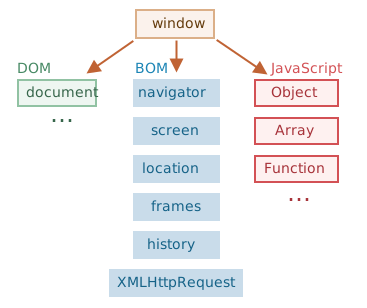
screen
navigator
The Window.navigator read-only property returns a reference to the Navigator object, which has methods and properties about the application running the script.
navigator
let sBrowser;
const sUsrAg = navigator.userAgent;

if (sUsrAg.includes("Firefox")) {
  sBrowser = "Mozilla Firefox";
} else if (sUsrAg.includes("SamsungBrowser")) {
  sBrowser = "Samsung Internet";
} else if (sUsrAg.includes("Opera") || sUsrAg.includes("OPR")) {
  sBrowser = "Opera";
} else if (sUsrAg.includes("Trident")) {
  sBrowser = "Microsoft Internet Explorer";
} else if (sUsrAg.includes("Edge")) {
  sBrowser = "Microsoft Edge";
} else if (sUsrAg.includes("Chrome")) {
  sBrowser = "Google Chrome or Chromium";
} else if (sUsrAg.includes("Safari")) {
  sBrowser = "Apple Safari";
} else {
  sBrowser = "unknown";
}

console.log(`You are using: ${sBrowser}`);
location
The Document.location read-only property returns a Location object, which contains information about the URL of the document and provides methods for changing that URL and loading another URL.
history
The DOM Window object provides access to the browser's session history (not to be confused for WebExtensions history) through the history object. It exposes useful methods and properties that let you navigate back and forth through the user's history. As of HTML5, they also let you manipulate the contents of the history stack. [MDN]

storage
JSON
The JSON object contains methods for parsing JavaScript Object Notation (JSON) and converting values to JSON. It can't be called or constructed, and aside from its two method properties, it has no interesting functionality of its own.
const obj = { name: 'TeachMeSkills' };
const str = JSON.stringify(obj)
const newObj = JSON.parse(str);

console.log(str); // '{"name":"TeachMeSkills"}''
console.log(typeof str); // string

console.log(newObj); // {name: "TeachMeSkills"}
console.log(typeof newObj); // object
localStorage
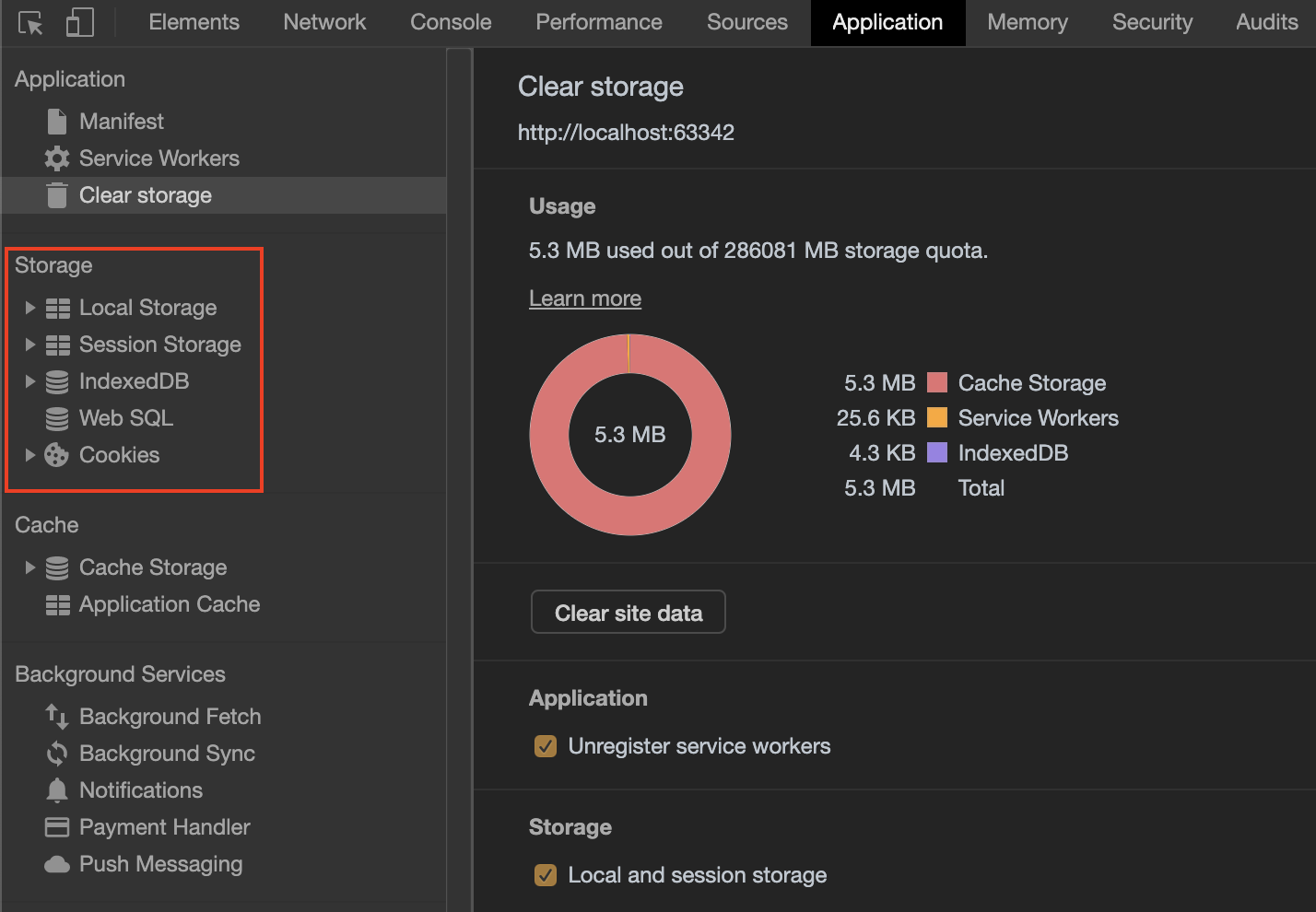
The read-only localStorage property allows you to access a Storage object for the Document's origin; the stored data is saved across browser sessions.
// Save data to localStorage
localStorage.setItem('key', 'value');

// Get saved data from localStorage
const data = localStorage.getItem('key');

// Remove saved data from localStorage
localStorage.removeItem('key');

// Remove all saved data from localStorage
localStorage.clear();
sessionStorage
The sessionStorage property accesses a session Storage object for the current origin. sessionStorage is similar to localStorage; the difference is that while data in localStorage doesn't expire, data in sessionStorage is cleared when the page session ends.
// Save data to sessionStorage
sessionStorage.setItem('key', 'value');

// Get saved data from sessionStorage
const data = sessionStorage.getItem('key');

// Remove saved data from sessionStorage
sessionStorage.removeItem('key');

// Remove all saved data from sessionStorage
sessionStorage.clear();
Web SQL
Web SQL Database is a web page API for storing data in databases that can be queried using a variant of SQL.[1][2]
The API is supported by Google Chrome,[3] Opera,[4] and the Android Browser.
IndexedDB
IndexedDB is a Web API for storing large data structures within browsers and indexing them for high-performance searching. Like an SQL-based RDBMS, IndexedDB is a transactional database system. However, it uses JavaScript objects rather than fixed columns tables to store data.
cookies
document.cookie = "key=value";

// You can also add an expiry date (in UTC time).
// By default, the cookie is deleted when the browser is closed
document.cookie = "key=value; expires=Sun, 26 Jan 2020 12:00:00 UTC";

// With a path parameter, you can tell the browser what path the cookie belongs to.
// By default, the cookie belongs to the current page
document.cookie = "key=value; path=/";
Links
BOM
By Andrew Bogomolov