How to BUILD own hosting platform for Drupal sites based on Docker containers
Evgeniy Melnikov
www.angarsky.ru
@angarsky

About me
- Senior Drupal Developer at the DrupalSquad team
- Drupal contributor: drupal.org/u/chalk
- Work with Drupal since 2009
- Author of the blog www.angarsky.ru
- Fond of search engine optimization
- Was creating and earning money from own sites
- Like a craft beer ㋡

What we will talk today about?
Drupal?

...any web application in general!
SHARED HOSTING
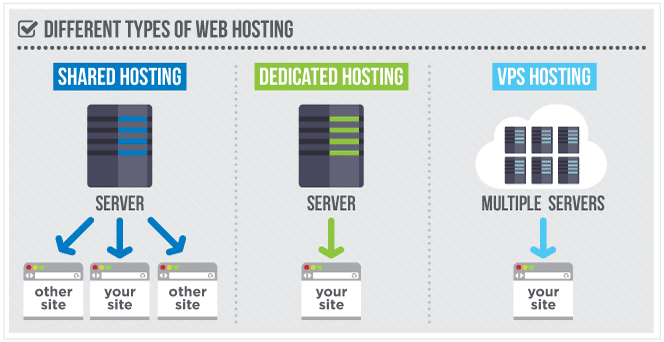
"" The simplest cloud platform FOR DEVELOPERS ""



Apache
PHP
MySQL
2.2
5.6
5.7
Docker
Apache 2.2
PHP 5.6
MySQL 5.7
Nginx 1.14
PHP 7.2
Case #1
- a new small but very ambitious D7 site
- US located server
- HTTPS
- Git, SSH, Drush access
- 100% result for PageSpeed Insights
CASE #2
- legacy D6 site with 1k unique users per day
- 20-30 authenticated users every hour
- 2 Gb database - thanks to the userpoints module

Plans & Pricing comparison
| Pantheon | $35 | |
| Wodby | $50 | |
| Bluehost | $10 | |
| DigitalOcean | $5 | 1 vCPU, 1 Gb RAM, 25 Gb SSD |
| Hetzner | $2.5 | 1 vCPU, 2 Gb RAM, 25 Gb SSD |
02 November 2018
Why DIGITAL OCEAN?
- A new "droplet" is created in 1 minute
- User friendly UI + Management API
- Up / down "droplet" resizing
- DNS records management UI
- Private network between "droplets"
- Metrics collection & monitoring
- Kubernetes

Initial Server Setup
Ubuntu 16.04
Check Server's cpu
cat /proc/cpuinfo | grep processor
 processor   : 0
 processor   : 1
 processor   : 2
cat /proc/cpuinfo | grep 'model name' | uniq
model name : Intel(R) Xeon(R) CPU E5-2650L v3 @ 1.80GHz
cat /proc/cpuinfo | grep 'model name' | uniq
model name : Intel(R) Xeon(R) CPU E5-2650 v4 @ 2.20GHz
upgrade Your server
 sudo apt-get update
 sudo apt-get upgrade
 sudo apt-get dist-upgrade

 // Cleans up unused packages.
 sudo apt autoremove

 // Restarts a server.
 sudo shutdown -r now
server access management
- create a user, grant a sudo group
- copy the "/root/.ssh/authorized_keys" file
- update the
"/etc/ssh/sshd_config" file
-
disable password authentication
-
disable root login
-
change the 22 port
-
- disable sudo password
- configure and enable basic UFW firewall
In a case of any questions ask Google or research DigitalOcean's guides!
install docker
& docker compose
sudo apt-get update && \
sudo apt-get install linux-image-extra-$(uname -r) linux-image-extra-virtual -y && \
sudo apt-get update && \
sudo apt-get install apt-transport-https ca-certificates curl software-properties-common -y && \
curl -fsSL
https://download.docker.com/linux/ubuntu/gpg
| sudo apt-key add - && \
sudo add-apt-repository "deb [arch=amd64]
https://download.docker.com/linux/ubuntu
$(lsb_release -cs) stable" && \
sudo apt-get update && \
sudo apt-get install docker-ce docker-compose -y && \
sudo docker run hello-world
command may be outdated
what kind of containers do we need?
containers list
?
NGINX
PHP
MYSql
redis
certbot
— where i can get these containers?
— Docker hub!
Dockerfile
FROM php:5.6.36-fpm

# Install Redis
RUN apt-get update \
 && pecl install redis

Commit to Github
Build on the Docker Hub
Docker image
Users pull the image
Users run a container
how does the docker hub work?
Dockerfile
FROM php:5.6.36-fpm

# Install Redis
RUN apt-get update \
 && pecl install redis
Build an image
locally
Run a container
from the image
Can i build images locally?

HOw it looks?

docker
domains
letsencrypt_certs

Dockerfile-certbot
Dockerfile-db
Dockerfile-nginx
Dockerfile-php
Dockerfile-redis
docker-compose.yml
/dumps
/logs
/.dockerignore
/.gitignore
+
Directory structure
docker-compose.yml
version: '2'

services:
  angarsky-nginx:
    build:
      context: .
      dockerfile: Dockerfile-nginx
    ports:
      - "80:80"
      - "443:443"
    volumes:
      - ./domains:/var/www
      - ./docker/nginx/conf.d:/etc/nginx/conf.d
      - ./letsencrypt_certs:/etc/letsencrypt
    depends_on:
      - angarsky-php
    mem_limit: 200MB
    cpu_shares: 256
    restart: always
    container_name: nginx
***
1
***
  angarsky-php:
    build:
      context: .
      dockerfile: Dockerfile-php
    volumes:
      - ./domains:/var/www
    depends_on:
      - angarsky-db
    links:
      - angarsky-db:mysql
    mem_limit: 300MB
    cpu_shares: 256
    restart: always
    container_name: php-fpm
***
2
***
  angarsky-db:
    build:
      context: .
      dockerfile: Dockerfile-db
    volumes:
      - shared_databases:/var/lib/mysql
    environment:
       - MYSQL_ROOT_PASSWORD=${ANGARSKY_MYSQL_ROOT_PASSWORD}
       - MYSQL_DATABASE=${ANGARSKY_MYSQL_DATABASE}
       - MYSQL_USER=${ANGARSKY_MYSQL_USER}
       - MYSQL_PASSWORD=${ANGARSKY_MYSQL_PASSWORD}
    mem_limit: 250MB
    cpu_shares: 512
    restart: always
    container_name: db
***
3
***
  angarsky-redis:
    build:
      context: .
      dockerfile: Dockerfile-redis
    mem_limit: 100MB
    restart: always
    container_name: redis

  angarsky-certbot:
    build:
      context: .
      dockerfile: Dockerfile-certbot
    command: /bin/true
    volumes:
      - ./domains:/var/www
      - ./letsencrypt_certs:/etc/letsencrypt
    depends_on:
      - angarsky-nginx
    container_name: certbot
***
4
***
volumes:
  shared_databases:
    driver: local
5

NGINX
Dockerfile-nginx
FROM nginx:stable
# FROM angarsky/nginx-pagespeed:v1.0

COPY docker/nginx/nginx.conf /etc/nginx/
COPY docker/nginx/my_ssl_params.conf /etc/nginx/
COPY docker/nginx/fastcgi_params /etc/nginx/
COPY docker/nginx/drupal8.conf /etc/nginx/
COPY docker/nginx/drupal7.conf /etc/nginx/
# COPY docker/nginx/pagespeed.conf /etc/nginx/

WORKDIR /var/www
nginx configuration files
nginx.conf
fastcgi_params
pagespeed.conf
my_ssl_params.conf
drupal7.conf
drupal8.conf
conf.d
docker / nginx /
nginx.conf
user www-data;
pid /var/run/nginx.pid;

worker_processes 1;

events {
    worker_connections 1024;
    multi_accept on;
}

http {
    # Fast CGI config.
    include    fastcgi_params;

    # Gzip config.
    # Extra headers config.
    # Timeouts config.
    # Logs config.

    include /etc/nginx/conf.d/*.conf;
}
It's
a simpe
example
References:
-
https://www.nginx.com/blog/tuning-nginx/
-
https://habrahabr.ru/post/198982/
-
https://github.com/wodby/drupal-nginx
-
https://www.linode.com/docs/websites/nginx/configure-nginx-for-optimized-performance
fastcgi_params
fastcgi_param  QUERY_STRING       $query_string;
fastcgi_param  REQUEST_METHOD     $request_method;
fastcgi_param  CONTENT_TYPE       $content_type;
fastcgi_param  CONTENT_LENGTH     $content_length;

fastcgi_param  SCRIPT_NAME        $fastcgi_script_name;
fastcgi_param  REQUEST_URI        $request_uri;
fastcgi_param  DOCUMENT_URI       $document_uri;
fastcgi_param  DOCUMENT_ROOT      $document_root;
fastcgi_param  SERVER_PROTOCOL    $server_protocol;
fastcgi_param  REQUEST_SCHEME     $scheme;

fastcgi_param  GATEWAY_INTERFACE  CGI/1.1;
fastcgi_param  SERVER_SOFTWARE    nginx/$nginx_version;

fastcgi_param  REMOTE_ADDR        $remote_addr;
fastcgi_param  REMOTE_PORT        $remote_port;
fastcgi_param  SERVER_ADDR        $server_addr;
fastcgi_param  SERVER_PORT        $server_port;
fastcgi_param  SERVER_NAME        $server_name;

# PHP only, required if PHP was built with --enable-force-cgi-redirect
fastcgi_param  REDIRECT_STATUS    200;

# From Wodby config.
fastcgi_param  HTTPS              $fastcgi_https if_not_empty;
fastcgi_param HTTP_MOD_REWRITE    On;
# Fixes HTTPoxy vulnerability https://httpoxy.org/#mitigate-nginx.
fastcgi_param HTTP_PROXY          '';
pagespeed.conf
pagespeed on;

# Basic system configuration
# https://www.modpagespeed.com/doc/system#file_cache
pagespeed FileCachePath             /var/cache/ngx_pagespeed;
pagespeed FileCacheSizeKb           102400;
pagespeed FileCacheCleanIntervalMs  3600000;
pagespeed FileCacheInodeLimit       500000;

pagespeed LRUCacheKbPerProcess      8192;
pagespeed LRUCacheByteLimit         16384;

# Filters
# https://www.modpagespeed.com/doc/config_filters
# The RewriteLevel disables all core filters by default
pagespeed RewriteLevel     PassThrough;
# Basic filters
pagespeed EnableFilters    remove_comments,collapse_whitespace;
pagespeed EnableFilters    combine_css,rewrite_css,fallback_rewrite_css_urls;
pagespeed EnableFilters    combine_javascript,rewrite_javascript;
# Advanced filters
pagespeed EnableFilters    insert_dns_prefetch,inline_google_font_css;
pagespeed EnableFilters    prioritize_critical_css;
pagespeed EnableFilters    resize_rendered_image_dimensions,recompress_images;
my_ssl_params.conf
ssl_protocols TLSv1 TLSv1.1 TLSv1.2;
ssl_prefer_server_ciphers on;
ssl_ciphers "EECDH+AESGCM:EDH+AESGCM:AES256+EECDH:AES256+EDH";
ssl_ecdh_curve secp384r1;
ssl_session_cache shared:SSL:10m;
ssl_session_tickets off;
ssl_stapling on;
ssl_stapling_verify on;
resolver 8.8.8.8 8.8.4.4 valid=300s;
resolver_timeout 5s;

add_header Strict-Transport-Security "max-age=63072000; includeSubdomains";
# Next headers are added to the nginx.conf
# add_header X-Frame-Options SAMEORIGIN;
# add_header X-Content-Type-Options nosniff;

ssl_dhparam /etc/letsencrypt/dhparam.pem;
References:
-
https://www.digitalocean.com/community/tutorials/how-to-secure-nginx-with-let-s-encrypt-on-ubuntu-16-04
-
https://raymii.org/s/tutorials/Strong_SSL_Security_On_nginx.html

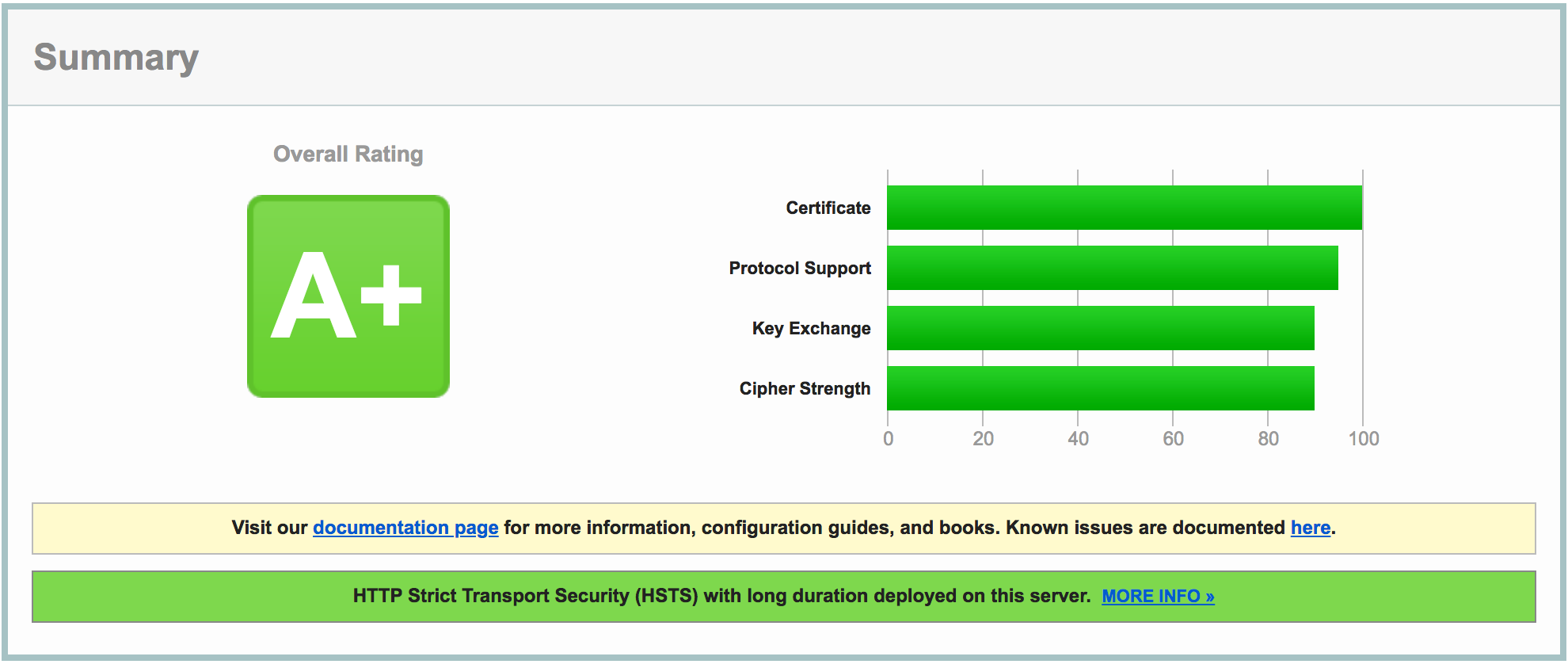
Check your SSL server configuration:
https://www.ssllabs.com/ssltest/
drupal8.conf
location ~ '\.php$|^/update.php' {
    # Other config.

    # Docker container with PHP-FPM
    fastcgi_pass php-fpm:9000;
}
References:
-
https://www.nginx.com/resources/wiki/start/topics/recipes/drupal/
-
https://github.com/wodby/drupal-php
conf.d/my-site.ru.conf
server {
    listen 80;
    listen [::]:80;
    server_name  my-site.ru;
    return 301 https://my-site.ru$request_uri;
}

server {
    listen 80;
    listen [::]:80;
    server_name  www.my-site.ru;
    return 301 https://my-site.ru$request_uri;
}

server {
    listen 443 ssl;
    listen [::]:443 ssl;
    ssl_certificate /etc/letsencrypt/live/my-site.ru/fullchain.pem;
    ssl_certificate_key /etc/letsencrypt/live/my-site.ru/privkey.pem;
    include my_ssl_params.conf;
    server_name www.my-site.ru;

    return 301 https://my-site.ru$request_uri;
}

# the end of the 1st of a configuration file
# the 2nd part of a configuration file
server {
listen 443 ssl;
listen [::]:443 ssl;
ssl_certificate /etc/letsencrypt/live/my-site.ru/fullchain.pem;
ssl_certificate_key /etc/letsencrypt/live/my-site.ru/privkey.pem;
include my_ssl_params.conf;
server_name my-site.ru;
root /var/www/my-site.ru/site;
include pagespeed.conf;
}
PHP
Dockerfile-php
FROM php:7.1.20-fpm

RUN apt-get update && apt-get install -y libpng-dev libjpeg-dev libpq-dev \
    && rm -rf /var/lib/apt/lists/* \
    && docker-php-ext-configure gd --with-png-dir=/usr --with-jpeg-dir=/usr \
    && docker-php-ext-install gd mbstring opcache pdo pdo_mysql pdo_pgsql zip

RUN pecl install redis

COPY docker/php/my-php.ini /usr/local/etc/php/conf.d/
RUN touch /var/log/php_errors.log && chown www-data:www-data /var/log/php_errors.log

WORKDIR /var/www
memory_limit = 192M
max_execution_time = 60

date.timezone = "Europe/Minsk"

; Opcache
opcache.memory_consumption = 64
opcache.interned_strings_buffer = 8
opcache.max_accelerated_files = 4000
opcache.revalidate_freq = 60
opcache.fast_shutdown = 1
opcache.enable_cli = 1

; Security
expose_php = off
allow_url_fopen = off
allow_url_include = off
disable_functions = php_uname, getmyuid, getmypid ...

; Session
session.cookie_secure = 1
session.use_only_cookies = 1
session.cookie_httponly = 1
session.hash_function = "whirlpool"

; Redis
extension = redis.so
my-php.ini
database
MySQL
Dockerfile-db
FROM mariadb:10.2.11

# Custom MySQL conf
COPY docker/db/custom-mysql.cnf /etc/mysql/conf.d/

# MySQLTuner (https://github.com/major/MySQLTuner-perl)
RUN  apt-get update \
    && apt-get install -y wget \
    && wget http://mysqltuner.pl/ -O mysqltuner.pl
[mysqld]
skip-host-cache
skip-name-resolve

collation-server = utf8_unicode_ci
character-set-server = utf8
local-infile = 0

key_buffer_size = 8M
connect_timeout = 5
wait_timeout = 30
max_allowed_packet = 64M
sort_buffer_size = 4M
bulk_insert_buffer_size = 8M
tmp_table_size = 16M
max_heap_table_size = 16M
read_buffer_size = 256K
read_rnd_buffer_size = 256K
join_buffer_size = 2M
max_tmp_tables = 16
interactive_timeout = 90
myisam-recover-options = FORCE,BACKUP
transaction-isolation = READ-COMMITTED
lower_case_table_names = 0

default-storage-engine = InnoDB
innodb_buffer_pool_size = 64M
innodb_log_file_size = 32M
innodb_log_buffer_size = 4M
innodb_flush_log_at_trx_commit = 2
innodb_ft_cache_size = 2M
innodb_ft_total_cache_size = 32M
innodb_sort_buffer_size = 256K
innodb_file_per_table = 1

table_open_cache = 254
table_cache = 256
max_connections = 100
thread_cache_size = 4
query_cache_limit	= 1M
query_cache_size    = 32M

log_error = /var/log/mysql/error.log
slow_query_log = 1
slow_query_log_file = /var/log/mysql/mysql-slow.log
long_query_time = 1

[mysqldump]
quick
quote-names
max_allowed_packet	= 128M
custom-mysql.cnf
Valid for the 250MB RAM
ram & mysql buffers

sort_buffer_size
read_buffer_size
join_buffer_size
x
max_connections
+
key_buffer_size + query_cache_size + tmp_table_size + innodb_buffer_pool_size
\}
mysql configuration tips
- use MySQL calculator: www.mysqlcalculator.com
- a big value is not always better
-
innodb_buffer_pool_size: 70-80% of RAM
thread_cache_size: created ~= cached
-
configure and analyze logs and reports
-
monitor the Disk I/O

- https://habr.com/post/159085/
-
https://habr.com/post/66684/
-
http: //dba.stackexchange.com/questions/27328/how-large-should-be-mysql-innodb-buffer-pool-size
-
http: //web-scalability.com/2008/05/30/mysql-тюнинг-настраиваем-по-взрослому/
a separate server for a database

at the DigitalOcean
- it's cheaper than keeping and resizing a single droplet
- use a private network between your droplets
optimize queries
Reduce number of queries
USE CACHE BACKENDS
redis
Dockerfile-redis
FROM redis
COPY docker/redis/redis.conf /usr/local/etc/redis/redis.conf
CMD [ "redis-server", "/usr/local/etc/redis/redis.conf" ]
maxmemory 80mb
maxmemory-policy allkeys-lru
redis.conf
mem_limit: 100MB
docker-compose.yml :

SSL certificate


Dockerfile-certbot
FROM debian:jessie-backports

RUN apt-get update \
  && apt-get install -y certbot -t jessie-backports \
  && mkdir -p /etc/letsencrypt
how does it work?
- configure an access to the /.well-known folder
- use a stage mode to prevent a limit reaching
docker-compose run --rm angarsky-certbot \
  certbot certonly --webroot \
  --email semen@angarsky.ru --agree-tos \
  -w /var/www/my-site.ru -d my-site.ru -d www.my-site.ru
docker-compose run --rm angarsky-certbot \
certbot renew --quiethttps://certbot.eff.org/docs/using.html
it's time to run!
run your containers
docker-compose up --build -ddocker-compose down --rmi allBuild & run:
STOP & destroy:
docker-compose restartREStart:
Monitor your containers
CONTAINER ID        IMAGE                  COMMAND                  CREATED             STATUS              PORTS                                      NAMES
11                  sites_angarsky-php     "docker-php-entryp..."   3 months ago        Up 2 weeks          9000/tcp                                   php-fpm
22                  sites_angarsky-nginx   "nginx -g 'daemon ..."   8 months ago        Up 2 weeks          0.0.0.0:80->80/tcp, 0.0.0.0:443->443/tcp   nginx
33                  sites_angarsky-redis   "docker-entrypoint..."   8 months ago        Up 2 weeks          6379/tcp                                   redis
44                  sites_angarsky-db      "docker-entrypoint..."   8 months ago        Up 2 weeks          3306/tcp                                   db
docker pslist of containers:
CONTAINER           CPU %               MEM USAGE / LIMIT   MEM %               NET I/O             BLOCK I/O           PIDS
11                  3.09%               205.6MiB / 300MiB   68.55%              45.2GB / 13.9GB     13.1GB / 496MB      5
22                  0.00%               44.56MiB / 200MiB   22.28%              419MB / 565MB       680MB / 54.7MB      8
33                  0.15%               18.32MiB / 100MiB   18.32%              5.6GB / 25.1GB      27.2MB / 0B         4
44                  0.63%               216MiB / 250MiB     86.39%              6.27GB / 15.9GB     1.21GB / 504GB      34
docker statsresource usage statistics:
trobleshooting
docker exec -it nginx /bin/bashconnect to a container:
docker logs nginxread CONTAINER's logs:
docker cp db:/var/log/mysql/mysql-slow.log ~/sites/logs/copy a file from a container to a host:

manage your databases
# MySQL report for analysis:
docker exec -i db mysqlreport --user $ANGARSKY_MYSQL_USER --password $ANGARSKY_MYSQL_PASSWORD

#Import / Export a database:
docker exec -i db mysql -u$ANGARSKY_MYSQL_USER -p$ANGARSKY_MYSQL_PASSWORD database_name < file.sql
docker exec -i db mysqldump -u$ANGARSKY_MYSQL_USER -p$ANGARSKY_MYSQL_PASSWORD database_name > file.sql

# Take care about Threads:
docker exec -i db mysqladmin -u$ANGARSKY_MYSQL_USER -p$ANGARSKY_MYSQL_PASSWORD extended-status | grep Threads

# MySQL CLI:
docker exec -it db mysql -u$ANGARSKY_MYSQL_USER -p$ANGARSKY_MYSQL_PASSWORD
# List of databases.
SHOW DATABASES;

# Create a DB.
CREATE DATABASE DB_NAME;

# List of users.
SELECT host, user FROM mysql.user;

# Show grants for a user.
SHOW GRANTS FOR USER_NAME;

# Grant access to DB.
GRANT ALL PRIVILEGES ON `DB_NAME`.* TO 'USER_NAME'@'%';
tools & services
Did we forget something?
drush

1. Drush as a stand-alone container
docker run --rm -v $(pwd):/app --net sites_default --link db:mysql drush/drush statusalias adrush='docker run --rm -v $(pwd):/app --net sites_default --link db:mysql drush/drush 'Create an alias in the ~/.bashrc file:
2. Drush in a php container
alias adrush='docker exec -it php-fpm /root/.composer/vendor/bin/drush 'RUN composer global require consolidation/cgr \
&& export PATH="$HOME/.composer/vendor/bin:$PATH" \
&& echo "export PATH=\"$HOME/.composer/vendor/bin:$PATH\"" >> ~/.bashrc \
&& cgr drush/drush:7.xmail delivery
- PHP mail() function?
- Gmail SMTP?
- No way!

- Free up to 10000 emails per month
- Easy configuration: DNS records + SMTP
- Analytics & reports
- Forwarding of inbound emails
uptime monitoring

www.uptimerobot.com
- Free (50 monitors, 5 minute intervals)
- An ability to check by response code, by text
- Analytics & reports
daily backups

#!/bin/bash

# Configure a cron job: `crontab -e`.
# 15 5 * * * /bin/bash /home/user/sites/my-site.ru/scripts/files_backup.sh

# Prepares a variables list.
DATABASE_BACKUP_DIRECTORY='/home/user/sites/dumps/files_backup'
DATABASE_BACKUP_FILES_DIRECTORY=' /home/user/sites/my-site.ru/site/sites/default'
DATABASE_BACKUP_DATE=`date '+%Y_%m_%d_%H-%M'`
DATABASE_BACKUP_ARCHIVE_NAME="$DATABASE_BACKUP_DIRECTORY/my_site_files_$DATABASE_BACKUP_DATE.tar.gz"

# The -C flag is used to include only a file/directory without a folder path to it.
tar -czvf $DATABASE_BACKUP_ARCHIVE_NAME -C $DATABASE_BACKUP_FILES_DIRECTORY files

# Removes backups that are older then X days.
/usr/bin/find $DATABASE_BACKUP_DIRECTORY -type f -name '*.tar.gz' -mtime +7 -delete
FILES_BACKUP.SH
#!/bin/bash

# Configure a cron job: `crontab -e`.
#
# ANGARSKY_MYSQL_USER=<user>
# ANGARSKY_MYSQL_PASSWORD=<password>
# 15 5 * * * /bin/bash /home/user/sites/my-site.ru/scripts/database_backup.sh

# Prepares a variables list.
DATABASE_BACKUP_DIRECTORY='/home/user/sites/dumps/database_backup'
DATABASE_BACKUP_DATE=`date '+%Y_%m_%d_%H-%M'`
DATABASE_BACKUP_FILENAME="my_site_db_$DATABASE_BACKUP_DATE.sql"
DATABASE_BACKUP_FILENAME_ABSOLUTE="$DATABASE_BACKUP_DIRECTORY/$DATABASE_BACKUP_FILENAME"
DATABASE_BACKUP_ARCHIVE_NAME="$DATABASE_BACKUP_DIRECTORY/my_site_db_$DATABASE_BACKUP_DATE.tar.gz"

# Creates a db backup and compresses an .sql file.
# The -C flag is used to include only a file without a folder path to it.
docker exec db mysqldump -u$ANGARSKY_MYSQL_USER -p$ANGARSKY_MYSQL_PASSWORD db_name > $DATABASE_BACKUP_FILENAME_ABSOLUTE
tar -czvf $DATABASE_BACKUP_ARCHIVE_NAME -C $DATABASE_BACKUP_DIRECTORY $DATABASE_BACKUP_FILENAME

# Removes backups that are older then X days + .sql files.
/usr/bin/find $DATABASE_BACKUP_DIRECTORY -type f -name '*.tar.gz' -mtime +7 -delete
/usr/bin/find $DATABASE_BACKUP_DIRECTORY -type f -name '*.sql' -delete
DATABASE_BACKUP.SH
try it yourself
http://www.angarsky.ru/link/digitalocean
Get 100$ over 60 days FREE!
QUESTIONS?
https://slides.com/angarsky/docker-based-hosting
by Evgeniy Melnikov, 11 November 2018
https://www.youtube.com/watch?v=J6DkDVyLTN8
A Docker based hosting for Drupal
By Semen Angarsky


