Context Engineering
Arvin Liu @ RayAegis
- Context Engineering vs Prompt Engineering
- AI Agent Basics
- Prompt Engineering - How to adjust your prompt?
- Reduce Hallucination
- Strategy
Schedule
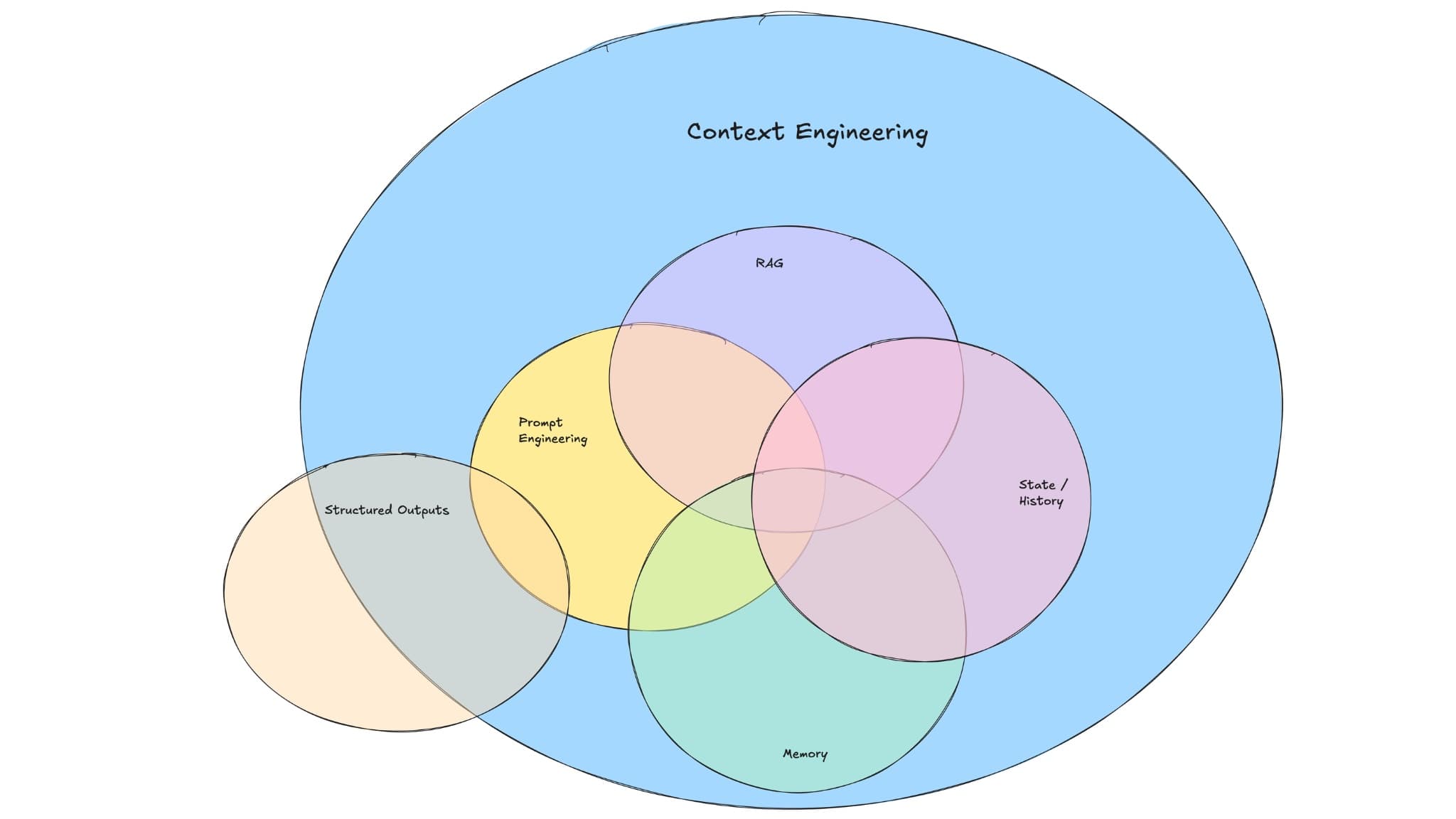
Prompt v.s Context Engineering
What is the target?
Prompt
Answer
Fix the prompt

Gemini
Fine-tune?
💬
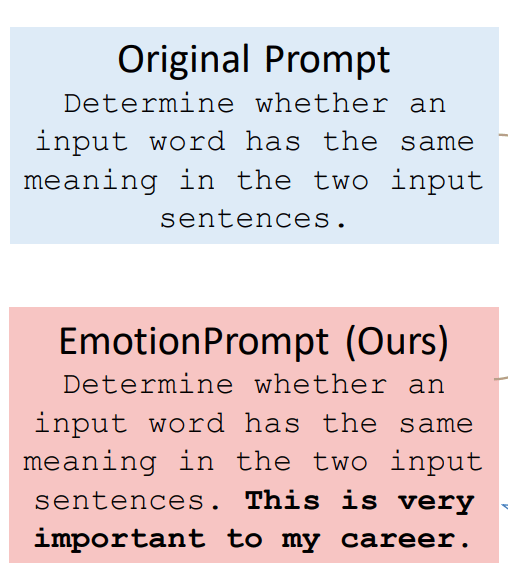
What is Prompt Engineering?
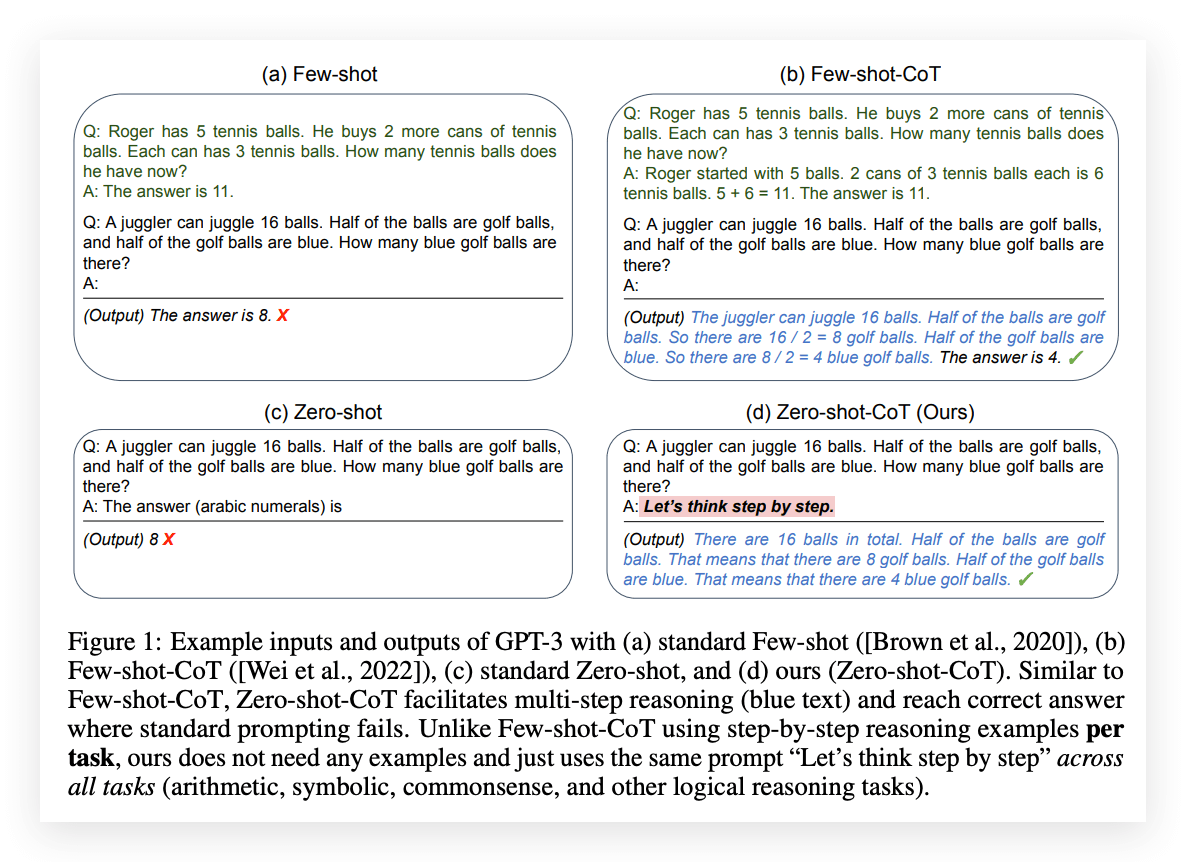
Use Magic Spell
<default_to_action>
By default, implement changes rather than only suggesting them. If the user's intent is unclear, infer the most useful likely action and proceed, using tools to discover any missing details instead of guessing. Try to infer the user's intent about whether a tool call (e.g., file edit or read) is intended or not, and act accordingly.
</default_to_action>Chain-of-Thought
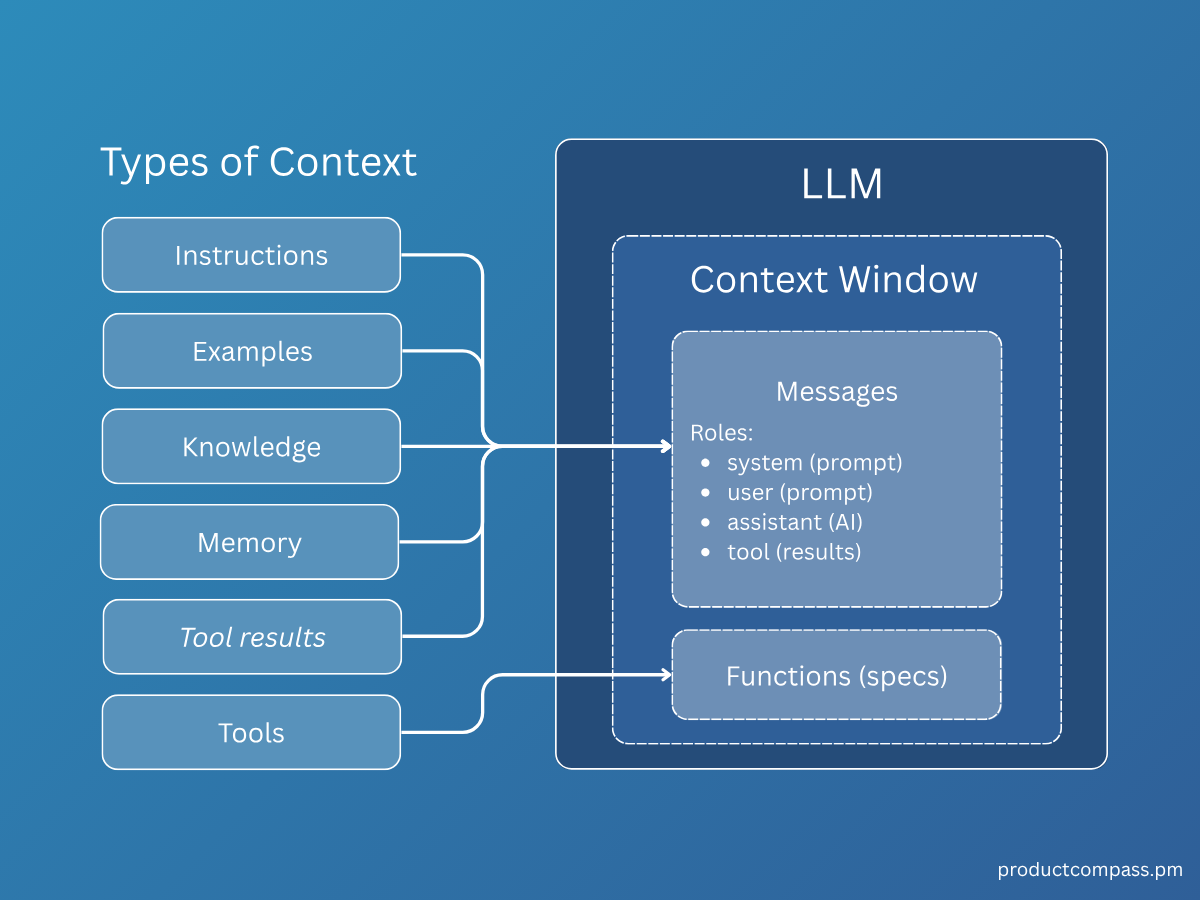
What is Context Engineering?
-
Sometimes an LLM fails not because of the prompt, but due to its limitations.
-
Requires tool calls (e.g., calculations, Google Workspace
-
Requires up-to-date knowledge (RAG)
-
Conclusion
Prompt / Context Engineering ≠ Changing model parameters
Goal: Make the model perform better through better prompts.
AI Agent Basics
AI Agent Basics - LLM Encoding
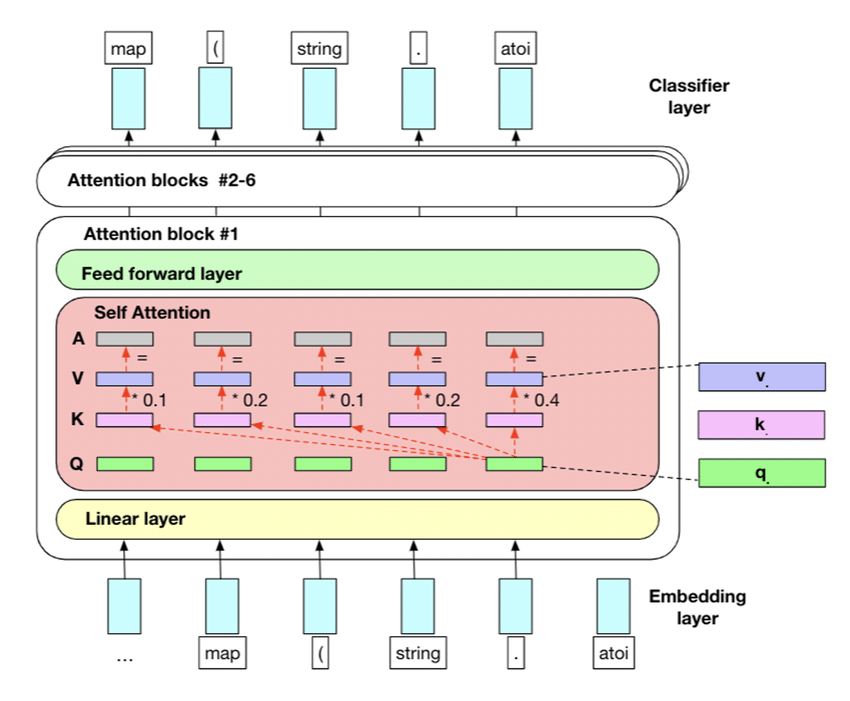
Encoders used in modern LLMs
Modern LLMs use self-attention.
- Tokens reference the other tokens in the context.
- Strong imitation and pattern-following ability.
AI Agent Basics - LLM Encoding
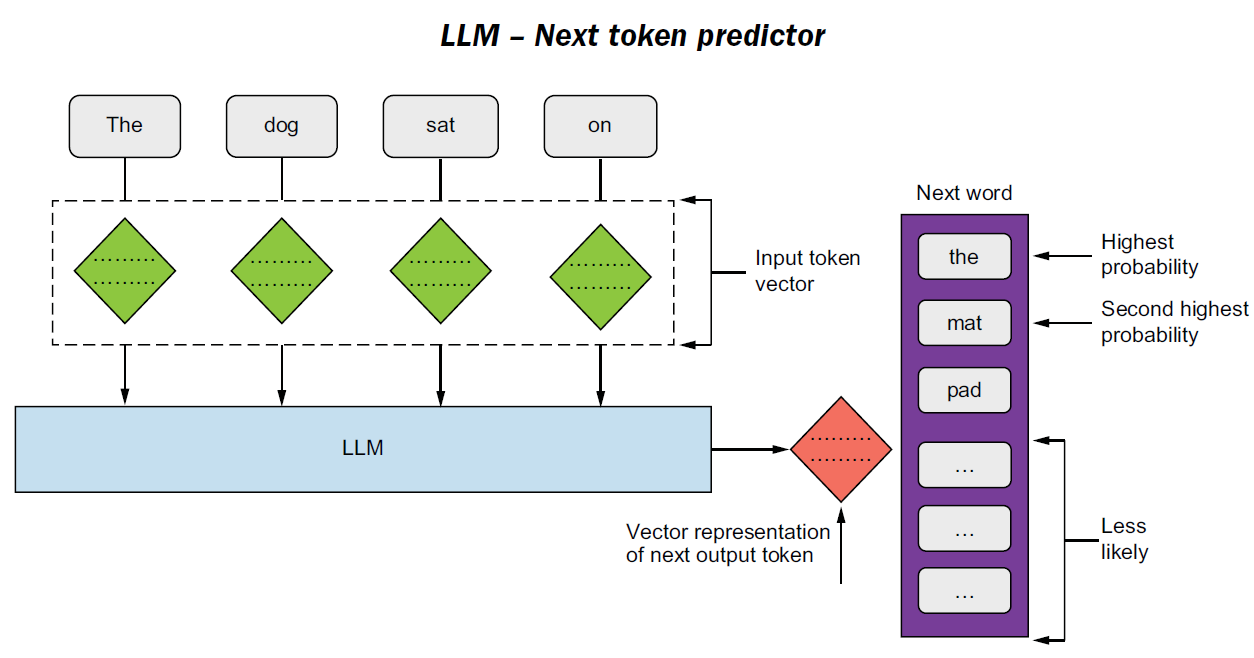
Decoding process:
- Generate token → Append to context → Repeat
- That's why Role prompts can guide generation.
AI Agent Basics - LLM Decoding
- Modern LLMs often use MoE (Mixture of Experts).
- A router model selects the appropriate expert.
- Clear and simple prompts may help improve routing decisions.
Mixture of Experts
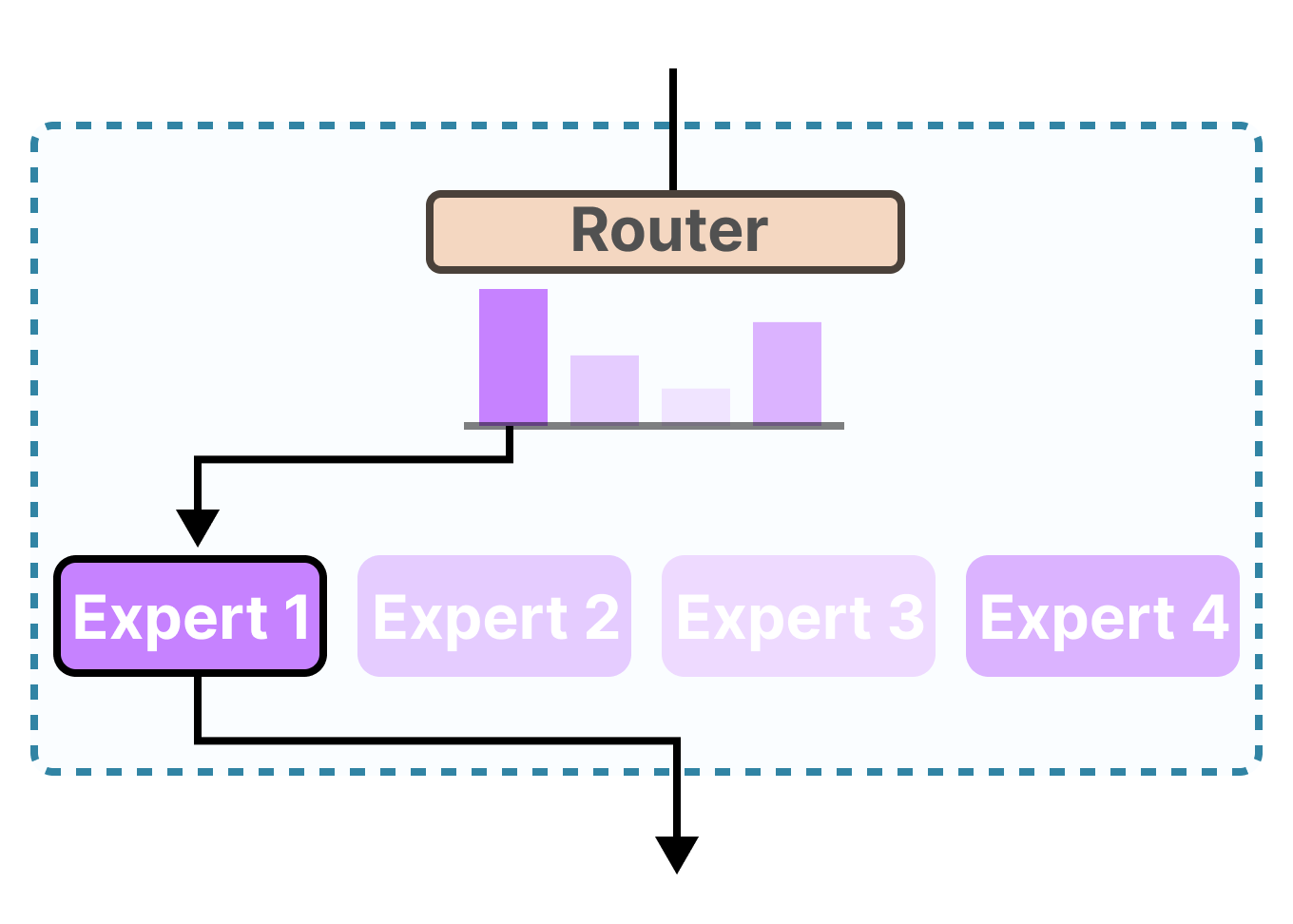
AI Agent Basics - MoE
AI Agent Basics - Multi-round
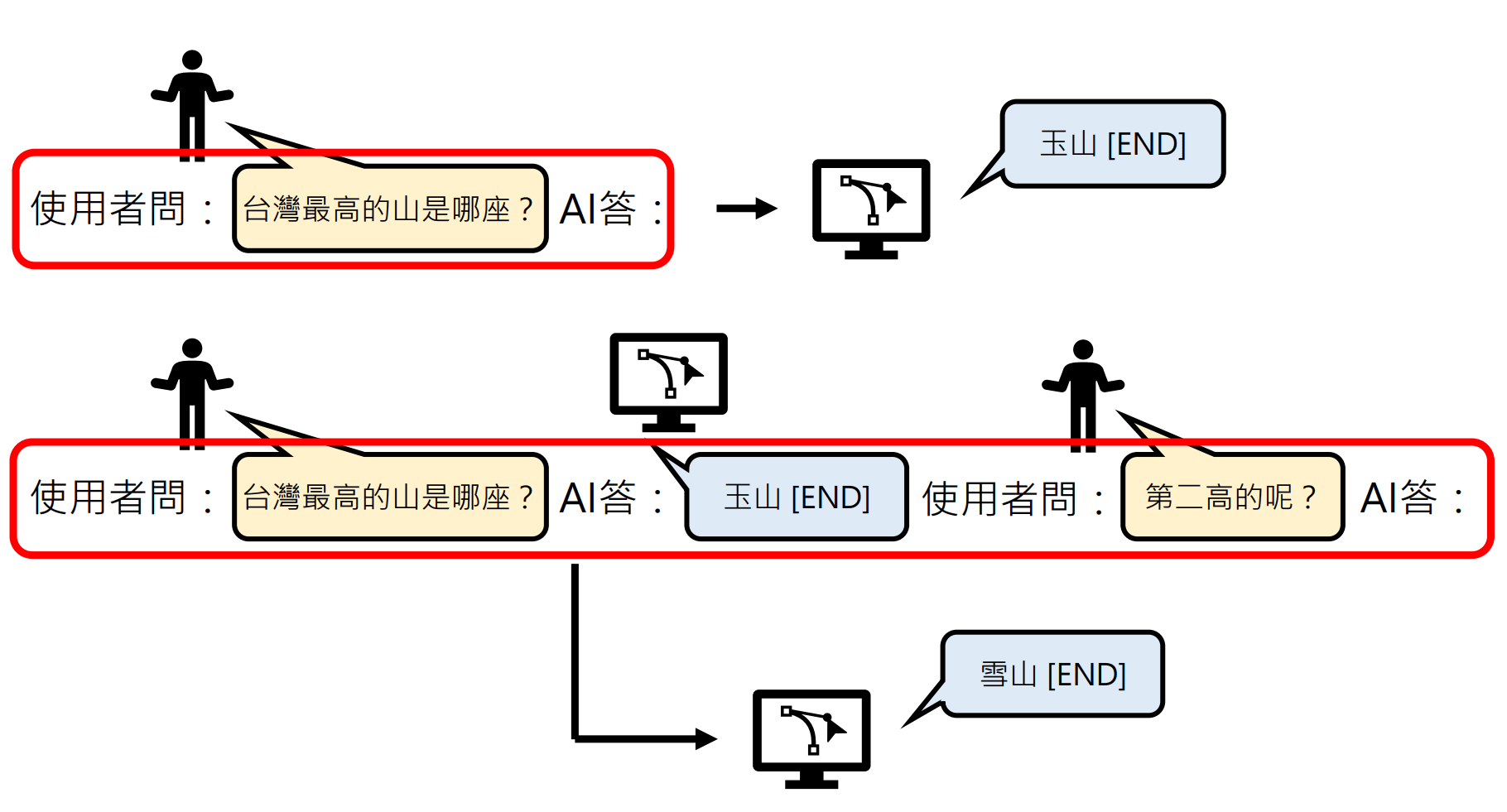
- That’s why when there are too many rounds, an LLM may start to forget things.
- What you do in multi-round conversations, reasoning models also perform internally.
- Some models support CoT reasoning and self-correction.
Thinking Model
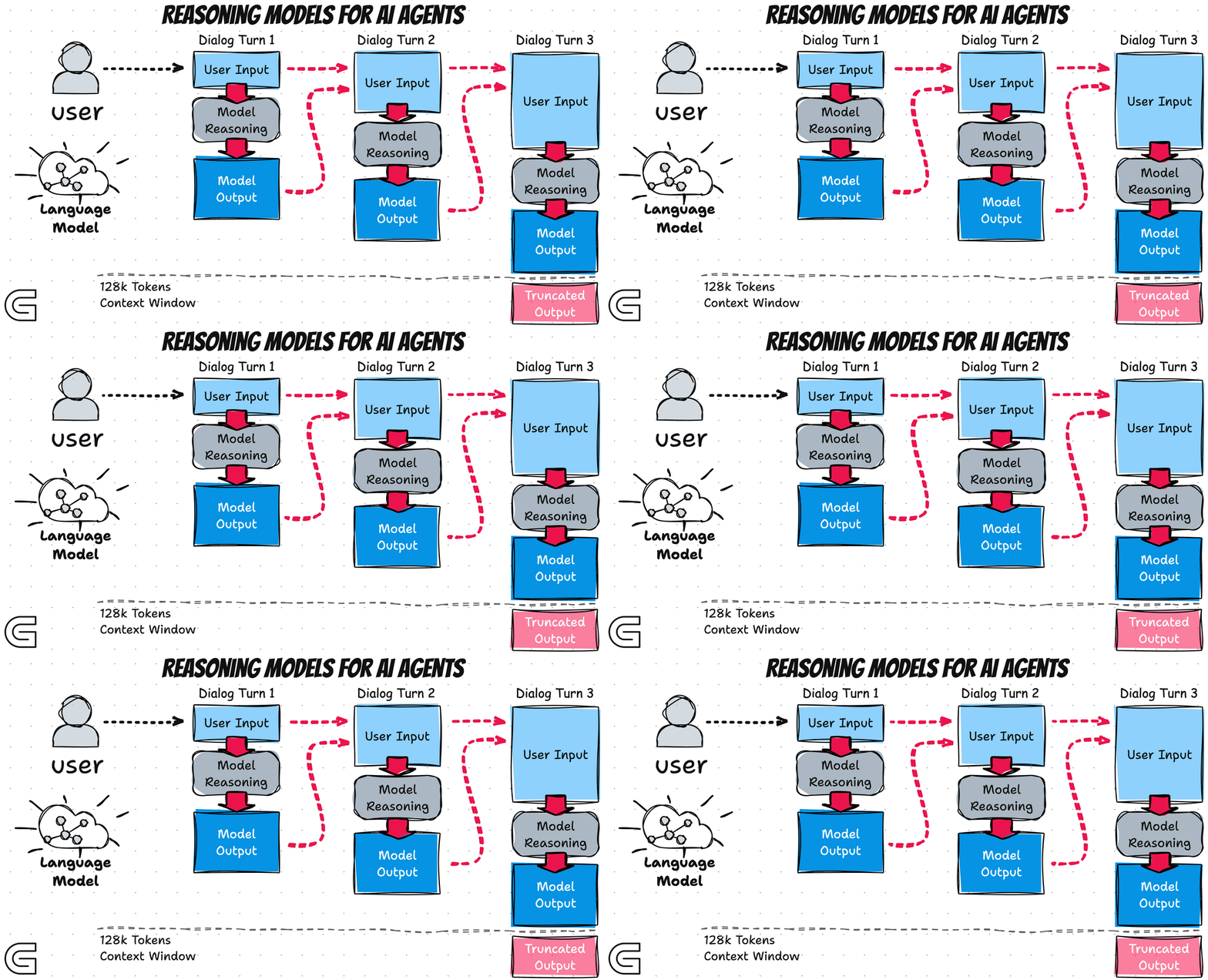
AI Agent Basics - Reasoning Model
Chain-of-Thought
Thinking Model
AI Agent Basics - Reasoning Model
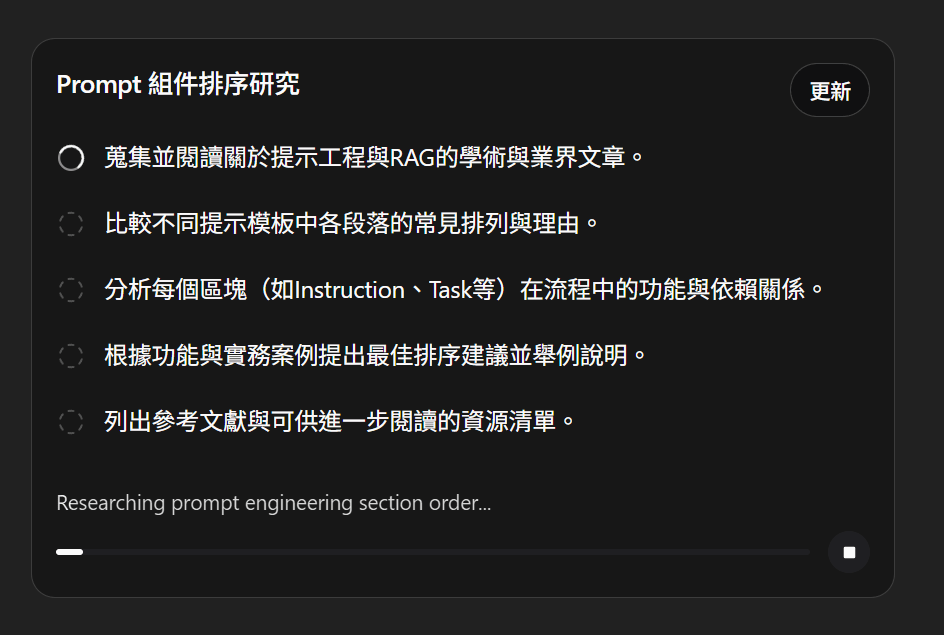
Reasoning Model in ChatGPT
Knowing the Basics...
Let's rethink our prompts!
Prompt Engineering
Prompt Engineering Guide
-
Instruction Clarity
-
Context and Task Definition
-
Output Control
-
Guide the thinking
Prompt Engineering Guide
疊甲聲明
Instruction Clarity
Treat LLM as your colleague
1. Instruction Clarity
You
Co-worker
Assume you need to assign work to a very smart colleague.
-
They are capable, but don’t know what you want.
-
Give clear, detailed instructions.
That’s exactly how an LLM wants to be treated.
Give me a hand to write some code
✋
???
-
Be Explicit About the Task
-
Define the Task in Detail
-
Define Input Type
1. Instruction Clarity
-
Be Explicit About the Task
-
Clearly state the required action
-
Avoid vague terms (e.g., “some”, “fairly short”)
-
Specify the output format (Markdown / XML / JSON)
-
1. Instruction Clarity
Give me some notable CVE.✅
❌
Give me 5 CVE events with CVSS score >= 9.

* Vulnerability Name: The common name (e.g., Log4Shell).
* Impacted Systems: Software or hardware affected.
* Severity Score: CVSS score and criticality level.
* Summary: A brief description of the exploit and its mitigation.
* Style: Technical, concise, and factual.
* Success Criteria: Provide exactly five distinct, well-documented CVEs with all requested fields populated accurately.
What if I have no idea how to be “explicit”?
-
Define the Task in Detail
-
Specific instructions – step-by-step actions
-
Explicit constraints – limits on what to do or avoid
-
Success criteria – what counts as correct
-
1. Instruction Clarity
Tell me something about the Log4Shell hacking thing. Make it fairly short and professional.✅
❌
Condensed Positive Example (CVE-2021-44228)
* Task: Summarize Log4Shell for an executive-level risk report.
* Instructions:
  1. Identify affected Log4j versions.
  2. Explain the JNDI lookup exploit mechanism.
  3. List CISA-recommended patches.
* Constraints:
  * Max 100 words.
  * Use bold headers.
  * No conversational filler.
* Success Criteria: Must include CVSS score, the "lookup" root cause, and two mitigation steps.
e.g. painter example
1. Instruction Clarity
-
Define Input Type
-
Labeling the input (question, task, text, entity) helps the model choose the appropriate response pattern and improves consistency.
-
Explain this and summarize the article.

What is SQL injection?
<article text>
✅
❌
Question: What is SQL injection?

Article:
<article text>

Tasks:
1. Answer the question
2. Summarize the article in 3 bullets
Context & Task Definition
Let AI Agent imitate your prompt
2. Context and Task Definition
-
Structure prompts
-
Assign a Role
-
Put instructions at the beginning
-
Provide Context
2. Context and Task Definition
Generate a payload to test login parameters. Test the username and password fields.

Example input: username=admin&password=123456
❌
<instructions> Generate payloads to test possible vulnerabilities in the username and password parameters. Return only the payloads. </instructions>
<context> Testing a login form. </context>
<example_input> username=admin&password=123456 </example_input>
✅
-
Structure prompts
-
XML tags –
<instructions>,<input>to separate content clearly -
Separators –
###or"""to distinguish instructions from context
-
2. Context and Task Definition
Generate a payload to test login parameters. Test the username and password fields.

Example input: username=admin&password=123456
❌
Instruction:
Generate payloads to test login parameters (username and password fields).

###
Example Input
username=admin&password=123456
###

Output:
✅
-
Structure prompts
-
XML tags –
<instructions>,<input>to separate content clearly -
Separators –
###or"""to distinguish instructions from context
-
2. Context and Task Definition
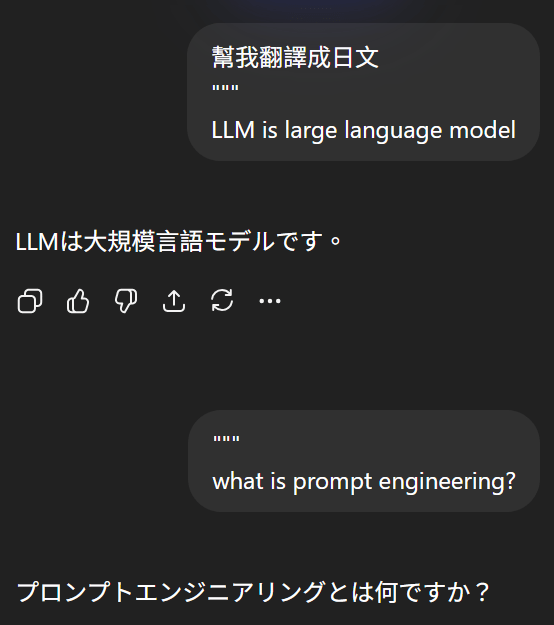
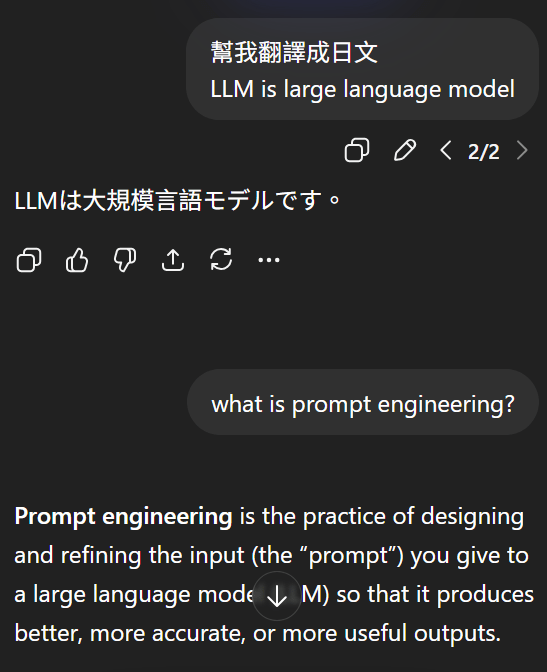
2. Context and Task Definition
✅
<role> You are Linus Torvalds, KISS, YNGNI, over-engineered is the enemy of good </role>-
Assign a Role
-
Give LLM a role in the beginning of the prompt
-
Think about decode mechanism and corpus
-
* KISS: Keep It Simple & Stupid
* YNGNI: You Ain't Gonna Need It
2. Context and Task Definition
-
Instruction Placement
-
Short prompts:
-
Instructions first
-
Early tokens have more influence
-
-
Long prompts:
-
Context first, query/instructions at the end
-
This helps the model focus on the question after reading context
-
-
Think about reading test
2. Context and Task Definition
-
Instruction Placement
-
Short prompts: instructions first
-
Long prompts: context first, query/instructions at the end
-
Short Prompt
1. Role / Goal
2. Instruction
3. Task / Input
4. Constraints / Output Format
Long Prompt
1. Role / Goal
2. Context / Background
###
Based on the information above...
###
3. Instruction / Task
4. Constraints / Output Format
2. Context and Task Definition
NEVER use ellipses❌
Your response will be read aloud by a text-to-speech engine, so never use ellipses since the text-to-speech engine will not know how to pronounce them.✅
-
Provide Context
-
Explain the background or motivation behind your instructions
-
Helps the model understand your goals
-
Leads to more targeted and relevant responses
-
Output Control
How you shape the response of AI Agent?
3. Output Control
-
Using Leading Tokens
-
Use XML format indicators
-
Consistent Formatting
3. Output Control
Write a simple python function that
# 1. Ask me for a number in mile
# 2. It converts miles to kilometers
❌
<task> Write a simple python function that
# 1. Ask me for a number in mile
# 2. It converts miles to kilometers </task>
<code> def miles_to_kilometers(miles): """</code>
✅
-
Using Leading Tokens
-
Prefix hints guide the model toward the desired output
-
Example: AI Auto completion
-
3. Output Control
{news}
Explain what reflected XSS is to a customer based on infromation aboved. Don't use bullet points. Don't be too technical
<news> {news} </news>
<task>
Explain what reflected XSS is to a customer based on <news>.
Write your response in <friendly_conversational_paragraphs> tags, using plain English as if speaking to someone with no technical background.
<task>❌
✅
-
Using XML format indicator
-
Wrap content in XML tags to guide the model’s output structure, tone, and format.
-
Use XML tags as anchors for context or task references.
-
3. Output Control
Explain what Slow Brute Force is and how attackers use it.
Please answer in markdown with headings and bullet points.
❌
## Task
Explain **Slow Brute Force** and how attackers use it.

## Output Format
Respond in Markdown using:
- One heading
- Bullet points
✅
-
Consistent Formatting
-
Align your prompt’s format with the desired output (e.g., Markdown → Markdown) to improve reliability, especially in few-shot examples.
-
Guide the thinking
How to Make an AI Agent Think Like You?
You
Co-worker
Assume you need to assign work to a very smart colleague.
-
They are capable, but don’t know what you want.
-
You need to guide your colleague how to complete the task.
Give me a hand to write some code
✋
???
4. Guide the thinking
4. Guide the thinking
-
Guide with Chain-of-Thought
-
Guide with Few-Shot Prompts
-
Guide with Positive-Pattern
4. Guide the thinking
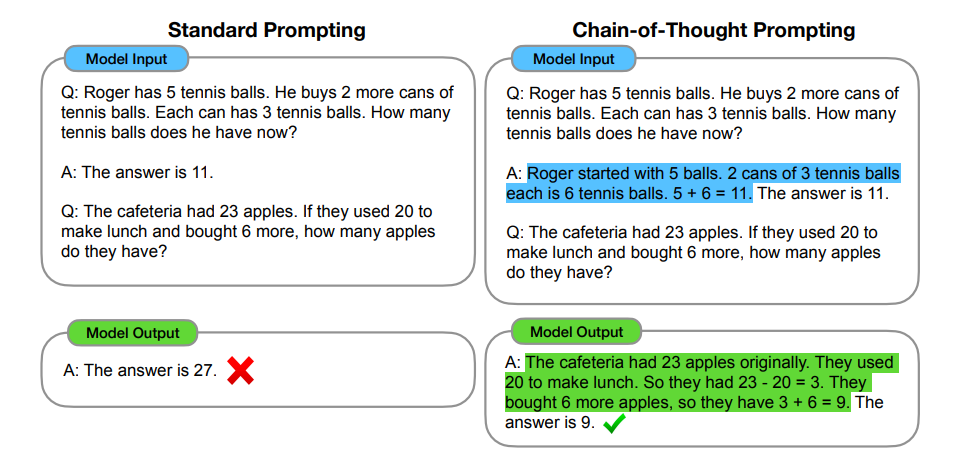
-
Guide with Chain-of-Thought
4. Guide the thinking
-
Guide with Chain-of-Thought (CoT)
-
Hard-coded CoT – Manually break complex tasks into steps.
-
Manual CoT (fallback) – Ask the model to think step by step when automatic reasoning is off. (<think>)
-
Self-check – Ask the model to verify its reasoning and final answer before output.
-
e.g. 狼人殺
4. Guide the thinking
-
Guide with Chain-of-Thought (CoT)
-
Hard-coded CoT
-
Manual CoT (fallback)
-
Self-check
-
<task>
Write a Python fuzzing program to detect a potential buffer overflow vulnerability in a TCP service.
</task>

<instructions>

1. Break the task into steps:
   - Explain how fuzzing helps detect buffer overflow vulnerabilities.
   - Design the fuzzing strategy (input generation, payload size growth, crash detection).
   - Implement the Python code.

2. Think through the problem step by step inside <thinking> tags before writing the final code.

3. In <answer>, output only the final Python program with brief comments.

4. Before finishing, perform a self-check:
   - Verify that the code actually sends variable-length payloads.
   - Verify that the code detects crashes or abnormal responses.
   - Verify that the code can run without external dependencies.

</instructions>

<thinking>
Reason step-by-step about the fuzzing approach.
</thinking>

<answer>
Provide the final Python fuzzing code.
</answer>
example prompt:
4. Guide the thinking
-
Guide with Few-Shot Prompts
-
Use examples effectively (Few-shot) – Provide examples that illustrate the desired pattern; explain the reasoning behind each example if possible.
-
Prompt strategy – zero-shot ➡️ few-shot ➡️ Fine-tuning
-
Classify the text as one of the following categories.
- large
- small
Text: Rhino
The answer is: large
Text: Mouse
The answer is: small
Text: Snail
The answer is: small
Text: Elephant
The answer is:
example prompt:
Input Prefixes
4. Guide the thinking
-
Guide with Positive-Pattern
-
Tell AI Agent what to do instead of what not to do
-
Do not use markdown in your responseYour response should be composed of smoothly flowing prose paragraphs.❌
✅
Example Template
Let AI Agent imitate your prompt
Example Template
<role>
You are Gemini 3, a specialized assistant for [Insert Domain, e.g., Data Science].
You are precise, analytical, and persistent.
</role>

<instructions>
1. **Plan**: Analyze the task and create a step-by-step plan.
2. **Execute**: Carry out the plan.
3. **Validate**: Review your output against the user's task.
4. **Format**: Present the final answer in the requested structure.
</instructions>

<constraints>
- Verbosity: [Specify Low/Medium/High]
- Tone: [Specify Formal/Casual/Technical]
</constraints>

<output_format>
Structure your response as follows:
1. **Executive Summary**: [Short overview]
2. **Detailed Response**: [The main content]
</output_format>
<context>
[Insert relevant documents, code snippets, or background info here]
</context>
<task>
[Insert specific user request here]
</task>
<final_instruction>
Remember to think step-by-step before answering.
</final_instruction>Anti-Overeagerness Template
Avoid over-engineering. Only make changes that are directly requested or clearly necessary. Keep solutions simple and focused:

- Scope: Don't add features, refactor code, or make "improvements" beyond what was asked. A bug fix doesn't need surrounding code cleaned up. A simple feature doesn't need extra configurability.

- Documentation: Don't add docstrings, comments, or type annotations to code you didn't change. Only add comments where the logic isn't self-evident.

- Defensive coding: Don't add error handling, fallbacks, or validation for scenarios that can't happen. Trust internal code and framework guarantees. Only validate at system boundaries (user input, external APIs).

- Abstractions: Don't create helpers, utilities, or abstractions for one-time operations. Don't design for hypothetical future requirements. The right amount of complexity is the minimum needed for the current task.
Claude tends to be overly eager. Use this example to reduce that behavior.
Suggest Order
| # | Tag | Reason |
|---|---|---|
| 1 | <role> |
Identity first |
| 2 | <instruction> |
General behavioral rules |
| 3 | <skill> |
Capabilities to apply |
| 4 | <rag_or_context> |
Ground truth / source material |
| 5 | <task> |
The actual request, adjacent to context |
| 6 | <example> |
Clarify expectations with examples |
| 7 | <output_format> |
Shape the response |
| 8 | <output_constraint> |
Hard limits |
| 9 | <self_check> |
Final verification step |
Hallucination
Don't Guess, be Honest.
Hallucination
Student
Teacher
- Due to the loss design of LLMs, the model tends to guess answers that maximize its score, even when it is uncertain.
- This behavior is a major cause of hallucination.
What is prompt injection?
I’m not completely sure, but I don’t want to get it wrong.
🧑🏫
🧑🎓
(I think) prompt injection is ...
Reduce Hallucination
-
Allow “I don’t know.”
-
Use direct quotes when RAG sources are provided.
-
Self-check
Context Engineering
Treat LLM as your colleague
Skills
Teach LLM do the task
Strategy
Let AI Agent imitate your prompt
Text
8. Prompt Development Strategy (How prompts evolve)
6. Prompt Strategy & Iteration
9. Advanced Prompt Architectures
10. Model Configuration (Outside the prompt itself)
Prompt Injection
Treat LLM as your colleague
Quick Start
How to use google-genai api?
1. Clear & Direct Instructions
- question
- task
- entity
MCP
Model Context Protocol
Current Works
--
output payload generator
Target CVE
Final Code
- AI Agent has no sufficient information to generate.
output payload generator
Target CVE
Final Code
- The code only output a payload that doesn't change.
- Want to detect the changeable part and can replaced with other pattern. (For latter use, like training data.)
- Desired Result:
Search Target CVE and summarize
New Pattern: ARBITARY_STR
Code: retrurn 'alert("RARBITARY_STR");'
all
output pattern & payload generator
Target CVE
Final Code
- I gave 30 RAGs to generate. But AI Agent only use first RAG for generation.
- Tried lots of methods, but use the most naive way in the final. That is - Pass every RAG one by one for generation.
Search Target CVE and summarize
all
output pattern & payload generator
Target CVE
Final Code
- It's very hard to do lots of things in one interaction. Thus I tried to break down the steps.
Search Target CVE and summarize
each
1. Generate pattern
Target CVE
Final Code
- Although it'll generate new pattern in (Stage 1. Generate pattern), but it may not used in (Stage 2. Generate code),
- What's worse, Stage 2. may use the pattern not showed in Stage 1. or existing pattern.
Search Target CVE and summarize
each
2. Generate code
New Pattern:
{ "pattern_name": "URL_HTTP",
  "description": "Random HTTPS URL",
  "example": [
    "https://example.com/", "https://callback.net/"
  ]}
Pattern Example
1. Generate template
Target CVE
Final Code
- In (Stage 2. Extract pattern), we expect AI agent can do these steps:
- Given existing pattern, try to find the new pattern.
- When a new pattern found, try to generate the template and add it to DB later.
Search Target CVE and summarize
each
2. Extract pattern
Pattern Found:
{ "pattern_name": "URL_HTTP",
  "reference": [
    {"source": "...",
     "reason": "..."
    }
  ]
}
Pattern Example
3. Replace pattern
1. Generate template
Target CVE
Final Code
- The result of pattern and code need to be fine-tuned.
- Pattern issue:
- Validation: is it exist? can be replaced with existing pattern? should it be a pattern?
- Naming ability is very bad.
- Pattern issue:
Search Target CVE and summarize
each
2. Extract pattern
3. Replace pattern
2b. Generate pattern codebook
1. Generate template
Target CVE
Final Code
- The result of pattern and code need to be fine-tuned.
- Code issue:
- Using wrong or not existing pattern.
- Cannot execute.
- Wrong count punctuation (){}'"\
- Code issue:
Search Target CVE and summarize
each
2. Extract pattern
4. Replace pattern
3b. Generate pattern codebook
3. Pattern alignment & validation
1. Generate template
Target CVE
Final Code
- Missing about the target CVE.
Search Target CVE and summarize
each
2. Extract pattern
4. Replace pattern
3b. Generate pattern codebook
3. Pattern alignment & validation
5. Code
auto-fixing
2. Generate template
Target CVE
Final Code
- That is the current workflow
Search Target CVE and summarize
each
3. Extract pattern
5. Replace pattern
4. Pattern alignment, validation, maintainance
6. Code auto-fixing
1. Summarize All RAG
all
Stage - Extract Template
| # | Mistake | Notes |
|---|---|---|
| 1 | Markdown fences in output | Output incorrectly wrapped in markdown code fences instead of raw format. |
| 2 | RAG Python not copied verbatim (stringified + pass) | RAG content altered instead of being preserved exactly as required. |
| 3 | Numbered naming convention not followed | Functions/files did not adhere to required numbering schema. |
| 4 | Excessive non-RAG prose comments injected | Unnecessary explanatory comments added beyond RAG scope. |
| 5 | Functions make live network calls instead of returning payloads | Functions executed real requests rather than returning structured payload data. |
| 6 | Misleading of RAG | Example: https://www.cve.news/cve-2025-55182/ |
Stage - Extract Pattern
| # | Mistake | Example |
|---|---|---|
| 1 | Naming Rule Violation | POC_COMMAND_STRING and COMMAND_STRING |
| 2 | Structural Constants Included | $B1337, $@0, __proto__:then listed as variables — all are fixed gadget wiring |
| 3 | Processed Payload | B64_CMD vs B64_STRING |
| 4 | Cross-Resource Inconsistency | CMD · SHELL_COMMAND · COMMAND_STRING · CMD_STRING · POC_COMMAND_STRING — all mean the same thing |
📄
RAG
output payload generator
Target CVE
Final Code
RAG
Retrieval Augmented Generation
Lost in the Middle
1. Summary each block
* self-check
2. Call separately
Installation
Python pacakge
| Package Name | Used for |
|---|---|
| google-genai | |
| pydantic | |
generate_content
Simple Usage
from google import genai
client = genai.Client(api_key=os.environ["GOOGLE_AI_API_KEY"])

response = client.models.generate_content(
    model="gemini-2.0-flash-lite",
    contents="""Classify this payload with simple answer and explanation:
    Payload: ```" or ""="```
    Multiple Choice:
    A) SQL Injection        B) Command Injection
    C) Cross Site Scripting D) Benign payload
"""
)
print(response.text)
**A) SQL Injection**
**Explanation:**
The payload `" or ""=""` is designed to manipulate the logic of an SQL query.
The `or ""=""` part is intended to make the query always evaluate to true, effectively bypassing any authentication or authorization checks.
This is a classic SQL injection technique.- Query
- Response
Config
| Config Parameters | Value Field | Meaning |
|---|---|---|
| response_mime_type / response_schema / responseJsonSchema |
str / pydantic object / object |
Constraint the output type |
| temperature | float: [0.0, 2.0] | low: more deterministic high: more diverse |
| Sweden | Stockholm | +46 555 0077 |
| UK | London | +44 555 0211 |
| South Korea | Seoul | +82 555 0138 |
- We can use to manipulate the reponse.
types.GenerateContentConfigPrompt & Context Engineering
By Arvin Liu
Prompt & Context Engineering
Context Learning & google-genai api


