RDBMS
Introduction...
History, classification and overview...
1. Navigational - hierarchical and network.
2. Graph - nodes, arcs and properties.
3. Relational - Tables, relations, joins, keys, normalized.
4. Object Oriented (ORM) - class <=> table, object <=> row
5. NoSQL - key => value, document oriented, denormalized.
Features...
- Normalized. Data non-redundancy.
- Predictable, reliable. Data integrity.
- Implementable behavior.
- Maintainable. Multi-user access control, constraints etc.
- Transactional.
Relational Or Non-Relational?
What's lacking then..
- Scalability.
- Dynamicity.
- Performance.
- Atomicity - "All or nothing"
- Consistency - "Follow rules - constraints, cascades, triggers..."
- Isolation - "System wide state when transactions happen serially"
- Durability - "Persist data in non-volatile memory"
A C I D

Keys and Constraints...
1. Primary key constraint
2. Foreign key constraint
3. Default
4. NOT NULL
5. Unique
6. Check
Normalization...
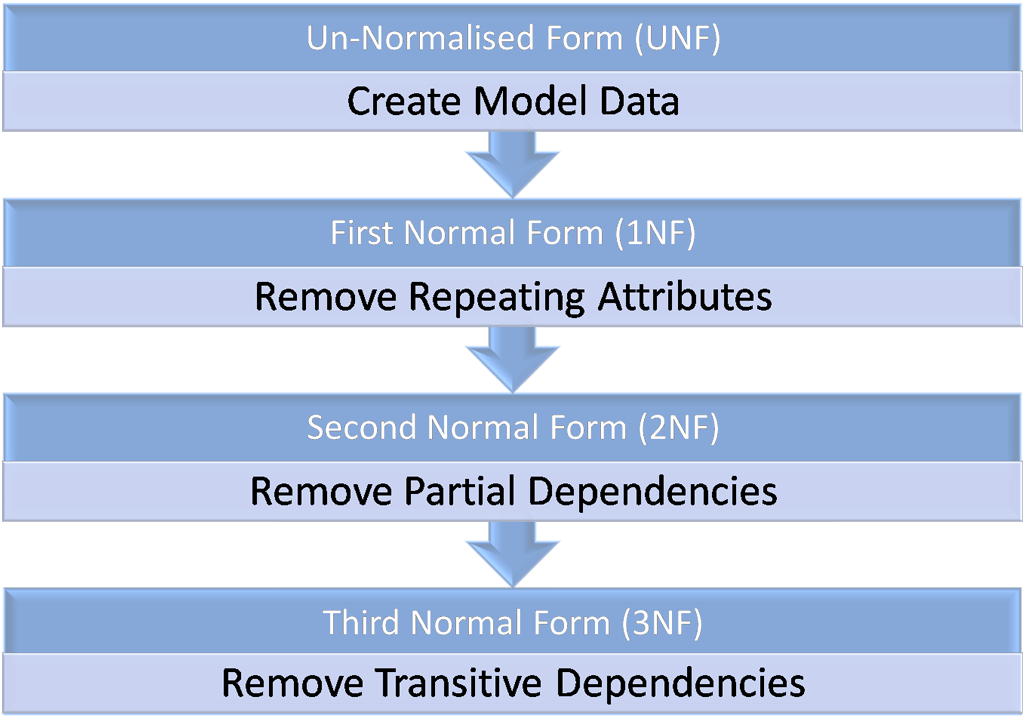
- First Normal Form
- Second Normal Form
- Third Normal Form
- Boyce-Codd Normal Form
Normalization...
First Normal Form
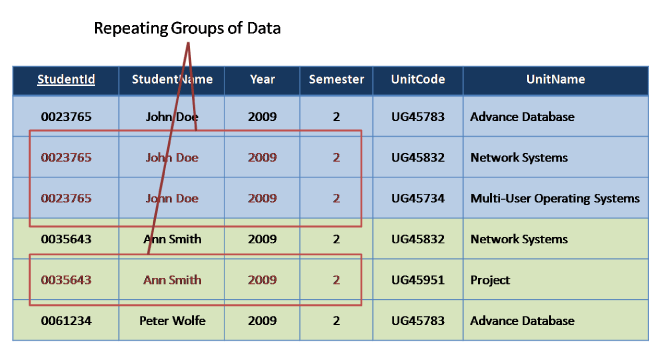
- Each record should be unique
- Each cell contains a single value
- No duplicate fields
First Normal Form
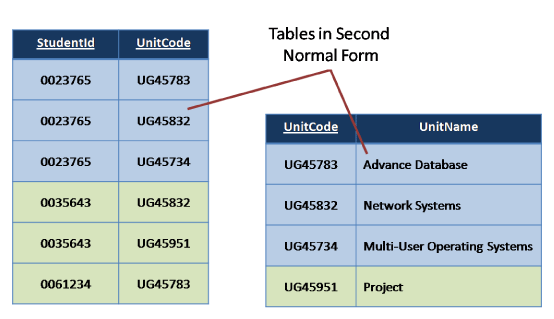
Second Normal Form
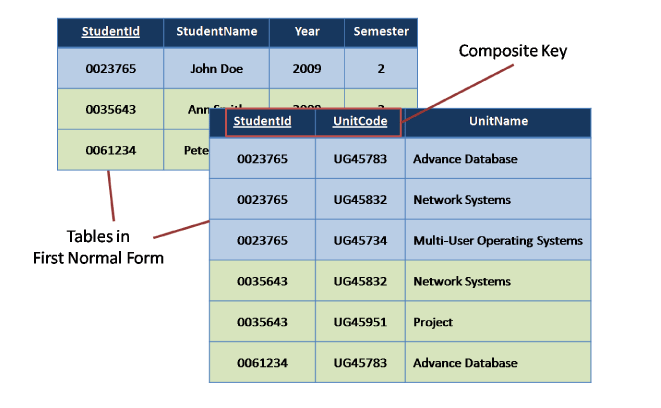
Remove repetitive rows associated directly to primary key (remove partial dependencies).
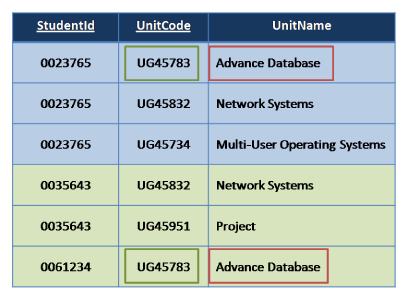
Second Normal Form
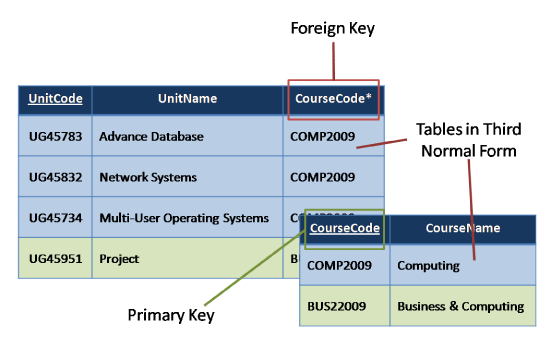
Third Normal Form
Non-key fields should depend only on primary key (remove transitive dependencies).
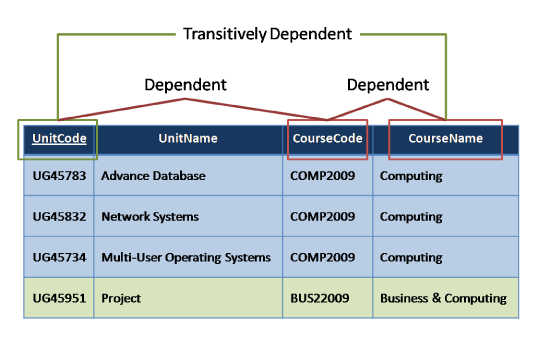
Third Normal Form
Boyce Codd Normal Form
| Author | Nationality | Book Title | Genre | Number of Pages |
|---|---|---|---|---|
| William Shakespere | English | The Comedy of Errors | Comedy | 100 |
| Markus Winand | Austrian | SQL Performance Explained | Textbook | 200 |
| Jeffery Ullman | American | A First Course in Database System | Textbook | 500 |
| Jennifer Widom | American | A First Course in Database System | Textbook | 500 |
Each attribute must represent a fact about the key, the whole key, and nothing but the key.
Boyce Codd Normal Form
| Author | Nationality |
|---|---|
| William Shakespere | English |
| Markus Winand | Austrian |
| Jeffery Ullman | American |
| Jennifer Widom | American |
| Book Title | Genre | Number of Pages |
|---|---|---|
| The Comedy of Errors | Comedy | 100 |
| SQL Performance Explained | Textbook | 200 |
| A First Course in Database System | Textbook | 500 |
| Author | Book Title |
|---|---|
| William Shakespere | The Comedy of Errors |
| Markus Winand | SQL Performance Explained |
| Jeffery Ullman | A First Course in Database System |
| Jennifer Widom | A First Course in Database System |
Structured Query Language
1. Data Definition Language
2. Data Manipulation Language
3. Data Control Language
Data Definition Language
- CREATE
- ALTER
- DROP
- INDEX
Data Manipulation Language
- INSERT
- UPDATE
- DELETE
- SELECT
Data Control Language
- GRANT
- REVOKE
Other SQL clauses...
- FROM
- WHERE
- DISTINCT
- GROUP BY
- HAVING
- ORDER BY
- LIMIT OR TOP
- OFFSET
- Aggregate - COUNT, MIN, MAX, SUM etc
Joins
- INNER JOIN
- LEFT JOIN
- RIGHT JOIN
- OUTER JOIN
- LEFT JOIN EXCLUDING INNER JOIN
- RIGHT JOIN EXCLUDING INNER JOIN
- OUTER JOIN EXCLUDING INNER JOIN
Refer - SQL Joins
INNER JOIN
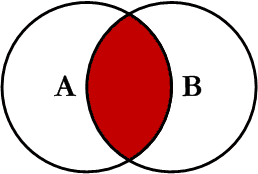
SELECT profiles.first_name,
       profiles.last_name,
       users.email
FROM users
INNER JOIN profiles
ON profiles.user_id = users.id
LEFT JOIN
SELECT profiles.first_name,
       profiles.last_name,
       users.email
FROM users
LEFT JOIN profiles
ON profiles.user_id = users.id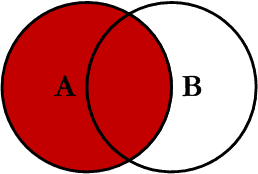
RIGHT JOIN
SELECT profiles.first_name,
       profiles.last_name,
       users.email
FROM users
RIGHT JOIN profiles
ON profiles.user_id = users.id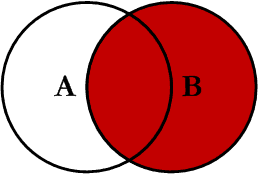
OUTER JOIN (FULL JOIN)
SELECT profiles.first_name,
       profiles.last_name,
       users.email
FROM users
FULL OUTER JOIN profiles
ON profiles.user_id = users.id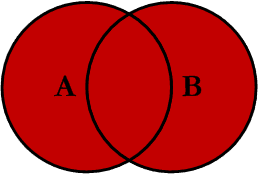
LEFT JOIN EXCLUDING INNER JOIN
SELECT profiles.first_name,
       profiles.last_name,
       users.email
FROM users
LEFT JOIN profiles
ON profiles.user_id = users.id
WHERE profiles.user_id IS NULL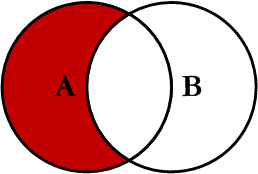
RIGHT JOIN EXCLUDING INNER JOIN
SELECT profiles.first_name,
       profiles.last_name,
       users.email
FROM users
RIGHT JOIN profiles
ON profiles.user_id = users.id
WHERE users.id IS NULL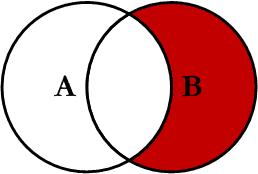
OUTER JOIN EXCLUDING INNER JOIN
SELECT profiles.first_name,
       profiles.last_name,
       users.email
FROM users
FULL OUTER JOIN profiles
ON profiles.user_id = users.id
WHERE users.id IS NULL
   OR profiles.user_id IS NULL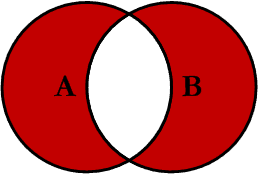
Subquery
Subquery or Inner query or Nested query is a query in a query. SQL subquery is usually added in the where clause of the SQL statement.
Can be used with following statements
- SELECT
- INSERT
- UPDATE
- DELETE
Note - Avoid using subqueries unless there is no other option.
Subquery - SELECT, UPDATE, DELETE
SELECT id, first_name
FROM profiles
WHERE first_name IN (SELECT first_name
FROM profiles
WHERE state = 5);
UPDATE profiles SET zip = '111111'
WHERE first_name IN (SELECT first_name
FROM profiles
WHERE state = 5);DELETE FROM profiles
WHERE first_name IN (SELECT first_name
FROM profiles
WHERE state = 5);Subquery - INSERT
INSERT INTO addresses(id, address)
SELECT id,
       address1 || ' ' || address2 || ', ' || city || ', ' || zip
FROM profiles WHERE state = 5
Index
An index is a data structure (most commonly a B- tree) that stores the values for a specific column in a table. An index is created on a column of a table .
CREATE INDEX col_name_index
ON table_name (col_name);
CREATE INDEX country_id_state_id_index
ON profiles (country_id, state_id);Multi-column index
As a general rule, an index should only be created on a table if the data in the indexed column will be queried frequently.
Refer - DB Indexing
Views
A view is simply any SELECT query that has been given a name and saved in the database. For this reason, a view is sometimes called a named query or a stored query.
CREATE OR REPLACE VIEW discounted_products_view AS
SELECT products.name,
       products.price
FROM products
INNER JOIN discounts
ON discounts.product_id = products.id
Materialized Views
CREATE OR REPLACE MATERIALIZED VIEW discounted_products_view AS
SELECT products.name,
       products.price
FROM products
INNER JOIN discounts
ON discounts.product_id = products.id;
REFRESH MATERIALIZED VIEW discounted_products_view;A materialized view create and store the result table in advance, filled with data.
Refer - Views and Mat Views
PL/SQL
PL/SQL is a combination of SQL along with the procedural features of programming languages.
Each PL/SQL program consists of SQL and PL/SQL statements which from a PL/SQL block.
PL/SQL Block consists of three sections:
- The Declaration section (optional).
- The Execution section (mandatory).
- The Exception Handling (or Error) section (optional).
PL/SQL
DECLARE
   <declarations section>
BEGIN
   <executable command(s)>
EXCEPTION
   <exception handling>
END;
DECLARE
a integer := 10;
b integer := 20;
c integer;
f real;
BEGIN
c := a + b;
dbms_output.put_line('Value of c: ' || c);
f := 70.0/3.0;
dbms_output.put_line('Value of f: ' || f);
END;Functions, Stored Procedures...
Just like any other language, to execute a piece of code later, PL/SQL have Functions and Stored Procedures.
Functions, Stored Procedures... differences
Refer: differences
1. Return value
2. Arguments (input, output values)
3. Call
4. SELECT, DML vs ONLY SELECT
5. Compilation
6. Use in where/having/select statements
.....
Functions, Stored Procedures... syntax
CREATE [OR REPLACE] PROCEDURE procedure_name
[(parameter_name [IN | OUT | IN OUT] type [, ...])]
{IS | AS}
BEGIN
  < procedure_body >
  < function_call >
END;
CREATE [OR REPLACE] FUNCTION function_name
RETURN return_data_type
{IS | AS}
DECLARE
< declaration >
BEGIN
< function_body >
return return_data_type
EXCEPTION
< exception handling >
END;Triggers
A trigger is a PL / SQL block structure which is fired when a DML statements like Insert, Delete, Update is executed on a database table.
A trigger is triggered automatically when an associated DML statement is executed. Refer - Triggers
CREATE [OR REPLACE ] TRIGGER trigger_name
    {BEFORE | AFTER | INSTEAD OF }
    {INSERT [OR] | UPDATE [OR] | DELETE}
    [OF col_name]
    ON table_name
    [REFERENCING OLD AS o NEW AS n]
    [FOR EACH ROW]
    WHEN (condition)
    BEGIN
       ---sql statements
    END;
Triggers
-
CREATE [OR REPLACE ] TRIGGER trigger_name - This clause creates a trigger with the given name or overwrites an existing trigger with the same name. -
{BEFORE | AFTER | INSTEAD OF } - This clause indicates at what time should the trigger get fired. i.e for example: before or after updating a table. INSTEAD OF is used to create a trigger on a view. before and after cannot be used to create a trigger on a view. -
{INSERT [OR] | UPDATE [OR] | DELETE} - This clause determines the triggering event. More than one triggering events can be used together separated by OR keyword. The trigger gets fired at all the specified triggering event. -
[OF col_name] - This clause is used with update triggers. This clause is used when you want to trigger an event only when a specific column is updated.
Triggers
-
CREATE [OR REPLACE ] TRIGGER trigger_name - This clause creates a trigger with the given name or overwrites an existing trigger with the same name. -
[ON table_name] - This clause identifies the name of the table or view to which the trigger is associated. -
[REFERENCING OLD AS o NEW AS n] - This clause is used to reference the old and new values of the data being changed. By default, you reference the values as :old.column_name or :new.column_name. The reference names can also be changed from old (or new) to any other user-defined name. You cannot reference old values when inserting a record, or new values when deleting a record, because they do not exist. -
[FOR EACH ROW] - This clause is used to determine whether a trigger must fire when each row gets affected ( i.e. a Row Level Trigger) or just once when the entire sql statement is executed(i.e.statement level Trigger). -
WHEN (condition) - This clause is valid only for row level triggers. The trigger is fired only for rows that satisfy the condition specified.
Triggers.. example
CREATE TRIGGER update_user_modtime
BEFORE UPDATE
ON users
FOR EACH ROW
EXECUTE PROCEDURE
update_modified_column();
Cursors
Cursors are used to avoid repetitive usage of select statements and facilitate a loop traversal of all the rows a desired select statement fetches in PL/SQL procedure.
CURSOR cursor_name AS select_statement;DECLARE
CURSOR delhi_users AS SELECT users.id,
users.email,
profiles.name,
profiles.address
FROM users
INNER JOIN profiles ON profiles.user_id = users.id
WHERE profiles.city = "Delhi";
BEGIN
OPEN delhi_users;
FETCH delhi_users;
-- sql statements
CLOSE delhi_users;
END;Cursors
A PL/pgSQL cursor allows us to encapsulate a query and process each individual row at a time. We use cursors when we want to divide a large result set into parts and process each part individually. If we process it at once, we may have a memory overflow error.
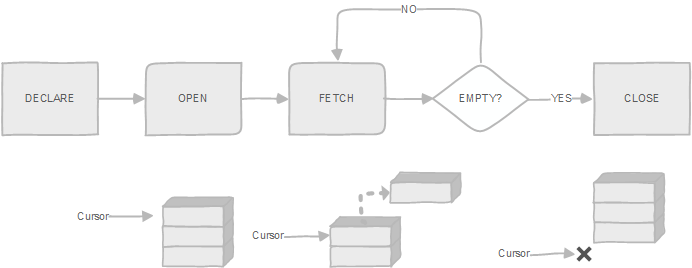
Cursors
- NEXT
- LAST
- PRIOR
- FIRST
- ABSOLUTE count
- RELATIVE count
- FORWARD
- BACKWARD
CREATE OR REPLACE FUNCTION get_film_titles(p_year INTEGER)
   RETURNS text AS $$
DECLARE
 titles TEXT DEFAULT '';
 rec_film   RECORD;
 cur_films CURSOR(p_year INTEGER)
 FOR SELECT
 FROM film
 WHERE release_year = p_year;
BEGIN
   -- Open the cursor
   OPEN cur_films(p_year);

   LOOP
    -- fetch row into the film
      FETCH cur_films INTO rec_film;
    -- exit when no more row to fetch
      EXIT WHEN NOT FOUND;

    -- build the output
      IF rec_film.title LIKE '%ful%' THEN
         titles := titles || ',' || rec_film.title || ':' || rec_film.release_year;
      END IF;
   END LOOP;

   -- Close the cursor
   CLOSE cur_films;

   RETURN titles;
END; $$

LANGUAGE plpgsql;
Questions...
Here be assignment...
RDBMS
By Ashish Mohite
RDBMS
Webonator Batch (Feb 2016) - RDBMS basics