E-Commerce
Website Training
goo.gl/L7y78
- Sublime text 2
-
HTML5
- CSS3, Object Oriented CSS
- jQuery
- E-Commerce UX
- Twitter Bootstrap
- Sublime text 2
-
HTML5
- CSS3, Object Oriented CSS
- jQuery
- E-Commerce UX
- Twitter Bootstrap

Sublime Text 2
Plugins
Package Control
Emmet
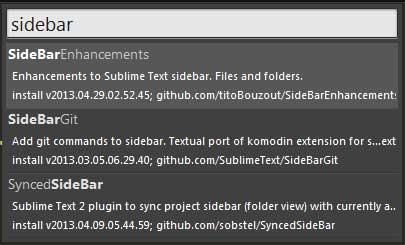
Side Bar Enhancement
Color Picker
Package Control 1/2
CTRL + `
import urllib2,os; pf='Package Control.sublime-package'; ipp=sublime.installed_packages_path(); os.makedirs(ipp) if not os.path.exists(ipp) else None; urllib2.install_opener(urllib2.build_opener(urllib2.ProxyHandler())); open(os.path.join(ipp,pf),'wb').write(urllib2.urlopen('http://sublime.wbond.net/'+pf.replace(' ','%20')).read()); print('Please restart Sublime Text to finish installation')
Restart Sublime Text 2
Package Control 2/2
CTRL + SHIFT + P
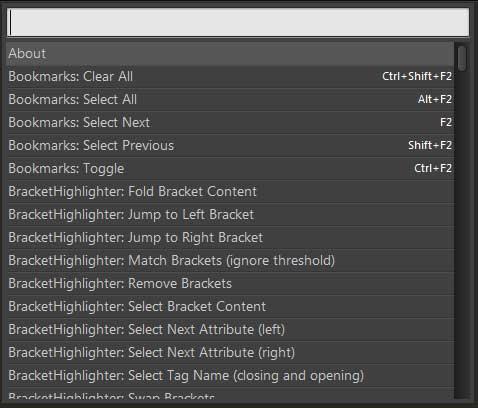

Emmet 1/5
Previously known as Zen Coding
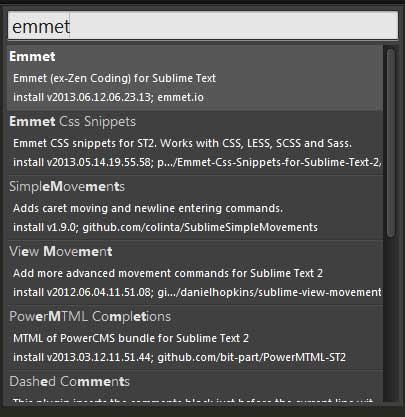
Emmet 2/5
html:5become
<!doctype html><html lang="en"><head><meta charset="UTF-8"><title>Document</title></head><body></body></html>
Emmet 2/5
div
become
div <div></div>
<div></div>
div#section.section
div#section.sectionbecome
<div id="section" class="section"></div>
<div id="section" class="section"></div>Emmet 3/5
div+p
become
div+p <div></div>
<p></p>
 <div></div>
 <p></p>
ul.list>li*2
ul.list>li*2become
<ul class="list">
    <li></li>
    <li></li>
</ul>
<ul class="list">
<li></li>
<li></li>
</ul>Emmet 4/5
table+
become
table+ <table>
<tr>
<td></td>
</tr>
</table>
 <table>
     <tr>
         <td></td>
     </tr>
 </table>
input:text.input-field
input:text.input-field
become
<input type="text" name="" id="" class="input-field">
<input type="text" name="" id="" class="input-field">Emmet 5/5
More documentation and cheat sheet
Side Bar Enhancement 1/1
Color Picker 1/1
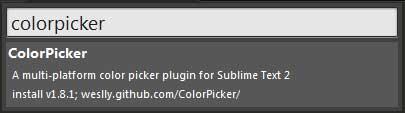
CTRL + SHIFT + C
Goto Anything
CTRL + P
Multiple Selections
CTRL + D

HTML5 + CSS3
HTML4
Since 1997
<div class="header"><div class="nav"></div></div><div class="content"></div><div class="footer"></div>
HTML5
<header> <nav></nav> </header> <section class="content"></section> <footer></footer>
<header><nav></nav></header><section class="content"></section><footer></footer>
HTML5 1/9
- New semantic / structural elements
- New input types
- New attributes
- New media element
HTML5 2/9
New semantic element
<header><nav><section><article><time></time><figure><figcaption><aside><footer>
HTML5 3/9
New input types
More<input type="color"><input type="range"><input type="email"><input type="number"><input type="date"><input type="tel"><input type="url">
HTML5 4/9
<input type="color"> <input type="range">HTML5 5/9
<input type="email"> <input type="tel"> <input type="url"> <input type="number">Looks almost the same
HTML5 6/9
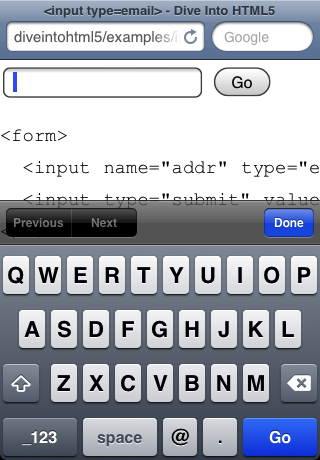
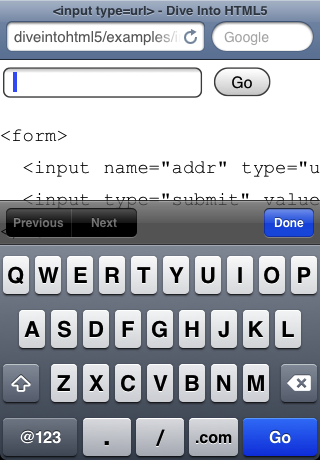
a

HTML5 7/9
New media element
<video></video>&
<audio></audio>HTML5 8/9
before HTML5
<object type="application/x-shockwave-flash" id="flashContent" name="flashContent"
data="/brainshark/viewer/getplayer.ashx?v=201207121701" width="100%" height="100%"
style="visibility: visible; "> <param name="scale" value="noscale">
<param name="wmode" value="window">
<param name="allowfullscreen" value="true">
<param name="allowscriptaccess" value="always">
<param name="bgcolor" value="">
<param name="SeamlessTabbing" value="false">
<param name="flashvars" value="pi=119002744&host=www.brainshark.com&securerequest=false&lng=en-GB,en-US;q=0.8,en;q=0.6">
</object>
HTML5 9/9
After HTML5
<video src="movie.mp4"></video> <audio src="music.mp3"></audio>Old Browser Support?
Polyfill
CSS3
-
New Selectors
- Rounded Corner
- Transition
- Transform
- @font-face / Web Font
- More
CSS3 Selectors 1/8
General Sibling
Element ~ ElementAttribute Selector
Element[attr^|*|$="value"]Pseudo-Class
Element:checkedElement:target
Structural
Element:last-childElement:nth-child(n)Element:only-child
CSS3 Rounded Corner 2/8
border-radius: value;.element{
border-radius: 5px;
}
border-radius: top-left top-right bottom-right bottom-left.element{
border-radius: 2px 4px 6px 8px;
}
CSS3 Transition 3/8
transition: property duration timing-function delay;element{
transition: background 1s ease 0;
}
prefixed version
element{
-webkit-transition: background 1s ease 0;-moz-transition: background 1s ease 0;-ms-transition: background 1s ease 0;-o-transition: background 1s ease 0;transition: background 1s ease 0;
}
NOT ALL PROPERTY ACCEPT TRANSITION
CSS3 Transform 4/8
transform: rotate(value); transform: scale(x-value, y-value); transform: skew(value); transform: translate(x-value, y-value);Transform property need prefixes
CSS3 @font-face 5/8
standard fonts
(arial, georgia, verdana, monospace)
vs
custom fonts
(open sans, icon-font, lot more)
CSS3 @font-face 6/8
@font-face{
font-family: 'myFont';src: url('font.eot') format('embedded-opentype'),url('font.woff') format('woff'),url('font.ttf') format('truetype'),url('font.svg') format('svg');
}
...
CSS3 @font-face generator 7/8
CSS3 @font-face 8/8
GOOGLE WEBFONT
TYPEKIT
Old Browser?
Old Conditional Comment
<!--[if lt IE 9]>
<link rel="stylesheet" href="booo.css">
<![endif]>
New Conditional Comment
<!--[if IE 7]> <html class="lt-ie9 lt-ie8"> <![endif]>
<!--[if IE 8]> <html class="lt-ie9"> <![endif]>
<!--[if gt IE 8]><!--> <html> <!--<![endif]-->
No box-shadow for IE8 & below
.shadow{
box-shadow: 0 0 3px #666;
}
.lt-ie9 .shadow{
border: solid 2px #666;
}
OOCSS
Object Oriented CSS
CSS Object
Basically, a CSS Object is a repeating visual pattern. Once created, an object can then be reused thoughout a site.
REUSE.
EFFICIENT STYLE SHEET.

.btn{
background: #333;border: solid .08em rgb(30,30,30);border-radius: .1em;color: #ededed;font-size: 1em;padding: .4em 1.2em;text-transform: uppercase;
}
.btn-red{
background: rgb(185,0,0);border-color: rgb(155,0,0);
}
.btn-blue{
background: rgb(0,60,120);border-color: rgb(0,60,90);
}
demo
Use appropriate class name
.navigation
.atr
.nav
.author
jQuery
JavaScript Library
DOM Traversal
Manipulation
Event Handling
Animation
Ajax
2 Ways to use jQuery
Local/Server
<script src="js/jquery.js"></script>CDN
<script src="//ajax.googleapis.com/ajax/libs/jquery/1.10.1/jquery.min.js"></script>Local/Server
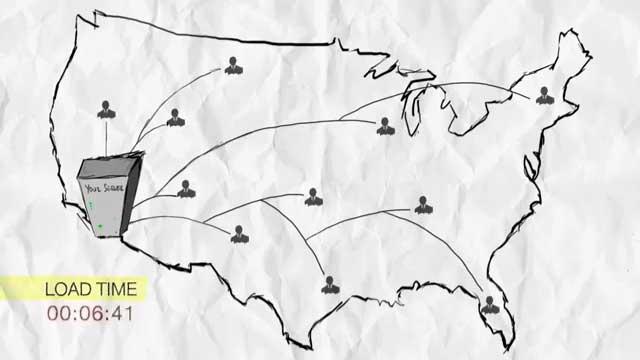
CDN
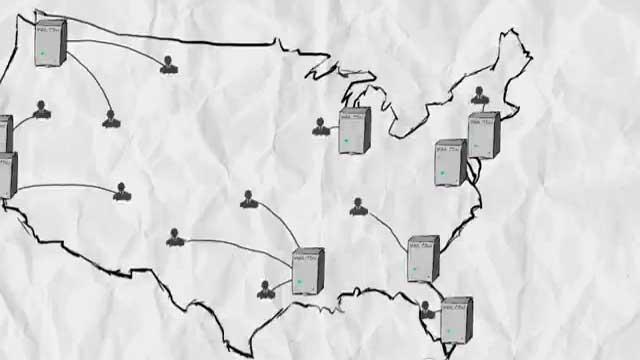
Put Script at the bottom
...<script src="jquery.js"></script></body>
 var Site = {     init:function(){         /* Code here */     } };
 $(function (){     Site.init(); })
var Site = { init:function(){ /* Code here */ } };
$(function (){ Site.init(); })E-Commerce UX
FAST
More Images
http://arngren.net/ > BIG FAILURE
Clean UI
Twitter Bootstrap
Front-end Framework
for rapid developement
http://goo.gl/wV5ro
Question?
e-commerce website training
By Bobby Lie


