git commit -m "Your WordPress blog under version control"
Brian Retterer
@bretterer
brian@stormpath.com
Who am I?
PHP Developer Evangelist at Stormpath
Laravel Developer
WordPress Meetup/Camp Organizer
Potter
Animal Lover
Working with WordPress since version 1.5
What Is Version Control?
It is the management of changes to documents, computer programs, large web sites, and other collections of information.
HUH????
multiple version of the same
files on your computer.....
ONLY BETTER!!!!!
Does this look familiar?

OK... So lets look at GIT
What is git?
Git is a distributed version control system
with an emphasis on speed.
Created by Linus Torvalds (see: Linux)
Advantages of Version Control
- Keep track of what changed, who made it, and when it happened
- Easily roll back changes when necessary
- Makes it easier to collaborate with other developers
That's Great ...
but what about keeping wordpress in version Control?
Two Options
- Keep Theme/Plugin Only under version Control
- Keep Whole Wordpress Install under version Control
Advantages of Keeping only theme/plugin in GIT
- Smaller repository
- Easier to integrate into other projects
- Shared Easier
- Different Versions of wordpress core files
disADVANTAGES OF KEEPING ONLY THEME/PLUGIN IN GIT
- Different versions of wordpress core files
- Compatibility issues
- Possible differences between
development and production
ADVANTAGES OF KEEPING
Whole wordpress IN GIT
- Same core files between dev and prod
- Easier to spin up to a new server
(if db is set up on different server) - Best way to test core upgrades
- Install plugins locally and push to production
disADVANTAGES OF KEEPING
WHOLE WORDPRESS IN GIT
- Database upgrade issues
- Harder to share a theme/plugin
- Have to set up .gitignore correctly
The .gitignore file (Full Install)
# Exclude these files from the git repo
wp-content/upgrade/*
wp-content/uploads/*
sitemap.*
wp-config.php (optional)
# ...wp-content/backup, wp-content/cache, etc.

# Hidden system files
*.DS_Store
*[Tt]humbs.db
*.Trashes

# Include these files in previously blocked directories
!wp-content/uploads/.htaccess
Why I say wp-config.php is optional
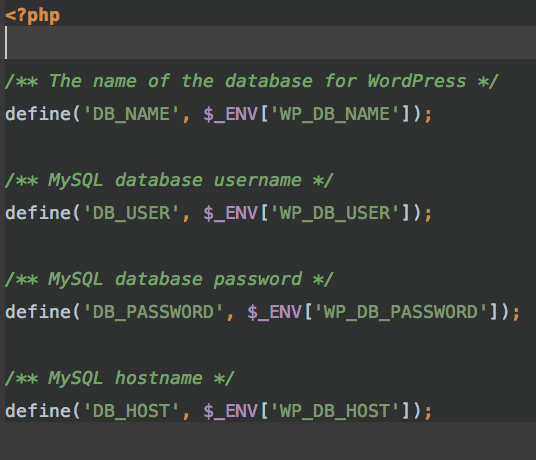
Why keep other things out?
# Exclude these files from the git repo
wp-content/upgrade/*
wp-content/uploads/*
sitemap.*
wp-config.php (optional)
# ...wp-content/backup, wp-content/cache, etc.

# Hidden system files
*.DS_Store
*[Tt]humbs.db
*.Trashes

# Include these files in previously blocked directories
!wp-content/uploads/.htaccess
Reduces size of repo
Git Commands
- git init: Initalizes a git repository
- git add: Adds files changes in working copy
- git commit: Creates a new commit to your working copy
- git status: Shows status of working copy
- git remote: Shows remote versions
- git push: Pushes your working copy to remote
- git pull: Fetches and merges from remote
- git log: Shows listing of commits
Good reference:
Aliases!!!!!!
Demo?
Questions?
Brian Retterer
@bretterer
bretterer@gmail.com
git commit -m "Your WordPress blog under version control"
By Brian Retterer
git commit -m "Your WordPress blog under version control"
Slides from Dayton Wordcamp