

Info Resources for CS Students

Catherine Gracey, Fall 2024

Hello!

My name is Cat, and I'm the CS librarian. It's my job to make sure CS students, faculty and staff have access to the information that they need

  • Book study spaces (extended hours!)
  • Use our FabLab to 3D print, use Cricut Machines and more!
  • Access books/articles/more 
  • Research Consults (with yours truly)
  • If you're unsure if I can help, just ask!

The Library is HERE FOR YOU!

But today, we're here to talk about your upcoming assignment!

1

What am I looking for, and where should I look?

2

HOW do I use search tools strategically?

3

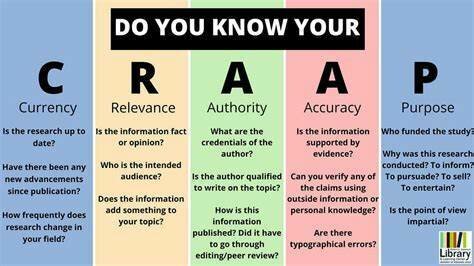
How do I know if the information I find is reliable, and properly attribute the info?

But first, pep talk!!

You are all experienced at finding information, so this conversation is going to focus on further building expertise.

Warm up:

Your friend asks you what time a local restaurant is open until. How do you find out?

  • Google it!
  • Maps App (my personal choice)
  • Check their Instagram
  • Call them
  • Drop by in person

In this case:

There isn't a 'correct' answer for approaching search questions, although some sources might be more reliable

Now, let's picture an instance where you're doing research for school.

  • You're trying to find the documentation for a particular package in Java

OR

  • You're trying to find the textbook the professor mentioned in the syllabus

OR

  • You're trying to find recent research on the topic for your term paper 

Picture a document that answers your research question perfectly

Where would that be stored?

Where would that be stored?

So, how do I access that?

What? Where?
Package documentation Website
Book Library
Research article Journal archive

How do I search for that?

What? Where? How?
Package documentation Website Google!
Book Library Library catalogue!
Research article Journal archive Article database!
  • Use keywords
  • If using multiple words together, use quotation marks, otherswise these can be searched seperately 
  • Review results and adjust accordingly 

Best Practice Search Tips

To find the right information, you have to look in the right place

  • Contains 'grey literature,' i.e. non-academic
    • Government documents
    • Industry reports
    • Professional organization information
    • Blogs, social media, more

Google (or other search engines)

  • Can search for content on specific websites (site:)
  • Can search for specific document types (filetype:)
  • Can use some syntax to guide search algorithm ("exact phrase")
  • Can use filters to display certain content

Google (or other search engines)

Find any Canadian government report that specifically mentions Justin Trudeau

hint, use:

  • site:
  • doctype:
  • ""

Let's practice!

  • TONS of information 
  • User friendly (natural language)
  • Familiar

Google

  • Misinformation or harmful content
  • Bias, search engine optimization
  • Advertisements
  • Inconsistency 

The main difference between searching in a search engine, compared to a library catalogue/article database, is that search engines make assumptions about what you mean, and databases don't

  • Contains
    • books (academic and pop)
    • journals
    • articles
    • conference proceedings
    • digital media

Library Catalogue

  • To search
    • Go to lib.unb.ca
    • Use search bar to enter keywords
    • Select which aspects of metadata you'd like to search (title, author)
    • Press "Go"
    • Use filters to narrow down results

Library Catalogue

Find any print book available in Fredericton that has "early childhood education" in the title

hint: you should have 241 results when you're done

Let's practice!

  • Collected intentionally, some review of credibility/reliability 
  • Lots of control over results through syntax/filters

Library Catalogue

  • Can't use natural language
  • May not have something you're looking for (talk to me)
  • Contain discipline-specific resources 
    • articles in specific journals, or published by specific publishers
    • content from particular conferences
    • lots of metadata, which can help you filter content
  • Require some expertise to use...

Article Databases

Quick Pause:

Individual research contributions

Articles

Traditionally like magazines/books, now virtual collections of articles

Journals/Conferences

Libraries or collections of journals/conference proceedings/more

Article Databases

  • To search:
    • Navigate to CS guide for list of CS databases
    • Choose one!
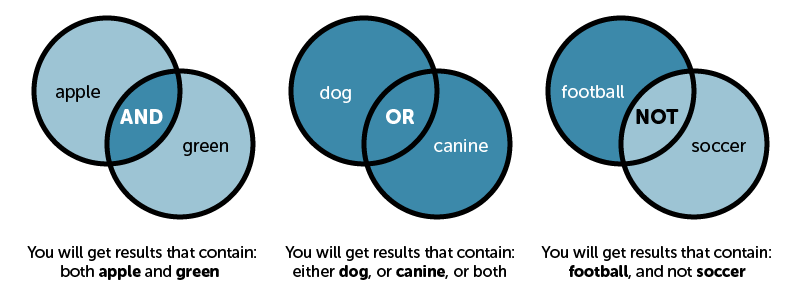
    • Combine keywords using Boolean Operators
    • Use filters to narrow down results

Article Databases

Other fun syntax!

Name Symbol What it does Example
Quotation "" Searches for that phrase exactly "graph theory"
Truncation  * Searches for variations on this word educat*
Proximity N/3 or Near/3 or W/3 Searches for kw within 3 (or n) words of each other  climate NEAR/2 change

Using IEEE, find a resource published in 2024 discussing artificial intelligence in healthcare

hint:

  • what are the 2 key terms here?
  • how should they be combined (AND/OR)

Let's practice!

  • Discipline specific 
  • Lots of control over results through syntax/filters
  • Highly reliable (almost always) research information

Article Database

  • Can't use natural language (coming soon)
  • May not have interdisciplinary work

Imagine you have decided to write a term paper on the very general topic of cybersecurity. Your advisor is very helpful and provides you with the following guidance

Let's practice

  1. UNB has a cybersecurity community, do an advanced Google search to find more info (bonus: look for pdfs)
  2. "You should read Claypoole's book on smart machines" look in the library catalogue to find the book (use advanced search)
  3. Your advisor said they attended a facinating poster session last year in Toronto on smart home security, use ACM (database) to find this

1

Come up with research idea/question

3

Consider what search tool you should use to find said document

5

Use filters/sorting to work through your results. Repeat or edit this process as necessary until you find something that answers your questions.

2

Think about where documents that answer this question might be

4

Break your question up into key concepts, and use Boolean opperators/appropriate syntax to search

  • This course uses IEEE referencing style
  • Might sound familiar... we used this database earlier
  • IEEE is a publisher that has a specific formatting style for references that it's authors should use
  • There are literally hundreds of referencing styles, but the point is to acknowledge the source and help the reader find it

Information sources you use in your work should be credited with a citation

Thank you!

Please don't hesitate to get in touch if you have any questions or need help!

CS 1203

By Catherine Gracey

CS 1203

  • 149