Week 11
Please sit on the right half of the room
--->
Mobile Apps
Mobile Platforms
Both legitimate software and malware are increasingly being developed for mobile platforms.
- Common platforms and app formats
- IOS: IPA (iOS App Store Package)
- Android: APK (Android Package)
- HarmonyOS: HAP (HarmonyOS Ability Package)



Mobile App Architecture
Modern mobile apps have mostly converged on a single app architecture that enforces various best practices.
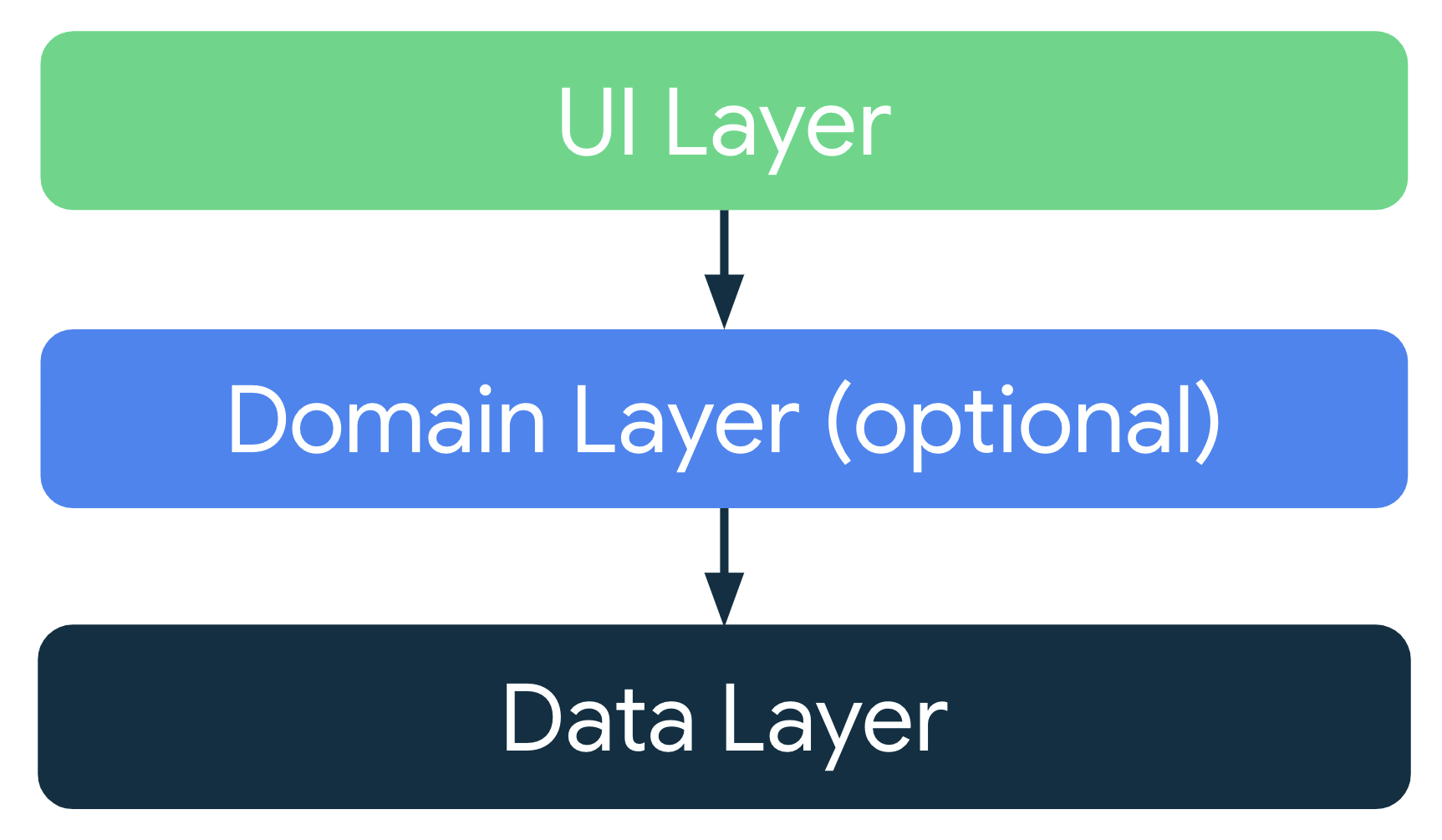
- User Interface layer generates what the user sees
- Data layer hold the app state
-
Domain layer simplifies their interaction
- Separation of app state and the user interface
- UI should be generated from data layer (don't store in UI)
Mobile App Challenges
Modern mobile apps have to support a uniquely complex set of user interactions and platform integration.
- Phones have limited resources and users may have many running apps. Can we arbitrarily free resources without breaking app functionality?
- Can we safely pause app execution and maintain the app state while the user switches or kills apps? What if they re-enter the app with a new context (e.g. orientation)
- Can we facilitate cross-app integration, like integrated browser windows or one app opening another with a particular UI state?
The Activity Lifecycle
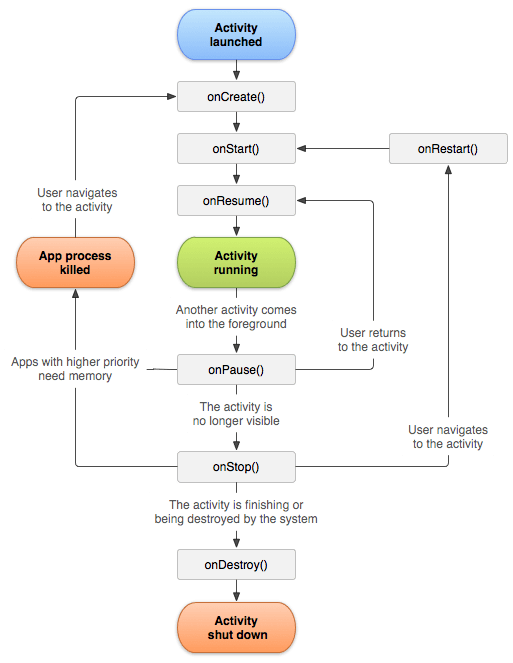
To solve these problems Android introduced the Activity Lifecycle, which provides an interface between the user applications and the operating system.
public abstract class Activity {

    // Called when the activity is first created.
    protected void onCreate(Bundle savedInstanceState) {}

    // Called when the activity is being restarted after being stopped.
    protected void onRestart() {}

    // Called before the activity is destroyed.
    protected void onDestroy() {}

    // Called when the activity becomes visible to the user.
    protected void onStart() {}

    // Called when the activity starts interacting with the user.
    protected void onResume() {}

    // Called when the system is about to pause the activity (e.g., another activity comes into focus).
    protected void onPause() {}

    // Called when the activity is no longer visible to the user.
    protected void onStop() {}

    // Optional: Called to save instance state before activity is paused or stopped.
    protected void onSaveInstanceState(Bundle outState) {}

    // Optional: Called to restore state when the activity is recreated.
    protected void onRestoreInstanceState(Bundle savedInstanceState) {}
}
Mobile App Reversing
Understanding the high-level architecture of mobile apps provides context when reversing.
- Activity class functions can be thought of as entry points to the user interface layer
- Often we're most interested in what happens at the data layer
- Tracing the interaction between the user interface and data layers can help us figure out the purpose of data layer functions
Questions?
Android Package Format
Structure of an APK
Android Packages are zip files that contain all application executables, libraries, assets, and bytecode files
-
AndroidManifest.xml: Package name, version, etc
- META-INF/: Lists APK files, hashes, the signing key
-
classes.dex: This main Dalvik Executable (DEX) file
- lib/, res/, assets/, resources/, resources.arsc, etc.
chase@laptop:/tmp$ unzip MyApp.apk
Archive:  MyApp.apk
  inflating: AndroidManifest.xml
  inflating: META-INF/MANIFEST.MF
 extracting: assets/filter/amaro_mask1.jpg
 extracting: assets/filter/amaro_mask2.jpg
...
chase@laptop:/tmp$ ls
AndroidManifest.xml  assets  build-data.properties  classes.dex  META-INF  res  resources.arsc
Android App Metadata
AndroidManifest.xml
chase@laptop:/tmp$ cat AndroidManifest.xml
<?xml version="1.0" encoding="utf-8"?>
<manifest
    xmlns:android="http://schemas.android.com/apk/res/android"
    android:versionCode="1"
    android:versionName="1.0">

    <!-- Beware that these values are overridden by the build.gradle file -->
    <uses-sdk android:minSdkVersion="15" android:targetSdkVersion="26" />

    <application
        android:allowBackup="true"
        android:icon="@mipmap/ic_launcher"
        android:roundIcon="@mipmap/ic_launcher_round"
        android:label="@string/app_name"
        android:supportsRtl="true"
        android:theme="@style/AppTheme">

        <!-- This name is resolved to com.example.myapp.MainActivity
             based on the namespace property in the build.gradle file -->
        <activity android:name=".MainActivity">
            <intent-filter>
                <action android:name="android.intent.action.MAIN" />
                <category android:name="android.intent.category.LAUNCHER" />
            </intent-filter>
        </activity>

        <activity
            android:name=".DisplayMessageActivity"
            android:parentActivityName=".MainActivity" />
    </application>
</manifest>
META-INF/
CERT.RSA
CERT.SF
MANIFEST.MF
chase@laptop:/tmp$ cd META-INF/
chase@chase-laptop:/tmp/apk/META-INF$ ls
CERT.RSA  CERT.SF  MANIFEST.MF

chase@laptop:/tmp/META-INF$ file CERT.RSA
CERT.RSA: DER Encoded PKCS7 Signed Data

chase@laptop:/tmp/META-INF$ file CERT.SF
CERT.SF: JAR Signature File, ASCII text, with CRLF line terminators

chase@laptop:/tmp/META-INF$ head MANIFEST.MF
Manifest-Version: 1.0
Built-By: Generated-by-ADT
Created-By: Android Gradle 2.2.3

Name: assets/filter/walden_map.png
SHA1-Digest: xlcsroYmeSKoWrsvyEY+K6OI/yA=

Name: res/raw/evergreen.glsl
SHA1-Digest: DIdzU2wOBIimbLfe7GOWN9B6m60=

Name: res/drawable-xxhdpi-v4/filter_thumb_sunrise.png
SHA1-Digest: grZysBUS54rqVCdKakHkpo5jld4=

Name: res/drawable-hdpi-v4/abc_list_longpressed_holo.9.png
SHA1-Digest: KQunCQh0E4bP0utgN0cHdQr9OwA=

Name: res/drawable-xxhdpi-v4/abc_ic_star_half_black_16dp.png
SHA1-Digest: EikVyBT5I7pmbJO2k8qF0V5hUc0=

Name: res/drawable-xhdpi-v4/i_cosmesis.png
Android App Resources
res/
# This directory holds uncompiled resources used by the application, like images,
# XML layouts, and strings. These are referenced in code using resource IDs.
chase@chase-laptop:/tmp/apk/res$ /bin/tree
.
├── anim
│   ├── abc_fade_in.xml
│   ├── abc_fade_out.xml
│   ├── abc_grow_fade_in_from_bottom.xml
│   ├── abc_popup_enter.xml
├── color
│   ├── abc_btn_colored_borderless_text_material.xml
│   ├── abc_hint_foreground_material_dark.xml
│   ├── abc_hint_foreground_material_light.xml
│   ├── abc_primary_text_disable_only_material_dark.xml
│   ├── abc_primary_text_disable_only_material_light.xml
├── color-v11
│   ├── abc_background_cache_hint_selector_material_dark.xml
│   └── abc_background_cache_hint_selector_material_light.xml
├── color-v23
│   ├── abc_btn_colored_borderless_text_material.xml
│   ├── abc_color_highlight_material.xml
│   ├── abc_tint_btn_checkable.xml
│   ├── abc_tint_default.xml
│   ├── abc_tint_edittext.xml
├── drawable
│   ├── abc_btn_borderless_material.xml
│   ├── abc_btn_check_material.xml
│   ├── abc_btn_colored_material.xml
│   ├── abc_btn_default_mtrl_shape.xml
│   ├── abc_btn_radio_material.xml
│   ├── abc_cab_background_internal_bg.xml
│   ├── abc_cab_background_top_material.xml
│   ├── abc_dialog_material_background.xml
│   ├── abc_edit_text_material.xml
├── drawable-hdpi-v4
│   ├── abc_ab_share_pack_mtrl_alpha.9.png
│   ├── abc_btn_check_to_on_mtrl_000.png
│   ├── abc_btn_check_to_on_mtrl_015.png
│   ├── abc_btn_radio_to_on_mtrl_000.png
│   ├── abc_btn_radio_to_on_mtrl_015.png
│   ├── abc_btn_switch_to_on_mtrl_00001.9.png
│   ├── abc_btn_switch_to_on_mtrl_00012.9.png
│   ├── abc_cab_background_top_mtrl_alpha.9.png
│   ├── abc_ic_commit_search_api_mtrl_alpha.png
│   ├── abc_ic_menu_copy_mtrl_am_alpha.png
│   ├── abc_ic_menu_cut_mtrl_alpha.png
│   ├── abc_ic_menu_paste_mtrl_am_alpha.png
│   ├── abc_ic_menu_selectall_mtrl_alpha.png
│   ├── abc_ic_menu_share_mtrl_alpha.png
│   ├── abc_ic_star_black_16dp.png
│   ├── abc_ic_star_black_36dp.png
│   ├── abc_ic_star_black_48dp.png
│   ├── abc_ic_star_half_black_16dp.png
│   ├── abc_ic_star_half_black_36dp.png
│   ├── abc_ic_star_half_black_48dp.png
assets/
resources.arsc
# This is where raw assets are stored. Files in assets/ aren’t compiled or
# optimized and can be loaded directly by the app.
chase@chase-laptop:/tmp/apk/assets$ /bin/tree
.
└── filter
    ├── amaromap.png
    ├── amaro_mask1.jpg
    ├── amaro_mask2.jpg
    ├── blackboard1024.png
    ├── blend1.jpg
    ├── bluevintage_mask1.jpg
    ├── brannan_blowout.png
    ├── brannan_contrast.png
    ├── brannan_luma.png
    ├── brannan_process.png
    ├── brannan_screen.png
    ├── brooklynCurves1.png
    ├── brooklynCurves2.png
    ├── calm_mask1.jpg
    ├── calm_mask2.jpg
    ├── earlybirdblowout.png
    ├── earlybirdcurves.png
    ├── earlybirdmap.png
    ├── earlybirdoverlaymap_new.png
    ├── earlybirdOverlayMap.png
    ├── edgeburn.png
    ├── fairy_tale.png
    ├── filter_map_first.png
    ├── flower_layer2c.jpg
    ├── freud_rand.png
    ├── healthy_mask_1.jpg
    ├── hefegradientmap.png
    ├── hefemap.png
    ├── hefemetal.png
    ├── hefesoftlight.png
    ├── hudsonbackground.png
    ├── hudsonmap.png
    ├── inkwellmap.png
# This file contains compiled resources, including strings, layouts, and
# other resources defined in XML. It’s optimized for quick lookup by the
# Android runtime.
chase@chase-laptop:/tmp/$ xxd resources.arsc | head -n 40
00000000: 0200 0c00 78fd 0500 0100 0000 0100 1c00 ....x...........
00000010: a0e5 0100 840b 0000 0000 0000 0001 0000 ................
00000020: 2c2e 0000 0000 0000 0000 0000 2100 0000 ,...........!...
00000030: 4700 0000 6900 0000 8e00 0000 b200 0000 G...i...........
00000040: e100 0000 0b01 0000 2f01 0000 4d01 0000 ......../...M...
00000050: 6e01 0000 9101 0000 b701 0000 e801 0000 n...............
00000060: 0e02 0000 3e02 0000 6d02 0000 a102 0000 ....>...m.......
00000070: cd02 0000 0403 0000 3203 0000 5c03 0000 ........2...\...
00000080: 8003 0000 a403 0000 cf03 0000 fa03 0000 ................
00000090: 2604 0000 6404 0000 8b04 0000 bd04 0000 &...d...........
000000a0: ee04 0000 1205 0000 4205 0000 7105 0000 ........B...q...
000000b0: ae05 0000 ea05 0000 1d06 0000 4f06 0000 ............O...
000000c0: 8d06 0000 bf06 0000 f806 0000 2407 0000 ............$...
000000d0: 5607 0000 8907 0000 c007 0000 e407 0000 V...............
000000e0: fc07 0000 1008 0000 4808 0000 7a08 0000 ........H...z...
000000f0: a408 0000 d608 0000 0109 0000 3709 0000 ............7...
00000100: 6009 0000 7609 0000 8e09 0000 b409 0000 `...v...........
00000110: ca09 0000 fb09 0000 110a 0000 260a 0000 ............&...
00000120: 3c0a 0000 530a 0000 700a 0000 8a0a 0000 <...S...p.......
00000130: a00a 0000 b60a 0000 cc0a 0000 e30a 0000 ................
00000140: f70a 0000 0c0b 0000 250b 0000 3e0b 0000 ........%...>...
00000150: 530b 0000 670b 0000 7c0b 0000 950b 0000 S...g...|.......
00000160: ac0b 0000 c20b 0000 f30b 0000 070c 0000 ................
00000170: 1e0c 0000 330c 0000 4c0c 0000 630c 0000 ....3...L...c...
00000180: 7c0c 0000 920c 0000 a60c 0000 ba0c 0000 |...............
00000190: d20c 0000 e90c 0000 010d 0000 240d 0000 ............$...
000001a0: 430d 0000 680d 0000 960d 0000 b70d 0000 C...h...........
000001b0: ce0d 0000 e30d 0000 040e 0000 280e 0000 ............(...
000001c0: 480e 0000 6b0e 0000 9a0e 0000 b80e 0000 H...k...........
000001d0: d70e 0000 030f 0000 1f0f 0000 3a0f 0000 ............:...
000001e0: 700f 0000 af0f 0000 e40f 0000 1b10 0000 p...............
000001f0: 4f10 0000 7c10 0000 ad10 0000 e510 0000 O...|...........
00000200: 1211 0000 4611 0000 7711 0000 a411 0000 ....F...w.......
00000210: c711 0000 fa11 0000 2c12 0000 5e12 0000 ........,...^...
00000220: 9312 0000 c712 0000 f812 0000 2a13 0000 ............*...
00000230: 5d13 0000 9313 0000 c513 0000 e813 0000 ]...............
00000240: 2714 0000 4e14 0000 8614 0000 b614 0000 '...N...........
00000250: ee14 0000 1615 0000 4715 0000 7915 0000 ........G...y...
00000260: a415 0000 c715 0000 eb15 0000 1a16 0000 ................
00000270: 3e16 0000 6816 0000 8d16 0000 c016 0000 >...h...........Android App Executables
Most modern Android apps are written in Java or Kotlin, which can compile to Dalvik (DEX) bytecode (similar to the JVM). This bytecode is executed by the Android Runtime.
// File: Fibonacci.kt
fun fib(n: Int): Int {
    if (n <= 1)
    	n
    else
    	fib(n - 1) + fib(n - 2)
}

fun main() {
    val number = 10
    println("Fibonacci of \$number is: \${fib(number)}")
}
public final class FibonacciKt {
  public static final int fib(int);
    Code:
       0: iload_0
       1: iconst_1
       2: if_icmpgt     7
       5: iload_0
       6: ireturn
       7: iload_0
       8: iconst_1
       9: isub
      10: invokestatic  #13                 // Method fib:(I)I
      13: iload_0
      14: iconst_2
      15: isub
      16: invokestatic  #13                 // Method fib:(I)I
      19: iadd
      20: ireturn

  public static final void main();
    Code:
       0: bipush        10
       2: istore_0
       3: getstatic     #19                 // Field java/lang/System.out:Ljava/io/PrintStream;
       6: new           #25                 // class java/lang/StringBuilder
       9: dup
      10: invokespecial #27                 // Method java/lang/StringBuilder."<init>":()V
      13: ldc           #29                 // String Fibonacci of
      15: invokevirtual #33                 // Method java/lang/StringBuilder.append:(Ljava/lang/String;)Ljava/lang/StringBuilder;
      18: iload_0
      19: invokevirtual #36                 // Method java/lang/StringBuilder.append:(I)Ljava/lang/StringBuilder;
      22: ldc           #38                 // String  is:
      24: invokevirtual #33                 // Method java/lang/StringBuilder.append:(Ljava/lang/String;)Ljava/lang/StringBuilder;
      27: iload_0
      28: invokestatic  #40                 // Method fib:(I)I
      31: invokevirtual #36                 // Method java/lang/StringBuilder.append:(I)Ljava/lang/StringBuilder;
      34: invokevirtual #44                 // Method java/lang/StringBuilder.toString:()Ljava/lang/String;
      37: invokevirtual #48                 // Method java/io/PrintStream.println:(Ljava/lang/String;)V
      40: return
}
Kotlin
Bytecode
Android Native Code
Android apps may also integrate native code (often in the form of shared objects). Bytecode running in the Android Runtime may load and execute exported functions.
// File: NativeLib.kt
class NativeLib {
    companion object {
        init {
            System.loadLibrary("native") // Load the shared library named "native"
        }

        @JvmStatic external fun fib(n: Int): Int // Declare external native method
    }
}
Shared objects are usually found in the `libs/` folder within the APK.
Questions?
Lab 1
APK Analysis
Lab 2
Vulnerability Analysis
HW
APK Analysis
Week 11
By Chase Kanipe