CS2106 Tutorial 7
Q1. Soft links can be made across different file systems and even across networks, but hard links cannot.
Explain why.
- Soft link (or symbolic link): A special file that contains the path to another relative or absolute location.
- Hard link: Basically just like another normal file, but it is sharing the file descriptor (inode) with other files.
- For soft links the path can specify any partition or even networked drives as long as they are mounted.
- As long as the OS can traverse to the target location, it can be a legal target for a soft link.
- Hard link is a "normal file", which is an entry in a directory that points to some shared inode. This is obviously only possible within the same partition otherwise inode cannot be found.
- Fast. Hard link is accessed just like any other file. Soft link needs to take additional hops to find the target location.
- Small. Hard link is an entry in the directory while a soft link is a file.
- Correct. Soft link can lead to invalid links when the target is removed.
Disadvantage: less flexible.
What are the advantages of hard link over soft link?
Note: Catalog entry = directory
(list of file names to file descriptor)
Q2 . File information like attributes, permissions, length, date last modified, date first created, reference count, etc can be stored in the file descriptor, or in the catalog entry.
Explain the advantages and disadvantages of each approach.
In file descriptor
- Makes directories small and simple. Saves more space if there is a large number of hard links.
- Avoid inconsistency in metadata.
In directory
- Flexible metadata. For example, different hard links can have different permission.
- Slightly faster to access the wanted data.
Q3. What problems can FAT lead to? How to fix them?
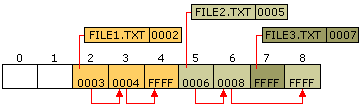
- Circular pointers.
chkdsk utility can detect and attempts to fix the invalid reference by scanning for a valid value for the offending block / referring to FAT2.
- Lost cluster - File does not exist in directory, but clusters are still allocated.
chkdsk asks if you want these files to be recovered (by creating file entries in a temporary directory).
- Cross-linked files - When the linked list of clusters collide.
chkdsk will attempt to separate the link but usually the recovered data is corrupted.
- Bad cluster - when a cluster fails the CRC, it indicates that the data inside the cluster is corrupted.
Mark the cluster as BAD and skip (and never use) the cluster. File is likely corrupted as a result.
- Bad file attributes.
Easily fixed.
- Invalid cluster link. When the target cluster does not exist or is BAD.
Remedy is similar to circular links and cross-linked files. Attempt to find the correct target or remove the offending link.
CS2106 Tutorial 7
By Chen Minqi