Python 101
Chris Gregory
Software Engineer
@ ISI Technology
Grant Eagon
UX Development Lead
@ BOLT System
Instructors
What can I expect?
- Understand basic programming concepts
- Read and write Python scripts
- Have a solid foundation to continue learning Python
- One step closer to a marketable skill
Today's Agenda
- Overview of Python
- Show you how to run Python scripts
- Introduce you fundamental concepts of Python
Prerequisites
- Differential Calculus
- Liner Algebra
- Web Basics 101, 102, 103, 104, 105
- Object Oriented Programming
- GitHub
Only kidding!
This course has NO hard requirements. We do however recommend the following:
Why Programming?
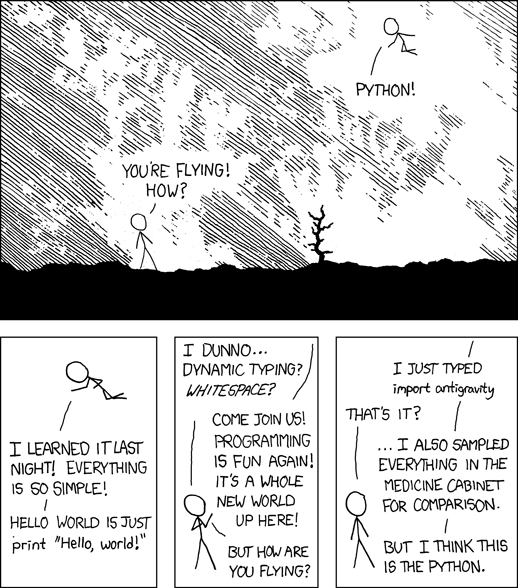
Why Python?
Easy To Read
print "Hello, World!"class Hello {
public static void main (String[] args) {
System.out.println ("Hello, world.");
}
}Vs.
Built with Python
The Python Language
- High-level language
- Other languages other high-level languages you might have heard of are C++, PHP, and Java
-
Low-level languages
- sometimes referred to as machine languages or assembly languages
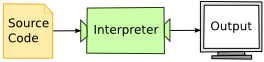

Interpreted
Compiled
$ python
Python 2.5.1 (r251:54863, May  2 2007, 16:56:35)
[GCC 4.1.2 (Ubuntu 4.1.2-0ubuntu4)] on linux2
Type "help", "copyright", "credits" or "license" for more information.
>>> print 1 + 1
2
Shell Mode
$ python firstprogram.py
2
Script Mode
# firstprogram.py
print 1 + 1
What is a program?
- Input: Get data from the keyboard, a file, or some other device
- Output: Display data on the screen or send data to another device
- Math: Perform basic mathematical operations like addition and multiplication
- Conditional Execution: Check for certain conditions and execute the appropriate sequence of statements.
- Repetition: Perform some action repeatedly, usually with some variation.
What is debugging?
- Syntax errors
- Runtime errors
- Semantic errors
Types of errors (or "bugs")
Errors in computer programs are referred to as "bugs"
The process of tracking them down and fixing them is known as "debugging"
Syntax Errors
Syntax refers to the structure of a program and the rules about that structure.
For example, in English, a sentence must begin with a capital letter and end with a period.
this sentence contains a syntax error.
So does this one
Runtime errors
The second type of error is a runtime error, so called because the error does not appear until you run the program.
These errors are also called exceptions because they usually indicate that something exceptional (and bad) has happened.
Semantic Errors
The third type of error is the semantic error.
If there is a semantic error in your program, it will run successfully, in the sense that the computer will not generate any error messages, but it will not do the right thing. It will do something else. Specifically, it will do what you told it to do.
Your First Program
$ python
Python 2.5.1 (r251:54863, May  2 2007, 16:56:35)
[GCC 4.1.2 (Ubuntu 4.1.2-0ubuntu4)] on linux2
Type "help", "copyright", "credits" or "license" for more information.
>>>
>>> print "Hello world!"
Hello World!Values and Data Types
- Integers (Whole numbers)
- (e.g. 1, 5, 34533)
- Floats (Numbers with decimal places)
- (e.g. 1.0, 78.234, 3.14)
- Strings
- (e.g. "Hello World!", "I am 28 years old")
- Boolean
- (e.g. True, False)
- type()
- A built-in function that tells you the type
Variables
message = "How are you?"
x = 5
pi = 3.14159
Incorrect assignment
# don't do this
5 = x
Assignment Statement
>>> type(message)
<type 'str'>
>>> type(n)
<type 'int'>
>>> type(pi)
<type 'float'>
Variable types
Variable names and keywords
- Variable names can be arbitrarily long
- Can contain both letters and numbers
- Must start with a letter
- Uppercase is legal, but convention is lowercase
- Variables are case-sensitive
- Chris and chris are different variables.
- The underscore character ( _ ) can appear in a name
- e.g.
- my_name
- price_of_tea_china
- e.g.
Illegal Variable Names
>>> 76trombones = "big parade"
SyntaxError: invalid syntax
>>> more$ = 1000000
SyntaxError: invalid syntax
>>> class = "Computer Science 101"
SyntaxError: invalid syntax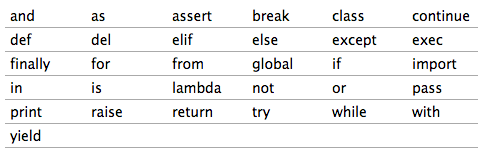
Reserved Keywords
Choosing Variable Names
Choose meaningful names for your variables. Choose clarity over brevity.
Which makes more sense?
x = "Bob"
or
name = "Bob"
number_of_students = 5
or
num = 5
Variable Excercies
- Store your own version of the message "Hello World" in a variable, and print it
- Store a message in a variable and then print that message
- Store a new message in the same variable and then print that new message
Please feel free to work together on any of these exercises!
Statements
A statement is an instruction that the Python interpreter can execute.
We've seen two kinds of statements so far: print and assignment
print 1
x = 2
print x
produces the output:
1
2
Evaluating expressions
An expression is a combination of values, variables, and operators. If you type an expression on the command line, the interpreter evaluates it and displays the result:
>>> 1 + 1
2
>>> x = 1 + 3
>>> x
4The evaluation of an expression produces a value, which is why expressions can appear on the right hand side of assignment statements. A value all by itself is a simple expression, and so is a variable.
Python as a calculator
- Addition (+)
- Subtraction (-)
- Multiplication (*)
- Exponents (**)
- Division (/)
Operations on strings
In general, you cannot perform mathematical operations on strings, even if the strings look like numbers.
# The following are NOT VALID
message = "Hello"
message - 1
"Hello" / 123
message * "Hello"
"15" * 2
Interestingly, the "+" operator does work with strings although it doesn't do what you might expect
fruit = "banana"
baked_good = " nut bread"
print fruit + baked_good
String Excercise
- Store your first name and last name in separate variables. Then combine them to print out your full name.
- Use concatenation to make a sentence that includes your first and last name and store it in a variable.
- Print the sentence
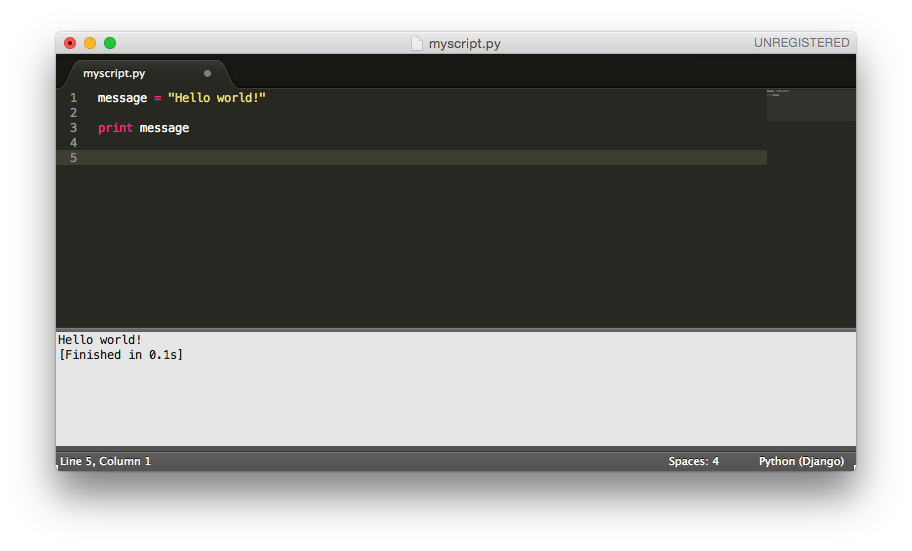
Using a Text Editor
Click here to:
Functions
In the context of programming, a function is a named sequence of statements that performs a desired operation.
This operation is specified in a function definition
def NAME( LIST OF PARAMETERS ):
    STATEMENTS
def say_hello():
print "Hello"
say_hello()Defining a Function
-
Function blocks begin with the keyword def followed by the function name and parentheses ( ( ) ).
-
Any input parameters or arguments should be placed within these parentheses. You can also define parameters inside these parentheses.
-
The first statement of a function can be an optional statement - the documentation string of the function or docstring.
-
The code block within every function starts with a colon (:) and is indented.
-
The statement return [expression] exits a function, optionally passing back an expression to the caller. A return statement with no arguments is the same as return None.
Function Examples
def new_line():
    print
print "First Line."
new_line()
print "Second Line."# output
First Line.
Second Line.print "First Line."
new_line()
new_line()
new_line()
print "Second Line."def three_lines():
new_line()
new_line()
new_line()
# since this line is not indented
# python knows it's not part of the
# function definition
print "First Line."
three_lines()
print "Second Line."
- You can call the same procedure repeatedly. In fact, it is quite common and useful to do so
- You can have one function call another function; in this case three_lines calls new_line
Flow of Execution
- A program doesn't always run top to bottom
- A function needs to be defined before being called
- When reading a program, don't read from top to bottom. Instead, follow the flow of execution
def new_line():
    print

def three_lines():
    new_line()
    new_line()
    new_line()

print "First Line."
three_lines()
print "Second Line."
1
2
9
3
5
7
4
6
8
Parameters
- Most functions require arguments
- These are values that control how the function does its job
- For example, if you want to find the absolute value of a number, you have to indicate what the number is:
>>> abs(5)
5
>>> abs(-5)
5
>>> pow(2, 3)
8
>>> pow(7, 4)
2401

>>> max(7, 11)
11
>>> max(4, 1, 17, 2, 12)
17
>>> max(3 * 11, 5**3, 512 - 9, 1024**0)
503
Parameters and the Import Statement
# example.py

# user-defined function with a parameter
def print_twice(param):
    print param, param
>>> from example import print_twice
>>> print_twice('Spam')
Spam Spam
>>> print_twice(5)
5 5
>>> print_twice(3.14159)
3.14159 3.14159
# We can also enter expressions for arguements
>>> print_twice('Spam' * 4)
SpamSpamSpamSpam SpamSpamSpamSpam
>>> print_twice(abs(-7))
7 7
>>> print_twice(max(3, 1, abs(-11), 7))
11 11Function Exercises:
- Write a function that takes in a person's name and prints out a greeting
- The greeting must be at least three lines and the person's name must be in each line.
- Use your function to greet at least three different people.
- Write a function that take in two numbers and adds them together. Make your function print out a sentence showing the two numbers and the result.
- Call your function with three different sets of numbers.
PEP 8 - Style Guide
CHS Codecamp Python 101
By chrisclmsn
CHS Codecamp Python 101
Intro to Python 101