Python 101
Class 2
Today's Agenda
- Write programs that make decisions
- Dive into more python concepts
- More on Strings
- Introduction to sequence data
- Iterations
- Lists
- Dictionaries
- Learn to build a simple game
Quick Review
- Data Types
- Integers, floats, strings, booleans
- Variables
- A name that refers to a value
- Functions
- Named sequence of statments
def print_type(variable):
    variable_type = type(variable)
    print variable_type

print_type(1)
print_type(3.14)
print_type("Hello World!")
print_type(True)
Conditionals
The modulus operator
>>> quotient = 7 / 3
>>> print quotient
>>> 2
>>> remainder = 7 % 3
>>> print remainder
>>> 1
Boolean values and expressions
An expression that evaluates to a boolean value.
Logical operators
There are three logical operators:
- and
- or
- not
n = 9

n > 0 and x < 10

n % 2 == 0 or n % 3 == 0

not(n > 0)
Conditionals
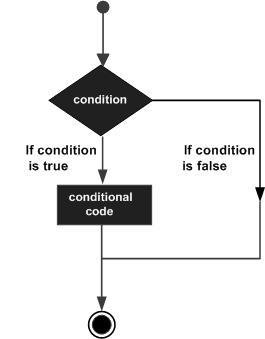
Useful programs make decisions
if x > 0:
    print "x is positive"
if BOOLEAN EXPRESSION:
STATEMENTSAlternative execution
if BOOLEAN EXPRESSION:
    STATEMENTS
else:
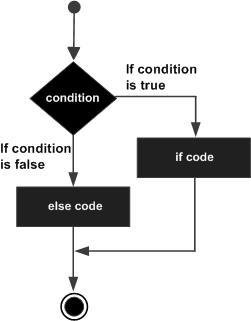
STATEMENTSA second form of the if statement is alternative execution, in which there are two possibilities and the condition determines which one gets executed
Excercise
Write a function named is_divisible_by_3 that takes a single integer as an argument and prints "
this number is divisible by 3" and "This number is not divisible by three" otherwise. Do the same for is_divisible_by_5
Next, generalize the first two functions into a function named is_divisible_by_n(x, n) that takes two integer arguments and prints out whether the first is divisible by the second.
Solutions
def is_divisible_by_3(x):
if x % 3 == 0:
print "This number is divisible by 3"
else:
print "This number is not divisible by 3"
def is_divisible_by_5(x):
if x % 5 == 0:
print "This number is divisible by 5"
else:
print "This number is not divisible by 5"
def is_divisible_by_n(x, n):
if x % n == 0:
print "This number is divisible by", n
else:
print "This number is not divisible by", n
is_divisible_by_3(9)
is_divisible_by_5(12)
is_divisible_by_n(40, 10)Chained conditionals
Sometimes there are more than two possibilities and we need more than two branches.
if BOOLEAN EXPRESSION:
STATEMENTS
elif BOOLEAN EXPRESSION:
STATEMENTS
else:
STATEMENTSNested Conditionals
One conditional can also be nested within another.
if BOOLEAN EXPRESSION:
if BOOLEAN EXPRESSION:
STATEMENTS
if BOOLEAN EXPRESSION:
    STATEMENTS
else:
STATEMENTSThe return statement
The return statement allows you to terminate the execution of a function.
def print_str(my_string):
    if not isinstance(my_string, str):
        return # string only
    print my_string
Keyboard input
Getting data from the user
my_input = raw_input()def is_raining():
print "Is it raining outside? (y/n) ")
# ask the user about the weather
response = raw_input()
if response == 'y':
print "Remember to take your umbrella"
else:
print "Enjoy your day"mark = int(input("What is your mark: "))
if mark >= 50:
print("Pass")
else:
print("Fail")age = int(input("Enter your age: "))
if age >= 13:
print("You are old enough to have a paper round")
else:
print("You are too young to have a paper round")# accepts input as string
raw_input()
# evaluates input first
input() Type conversion
Each python type comes with a built-in command that attempts to convert values of another type into that type.
Excercise
Write a function that asks the user how old they are. Tell them if they are old enough to vote.
Then extend the program tell them how many years it is until they can retire (assume at age 65).
# HINTS

# Use the input() function to get their age

my_variable = input("ask for input")

# use an alternative execution conditional

if BOOLEAN EXPRESSION:
    STATEMENT
else:
    STATEMENT
Solution
age = input("How old are you? ")

if age >= 18:
    print "You can vote!"
else:
    years_to_vote = 18 - age
    print "Aww man.. you can vote in " + str(years_to_vote) + " years"

years_until_retirement = str(65 - age)

print "You have " + years_until_retirment + " years until you retire"
Functions
with return values
Functions
with return values
biggest = max(3, 7 , 2, 5)
x = abs(3 - 11) + 10
>>> 18
def area(radius):
temp = 3.14159 * radius**2
return tempProgram development
How to deal with increasingly complex functions.
def distance(x1, y1, x2, y2):
    return 0.0
def distance(x1, y1, x2, y2):
    dx = x2 - x1
    dy = y2 - y1
    dsquared = dx**2 + dy**2
    result = dsquared**0.5 # or Math.sqrt(dsquared)
    return result
Key Points
- Make small changes
- Use temporary variables
- Refactor or reduce code
Excercises
Write a compare function that returns 1 if a > b, 0 if a == b and -1 if a < b
Write the function is_even(n) that takes an integer as an argument and returns True if the argument is an even number and False if it is odd
Solutions
def compare(a, b):
    if a > b:
        return 1
    if a < b:
        return -1
    return 0


print compare(1, 5)
print compare(9, 5)
print compare(5, 5)
def is_even(n):
return n % 2 == 0
def is_odd(n):
return n % 2 != 0Iteration
Computers are often used to automate repetitive tasks.
The while statement
def countdown(n):
    while n > 0:
        print n
        n = n - 1
    print "Blastoff!"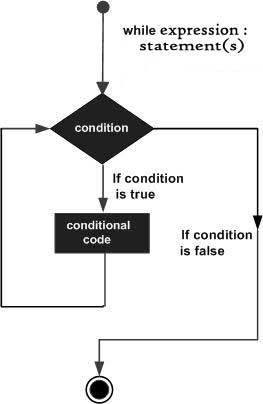
while EXPRESSION:
    STATEMENTS
Excercise
x = 100
while x <= 200:
    if x % 2 == 0:
        print x
    x += 1
Create a while loop that prints every even number from 100 to 200 (include both)
# Hint:

x = 100
while EXPRESSION:
    if EXPRESSION:
        print x
    x += 1
Excercises
# Modify so that "Quack" and "Quack"
# are spelled correctly

prefixes = "JKLMNOPQ"
suffix = "ack"

for letter in prefixes:
    print letter + suffix
# create a function that accepts a string
# and returns a reversed version of that string

def reverse(s):
    reverse_string = ''

    # write your code here

    return reverse_string
# Encapsulate in a function named "count_letters"
# and generalize it so that it accepts the string
# and the letter as arguments
fruit = "banana"
count = 0
for char in fruit:
if char == 'a':
count += 1
print countStrings
A compound data type
fruit = "banana"
letter = fruit[1]
print letter
Solutions
# Solution 1

prefixes = "JKLMNOPQ"
suffix = "ack"

for letter in prefixes:
    if letter == 'O' or letter == 'Q':
        print letter + 'u' + suffix
    else:
        print letter + suffix


# Solution 2

def reverse(s):
    reversed_string = ''
    for letter in s:
        reversed_string = letter + reversed_string
    return reversed_string


# Solution 3

def count_letters(string, letter):
    count = 0
    for char in string:
        if char == letter:
            count += 1
    print count
Lists
A list is an ordered set of values, where each value is identified by an index
[10, 20, 30, 40]

["spam", "bungee", "swallow"]

["orange", 3, 2.5, [1,2,"dog"]]
Excercises
- Create a function only_evens(numbers) that accepts a list as a parameter, removes all odd numbers and returns a new list with only even numbers
- Write a loop that traverses the following list and prints the length of each item:
- ['spam!', 'one', ['apple','orange'], [1,2,3]]
Solutions
def is_even(n):
    return n % 2 == 0


def only_evens(number_list):
    evens = []
    for number in number_list:
        if is_even(number):
            evens.append(number)
    return evens


print only_evens([1, 2, 3, 4, 5])


my_list = ['spam!', 'one', ['apple', 'orange'], [1, 2, 3]]

for item in my_list:
    print len(item)
Dictionaries
All of the compound data types we have studied thus far (strings, lists, tuples) are sequence types.
Sequence types use integers as indicies to access the values they contain within them.
Dictionaries are a different kind of compound type, specifically it is a mapping type.
Excercise
Save a really long string to a variable.
Create a dictionary that contains a key for each letter in the string and references the count of how many times that letter is present.
# Example

string = "my string"

# output
{"m": 1, "y" : 1, "s" : 2, "t" : 1, "r" : 1, "n" : 1, "g" : 1}
Assignment
# to get a random number

from random import randint
random_number = randint(1, 100)- Create a number guessing game
- Game generates a random number between 1 and 100
- The game asks the user for a number
- If the number is too high, output "lower"
- If the number is too low, output "higher"
- If the user guesses correctly, output "You win"
- If the user guesses incorrectly more than 5 times, output "You lose!"
-
Extra challenge:
- Make three different levels of difficulty
- Hard (3 guesses), normal (5 guesses), easy (10 guess)
- Prompt the user for the game difficulty first
CHS Codecamp Python 101 - Class 2
By chrisclmsn