


Content ITV PRO
This is Itvedant Content department
Learning Outcome
5
Relate DNS to real-world internet usage (like browsing websites)
4
Identify common DNS record types and their purpose
3
Describe how domain names map to IP addresses
2
Describe how domain names map to IP addresses
1
Explain why DNS is needed despite IP addressing
Topic Name-Recall(Slide3)
Before DNS, you learned:
192.168.1.1 or 8.8.8.8)Hook/Story/Analogy(Slide 4)
“Phone Contacts System”
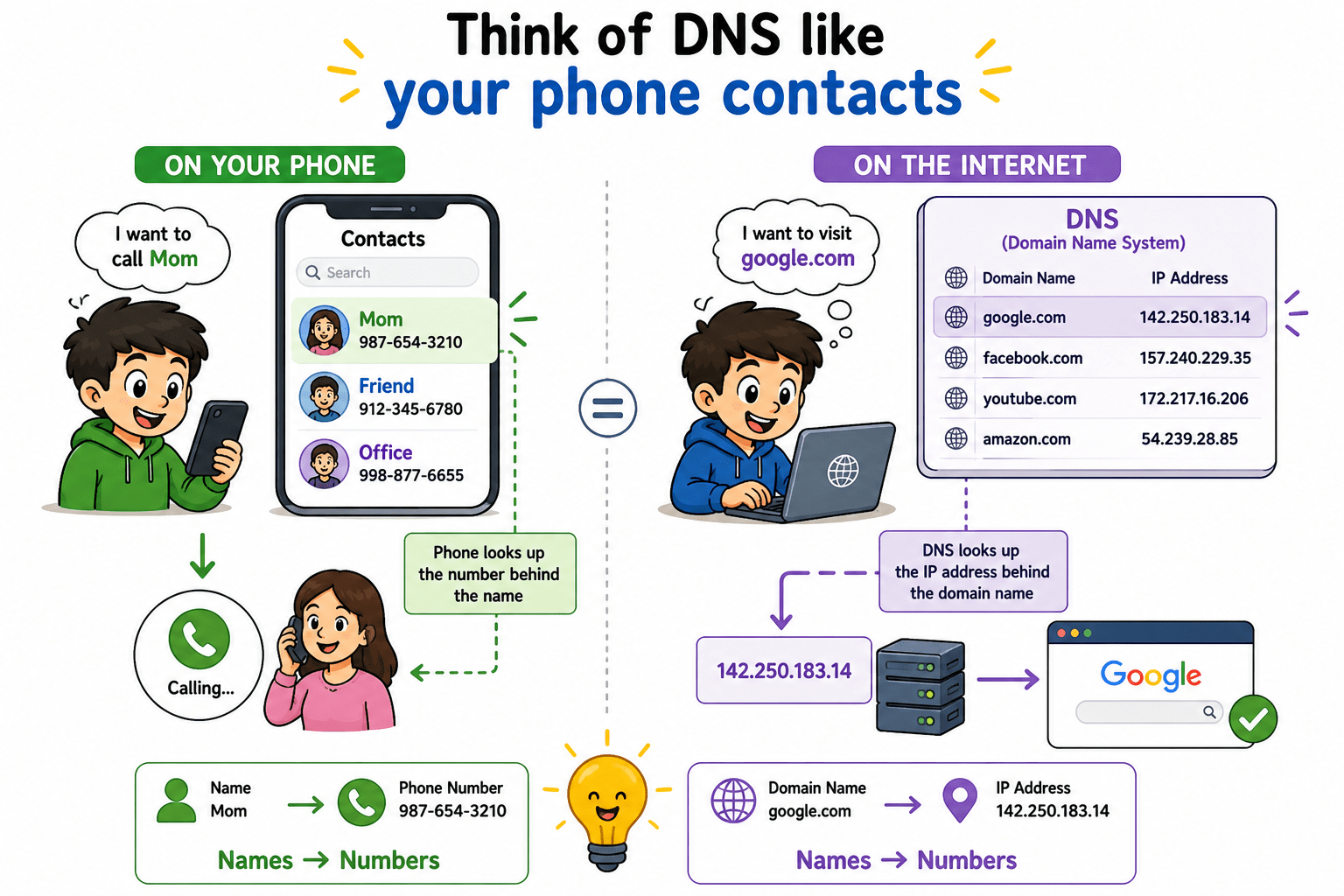
Think of DNS like your phone contacts.
Similarly:
google.com142.250.183.14Transition from Analogy to Technical Concept(Slide 5)
In the analogy:
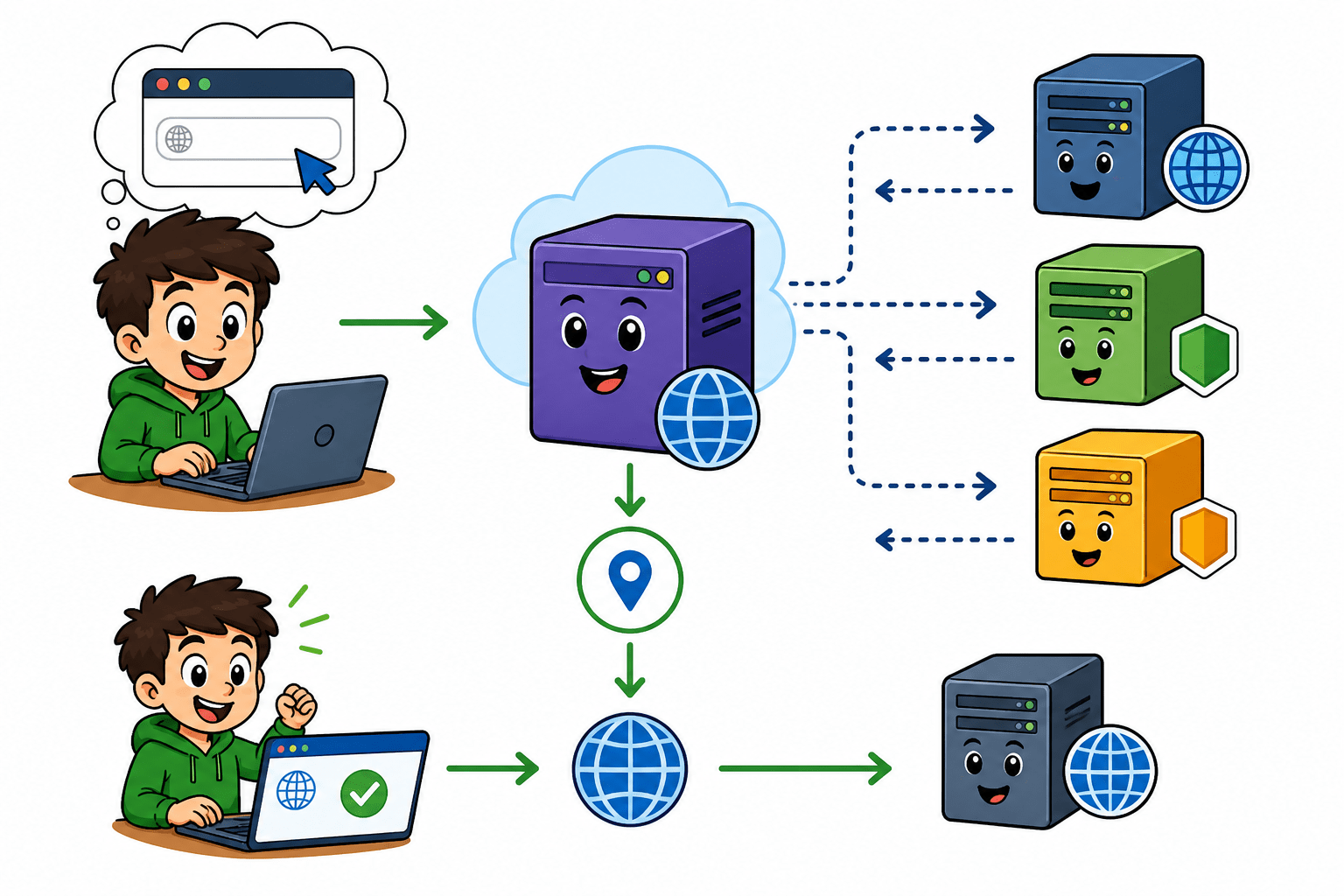
Now, instead of a simple contact list in your phone, the internet uses a network of DNS servers to perform this lookup. When you enter a domain name, your system sends a request to these servers to find the corresponding IP address. This process happens within milliseconds, even though it involves multiple steps behind the scenes.
So while the analogy is simple, in reality DNS is a distributed and hierarchical system that efficiently connects human-friendly names to machine-level addresses.
Core Concepts (Slide 6)
What is DNS?
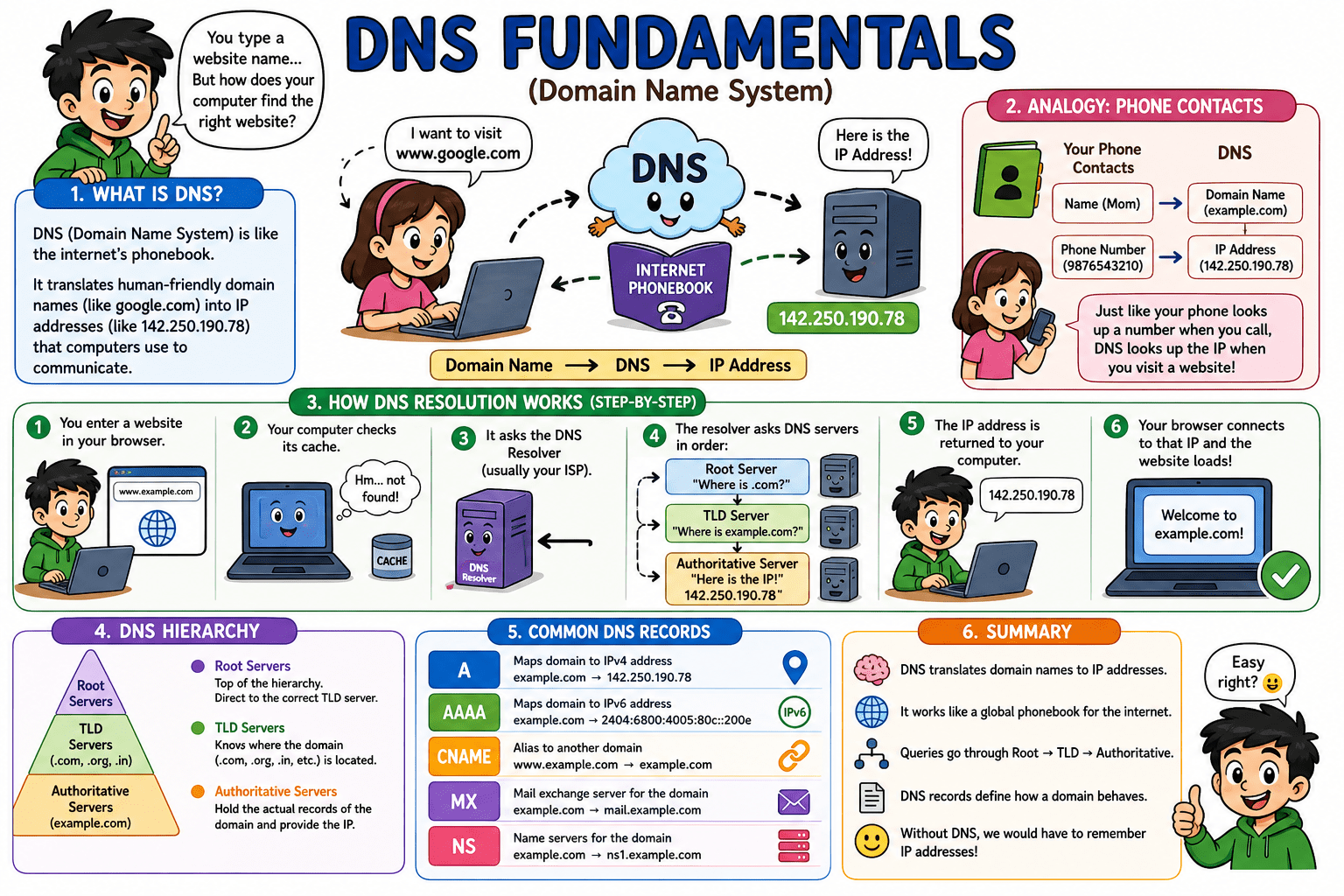
DNS (Domain Name System) is the internet's phonebook. Computers communicate using IP addresses (numbers), but humans prefer names like google.com. DNS automatically translates domain names into IP addresses so your browser can find the right server. DNS (Domain Name System) is the system that converts human-friendly names (like google.com) into machine-friendly IP addresses (like 142.250.183.14).
How DNS Works (Domain → IP Resolution)
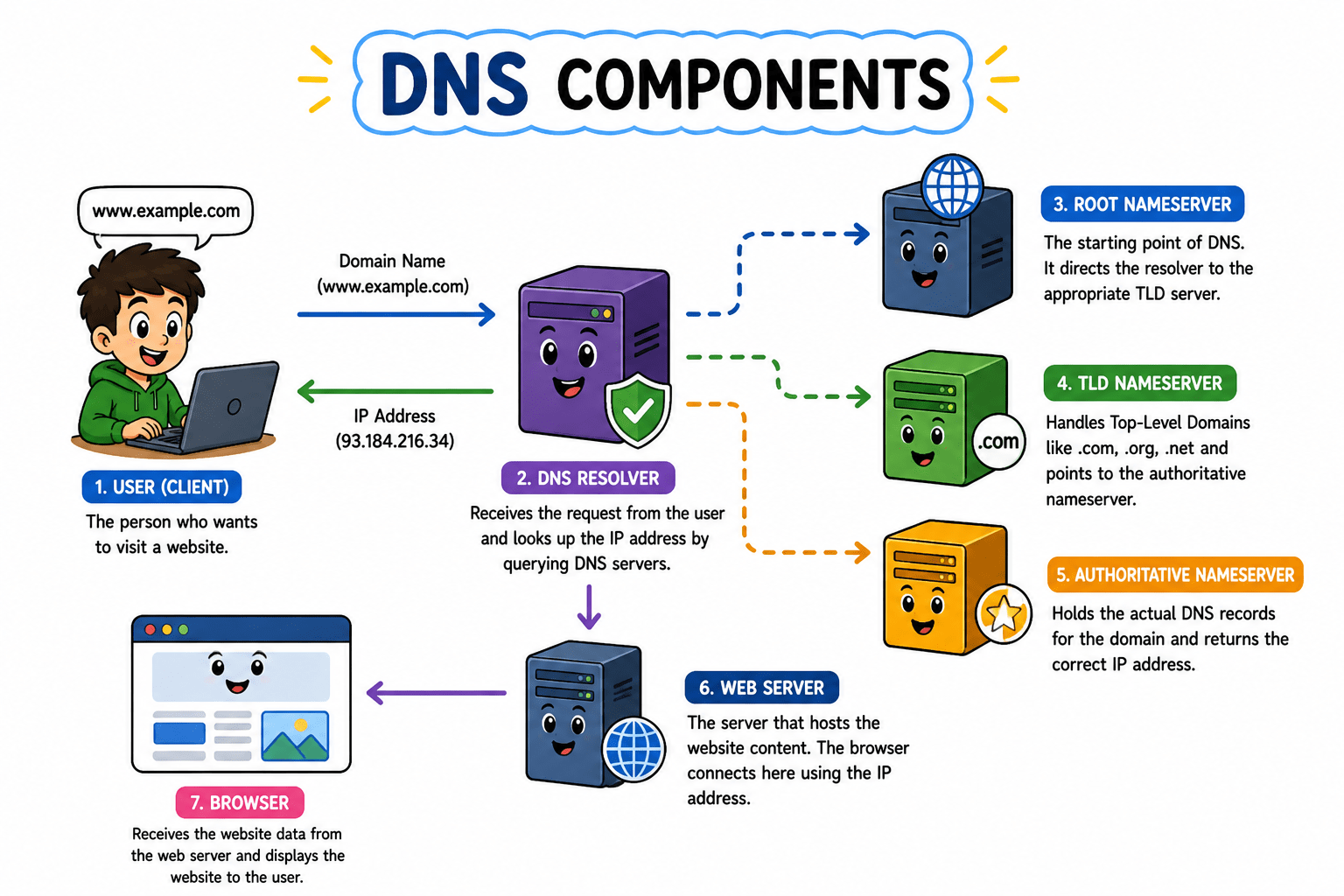
Here’s what happens when you type a URL:
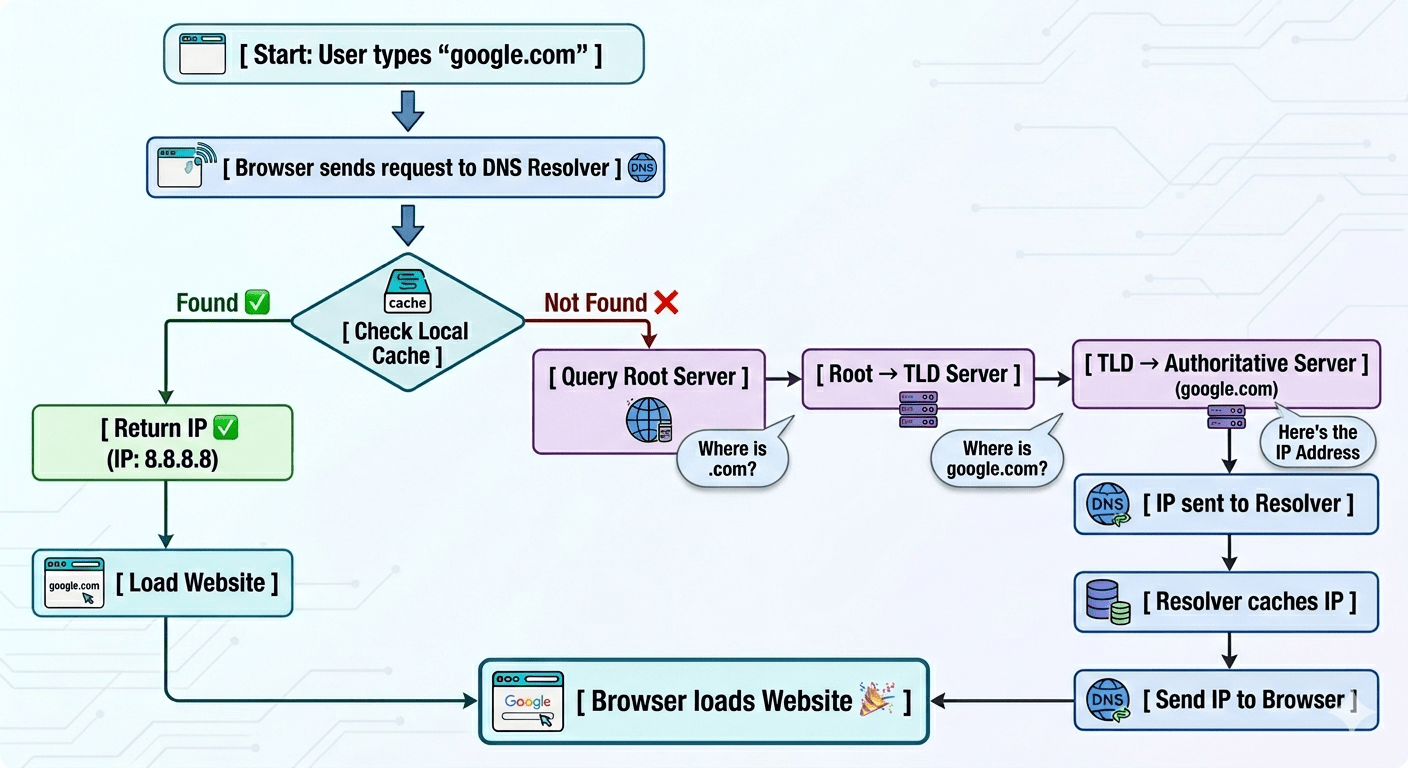
You type google.com in browser
Your system asks a DNS Resolver:
“Hey, what’s the IP for this?”
Resolver checks cache (if already known)
Core Concepts (Slide 7)
If not found, it goes on a journey:
Root Server → “Where is .com?”
TLD Server → “Where is google.com?”
Authoritative Server → “Here’s the IP”
IP comes back → browser loads the website
Core Concepts (.....Slide N-3)
DNS Components
TLD Server (.com, .org, etc.):-The TLD (Top-Level Domain) Server manages domain extensions like .com, .org, and .net. It helps narrow down the search by pointing to the authoritative server for the specific domain. It acts like a category filter in the DNS system
Core Concepts (.....Slide N-3)
Authoritative Server (Final Authority):-The Authoritative DNS Server holds the actual DNS records, including the correct IP address of the domain. It provides the final answer to the resolver. This is the only server that gives the exact information needed to connect to the website.
Your Device → Resolver → Root Server → TLD Server→ Authoritative Server → IP Address
Core Concepts (.....Slide N-3)
Common DNS Record Types
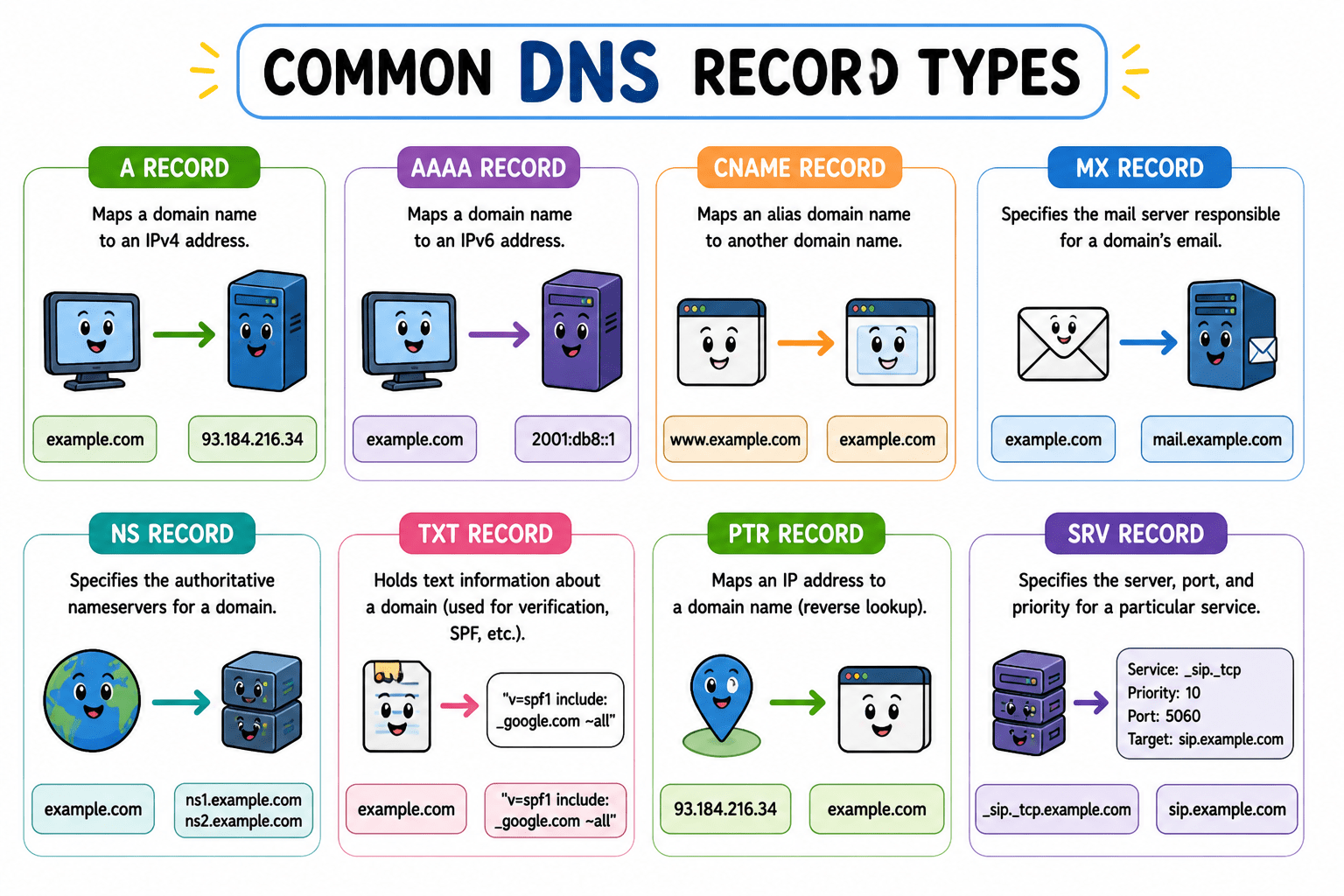
DNS records are instructions stored on the authoritative server. Each record type answers a different question about the domain — where is the website, where do emails go, what is the IPv6 address, etc. The Common records are as follows:-
A Record
An A (Address) Record maps a domain name to its IPv4 address, allowing browsers to locate the correct server. It is the most basic and commonly used DNS record. Without it, your domain wouldn’t know where to point.
AAAA Record:An AAAA Record maps a domain name to an IPv6 address, which is the newer version of IP addressing. It performs the same function as an A record but supports a much larger address space. It is essential for modern internet infrastructure.
Core Concepts (.....Slide N-3)
CNAME Record:A CNAME (Canonical Name) Record is used to create an alias for a domain, pointing it to another domain instead of an IP address. This helps manage multiple domain names easily without duplicating records. It’s commonly used for subdomains like www.
MX Record:An MX (Mail Exchange) Record specifies the mail servers responsible for receiving emails for a domain. It ensures emails are routed to the correct server instead of getting lost in the void. Without MX records, email communication wouldn’t work properly.
Example :-
Core Concepts (.....Slide N-3)
Example :-
Summary
5
DNS records define how domains behave (web, mail, etc.)
4
DNS queries go through a structured hierarchy:
3
It works like a global phonebook system
2
DNS solves this by mapping names → IPs
1
IP addresses identify devices, but they’re hard to remember
Quiz
Which DNS server is the FIRST to receive your query when you type a domain name?
A. Root Server
B. TLD Server
C. Authoritative Server
D. Recursive Resolver
Quiz-Answer
Which DNS server is the FIRST to receive your query when you type a domain name?
A. Root Server
B. TLD Server
C. Authoritative Server
D. Recursive Resolver
Quiz
If you visit the same website twice, why is the second DNS lookup faster?
A. The root server remembers you
B. The resolver uses its cache
C. The TLD server stores your IP
D. The authoritative server sends a faster response
Quiz-Answer
If you visit the same website twice, why is the second DNS lookup faster?
A. The root server remembers you
D. The authoritative server sends a faster response
C. The TLD server stores your IP
B. The resolver uses its cache
Quiz
Which part of a URL defines how data is transferred?
A. Domain name
B. Path
C. Protocol
D. Query string
Quiz-Answer
Which part of a URL defines how data is transferred?
A. Domain name
B. Path
D. Query string
C. Protocol
By Content ITV