
Content ITV PRO
This is Itvedant Content department
PayFlow AI-Assisted CI/CD Optimisation & Debugging
Business Scenario
Welcome back to the PayFlow Project.
In the previous lab, you learned how to monitor Jenkins pipelines, generate test reports, track failures, and analyse console logs. As a DevOps QA Engineer, your next responsibility is to use Artificial Intelligence (AI) to improve the efficiency of the CI/CD pipeline.
Pre-Lab Preparation
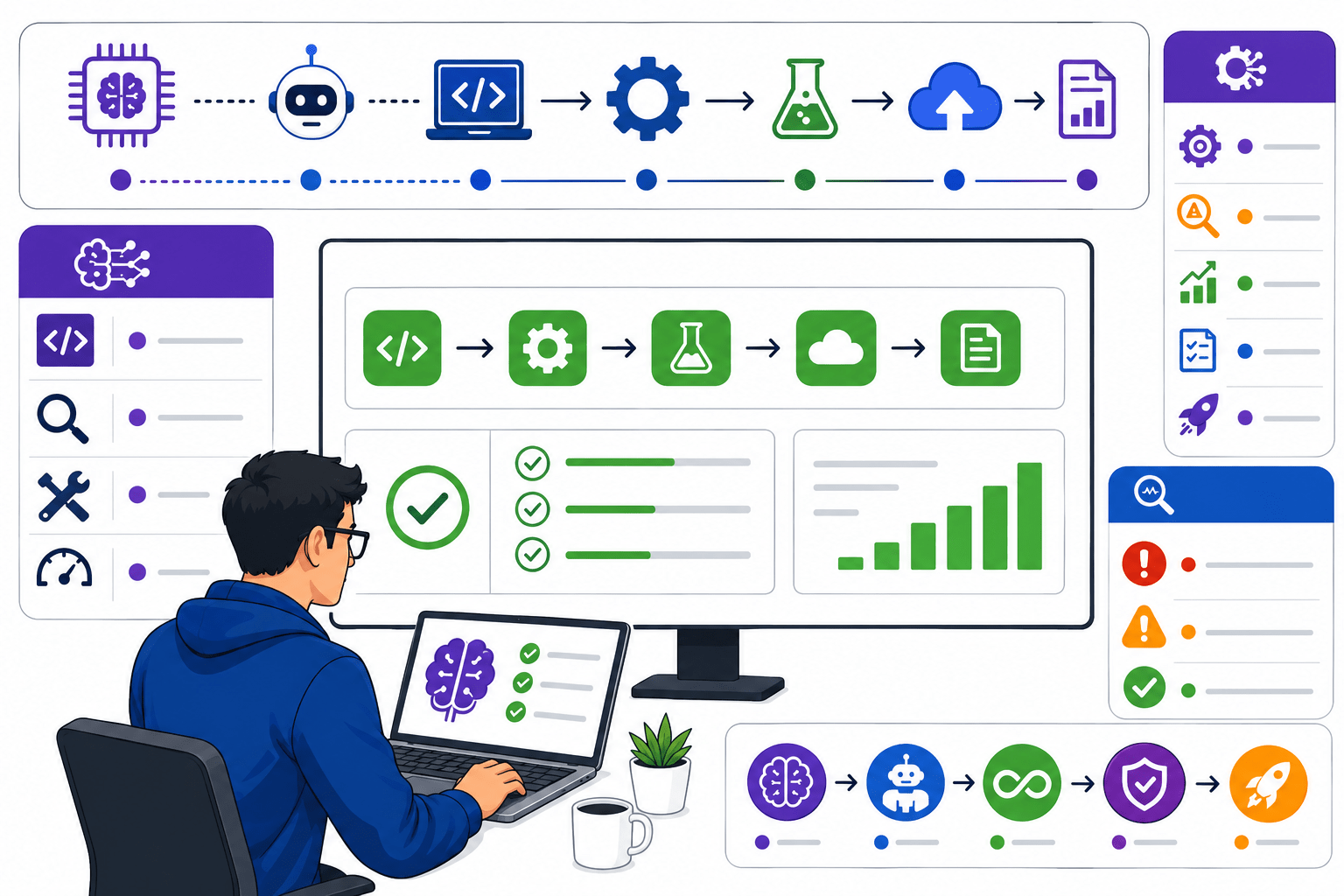
As your QA Manager, I want you to understand that modern DevOps teams use AI tools to reduce manual effort, identify pipeline issues faster, optimise workflows, and improve test execution. AI can assist in generating pipeline configurations, analysing build failures, suggesting fixes, and optimising automation strategies. In this lab, you will use AI tools to configure Jenkins pipelines, debug CI/CD failures, optimise pipeline workflows, and improve automation test efficiency. By the end of this lab, you will understand how AI enhances DevOps productivity and supports faster, more reliable software delivery.
Topic: DevOps for Q
1)Use AI for pipeline configuration
2)Debug CI/CD failures using AI
3)Optimise workflows
4)Improve test efficiency
git pull origin branchNameGit Pull
Task 1: Configure CI/CD Pipeline Using AI
Learning Objective
The objective of this task is to learn how Artificial Intelligence (AI) can assist in configuring a Jenkins CI/CD pipeline. You will understand how AI tools like ChatGPT and GitHub Copilot help generate Jenkins pipeline scripts, suggest best practices, identify configuration mistakes, and reduce manual effort while setting up the PayFlow CI/CD pipeline.
Understand AI in CI/CD Pipeline Configuration
1
Step Objective
Learn how AI assists DevOps engineers in configuring CI/CD pipelines.
What is AI-Assisted Pipeline Configuration?
AI-Assisted Pipeline Configuration is the process of using AI tools to automatically generate, improve, or validate Jenkins pipeline scripts and CI/CD workflows. AI helps developers and QA engineers create pipelines faster with fewer errors.
How Does It Work?
Open an AI tool (ChatGPT or GitHub Copilot).
Enter a pipeline-related prompt.
AI generates a Jenkins pipeline script.
Review the generated code.
Use the script in Jenkins.
Example (PayFlow Project)
Prompt:
"Generate a Jenkins pipeline to build the PayFlow Maven project and execute Selenium tests."
AI generates a basic Jenkinsfile containing Checkout, Build, Test, and Report stages.
Step Objective
Learn how AI assists DevOps engineers in configuring CI/CD pipelines.
What is AI-Assisted Pipeline Configuration?
AI-Assisted Pipeline Configuration is the process of using AI tools to automatically generate, improve, or validate Jenkins pipeline scripts and CI/CD workflows. AI helps developers and QA engineers create pipelines faster with fewer errors.
How Does It Work?
Open an AI tool (ChatGPT or GitHub Copilot).
Enter a pipeline-related prompt.
AI generates a Jenkins pipeline script.
Review the generated code.
Use the script in Jenkins.
Example (PayFlow Project)
Prompt:
"Generate a Jenkins pipeline to build the PayFlow Maven project and execute Selenium tests."
AI generates a basic Jenkinsfile containing Checkout, Build, Test, and Report stages.
Activity
Introduce AI tools.
Demonstrate prompt writing.
Show a generated Jenkins pipeline.
Activity
Open ChatGPT.
Generate a sample Jenkinsfile.
Review the generated script.
Generate a Jenkins Pipeline Using AI
2
What is AI Pipeline Generation?
AI Pipeline Generation uses AI tools to create a Jenkinsfile based on project requirements automatically.
How Does It Work?
Describe the project requirements.
Ask AI to generate the Jenkinsfile.
Review the generated stages.
Modify the script if required.
Save the Jenkinsfile.
Example (PayFlow Project)
Prompt:
"Create a Jenkins Declarative Pipeline for the PayFlow project using Maven and Selenium."
AI generates:
Checkout
Build
Test
Publish Reports
What is AI Pipeline Generation?
AI Pipeline Generation uses AI tools to create a Jenkinsfile based on project requirements automatically.
How Does It Work?
Describe the project requirements.
Ask AI to generate the Jenkinsfile.
Review the generated stages.
Modify the script if required.
Save the Jenkinsfile.
Example (PayFlow Project)
Prompt:
"Create a Jenkins Declarative Pipeline for the PayFlow project using Maven and Selenium."
AI generates:
Checkout
Build
Test
Publish Reports
Activity
Demonstrate pipeline generation.
Explain each pipeline stage.
Activity
Generate the pipeline.
Review the stages.
Save the script.
Review and Validate AI Suggestions
3
What is AI Validation?
AI-generated code should always be reviewed to ensure it matches project requirements and follows best practices.
How Does It Work?
Review the Jenkinsfile.
Check pipeline stages.
Verify plugins.
Validate syntax.
Correct any issues.
Example (PayFlow Project)
The AI-generated pipeline includes all required stages but misses the JUnit report publishing step. The QA Engineer updates the script before using it.
Activity
Explain code review.
Demonstrate validation.
Activity
Compare AI output with project requirements.
Identify missing configurations.
Configure the AI-Generated Pipeline in Jenkins
4
What is Pipeline Configuration?
Pipeline Configuration is the process of adding the Jenkinsfile to Jenkins so the pipeline can be executed automatically.
How Does It Work?
Open Jenkins.
Create a Pipeline Job.
Paste the Jenkinsfile.
Save the configuration.
Run the pipeline.
Example (PayFlow Project)
The AI-generated Jenkinsfile is added to the PayFlow Pipeline Job and executed successfully.
What is Pipeline Configuration?
Pipeline Configuration is the process of adding the Jenkinsfile to Jenkins so the pipeline can be executed automatically.
How Does It Work?
Open Jenkins.
Create a Pipeline Job.
Paste the Jenkinsfile.
Save the configuration.
Run the pipeline.
Example (PayFlow Project)
The AI-generated Jenkinsfile is added to the PayFlow Pipeline Job and executed successfully.
Activity
Demonstrate pipeline configuration.
Explain Jenkins Pipeline settings.
Activity
Compare AI output with project requirements.
Identify missing configurations.
Activity
Configure the pipeline.
Save the Jenkins Job.
Execute the pipeline.
Verify AI Pipeline Execution
5
What is Pipeline Verification?
Pipeline Verification ensures that all pipeline stages execute successfully without configuration errors.
How Does It Work?
Run the pipeline.
Monitor each stage.
Check build status.
Review reports.
Record observations.
Example (PayFlow Project)
The PayFlow pipeline completes:
Checkout ✔
Build ✔
Selenium Tests ✔
Reports ✔
Build Status: SUCCESS
What is Pipeline Verification?
Pipeline Verification ensures that all pipeline stages execute successfully without configuration errors.
How Does It Work?
Run the pipeline.
Monitor each stage.
Check build status.
Review reports.
Record observations.
Example (PayFlow Project)
The PayFlow pipeline completes:
Checkout ✔
Build ✔
Selenium Tests ✔
Reports ✔
Build Status: SUCCESS
Activity
Demonstrate pipeline execution.
Explain build verification.
Activity
Compare AI output with project requirements.
Identify missing configurations.
Execute the pipeline.
Verify each stage.
Record results.
Task 2: Debug CI/CD Failures Using AI
What is AI-Based Debugging?
AI-Based Debugging uses AI tools to analyse build logs, error messages, and pipeline failures to identify the root cause and recommend possible solutions quickly.
How Does It Work?
Copy the Jenkins error log.
Paste it into an AI tool.
AI analyses the error.
AI suggests the root cause.
Apply the recommended fix.
Example (PayFlow Project)
A Jenkins build fails because Maven dependencies are missing. The QA Engineer pastes the error into ChatGPT, which suggests checking the Maven configuration and dependency versions.
Understand AI-Based Debugging
1
What is AI-Based Debugging?
AI-Based Debugging uses AI tools to analyse build logs, error messages, and pipeline failures to identify the root cause and recommend possible solutions quickly.
How Does It Work?
Copy the Jenkins error log.
Paste it into an AI tool.
AI analyses the error.
AI suggests the root cause.
Apply the recommended fix.
Example (PayFlow Project)
A Jenkins build fails because Maven dependencies are missing. The QA Engineer pastes the error into ChatGPT, which suggests checking the Maven configuration and dependency versions.
Activity
Explain AI debugging.
Demonstrate error analysis.
Activity
Review a failed build.
Copy the error message.
Analyse it using AI.
What is AI Log Analysis?
AI Log Analysis is the process of using AI to understand Jenkins Console Logs and explain technical error messages in simple language.
How Does It Work?
Open Jenkins Console Output.
Copy the log.
Paste it into ChatGPT.
Review AI's explanation.
Identify the failed stage.
Example (PayFlow Project)
Console Output:
BUILD FAILURE
Could not resolve dependencies.
AI explains that the required Maven dependency is missing and suggests updating the pom.xml file.
Analyse Jenkins Console Logs Using AI
2
What is AI Log Analysis?
AI Log Analysis is the process of using AI to understand Jenkins Console Logs and explain technical error messages in simple language.
How Does It Work?
Open Jenkins Console Output.
Copy the log.
Paste it into ChatGPT.
Review AI's explanation.
Identify the failed stage.
Example (PayFlow Project)
Console Output:
BUILD FAILURE
Could not resolve dependencies.
AI explains that the required Maven dependency is missing and suggests updating the pom.xml file.
Activity
Demonstrate Console Log analysis.
Explain AI-generated explanations.
Activity
Analyse Console Logs.
Compare AI suggestions with actual errors.
Task 3: Identify Root Cause Using AI
Understand Postman
1
Task 5: Use Postman to Send Basic Requests
What is Postman?
Postman is an API testing tool used by developers and testers to send requests, receive responses, and validate API functionality.
It provides a user-friendly interface that allows users to test APIs without writing code.
API Testers use Postman to verify whether APIs are working correctly and returning the expected results.
Why is Postman used?
Postman helps testers:
Send API requests
View API responses
Validate API behavior
Test API functionality
Analyse request and response data
Perform manual API testing before automation
Features of Postman
Request Builder
Allows users to create and send API requests.
Response Viewer
Displays API responses received from the server.
Collections
Helps organise multiple API requests into a single collection.
Environment Variables
Allows reuse of values such as URLs and tokens.
Test Scripts
Allows validation of API responses using JavaScript.
How Postman Works
User enters API URL.
User selects request type.
Request is sent to the server.
Server processes the request.
Response is returned.
User validates the response.
Understand Postman
1
What is Postman?
Postman is an API testing tool used by developers and testers to send requests, receive responses, and validate API functionality.
It provides a user-friendly interface that allows users to test APIs without writing code.
API Testers use Postman to verify whether APIs are working correctly and returning the expected results.
Why is Postman used?
Postman helps testers:
Send API requests
View API responses
Validate API behavior
Test API functionality
Analyse request and response data
Perform manual API testing before automation
Features of Postman
Request Builder
Allows users to create and send API requests.
Response Viewer
Displays API responses received from the server.
Collections
Helps organise multiple API requests into a single collection.
Environment Variables
Allows reuse of values such as URLs and tokens.
Test Scripts
Allows validation of API responses using JavaScript.
How Postman Works
User enters API URL.
User selects request type.
Request is sent to the server.
Server processes the request.
Response is returned.
User validates the response.
What is Postman?
Postman is an API testing tool used by developers and testers to send requests, receive responses, and validate API functionality.
It provides a user-friendly interface that allows users to test APIs without writing code.
API Testers use Postman to verify whether APIs are working correctly and returning the expected results.
Why is Postman used?
Postman helps testers:
Send API requests
View API responses
Validate API behavior
Test API functionality
Analyse request and response data
Perform manual API testing before automation
Features of Postman
Request Builder
Allows users to create and send API requests.
Response Viewer
Displays API responses received from the server.
Collections
Helps organise multiple API requests into a single collection.
Environment Variables
Allows reuse of values such as URLs and tokens.
Test Scripts
Allows validation of API responses using JavaScript.
How Postman Works
User enters API URL.
User selects request type.
Request is sent to the server.
Server processes the request.
Response is returned.
User validates the response.
Send Basic Requests
2
What is a Request?
A Request is a message sent by a client to the server asking for information or requesting an action.
Example:
A patient wants to view the doctor's details.
The healthcare application sends a request to the server.
What is a Response?
A Response is the information returned by the server after processing a request.
Example:
The server returns the doctor's information requested by the patient.
GET Request
GET Request is used to retrieve information from the server.
Examples:
Retrieve Patient Details
Retrieve Doctor Information
Retrieve Appointment Information
Sample JSON Response
{
"doctorId": 101,
"doctorName": "Dr Rajesh Sharma",
"specialisation": "Cardiology",
"status": "Active"
}
Status Code
Indicates whether the request was successful.
200 → Success
404 → Resource Not Found
500 → Internal Server Error
Response Body
Contains actual information returned by the server.
Example:
Doctor information, patient information, and appointment details.
Response Time
Indicates how long the server took to process the request.
What is a Request?
A Request is a message sent by a client to the server asking for information or requesting an action.
Example:
A patient wants to view the doctor's details.
The healthcare application sends a request to the server.
What is a Response?
A Response is the information returned by the server after processing a request.
Example:
The server returns the doctor's information requested by the patient.
GET Request
GET Request is used to retrieve information from the server.
Examples:
Retrieve Patient Details
Retrieve Doctor Information
Retrieve Appointment Information
Sample JSON Response
{
"doctorId": 101,
"doctorName": "Dr Rajesh Sharma",
"specialisation": "Cardiology",
"status": "Active"
}
Status Code
Indicates whether the request was successful.
200 → Success
404 → Resource Not Found
500 → Internal Server Error
Response Body
Contains actual information returned by the server.
Example:
Doctor information, patient information, and appointment details Check the Response Time and Indicates how long the server took to process the request.
What is a Request?
A Request is a message sent by a client to the server asking for information or requesting an action.
Example:
A patient wants to view the doctor's details.
The healthcare application sends a request to the server.
What is a Response?
A Response is the information returned by the server after processing a request.
Example:
The server returns the doctor's information requested by the patient.
GET Request
GET Request is used to retrieve information from the server.
Examples:
Retrieve Patient Details
Retrieve Doctor Information
Retrieve Appointment Information
Sample JSON Response
{
"doctorId": 101,
"doctorName": "Dr Rajesh Sharma",
"specialisation": "Cardiology",
"status": "Active"
}
Status Code
Indicates whether the request was successful.
200 → Success
404 → Resource Not Found
500 → Internal Server Error
Response Body
Contains actual information returned by the server.
Example:
Doctor information, patient information, and appointment details Check the Response Time and Indicates how long the server took to process the request.
Great job!
In this lab, you learned the fundamentals of API Testing and how healthcare applications communicate using APIs. You explored Healthcare APIs, REST architecture, API endpoints, workflows, Postman installation, and basic API testing concepts. By completing this lab, you can understand healthcare APIs, explain REST architecture, identify API endpoints, understand the API communication flow, install and configure Postman, and prepare the environment for API testing.
Checkpoint
Next-Lab Preparation
Git Push
git push origin branchNameTopic: API Automation with Rest Assured
1)Setup and Configuration
2)Writing GET, POST, PUT, DELETE Tests 3)Validating Response Codes & Body
By Content ITV