Using React Native in a Polyglot App Ecosystem
Who am I?
David Guijarro
Team Lead Frontend & Mobile at Nect GmbH
@davguij // guijarro.dav@gmail.com
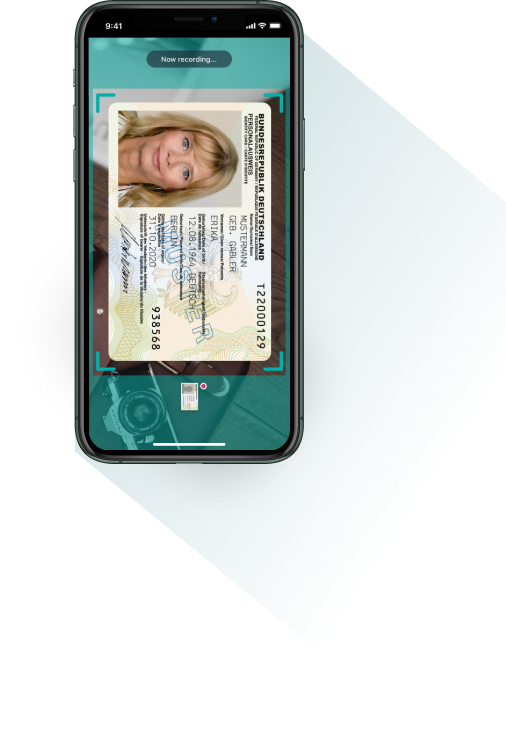
What do we do at Nect?

React Native

"Learn once, write anywhere"
Core components
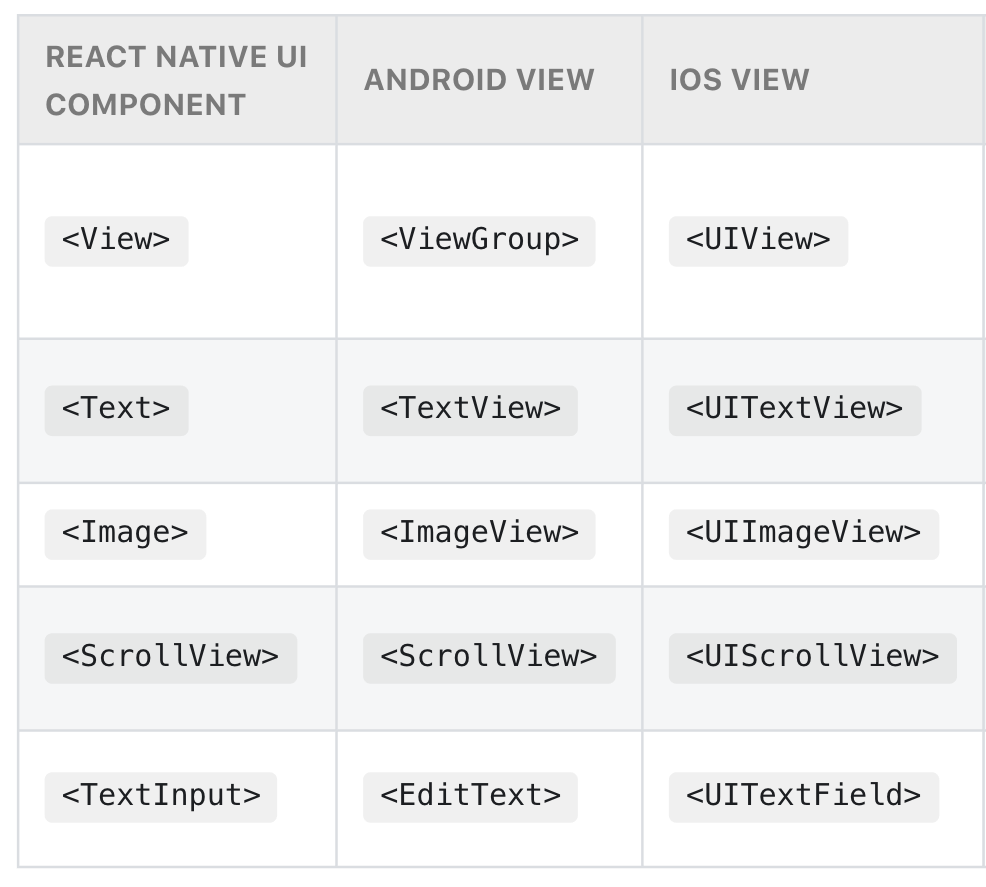
Transformed into native components
More https://reactnative.dev/docs/components-and-apis
import React from 'react';
import { Text, View } from 'react-native';

const HelloWorldApp = () => {
  return (
    <View style={{
        flex: 1,
        justifyContent: 'center',
        alignItems: 'center'
      }}>
      <Text>Hello, world!</Text>
    </View>
  );
}

export default HelloWorldApp;
But...!
- Code is still JavaScript, running on a JS engine
- Updates to components run on the JavaScript side, and need to be sent "across the bridge"
Updates to native views
- serialized as JSON objects
- batched together
- sent over to the native side at the end of each iteration of the event loop
The Three Threads
Main thread (UI thread)
JavaScript thread
Shadow thread
JavaScript thread
Shadow thread
Native side
Event
The React Native Bridge
- Asynchronous message broker (event-driven architecture)
- Written in C++

Native modules
React Native consumer app
iOS
Android
JavaScript facade
Native modules
npx react-native-builder-bob init
Getting started

Native modules
JavaScript facade
import { NativeModules } from "react-native";
const { MyAwesomeModule } = NativeModules;

interface MyAwesomeModuleInterface {
  doSomethingCool(oneArgument: string, anotherArgument: boolean): void;
}

export default MyAwesomeModule as MyAwesomeModuleInterface;
Native modules
Android implementation
// android/app/src/main/java/com/davguij/my-awesome-module/MyAwesomeModule.java

package com.davguij.my-awesome-module;

import com.facebook.react.bridge.NativeModule;
import com.facebook.react.bridge.ReactApplicationContext;
import com.facebook.react.bridge.ReactContext;
import com.facebook.react.bridge.ReactContextBaseJavaModule;
import com.facebook.react.bridge.ReactMethod;
import java.util.Map;
import java.util.HashMap;

public class MyAwesomeModule extends ReactContextBaseJavaModule {

  // constructor
  MyAwesomeModule(ReactApplicationContext context) {
    super(context);
  }
}
Native modules
Android: getName()
// android/app/src/main/java/com/davguij/my-awesome-module/MyAwesomeModule.java

(...)

  @Override
  public String getName() {
    return "MyAwesomeModule";
  }

(...)
Native modules
Android: expose a method
// android/app/src/main/java/com/davguij/my-awesome-module/MyAwesomeModule.java

(...)

  @ReactMethod
  public void doSomethingCool(String oneArgument, Boolean anotherArgument) {
    // Implementation!
  }

(...)
Native modules
Android: register the module
// android/app/src/main/java/com/davguij/
// my-awesome-module/MyAwesomePackage.java

package com.davguij.my-awesome-module;
import com.facebook.react.ReactPackage;
import com.facebook.react.bridge.NativeModule;
import com.facebook.react.bridge.ReactApplicationContext;
import com.facebook.react.uimanager.ViewManager;

import java.util.ArrayList;
import java.util.Collections;
import java.util.List;

public class MyAwesomePackage implements ReactPackage {

  @Override
  public List<ViewManager> createViewManagers(
          ReactApplicationContext reactContext) {
    return Collections.emptyList();
  }

  @Override
  public List<NativeModule> createNativeModules(
          ReactApplicationContext reactContext) {
    List<NativeModule> modules = new ArrayList<>();

    modules.add(new MyAwesomePackage(reactContext));

    return modules;
  }

}
// android/app/src/main/java/com/davguij/
// my-awesome-module/MainApplication.java
import com.davguij.my-awesome-module.MyAwesomePackage;
(...)
@Override
protected List<ReactPackage> getPackages() {
List<ReactPackage> packages = new PackageList(this).getPackages();
packages.add(new MyAwesomePackage()); // <---
return packages;
}
};
Native modules
Android: instantiate the module
Native modules
Done!

Native modules
iOS implementation
// ios/MyAwesomeModule/MyAwesomeModule.h

#import <React/RCTBridgeModule.h>

@interface MyAwesomeModule : NSObject <RCTBridgeModule>
@end

---

// ios/MyAwesomeModule/MyAwesomeModule.m

#import "MyAwesomeModule.h"

@implementation MyAwesomeModule
RCT_EXPORT_MODULE();
@end
Native modules
iOS: Custom module name
@implementation MyAwesomeModule

// export the name of the native module as
// 'MyAwesomeModule' since no explicit name is mentioned
RCT_EXPORT_MODULE();

// export the module using a custom name
RCT_EXPORT_MODULE(MyIncredibleModule);
Native modules
iOS: expose a method
// ios/MyAwesomeModule/MyAwesomeModule.m

#import "MyAwesomeModule.h"

@implementation MyAwesomeModule
RCT_EXPORT_MODULE();

RCT_EXPORT_METHOD(doSomethingCool:(NSString *)oneArg anotherArg:(BOOL *)anotherArg)
{
  // do your magic here!
}

@end
Native modules
Done!

Native modules
Distribution
npm package
Public
Private
@ namespaced
Registry (npm, GitHub...)
Native modules
Build, version and release
yarn publish
npm run publish
release-it
Test
Build
Bump version
Create Git tag
Generate changelog
Publish
Native UI components
Android: create/import a View
// MyAwesomeView.java

public class MyAwesomeView extends RelativeLayout {
  (...)
 }
Native UI components
Android: implement the ViewManager
// MyAwesomeViewManager.java

package com.davguij.my-awesome-ui-component

import com.facebook.react.uimanager.SimpleViewManager

public class MyAwesomeViewManager extends SimpleViewManager<MyAwesomeView> {

  public static final String COMPONENT_NAME = "MyAwesomeComponent";

  @Override
  public String getName() {
    return REACT_CLASS;
  }

}
Native UI components
Android: implement createViewInstace()
// MyAwesomeViewManager.java

(...)

import com.facebook.react.uimanager.ThemedReactContext

public class MyAwesomeViewManager extends SimpleViewManager<MyAwesomeView> {

  (...)
  @Override
  public MyAwesomeView createViewInstance(ThemedReactContext reactContext) {
    return new MyAwesomeView(reactContext);
  }

}
Native UI components
Android: expose props setters
// MyAwesomeViewManager.java

(...)

public class MyAwesomeViewManager extends SimpleViewManager<MyAwesomeView> {

  (...)

  @ReactProp(name = "floatProp", defaultFloat = 0f)
  public void setFloatProp(MyAwesomeView view, float floatProp) {
    // do the magic!
  }

}
Native UI components
Android: register the ViewManager
// MyAwesomePackage.java

package com.davguij.my-awesome-module;
import com.facebook.react.ReactPackage;
import com.facebook.react.bridge.ReactApplicationContext;
import com.facebook.react.uimanager.ViewManager;


public class MyAwesomePackage implements ReactPackage {

  @Override
  public List<ViewManager> createViewManagers(
          ReactApplicationContext reactContext) {
    return Arrays.<ViewManager>asList(
      new MyAwesomeViewManager(reactContext)
    );
  }

  (...)
}
Native UI components
Android: Done!

Native UI components
iOS: extend the React ViewManager class
// MyAwesomeViewManager.m

#import <React/RCTViewManager.h>

@interface MyAwesomeViewManager : RCTViewManager
@end
Native UI components
iOS: expose the module
// MyAwesomeViewManager.m

(...)

@implementation MyAwesomeViewManager

RCT_EXPORT_MODULE(MyAwesomeView)

@end
Native UI components
iOS: implement the view() method
// MyAwesomeViewManager.m

(...)

@implementation MyAwesomeViewManager

RCT_EXPORT_MODULE(MyAwesomeView) // Used later to refer to the component

- (UIView *)view
{
  return [[MyAwesomeView alloc] init];
}

@end
Native UI components
iOS: expose prop setters
// MyAwesomeViewManager.m

(...)

@implementation MyAwesomeViewManager

(...)

RCT_EXPORT_VIEW_PROPERTY(isReallyAwesome, BOOL)

@end
Native UI components
iOS: Done!

Native UI components
Wrap it with JavaScript
// MyAwesomeView.ts

import React from 'react';
import { requireNativeComponent, ViewProps } from 'react-native';

interface NativeComponentProps {
  isReallyAwesome: boolean;
}

const MyAwesomeViewRaw = requireNativeComponent<NativeComponentProps>('MyAwesomeView');

type MyAwesomeViewProps = ViewProps && NativeComponentProps;

export const MyAwesomeView: React.FC<MyAwesomeViewProps> = (props) => {
  return <MyAwesomeViewRaw {...props} />;
}
Using React Native in an existing app
Directory structure
- project
- index.js
- package.json
- (...)
- iOS
- Copy iOS project here
- Android
- Copy Android project here
Using React Native in an existing app
💡 Use Git submodules!
💡create-react-native-app
Using React Native in an existing app
Install JS dependencies
yarn add react-native reactUsing React Native in an existing app
Install native dependencies
// build.gradle

dependencies {
    (...)
    implementation "com.facebook.react:react-native:+"
    implementation "org.webkit:android-jsc:+"
    (...)
}

allprojects {
    repositories {
        maven {
            // All of React Native (JS, Android binaries) is installed from npm
            url "$rootDir/../node_modules/react-native/android"
        }
        maven {
            // Android JSC is installed from npm
            url("$rootDir/../node_modules/jsc-android/dist")
        }
        (...)
    }
    (...)
}
Using React Native in an existing app
Allow non-https traffic
// AndroidManifest.xml

<!-- ... -->
<application
  android:usesCleartextTraffic="true" tools:targetApi="28" >
  <!-- ... -->
</application>
<!-- ... -->
For the app to connect to the Metro server and be served the RN code
Using React Native in an existing app
Build RN view
// index.js

import React from 'react';
import {
  AppRegistry,
  Text,
  View
} from 'react-native';

class MyAwesomeRNApp extends React.Component {
  render() {
    return (
      <View>
        <Text>
          Awesome, right?
        </Text>
      </View>
    );
  }
}

AppRegistry.registerComponent(
  'MyAwesomeRNApp',
  () => MyAwesomeRNApp
);
Using React Native in an existing app
The magic: ReactRootView

public class MyReactActivity extends Activity implements DefaultHardwareBackBtnHandler {
    private ReactRootView mReactRootView;
    private ReactInstanceManager mReactInstanceManager;

    @Override
    protected void onCreate(Bundle savedInstanceState) {
        super.onCreate(savedInstanceState);
		(...)
        mReactRootView = new ReactRootView(this);
        List<ReactPackage> packages = new PackageList(getApplication()).getPackages();
        // Packages that cannot be autolinked yet can be added manually here, for example:
        // packages.add(new MyReactNativePackage());
        // Remember to include them in `settings.gradle` and `app/build.gradle` too.

        mReactInstanceManager = ReactInstanceManager.builder()
                .setApplication(getApplication())
                .setCurrentActivity(this)
                .setBundleAssetName("index.android.bundle")
                .setJSMainModulePath("index")
                .addPackages(packages)
                .setUseDeveloperSupport(BuildConfig.DEBUG)
                .setInitialLifecycleState(LifecycleState.RESUMED)
                .build();

      	mReactRootView.startReactApplication(mReactInstanceManager, "MyAwesomeRNApp", null);

        setContentView(mReactRootView);
    }

    @Override
    public void invokeDefaultOnBackPressed() {
        super.onBackPressed();
    }
}
Nect app example
export default function isDeviceCompatible() {
  DeviceCompatibilityBridge.isBackCameraCompatible((err, isCompat) => {
    // callback
    if (isCompat === false) {
      AnalyticsSrv.emit('UNSUPPORTED_CAMERA', {caseUuid, deviceInfo});
      (...)
    }
  });
}
package api_client;
public class DeviceCompatibilityBridgeModule extends ReactContextBaseJavaModule {
(...)
@ReactMethod
public void isBackCameraCompatible (Callback callback) {
try {
final String[] cameraList = cameraManager.getCameraIdList();
for (final String cameraId : cameraList) {
final CameraCharacteristics chars
= cameraManager.getCameraCharacteristics(cameraId);
final Integer facing = chars.get(CameraCharacteristics.LENS_FACING);
if(facing == CameraCharacteristics.LENS_FACING_BACK){
final boolean hasProfile = CamcorderProfile.hasProfile(Integer.parseInt(cameraId));
if (!hasProfile && cameraList.length > 1) {
continue;
}
CamcorderProfile backCameraProfile = CamcorderProfile.get(Integer.parseInt(cameraId));
if(backCameraProfile.hasProfile(CamcorderProfile.QUALITY_720P) && backCameraProfile.get(CamcorderProfile.QUALITY_720P).videoFrameRate > 23){
callback.invoke(null, true);
return;
}
}
}
} catch (Exception e) {
e.printStackTrace();
callback.invoke(e.getMessage());
return;
}
callback.invoke(null, false);
}
}The future
TurboModules
No more Bridge!
Questions?

Using React Native in a polyglot app ecosystem
By David Guijarro


