ITP 104
Web Publishing
Course Introduction
David Tang
Spring 2014
Course Goals
How to build and host a basic, static website
using HTML and CSS
About Me
- Started teaching web development classes for ITP in 2011. Now Full-time faculty
- Graduated from USC w/ Bachelors and Masters in ISE
- Worked for:
- The Aerospace Corporation
- Residency Group
- CitizenNet (current)
- Full stack web developer
Syllabus
See Syllabus
http://web-app.usc.edu/soc/syllabus/20141/31806.pdf
Sample Final Projects
Web Pages
-
Webpages are created using Hypertext Markup Language (HTML)
- HTML is not a programming language, it is a markup language. HTML is used to structure the content of your web page
- CSS (Cascading Style Sheets) is used to control the look and feel of the web page.
- color, borders, shadows, spacing (padding, margins), fonts, positioning, etc
- Browsers allow you to view webpages.
- Chrome, Firefox, Internet Explorer, Safari, Opera
How the Web Works
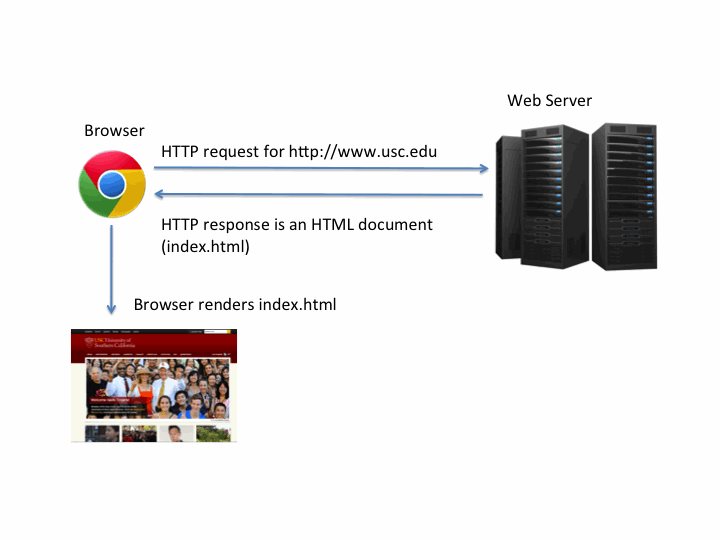
- Hypertext Transfer Protocol (HTTP / HTTPS) is the communication protocol for the Internet
- A browser uses HTTP to request web pages on a server
- Web servers have IP addresses (192.68.20.50) associated with them.
- IP addresses often have a domain name
- i.e. www.usc.edu is just an alias to the IP address
- A web server responds to an HTTP request with an HTML document (a web page) and your browser renders the HTML and CSS to display the web page
HTML Syntax
- HTML is for structuring content
- HTML is made up of tags, opening and closing tags
Example:
<p> Welcome to ITP 104! </p>
Your First Web Page
-
Open up Notepad (Windows) or TextEdit (Mac) and create a file "about.html"
- Note mac users have to turn off rich text editing on TextEdit
- Copy the following into the file:
<p> This is my first web page </p>
- Open the file in your browser
ITP 104
By David Tang