



Daniel de la Cruz Calvo
Software Engineer and professional mentor for developers.
Curso de React.JS
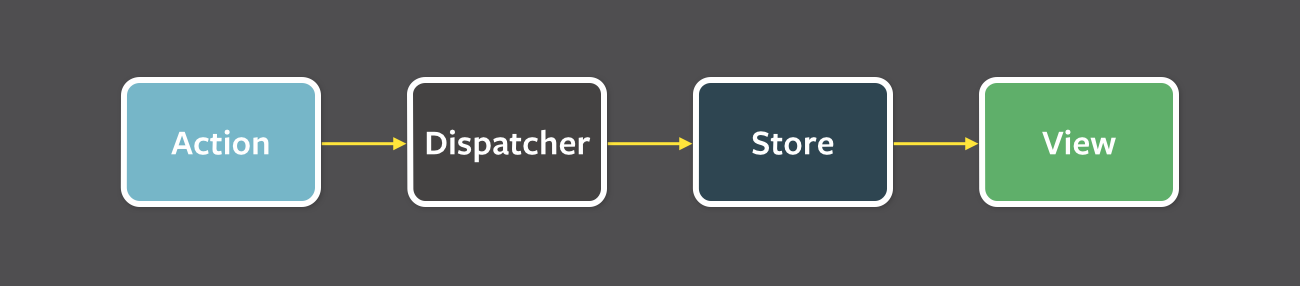
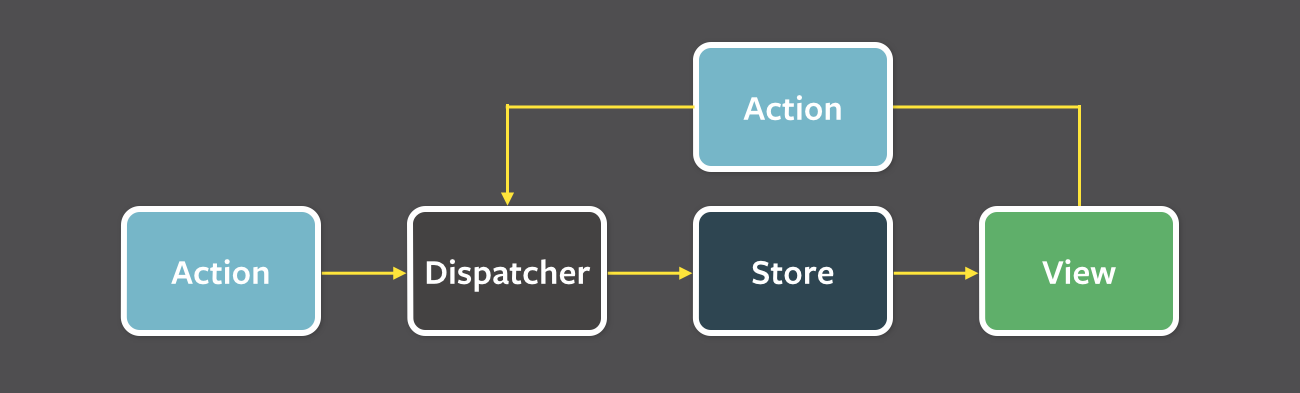
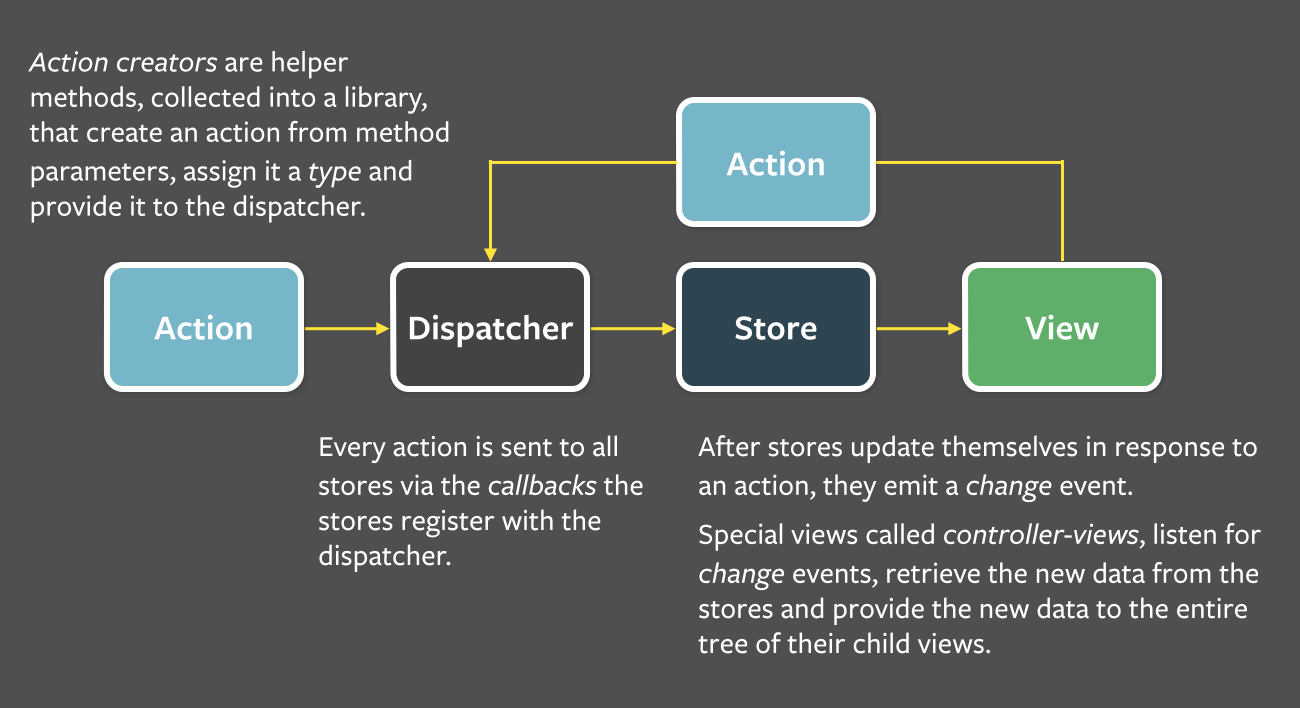
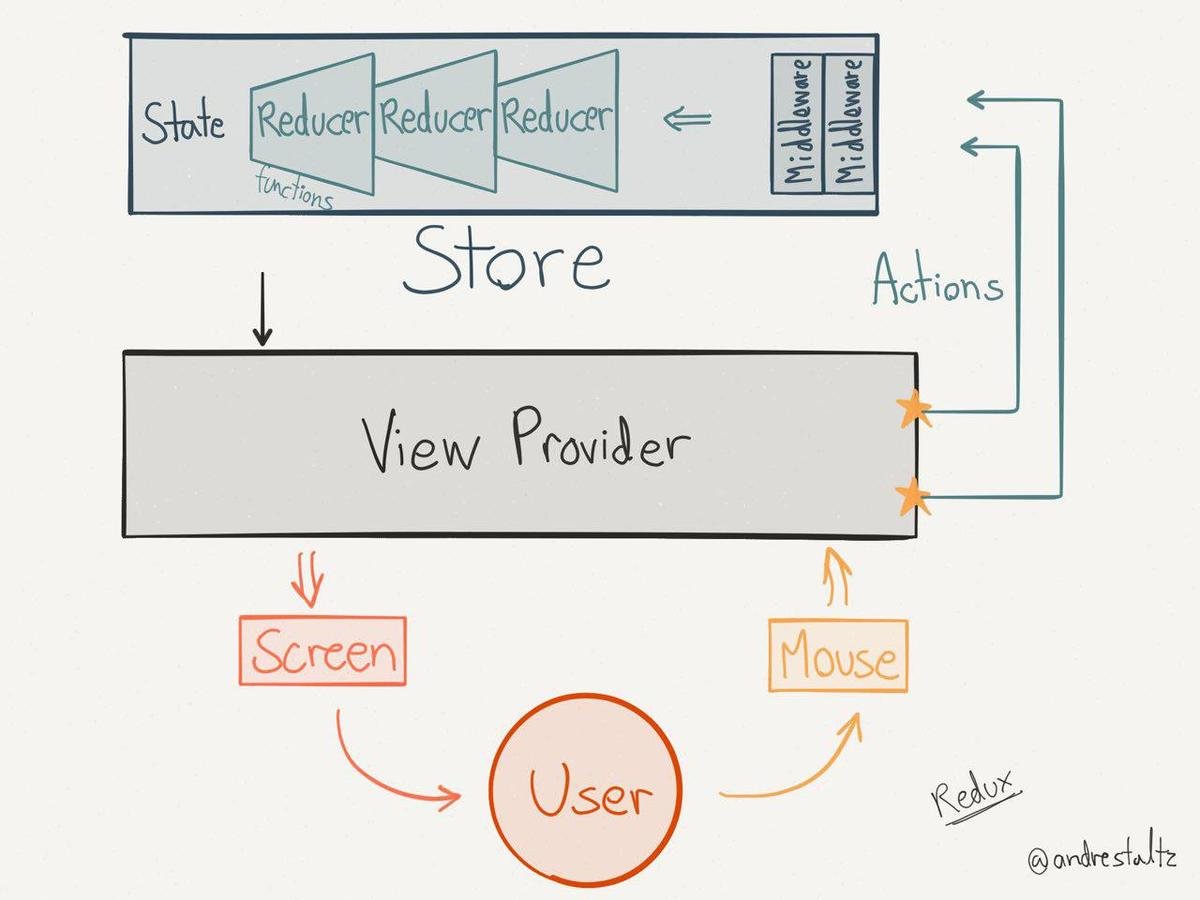
Singleton Store: manages state and has a dispatch(action) function
(state, action) => stateconst counter = (state = 0, action) => {
switch (action.type) {
case 'INCREMENT':
return state + 1
case 'DECREMENT':
return state - 1
default:
return state
}
}import { createStore } from 'redux'
const store = createStore(counter)store.subscribe(() =>
console.log(store.getState())
)store.dispatch({ type: 'INCREMENT' })
// 1
store.dispatch({ type: 'INCREMENT' })
// 2
store.dispatch({ type: 'DECREMENT' })
// 1{
type: 'ADD_TODO',
payload: {
text: 'Do something.'
}
}{
type: 'ADD_TODO',
payload: new Error(),
error: true
}An action must
An action may
An action must not
const ADD_TODO = 'ADD_TODO'
const REMOVE_TODO = 'REMOVE_TODO'

export {
  ADD_TODO,
  REMOVE_TODO
}import { ADD_TODO, REMOVE_TODO } from '../actionTypes'
const addTodo = (text) => {
return {
type: ADD_TODO,
text
}
}{
visibilityFilter: 'SHOW_ALL',
todos: [
{
text: 'Consider using Redux',
completed: true,
},
{
text: 'Keep all state in a single tree',
completed: false
}
]
}const reducer = (previousState, action) => newStateThings you should never do inside a reducer:
function todoApp(state = initialState, action) {
  switch (action.type) {
    case SET_VISIBILITY_FILTER:
      return Object.assign({}, state, {
        visibilityFilter: action.filter
      })
    default:
      return state
  }
}function todoApp(state = initialState, action) {
switch (action.type) {
case SET_VISIBILITY_FILTER:
return Object.assign({}, state, {
visibilityFilter: action.filter
})
case ADD_TODO:
return Object.assign({}, state, {
todos: [
...state.todos,
{
text: action.text,
completed: false
}
]
})
default:
return state
}
}case TOGGLE_TODO:
return Object.assign({}, state, {
todos: state.todos.map((todo, index) => {
if (index === action.index) {
return Object.assign({}, todo, {
completed: !todo.completed
})
}
return todo
})
})function visibilityFilter(state = SHOW_ALL, action) {
switch (action.type) {
case SET_VISIBILITY_FILTER:
return action.filter
default:
return state
}
}function todos(state = [], action) {
switch (action.type) {
case ADD_TODO:
return [
...state,
{
text: action.text,
completed: false
}
]
case TOGGLE_TODO:
return state.map((todo, index) => {
if (index === action.index) {
return Object.assign({}, todo, {
completed: !todo.completed
})
}
return todo
})
default:
return state
}
}import { combineReducers } from 'redux'
import { visibilityFilter, todos } from './reducers'
const todoApp = combineReducers({
visibilityFilter,
todos
})
export default todoApp| Presentational Components | Container Components | |
|---|---|---|
| Purpose | How things look (markup, styles) | How things work (data fetching, state updates) |
| Aware of Redux | No | Yes |
| To read data | Read data from props | Subscribe to Redux state |
| To change data | Invoke callbacks from props | Dispatch Redux actions |
| Are written | By hand | Usually generated by React Redux |
import React from 'react'
import { render } from 'react-dom'
import { Provider } from 'react-redux'
import { createStore } from 'redux'
import todoApp from './reducers'
import App from './components/App'

let store = createStore(todoApp)

render(
  <Provider store={store}>
    <App />
  </Provider>,
  document.getElementById('root')
)const MyComponent = () => (
// ...
)
const mapStateToProps = (state) => state
const mapDispatchToProps = (dispatch) => {
return {
onSomethingHappened: dispatch(yourAction())
}
}
export default connect(
mapStateToProps,
mapDispatchToProps
)(MyComponent)A thunk is a function that wraps an expression to delay its evaluation
// calculation of 1 + 2 is immediate
// x === 3
let x = 1 + 2;

// calculation of 1 + 2 is delayed
// foo can be called later to perform the calculation
// foo is a thunk!
let foo = () => 1 + 2;const INCREMENT_COUNTER = 'INCREMENT_COUNTER';
function increment() {
return {
type: INCREMENT_COUNTER
};
}
function incrementAsync() {
return dispatch => {
setTimeout(() => {
// Yay! Can invoke sync or async actions with `dispatch`
dispatch(increment());
}, 1000);
};
}function incrementIfOdd() {
return (dispatch, getState) => {
const { counter } = getState();
if (counter % 2 === 0) {
return;
}
dispatch(increment());
};
}npm install --save redux-thunk
import { createStore, applyMiddleware } from 'redux';
import thunk from 'redux-thunk';
import rootReducer from './reducers/index';

// Note: this API requires redux@>=3.1.0
const store = createStore(
  rootReducer,
  applyMiddleware(thunk)
);By Daniel de la Cruz Calvo
Slides de la clase sobre Redux para Escuela IT