


Dimitris Kiriakakis
Fullstack Developer | Freelancer
Practical steps and modern techniques.
Dimitris Kiriakakis | NG Poland 2024
Fullstack Developer @ ZEAL
Who am I
Writing code professionally since 2013
Sharing blog posts about web vitals, web performance, sustainability and other topics on Medium and Dev.To (@dimeloper)
Overview
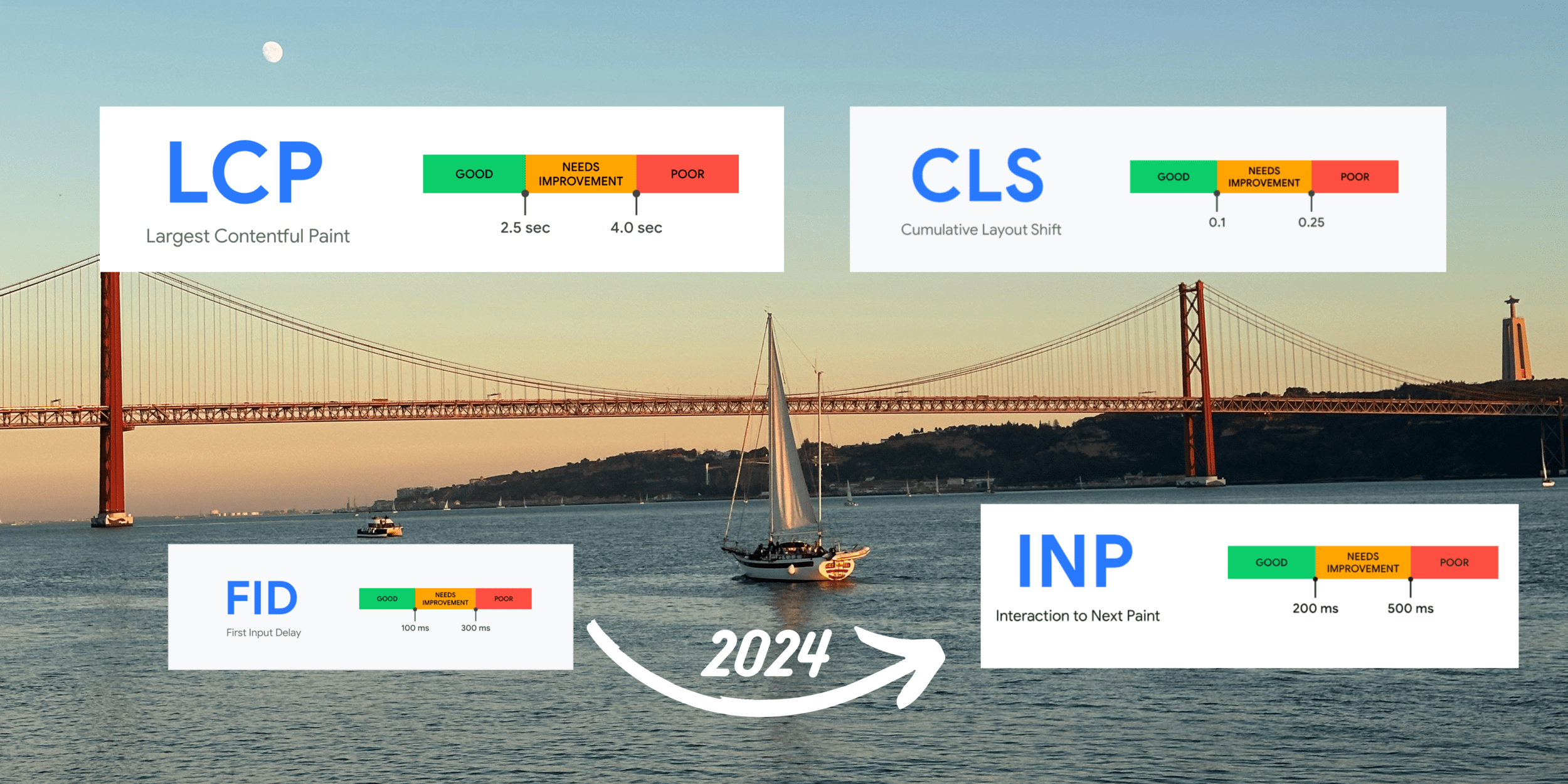
Web Vitals review
Review a sample Angular app
Apply optimisation techniques
Useful tools and resources
A set of metrics that measure real-world user experience for loading performance, interactivity and visual stability of a web page.
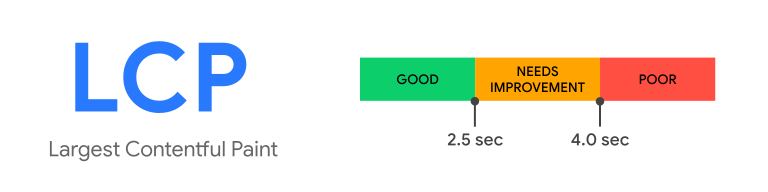
Largest Contentful Paint (LCP) is the Core Web Vital metric for measuring load speed.
It reports the render time of the largest image or text block visible in the viewport, relative to when the user first navigated to the page.
To provide a good user experience, sites should have an LCP score of 2.5 seconds or less.
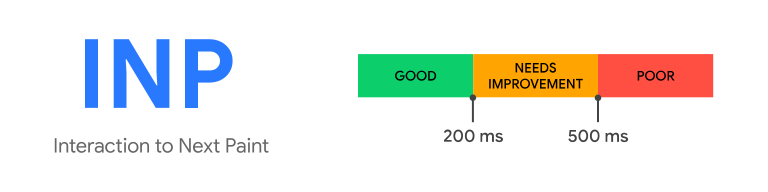
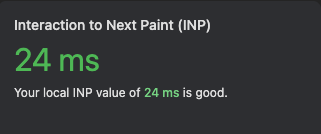
Interaction to Next Paint (INP) is the Core Web Vital metric for measuring interactivity.
INP observes the latency of all click, tap, and keyboard interactions with a page throughout its lifespan, and reports the longest duration.
An INP equal to or less than 200 ms means our page has good responsiveness.
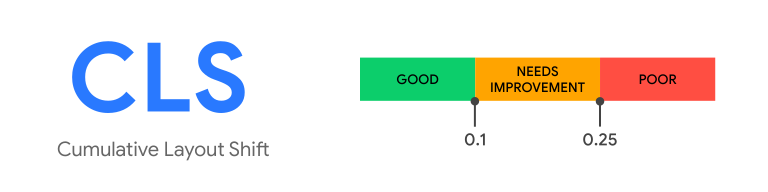
Cumulative Layout Shift (CLS) is the Core Web Vital metric for measuring visual stability.
It helps quantify how often users experience unexpected layout shifts.
To provide a good user experience, our site must have a CLS score of 0.1 or less.
Steps we are going to take:
Optimise the main banner section (LCP element)
Optimise the secondary banners section (initial viewport)
Ensure that both banner sections have placeholders
Lazy load the rest of the content (outside of the initial viewport)
Eliminate interactions that cause long delays
Full article: dimeloper.com/angular-optimization
Optimising the main banner (before)
Depends on client side code (disables SSR benefits)
Asset is not optimised (too big, png format)
No placeholder while the image loads (causes LS)
<!-- main banner template -->
<div class="banner">
  @if (banner != '') {
    <img [src]="banner" />
  }
</div>
// component code
this.breakpointObserver
.observe([
Breakpoints.XSmall,
...
])
.subscribe(result => {
if (result.matches) {
if (result.breakpoints[Breakpoints.XSmall]) {
this.banner = this.banners.mobile;
this.cols = this.gridByBreakpoint.xs;
this.rowHeight = '250px';
}
...Optimising the main banner (after)
We are utilising NgOptimizedImage
Placeholder makes sure that no LS will happen
Priority sets the fetchpriority to high and generates preload link
Created viewport specific variations for image and used webp
<!-- main banner template -->
<div class="banner">
  <img
    ngSrc="/assets/images/pokemon-banner-mobile-1x.webp"
    srcset="
      /assets/images/pokemon-banner-mobile-1x.webp  576w,
      /assets/images/pokemon-banner-mobile-2x.webp  992w,
      /assets/images/pokemon-banner.webp           1920w
    "
    placeholder
    fill
    priority
    alt="Pokemon Banner with Pikachu" />
</div>
Optimising the secondary banner (before)
Depends on variables that will be evaluated on the client
Mat-grid-list can be replaced by CSS grid
No placeholders while the images are being loaded
<!-- secondary banner template -->
<mat-grid-list [cols]="cols" [rowHeight]="rowHeight">
  @for (pokemon of pokemons; track pokemon) {
    <mat-grid-tile>
      <mat-card class="pokemon-card">
        <mat-card-header>
          <mat-card-title-group>
            <mat-card-title>{{ pokemon.title }}</mat-card-title>
            <mat-card-subtitle>Extra large</mat-card-subtitle>
          </mat-card-title-group>
        </mat-card-header>
        <img mat-card-xl-image class="pokemon-teaser" [src]="pokemon.image" />
        <mat-card-content class="pokemon-preview">
          {{ pokemon.preview }}
        </mat-card-content>
      </mat-card>
    </mat-grid-tile>
  }
</mat-grid-list>
// component code
this.breakpointObserver
.observe([
Breakpoints.XSmall,
...
])
.subscribe(result => {
if (result.matches) {
if (result.breakpoints[Breakpoints.XSmall]) {
this.banner = this.banners.mobile;
this.cols = this.gridByBreakpoint.xs;
this.rowHeight = '250px';
}
...Optimising the secondary banner (after)
By default img loading priority is lazy
Defining width and height are necessary because no fill
<div class="pokemon-teaser-grid">
  @for (pokemon of pokemons; track pokemon) {
    <mat-card class="pokemon-card">
      <mat-card-header>
        <mat-card-title-group>
          <mat-card-title>{{ pokemon.title }}</mat-card-title>
          <mat-card-subtitle>Extra large</mat-card-subtitle>
        </mat-card-title-group>
      </mat-card-header>
      <img
        class="pokemon-teaser"
        [ngSrc]="pokemon.image"
        [alt]="'Teaser showing ' + pokemon.title"
        width="160"
        height="160" />
      <mat-card-content class="pokemon-preview">
        {{ pokemon.preview }}
      </mat-card-content>
    </mat-card>
  }
</div>
Rest of the content (before)
Is not part of the initial viewport, can be deferred
Show static placeholders until the user scrolls to them
<!-- rest of content-->
<app-pokemon-list />
<div class="button-wrapper">
  <button mat-raised-button (click)="openDialog()">
    Pick your favorite via popup form
  </button>
  <button mat-raised-button (click)="openForm()">
    Pick your favorite via inline form
  </button>

  @defer {
    <app-form [hidden]="hideForm" />
  }
</div>
Rest of the content (after)
<!-- rest of content -->
@defer (on viewport; prefetch on idle) {
  <app-pokemon-list />
} @placeholder {
  <b>Favourite Pokemon</b>
}

@defer (on viewport) {
  <div class="button-wrapper">
    <button mat-raised-button (click)="openDialog()">
      Pick your favorite via popup form
    </button>
    <button mat-raised-button (click)="openForm()">
      Pick your favorite via inline form
    </button>

    @if (!hideForm) {
      @defer {
        <app-form />
      } @loading (minimum 500ms) {
        <img
          class="loading-animation"
          alt="loading..."
          src="../assets/images/loading.gif" />
      }
    }
  </div>
} @placeholder {
  <div class="button-wrapper">
    <button mat-raised-button>Pick your favorite via popup form</button>
    <button mat-raised-button>Pick your favorite via inline form</button>
  </div>
}
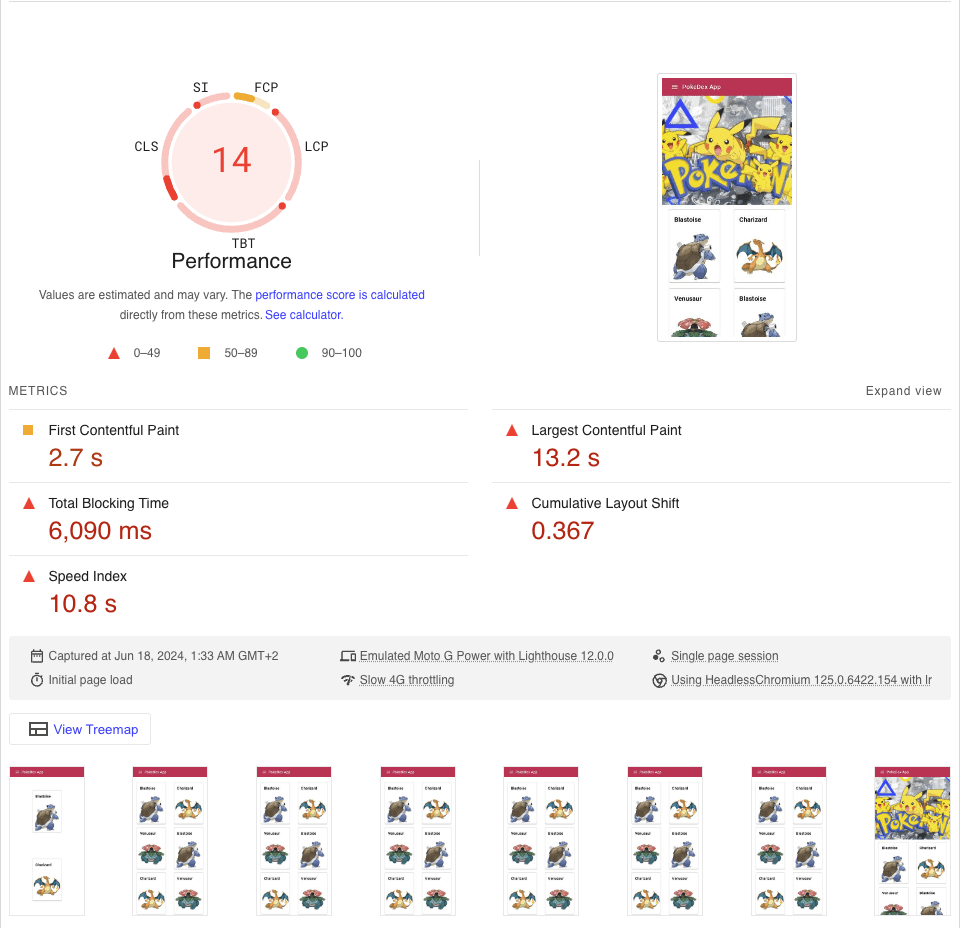
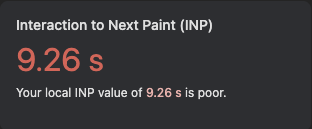
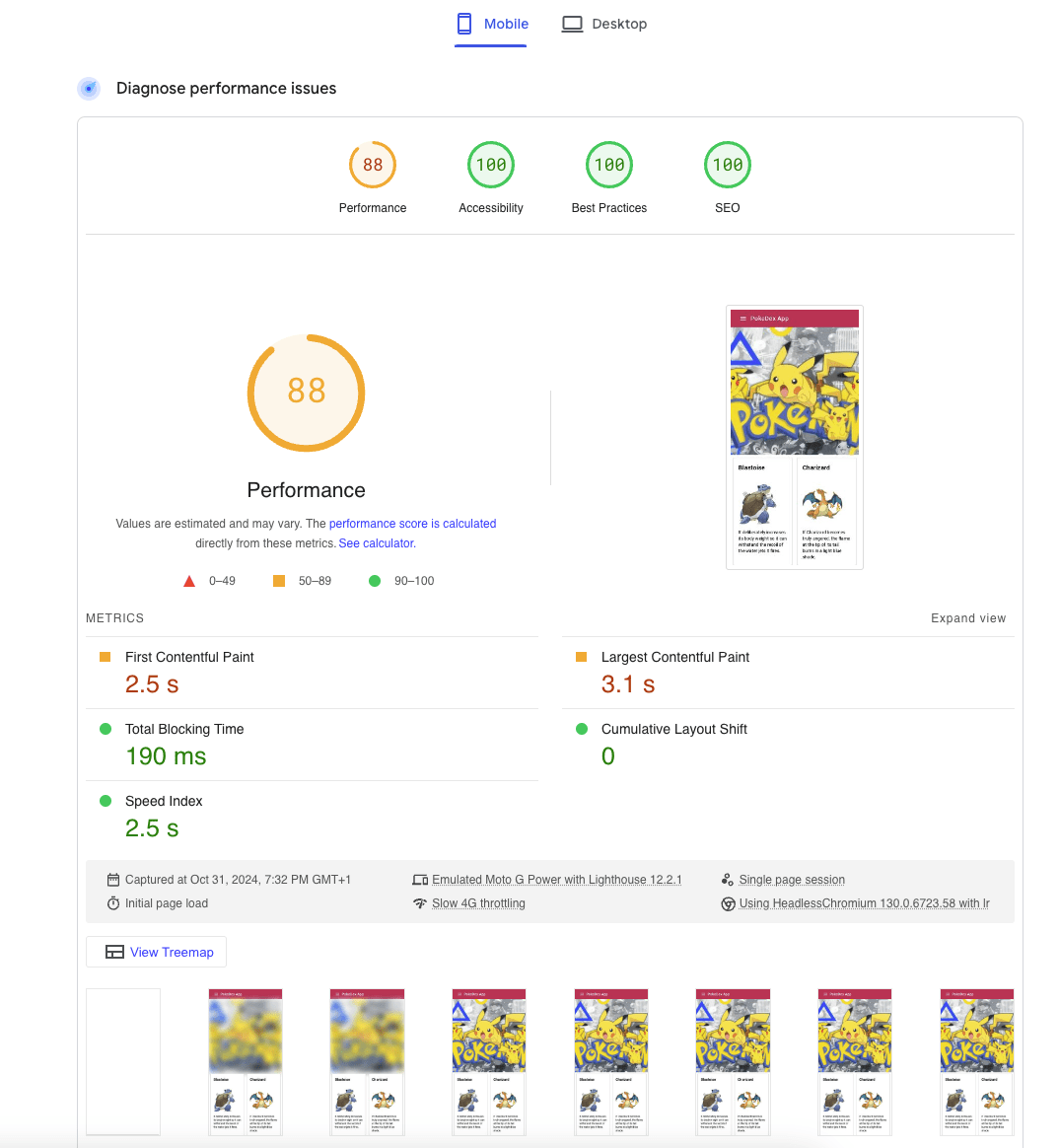
Result
Useful Tools & Websites
Pagespeed insights:
Angular docs:
Full article: dimeloper.com/angular-optimization
LinkedIn: linkedin.com/in/kiriakakis
Twitter: @dimeloper
Slides
Questions?
By Dimitris Kiriakakis