RingTo
Integration Tests
Agenda
- What is an integration test?
- Grunt
- Selenium
- Backend
- Appium
- Android
- iOS
What is an integration test
- Full functionality tests
- Need (at minimum)
- PHP Server
- Node Server
- API Server
- SQL
- Catapult
- Mobile
- iOS
- Android
Grunt
The task master
What is Grunt
- Sets up environment
- Run tests
- Flexible

Grunt Options
- Test Types - what test type to run
- appium
- backend
- selenium
- --target <which environment>
- stage
- prod
- dev
- --email <email address to use>
- --password <password>
- --app <location of app for appium>
- --appiumPort <appium server port>
- --mobileOS <which OS for appium>
Example Test Commands
// Run Selenium Test Against Stage
grunt selenium --target stage --email dtolbert@bandwidth.com --password 234 --logLevel silly

//Run Backend Test Against Prod
grunt backend --target prod --email dtolbert@bandwidth.com --password 234 --logLevel silly

//Run iOS Test **target MUST MATCH app build**
grunt appium --target dev --email dtolbert@bandwidth.com --password 234
    --logLevel silly --mobileOS ios --app ~/downloads/Ringto.app

//Run Android Test **target MUST MATCH app build**
grunt appium --target dev --email dtolbert@bandwidth.com --password 234
    --logLevel silly --mobileOS android --app ~/downloads/Ringto.apk
Gruntfile.js
'use strict';
var _ = require('lodash');

module.exports = function (grunt) {
	var envURLs = {
		dev: 'dev.ring.to',
		stage: 'stage.ring.to',
		prod: 'ring.to',
		nathan: 'nfuchs.ring.to'
	};
	var defaultAndroid = 'https://s3.amazonaws.com/ringto-beta/RingTo.apk';
	var mobileOS = grunt.option('mobileOS') || 'android';
	var appiumPort = grunt.option('appiumPort') || '4723';
	var appLocation = grunt.option('app') || defaultAndroid;
	var email = grunt.option('email') || 'ringtotester@gmail.com';
	var password = grunt.option('password') || 'ringto14';
	var target = grunt.option('target') || 'dev';
	var logLevel = grunt.option('logLevel') || 'silly';
	var sourceFiles = ['*.js', 'lib/**/*.js'];
	var testFiles = ['test/**/*.js'];
	var allFiles = sourceFiles.concat(testFiles);

	var defaultJsHintOptions = grunt.file.readJSON('./.jshintrc');
	var testJsHintOptions = _.extend(
		grunt.file.readJSON('./.jshintrc'),
		defaultJsHintOptions
	);
	var setEnvironmentVariable = function (name, value) {
		process.env[name] = value;
	};

	grunt.initConfig({
		jscs: {
			src: allFiles,
			options: {
				config: '.jscsrc',
				force: true
			}
		},

		jshint: {
			src: allFiles,
			options: defaultJsHintOptions,
			test: {
				options: testJsHintOptions,
				files: {
					test: allFiles
				}
			}
		},
		/* jshint camelcase: false */
		simplemocha: {
			/* jshint camelcase: true */
			options: {
				globals: ['should', 'expect'],
				timeout: 3000,
				ignoreLeaks: false,
				ui: 'bdd',
				reporter: 'spec'
			},

			all: { src: ['test/<%= test_type %>/**/*.js'] }
		}
	});

	// Load plugins
	grunt.loadNpmTasks('grunt-contrib-jshint');
	grunt.loadNpmTasks('grunt-jscs');
	grunt.loadNpmTasks('grunt-simple-mocha');

	grunt.registerTask('setAppiumTest', [], function () {
		grunt.config.set('test_type', 'appium');
		setEnvironmentVariable('MOBILE_OS', mobileOS.toLowerCase());
		setEnvironmentVariable('APPIUM_PORT', appiumPort);
		setEnvironmentVariable('APP_LOCATION', appLocation);
	});
	grunt.registerTask('setBackendTest', [], function () {
		grunt.config.set('test_type', 'backend');
	});
	grunt.registerTask('setSeleniumTest', [], function () {
		grunt.config.set('test_type', 'selenium');
	});

	grunt.registerTask('setupEnvironment', [], function () {
		setEnvironmentVariable('NODE_TLS_REJECT_UNAUTHORIZED', 0); //ignore cert issue
		setEnvironmentVariable('RINGTO_USER', email);
		setEnvironmentVariable('RINGTO_PASS', password);
		setEnvironmentVariable('LOG_LEVEL', logLevel);
		setEnvironmentVariable('RINGTO_DOMAIN', envURLs[target]);
	});

	// Register tasks
	grunt.registerTask('lint', 'Check for common code problems.', ['jshint']);
	grunt.registerTask('style', 'Check for style conformity.', ['jscs']);
	grunt.registerTask('clean', ['lint', 'style']);
	grunt.registerTask('backend', ['clean','setupEnvironment',
		'setBackendTest', 'simplemocha']);
	grunt.registerTask('appium', ['clean','setupEnvironment',
		'setAppiumTest', 'simplemocha']);
	grunt.registerTask('selenium', ['clean','setupEnvironment',
		'setSeleniumTest', 'simplemocha']);

};
Selenium
Front End Tests
Selenium
- Web automation
- Standalone Selenium Server
- Webdriverio
- Supports all browsers
- We focus on Chrome

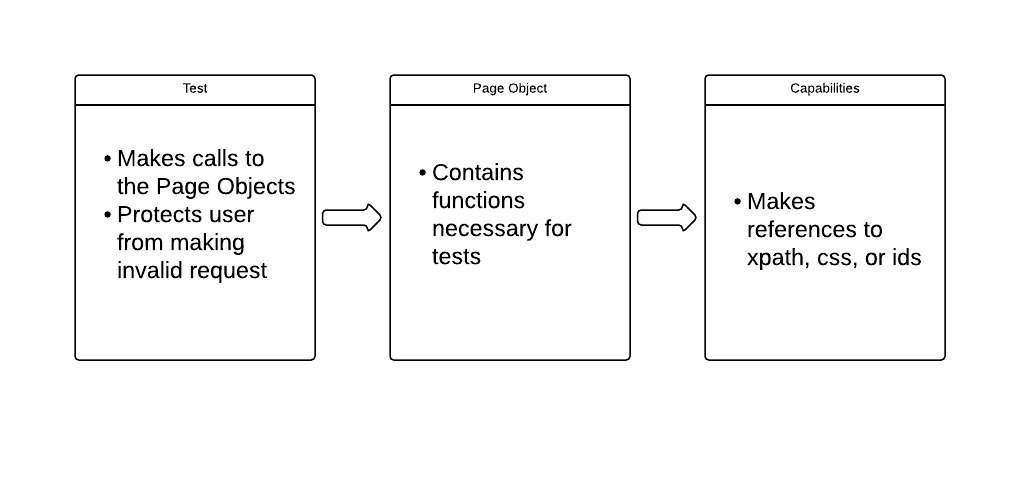
Page Objects
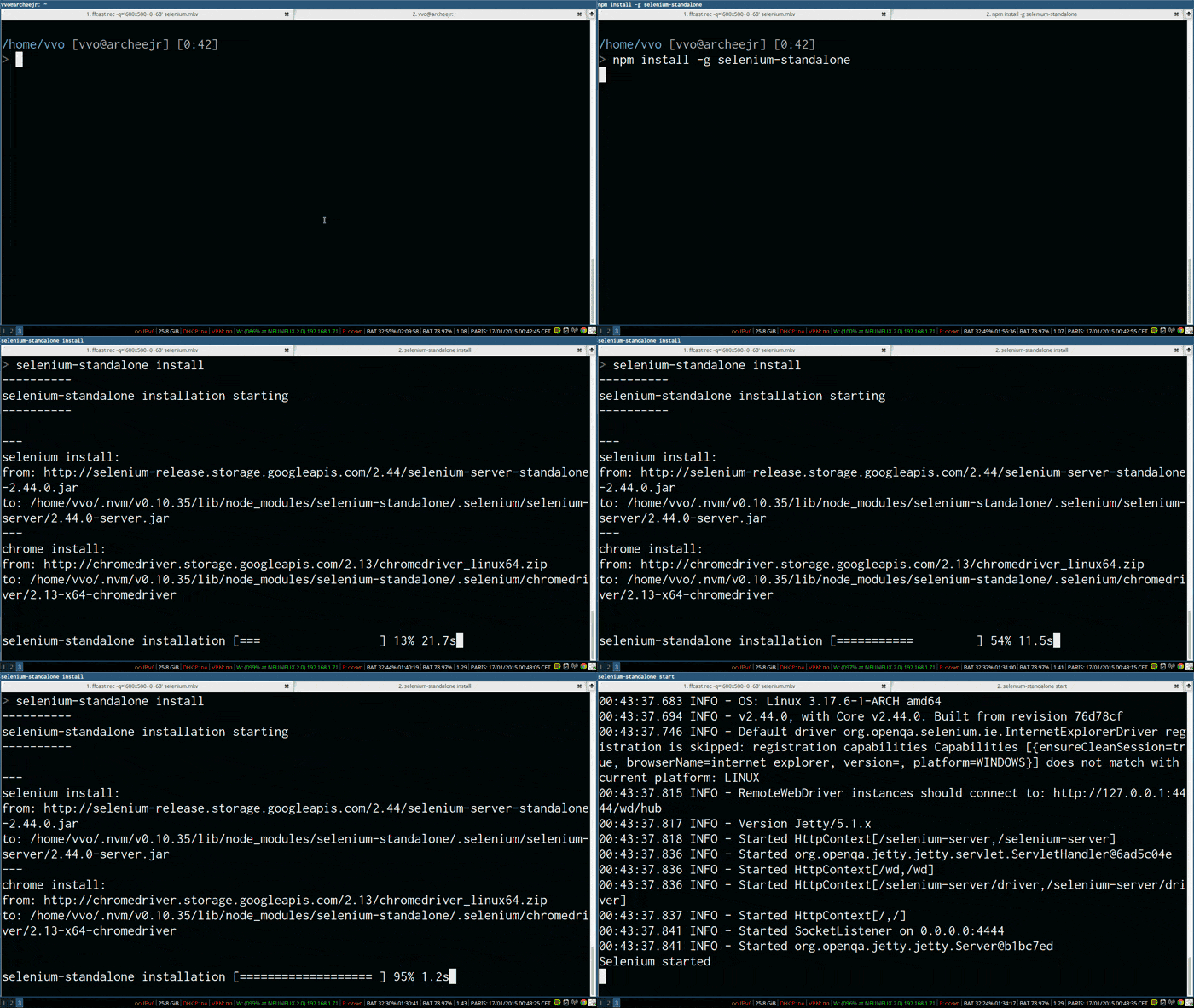
Launch Selenium Server
Login To RingTo
Login Example
var LandingPage = require('./../../lib/web/pages/landing_page');
var startup = require('./../../lib/web/startup');
var config = require('./../../lib/config');
var webdriverio = require('webdriverio');

describe('log in', function () {
	var page;
	this.timeout(3000000);

	before(function () {
		var desired = { desiredCapabilities: {browserName: 'chrome'} };
		page = startup(desired);
		return page.wait(); //Return the promise chain
	});
	after(function () {
		return page.quit(); //End the test
	});
	describe('With email', function () {
		describe('and valid password', function () {
			before(function () {
                                //Since we move to a new page, update the value
				page = page.clickLoginButton();
				page.await(); //Wait for specific element
                                //Since we're staying on the page, don't need to reassign
				page.enterCreds(config.user.email, config.user.password);
                                //Move to a new page, update page
				page = page.clickSigninButton();
                                //Move to a new page, update page
				page = page.clickAccountMenu();
                                // Return the promise Chain
				return page.wait();
			});
			it('should be able to logout', function () {
			    //Make the assertion that logout is there
                            return page.assertLogOut();
			});
		});
	});

});
Account Menu Page Example
var page = require('./../pages_json/account_menu.json');
var LandingPage = require('./landing_page');

module.exports = function (driver, promisedState) {
	var state = promisedState;

	this.clickLogOut = function () {
		state = state.then(function () {
			return driver
				.click(page.logout.xpath);
		});
		return new LandingPage(driver, promisedState);
	};

	this.assertLogOut = function () {
		state = state.then(function () {
			return driver
				.isExisting(page.logout.xpath).should.eventually.be.true;
		});
	};

	this.wait = function () {
		return state.then(function () {
			return;
		});
	};

	this.quit = function () {
		return driver.end();
	};
};
Building the promise chain
//Driver is the continuous selenium driver
//Promised state is the promise chain
module.exports = function (driver, promisedState) {
	var state = promisedState;

	this.clickLogOut = function () {
                /*Add this particular 'method' on the existing
                Promise chain */
		state = state.then(function () {
			return driver
				.click(page.logout.xpath);
		});
                // Since we move to a new page, return the new page
		return new LandingPage(driver, promisedState);
	};

        // Required for each Page object
	this.wait = function () {
		return state.then(function () {
			return;
		});
	};
        // Required for each Page object
	this.quit = function () {
		return driver.end();
	};
};
One page application woes
this.clickAccountMenu = function () {
	state = state.then(function () {
		return driver
			.click(page.account_dropdown.xpath)
                        //Now we're going to wait until the internal promise is true
			.waitUntil(function () {
                                //Get the 'style' value for the 'account drop down'
				return this.getAttribute('#accountDropdown', 'style')
					.then(function (res) {
                                                //Now we wait until it's set to block
						return res === 'display: block;';
					});
			}, 10000); //Wait for 10,000ms
	});
        //The driver will now be pointing the the account menu
	return new AccountMenu(driver, state);
};
Running the tests
grunt selenium --target stage --email dtolbert@bandwidth.com --password xxx --logLevel silly Questions?

Backend
Testing the API
Validating API
- Blackbox testing
- Assume no internal knowledge
- Validate functionality by asking the system for information
- NodeJS
- Mocha
- SuperTest
- Catapult

RingTo 'SDK'
/**
 * Gets the token to make API calls to RingTo
 * @param  {Object} user - object containing email and password
 * @return {Promise}      - The token to access the API server
 */
module.exports.loginToPHP = function (user) {
	var path = 'https://' + config.ringtoURL + '/ajax/user.php?';
	return request.post(path)
		.set('Content-Type', 'application/x-www-form-urlencoded')
		.send('action=l')
		.send('email=' + user.email)
		.send('password=' + user.password)
		//.send('token=t')
		.then(function (res) {
			return res.headers['set-cookie'];
		})
		.catch(function (e) {
			throw e;
		});
};

/**
 * Gets the token to make API calls to RingTo
 * @param  {Object} user - object containing email and password
 * @return {Promise}      - The token to access the API server
 */
module.exports.loginToPartners = function (user) {
	var path = 'https://partners.' + config.ringtoURL + '/api/oauth/token';
	return request.post(path)
		.set('Content-Type', 'application/x-www-form-urlencoded')
		.send('grant_type=password')
		.send('username=' + user.email)
		.send('password=' + user.password)
		.send('client_id=ringto')
		.send('client_secret=1')
		.then(function (res) {
			return {
				accessToken: res.body.access_token,
				userId: res.body.extra_data.user.uuid
			};
		})
		.catch(function (e) {
			throw e;
		});
};

/**
 * Logs in to both the PHP and Partners Server
 * @param  {Object} userInfo - email, password
 * @return {User} - User object
 */
module.exports.login = function (userInfo) {
	return module.exports.loginToPHP(userInfo)
		.then(function (cookies) {
			userInfo.cookies = cookies;
			return module.exports.loginToPartners(userInfo);
		})
		.then(function (creds) {
			userInfo.accessToken = creds.accessToken;
			userInfo.userId = creds.userId;
			return new User(userInfo);
		})
		.catch(function (error) {
			logger.error('Unable to log in with user');
			throw error;
		});
};
RingTo 'User'
/**
 * The user class
 * @constructor
 * @param {JSON} user - email,password,cookie,userId,accessToken
 */
function User(user) {
	var apiRoot = 'https://partners.' + config.ringtoURL +
            '/api/users/' + user.userId;
	var accessQuery = { access_token: user.accessToken };

	/** Get the access token */
	this.accessToken = function () {
		return user.accessToken;
	};
	/** Get the user id */
	this.userId = function () {
		return user.userId;
	};
	/** Get the user password */
	this.password = function () {
		return user.password;
	};
	/** Get the user email */
	this.email = function () {
		return user.email;
	};
	/** Get the cookies */
	this.cookies = function () {
		return user.cookies;
	};

	/**
	 * Get the messages for user
	 * @param  {object} queryParams - number, page, page_size, or after
	 * @return {Object} - messages are in array, pagination for help
	 */
	this.getMessages = function (queryParams) {
		logger.silly('Getting messages for user: ' + user.email);
		queryParams = typeof queryParams !== 'undefined' ? queryParams : '';
		return request.get(apiRoot + '/messages')
			.query(queryParams)
			.query(accessQuery)
			.then(function (res) {
				return {
					messages: res.body.data,
					pagination: res.body.pagination
				};
			})
			.catch(function (e) {
				logger.error('Error getting messages');
				throw e;
			});

	};

	/**
	 * Get the messages for user
	 * @param  {String} messageId - ID of message to be deleted
	 * @return {Object} - Response of get request
	 */
	this.getMessageById = function (messageId) {
		logger.silly('Getting messages: ' + messageId);
		return request.get(apiRoot + '/messages/' + messageId)
			.query(accessQuery)
			.then(function (res) {
				return res.body;
			})
			.catch(function (e) {
				logger.error('Error getting message');
				throw e;
			});
	};

	/**
	 * Deletes the message for id
	 * @param  {String} messageId - ID of message to be deleted
	 * @return {Object} - Response of delete request
	 */
	this.deleteMessageById = function (messageId) {
		logger.silly('Deleting messageId: ' + messageId);
		return request.del(apiRoot + '/messages/' + messageId)
			.query(accessQuery)
			.then(function (res) {
				return res.body;
			});
	};

	/**
	 * Get the messages for user
	 * @param  {object} queryParams - page, page_size
	 * @return {Object} - messages are in array, pagination for help
	*/
	this.getNumbers = function (queryParams) {
		logger.silly('Getting Numbers for user: ' + user.email);
		queryParams = typeof queryParams !== 'undefined' ? queryParams : '';
		return request.get(apiRoot + '/numbers')
			.query(queryParams)
			.query(accessQuery)
			.then(function (res) {
				return {
					numbers: res.body.data,
					pagination: res.body.pagination
				};
			});
	};

	/**
	 * Returns the messages based on text and number
	 * @param  {String} text   Text to search
	 * @param  {String} number - E164 number
	 * @return {Array} - Message Object from RingTo if found, false if not
	 */
	this.getMessagesByTextAndNumber = function (text, number) {
		return this.getMessages({number: number})
			.then(function (messages) {
				var foundMessage = [];
				if (messages.messages.length > 0) {
					messages.messages.forEach(function (message) {
						if (message.text === text) {
							foundMessage
                                                            .push(_.cloneDeep(message));
						}
					});
				}
				return foundMessage;
			});
	};
}
Deleting Message
Steps:
- Setup
- Login
- Allocate new Catapult #
- Get account number
- Send message to number
- Get messages (get ID)
- Delete message (by ID)
- Get messages again
- Get message/{id}
- Assertions
- Cleanup
- Release Catapult #

Delete User Test
var expect = require('chai').expect;
var RingTo = require('./../../lib/ringto.js');
var config = require('./../../lib/config.js');
var common = require('./../../lib/common.js');
var catapult = require('./../../lib/catapult.js');
var Promise = require('bluebird');

describe('Delete Message From API Server', function () {
	this.timeout(50000);
	var user;
	var catapultNumber;
	var fromNumber;
	var toNumber;
	var text = (new Date() / 1000).toString();
	before(function () {
		//Sign in with user and allocate a new catapult number for testing
		return common.setupForTest(config.user)
			.then(function (res) {
				user = res.user;
				catapultNumber = res.number;
				fromNumber = catapultNumber.number;
				return user.getNumbers();
			})
			.then(function (numbers) {
				toNumber = numbers.numbers[0].number;
				return catapult.sendMessage({
					from: fromNumber,
					text: text,
					to: toNumber
				});
			})
			.then(function () {
				//Wait 1 second before trying to retrieve message
				return Promise.delay(1000);
			});
	});

	after(function () {
		//Delete the number after we're done with it
		return Promise.promisify(catapultNumber.delete).bind(catapultNumber)();
	});
	describe('With valid message id', function () {
		var messageId;
		var deleteResponse;
		var beforeMessages;
		var deletedMessage;
		before(function () {
			return user.getMessagesByTextAndNumber(text, fromNumber)
				.then(function (messages) {
					if (messages.length !== 1) {
						throw new Error('Error');
					}
					beforeMessages = messages;
					messageId = messages[0].message_id;
					return user.deleteMessageById(messageId);
				})
				.then(function (res) {
					deleteResponse = res;
				});
		});

		it('should return 200 OK', function () {
			expect(deleteResponse.code).to.equal(200);
		});

		it('should return the message ID', function () {
			expect(deleteResponse.message_id).to.equal(messageId);
		});

		describe('then retrieving all messages', function () {
			var afterMessages;
			before(function () {
				return user.getMessagesByTextAndNumber(text, fromNumber)
				.then(function (messages) {
					afterMessages = messages;
				});
			});

			it('should not be in the message list', function () {
				expect(afterMessages).to.be.empty;
			});
		});
		describe('then retrieving the deleted message by ID', function () {
			var error;
			before(function () {
				return user.getMessageById(messageId)
					.catch(function (e) {
						error = e.response;
					});
			});
			it('should return 404', function () {
				expect(error.status).to.equal(404);
			});
		});

	});

});
Running the tests
grunt backend --target prod --email dtolbert@bandwidth.com --password xxx --logLevel sillyQuestions?
Appium
Testing Mobile Devices
Pros
-
Any Webdriver language
-
Any Testing Framework
-
Runs on production App
- Optional Visual SDK
Cons
-
‘Quick’ tests require more overhead
-
Samples are not so good
-
Confusing at times
-
Need Selenium Server
Why Appium
iOS Explorer
Android Explorer
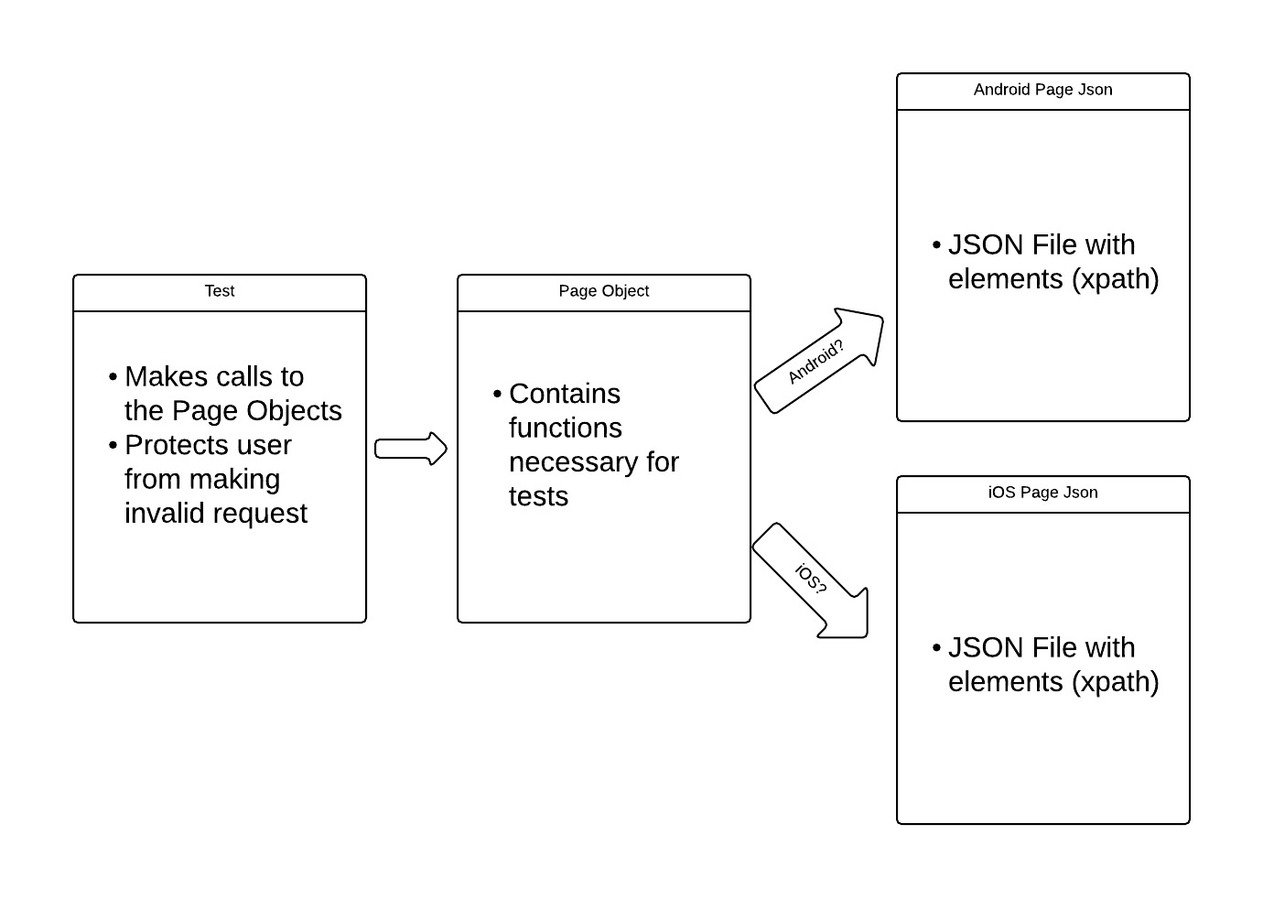
Page Objects
Building the iOS JSON
Caution when selecting xpath
Building the Android JSON
Login
Steps:
- Launch App
- Navigate Landing Page
- Enter Creds
- Login to app
- Make sure we're logged in
Login Test
var startup = require('./../../lib/appium/startup');
var config = require('./../../lib/config');
var _ = require('underscore');

describe('log in', function () {
	var page;
	var desired = { desiredCapabilities: {}};
	this.timeout(3000000);

	before(function () {
		//Get the correct capabilities
		if (config.mobileOS === 'ios'){
			desired.desiredCapabilities =
				_.clone(require('./../../lib/appium/caps')
				.iOSSim);
		}
		else {
			desired.desiredCapabilities =
				_.clone(require('./../../lib/appium/caps')
				.androidDevice);
		}
		desired.desiredCapabilities.app = config.appLocation;
		desired.port = config.appiumPort;
		page = startup(desired); //Launch the app
		return page.wait();
	});
	after(function () {
		return page.quit();
	});
	describe('With email', function () {
		describe('and valid password', function () {
			before(function () {
				page = page.tapLoginButton();
				page.enterCreds(config.user.email, config.user.password);
				page = page.tapLoginButton();
				return page.wait();
			});
			it('should see message button', function () {
				return page.waitForButton();
			});
		});
	});

});
startup.js
var pages;
if (config.mobileOS === 'ios'){
	pages = requireDir('./pages_json/ios');
}
else {
	pages = requireDir('./pages_json/android');
}

var page = pages.landing_page;
// Launch the app
function launchApp (desired) {
	return wd
		.remote(desired)
		.init()
		.timeoutsImplicitWait(30000);
}

module.exports = function (desired) {
	var driver = {};
	driver = launchApp(desired);
	chaiAsPromised.transferPromiseness = driver.transferPromiseness;
        //Give us a new landing page
	return new LandingPage(driver,
            driver.waitForExist(page.login_button.xpath, 3000));
};
caps.js
exports.iOSSim = {
	browserName: '',
	platformName: 'iOS',
	platformVersion: '8.4',
	deviceName: 'iPhone Simulator',
	//automatically accept alerts
	autoAcceptAlerts: true,
	app: undefined // will be set later
};

exports.androidDevice = {
	platformName: 'android',
	deviceName: 'Android',
	app: undefined
};
Landing Page
var mobileOS = require('./../../config.js').mobileOS;
var LoginPage = require('./login_page.js');
var requireDir = require('require-dir');
var pages;
if (mobileOS === 'ios'){
	pages = requireDir('./../pages_json/ios');
}
else {
	pages = requireDir('./../pages_json/android');
}
var page = pages.landing_page;
var nextPage = pages.login_page;

module.exports = function (driver, promisedState) {
	var state = promisedState;

	this.tapLoginButton = function () {
		state = state.then(function () {
			return driver
				.click(page.login_button.xpath);
		});
		return new LoginPage(driver, state);
	};

	this.await = function () {
		return driver
			.waitForExist(page.login_button.xpath);
	};

	this.wait = function () {
		return state.then(function () {
			return;
		});
	};

	this.quit = function () {
		return driver.end();
	};
};
iOS Login
grunt appium --target prod --email dtolbert@bandwidth.com --password 123
 --logLevel silly --mobileOS ios --app ~/Desktop/RingTo\ Production.app
Android Login
grunt appium --target prod --email dtolbert@bandwidth.com --password 123 --logLevel silly
 --mobileOS android --app https://s3.amazonaws.com/ringto-beta/RingTo.apk
Questions?
In Closing
Final Remarks
Future Enhancements
- Run 'mobile web' test
- iOS
- Android
- Parallel testing
- More Browsers
- Safari
- Firefox
- Edge (IE)
- Single Page Object
- iOS/Web/Android COULD Share code
- New Environment
- Setup/Tear down before/after
- Travis
Final Questions?
RingTo Integration Tests
By Daniel Tolbert