

























The biggest lies about

React Hooks

fakiolasmarios@gmail.com

twitter.com/@fakiolinho - medium.com/@fakiolinho

Full-stack JavaScript lover, happy husband, proud father ๐Ÿ‘จโ€๐Ÿ‘ฉโ€๐Ÿ‘งโ€๐Ÿ‘ง

Software Engineering Manager / Frontend Head at omilia.com

Fakiolas Marios

fakiolasmarios@gmail.com - twitter.com/@fakiolinho - medium.com/@fakiolinho

Workshops Tutor at 2hog.codes

React Hooks

React 16.8 - 6/2/2019

React Hooks

React 16.8 - 6/2/2019

React Hooks

were created so we can win the fight against evil classes

React Hooks

were created so we can win the fight against evil classes

React Hooks

so why then?

React Hooks

were created in order to re-use logic without nesting deeper in the components tree

...i am looking at you HOCs and render props ๐Ÿ˜ข

As an architect, you are asked to design a brand new project

Your go-to technology is ReactJS

Specs indicate that lots of forms will be implemented

You decide to go with

controlled components

class Form extends React.Component {
  state = {
    field: '',
  };

  handleSubmit = data => axios.post('/url', data);

  render() {
    return (
      <form onSubmit={this.handleSubmit}>
        <input
          value={this.state.field}
          onChange={e => (
            this.setState({ field: e.target.value })
          )}
        />
      </form>
    );
  }
}

A class component is required

class Form extends React.Component {
  state = {
    field: '',
  };

  handleSubmit = data => axios.post('/url', data);

  render() {
    return (
      <form onSubmit={this.handleSubmit}>
        <input
          value={this.state.field}
          onChange={e => (
            this.setState({ field: e.target.value })
          )}
        />
      </form>
    );
  }
}

Because you need internal state

...and you ship it ๐Ÿš€

...the project should support longer

forms with multiple fields

Who hates some old-fashioned

copy-paste right?

<form onSubmit={this.handleSubmit}>
  <input
    value={this.state.field1}
    onChange={e => (
      this.setState(prevState => ({
        ...prevState,
        field1: e.target.value
      }))
    )}
  />

  <input
    value={this.state.field2}
    onChange={e => (
      this.setState(prevState => ({
        ...prevState,
        field2: e.target.value
      }))
    )}
  />

  ...
</form>

...and you ship it ๐Ÿš€

...the project should support

complex forms with different

types of fields

Copy and paste won't do the job this time

maybe we can create some re-usable components and move faster

const Field = ({
  name="field",
  value="",
  type="text",
  onChange,
}) => (
  <input
    name={name}
    type={type}
    value={value}
    onChange={onChange}
  />
);

Let's create our own Field component

class Form extends React.Component {
  state = {
    field: '',
  };

  handleChange = e => this.setState({
    [e.target.name]: e.target.value,
  });

  handleSubmit = e => {
    e.preventDefault();
    axios.post('/url', this.state);
  };

  render() {
    return (
      <form onSubmit={this.handleSubmit}>
        <Field
          name="field"
          value={this.state.field}
          onChange={this.handleChange}
        />
      </form>
    );
  }
}

Refactor our Form component

class Form extends React.Component {
  state = {
    field: '',
  };

  handleChange = e => this.setState(prevState => ({
    ...prevState,
    [e.target.name]: e.target.value,
  }));

  handleSubmit = e => ...;

  render() {
    return (
      <form onSubmit={this.handleSubmit}>
        <Field
          name="field"
          value={this.state.field}
          onChange={this.handleChange}
        />
        <Field.../>
      </form>
    );
  }
}

Field component can be re-used easily

What about forms logic?

It is not that re-usable ๐Ÿ˜ฌ

class Form extends React.Component {
  state = {
    field: '',
  };

  handleChange = e => this.setState({
    [e.target.name]: e.target.value,
  });

  handleSubmit = e => {
    e.preventDefault();
    axios.post('/url', this.state);
  };

  render() {
    return (
      <form onSubmit={this.handleSubmit}>
        <Field
          name="field"
          value={this.state.field}
          onChange={this.handleChange}
        />
      </form>
    );
  }
}

Repeated logic across all forms

Let's provide a wrapper that will bring this kind of logic anywhere we like

const Form = () => {
  const initialValues = {
    field: "",
  };

  const handleSubmit = data => axios.post('/url', data);

  return (
    <FormHandler initialValues={initialValues} onSubmit={handleSubmit}>
      {({ values, onChange, onSubmit }) => (
        <form onSubmit={onSubmit}>
          <Field
            value={values.field}
            name="field"
            onChange={onChange}
          />
        </form>
      )}
    </FormHandler>
  );
};

Let's use render props pattern

const Form = () => {
  const initialValues = {
    field: "",
  };

  const handleSubmit = data => axios.post('/url', data);

  return (
    <FormHandler initialValues={initialValues} onSubmit={handleSubmit}>
      {({ values, onChange, onSubmit }) => (
        <form onSubmit={onSubmit}>
          <Field
            value={values.field}
            name="field"
            onChange={onChange}
          />
        </form>
      )}
    </FormHandler>
  );
};

Re-usable logic by using render props

const Form = () => {
  const initialValues = {
    field: "",
  };

  const handleSubmit = data => axios.post('/url', data);

  return (
    <FormHandler initialValues={initialValues} onSubmit={handleSubmit}>
      {({ values, onChange, onSubmit }) => (
        <form onSubmit={onSubmit}>
          <Field
            value={values.field}
            name="field"
            onChange={onChange}
          />
        </form>
      )}
    </FormHandler>
  );
};

Re-usable logic by using render props

export default class FormHandler extends React.Component {
  state = this.props.initialValues;

  handleChange = e => {
    e.persist();
    this.setState(prevState => ({
      ...prevState,
      [e.target.name]: e.target.value
    }));
  };

  handleSubmit = e => {
    e.preventDefault();
    this.props.onSubmit(this.state);
  };

  render() {
    return this.props.children({
      values: this.state,
      onChange: this.handleChange,
      onSubmit: this.handleSubmit
    });
  }
}

Re-usable logic by using render props

Neat, our forms are looking good ๐Ÿ’ช

...the project needs to provide a confirmation step for all the forms that have a destructive purpose

We need a confirmation step for

certain forms

Should we add a prop named

"shouldDoubleCheck"

to prevent forms submission at will?

<FormHandler
  shouldDoubleCheck
  initialValues={initialValues}
  onSubmit={onSubmit}
>
  ...
</FormHandler>
handleSubmit = e => {
  e.preventDefault();

  if (this.props.shouldDoubleCheckout) {
    const answer = window.confirm('Are you really sure about this?');

    if (answer) {
      this.props.onSubmit(this.state);
    }
  } else {
    this.props.onSubmit(this.state);
  }
};

Check for "shouldDoubleCheck" across all forms submissions

This logic will run across all forms right?

Only a few really will use it ๐Ÿ˜ฌ

We need another wrapper that will introduce this confirmation logic

<FormHandler initialValues={initialValues} onSubmit={handleSubmit}>
  {({ values, onChange, onSubmit }) => (
    <DoubleCheckHandler onSubmit={onSubmit}>
      {({ onSubmitWithDoubleCheck }) => (
        <form onSubmit={onSubmitWithDoubleCheck}>
          <Field
            value={values.field}
            name="field"
            label="Field"
            onChange={onChange}
          />
        </form>
      )}
    </DoubleCheckHandler>
  )}
</FormHandler>

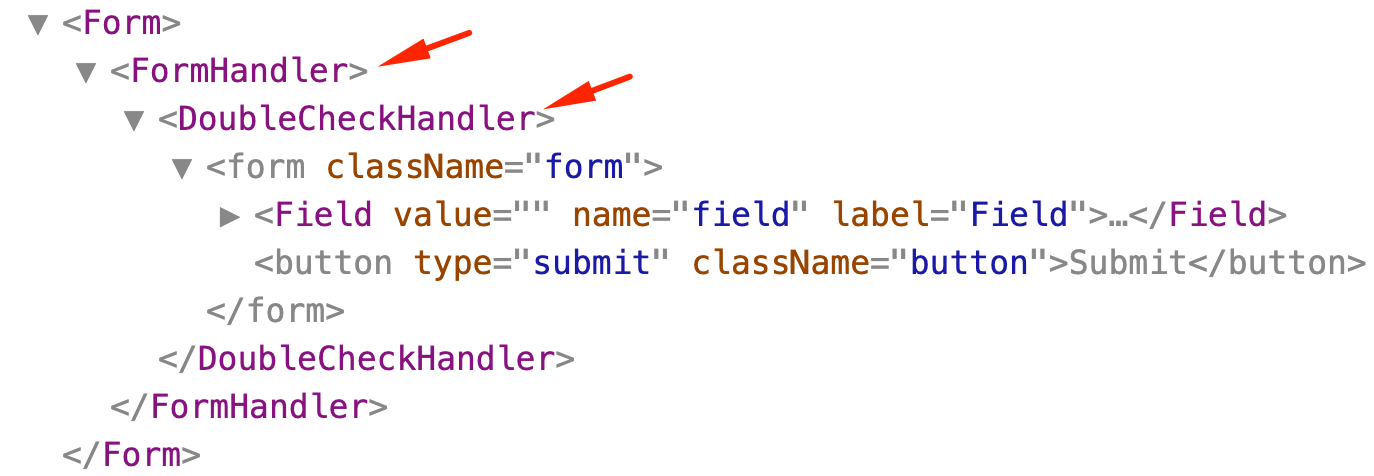
Introduce "DoubleCheckHandler" wrapper

<FormHandler initialValues={initialValues} onSubmit={handleSubmit}>
  {({ values, onChange, onSubmit }) => (
    <DoubleCheckHandler onSubmit={onSubmit}>
      {({ onSubmitWithDoubleCheck }) => (
        <form onSubmit={onSubmitWithDoubleCheck}>
          <Field
            value={values.field}
            name="field"
            label="Field"
            onChange={onChange}
          />
        </form>
      )}
    </DoubleCheckHandler>
  )}
</FormHandler>

Introduce "DoubleCheckHandler" wrapper

const DoubleCheckHandler = ({ onSubmit, children }) => {
  const handleSubmitWithDoubleCheck = e => {
    e.preventDefault();

    const answer = window.confirm("Are you really sure about this?");

    if (answer) {
      onSubmit(e);
    }
  };

  return children({
    onSubmitWithDoubleCheck: handleSubmitWithDoubleCheck
  });
};

No "shouldDoubleCheck" prop is needed in DoubleCheckHandler

Neat, our forms are looking good ๐Ÿ’ช

Let's share all this effort with the teammates

No-one seems to be excited ๐Ÿ˜ข

"This is not that readable. How are we going to maintain these components?"

<FormHandler initialValues={initialValues} onSubmit={handleSubmit}>
  {({ values, onChange, onSubmit }) => (
    <DoubleCheckHandler onSubmit={onSubmit}>
      {({ onSubmitWithDoubleCheck }) => (
      ...
      )}
    </DoubleCheckHandler>
  )}
</FormHandler>

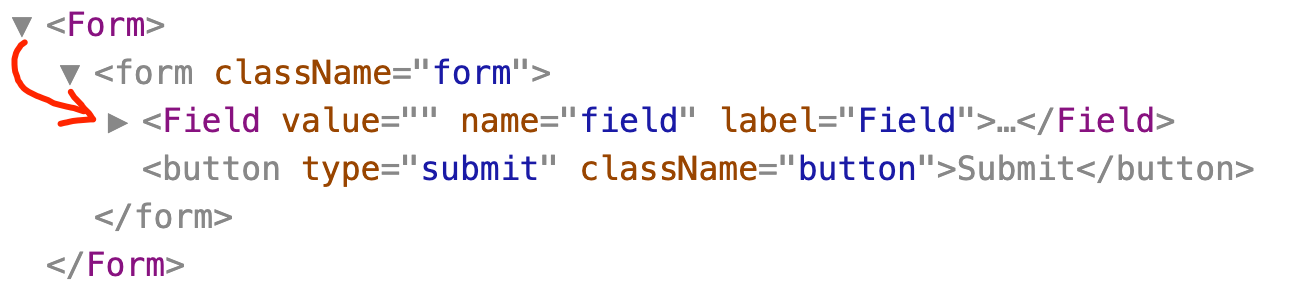
"What about all these wrapping components?

Components tree seems pretty ugly"

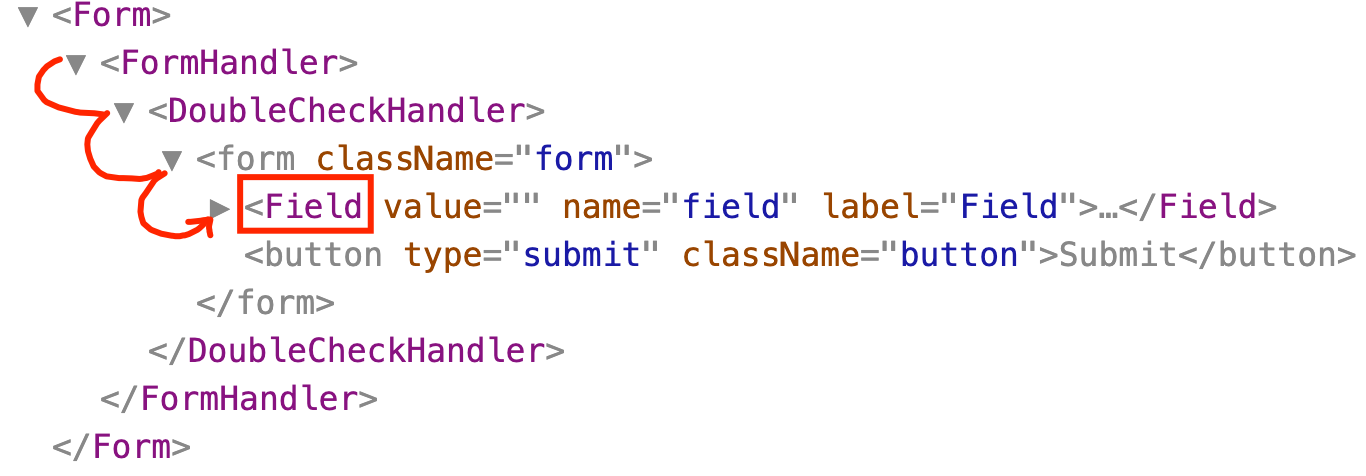
"What about testing? How deep we should go to find and tweak a Field?"

We need to use full mount with enzyme or many dives with shallow testing

Obviously this solution isn't that cool

Time to jump 1 year ahead and reach Hooks era

const Form = () => {
  const initialValues = {
    field: '',
  };

  const handleSubmit = data => axios.post('/url', data);

  // We need a mechanism to get:
  // 1. updated values
  // 2. re-usable onChange handler
  // 3. re-usable onSubmit handler

  return (
    <form onSubmit={onSubmit}>
      <Field
        value={values.field}
        name="field"
        onChange={onChange}
      />
    </form>
  );
};

Let's take 1 big breath and start from the very start

const Form = () => {
  const initialValues = {
    field: '',
  };

  const handleSubmit = data => axios.post('/url', data);

  const {
    values,
    onChange,
    onSubmit,
  } = useForm(initialValues, handleSubmit);

  return (
    <form onSubmit={onSubmit}>
      <Field
        value={values.field}
        name="field"
        onChange={onChange}
      />
    </form>
  );
};

A custom Hook is all we need

const useForm = (initialValues = {}, onSubmit) => {
  const [values, setValues] = React.useState(initialValues);

  const handleChange = e => {
    e.persist();
    setValues({
      ...values,
      [e.target.name]: e.target.value
    });
  };

  const handleSubmit = e => {
    e.preventDefault();
    onSubmit(values);
  };

  return { values, onChange: handleChange, onSubmit: handleSubmit };
};

We can create a custom Hook with some internal state

const useForm = (initialValues = {}, onSubmit) => {
  const [values, setValues] = React.useState(initialValues);

  const handleChange = e => {
    e.persist();
    setValues({
      ...values,
      [e.target.name]: e.target.value
    });
  };

  const handleSubmit = e => {
    e.preventDefault();
    onSubmit(values);
  };

  return { values, onChange: handleChange, onSubmit: handleSubmit };
};

"useState" Hook does all the dirty work

const Form = () => {
  const initialValues = {
    field: '',
  };

  const handleSubmit = data => axios.post('/url', data);

  const {
    values,
    onChange,
    onSubmit,
  } = useForm(initialValues, handleSubmit);

  return (
    <form onSubmit={onSubmit}>
      <Field
        value={values.field}
        name="field"
        onChange={onChange}
      />
    </form>
  );
};

Much more readable code with Hooks

const Form = () => {
  const initialValues = {
    field: '',
  };

  const handleSubmit = data => axios.post('/url', data);

  const {
    values,
    onChange,
    onSubmit,
  } = useForm(initialValues, handleSubmit);
  const { onDoubleCheckSubmit } = useDoubleCheck(onSubmit);

  return (
    <form onSubmit={onDoubleCheckSubmit}>
      <Field
        value={values.field}
        name="field"
        onChange={onChange}
      />
    </form>
  );
};

Much more readable code with Hooks

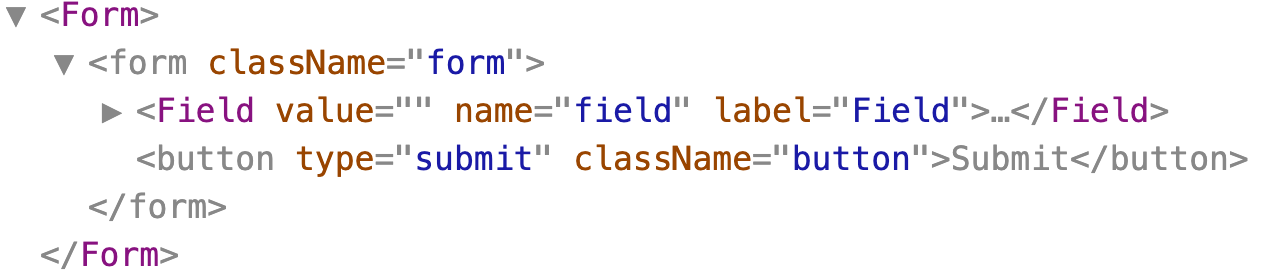
Cleaner components tree with Hooks

No more deep dive to test elements behaviour with Hooks

...everyone is happy, so you ship it ๐Ÿš€

  • Code re-usability with some simple functions and not complex patterns

  • Much more readable code

  • No more garbage in components tree

React Hooks pros

We still need classes for a couple cases:

  • Error Boundaries

  • getSnapshotBeforeUpdate

  • we cannot use Hooks directly inside classes

Do Hooks replace classes?

Questions

The biggest lies about React Hooks

By Marios Fakiolas

The biggest lies about React Hooks

What problems React Hooks do really solve?

  • 706