


Research data management for transparent and sustainable science
Felix Hoffstaedter
Research Centre Jülich, Germany
OHBM 2026 DISCLOSURES
-
nothing to declare
-
this talk is more about a mind set than howto
-
links available
-
yes, everything depends on the project
-
BUT sharing of code is essential for everything
Research Data Management
What is - Research Data
Experimental data
Research Software/Code
Anything we produce while doing research
Everybody does it ... in a way ...
Why not being thorough from the beginning?
Research Data Management - the Tools

-
Written by Linus Torvals, 2005
-
"the stupid content tracker" (manual)
-
Version Control
-
What is “version control”, and why should you care?
-
Version control is a system that records changes to a file or set of files over time so that you can recall specific versions later.
-
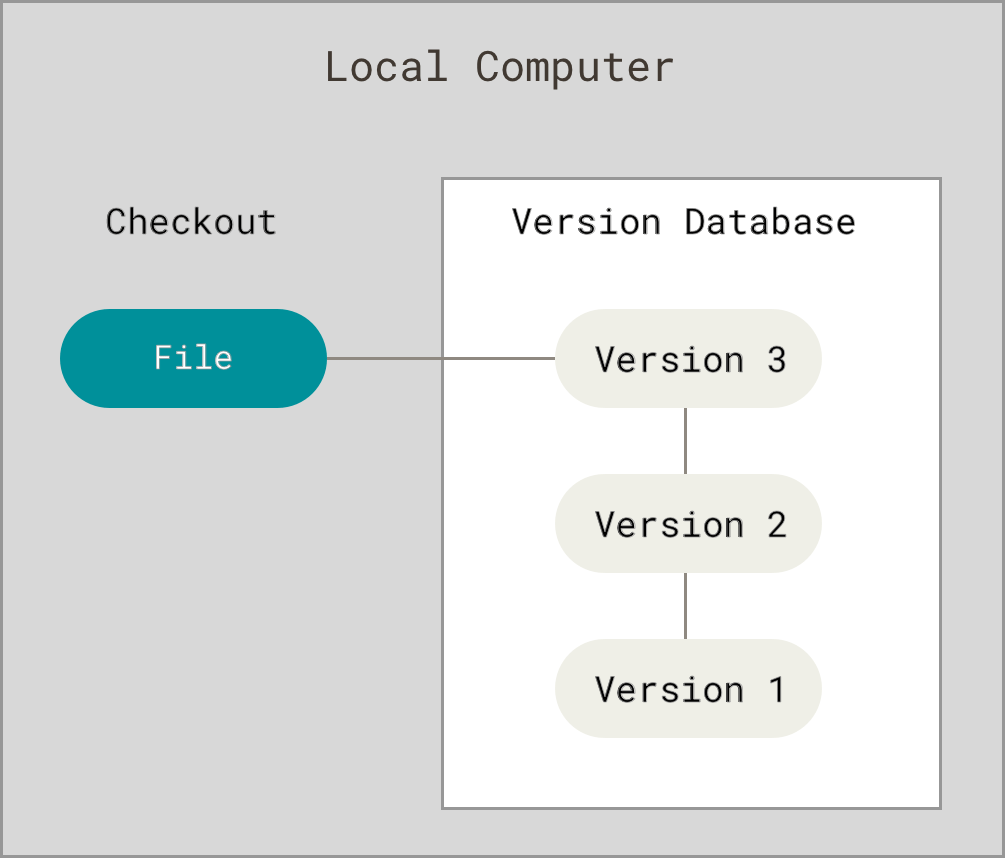
Research Data Management - the Tools
-
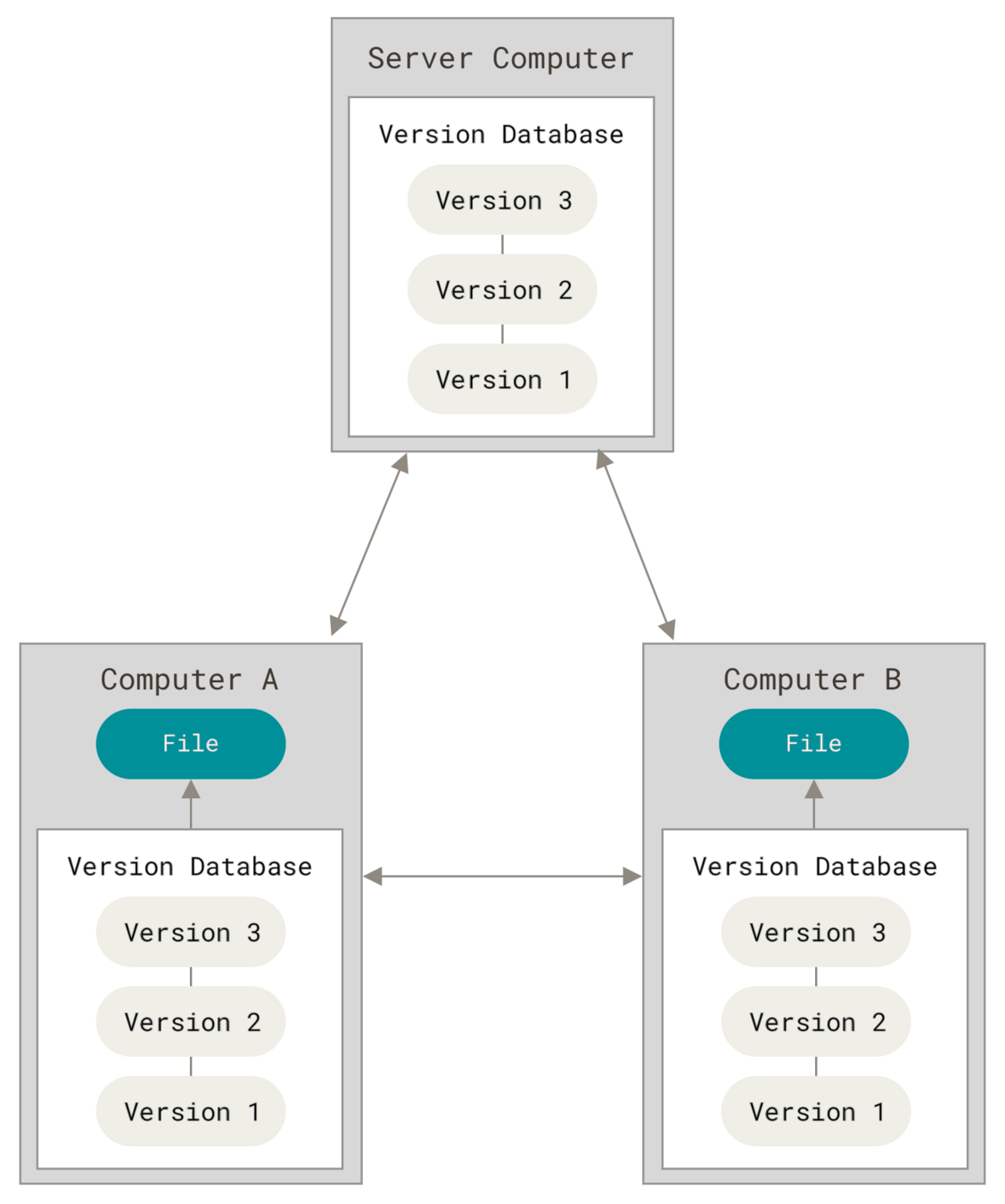
Distributed Version Control System (book)
-
Every CLONE is really a full backup of all the data
-
Features of git:
-
can revert anything you did (wrong)
-
lets you travel in time
-
tells you differences between versions
-
shows anything new
-
link datasets/repos via gitmodules
-
Research Data Management - the Tools
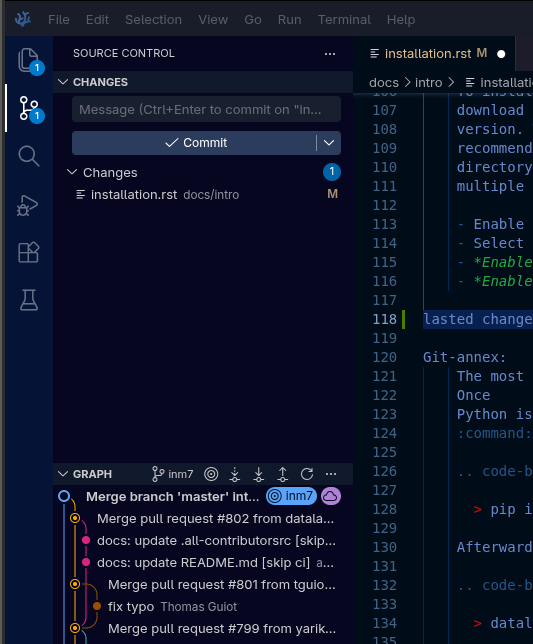
Industry standard - pre-installed on every system
- is build into most editors and IDEs
- VS Code / Codium (FOSS)
- Jupyter Lab
- Pycharm
- Matlab
- .. often available as extension
Research Data Management - the Tools
-
git forges
- host data to clone from and push to
- help to consolidate different versions
- discussions on repos via
- issues / work items
- automate & execute processes via
- actions / pipelines
- compile executables



Research Data Management - the Tools
-
git only likes text
-
git doesn't like binaries or large data
-
git annex - Joey Hess, 2010
-
distributed file synchronization system
-
Research Data Management - the Tools
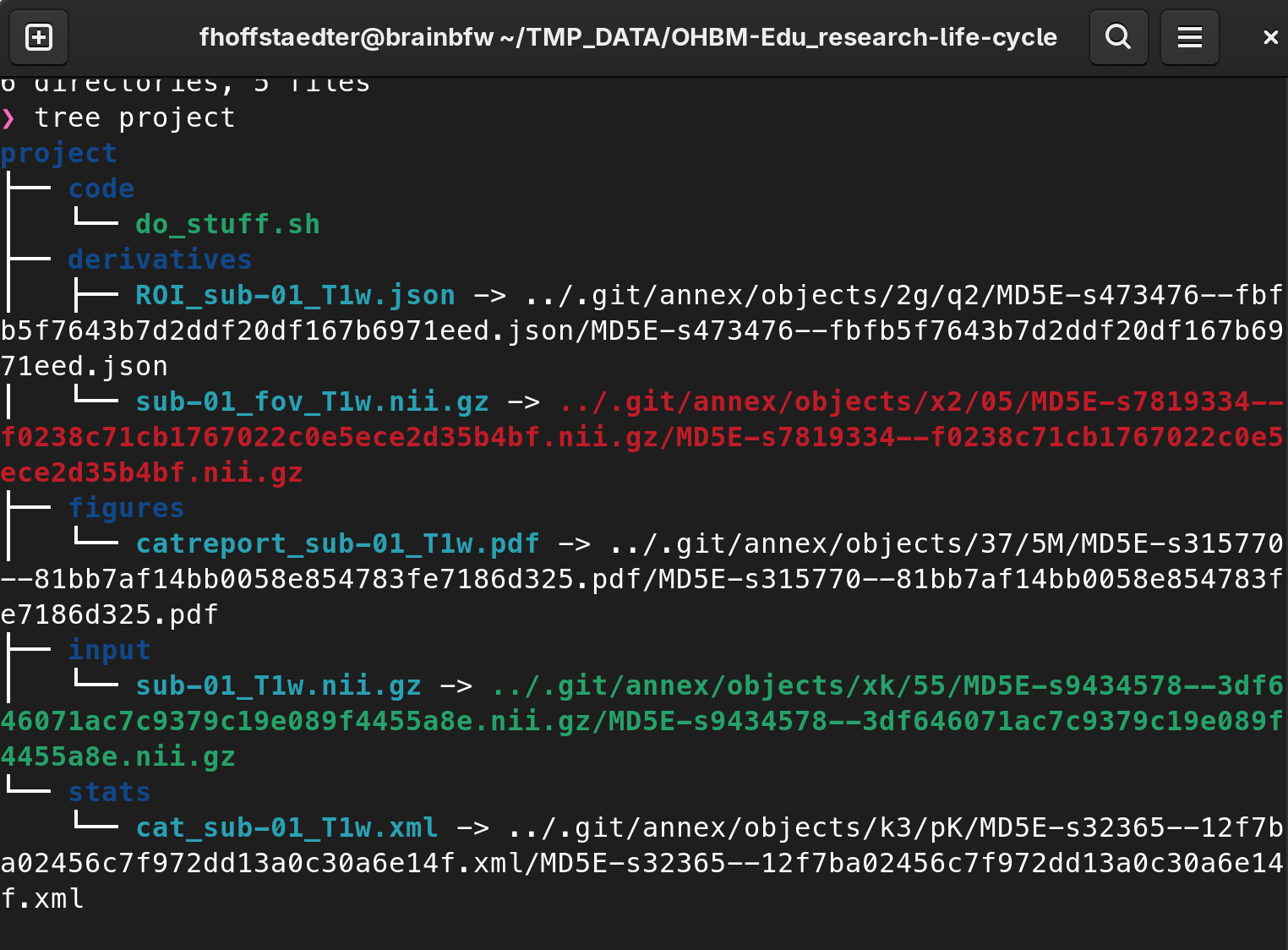
- git-annex uses Git to index files but does not store them in the Git history. Instead, a symbolic link representing and linking to the possibly large file is committed.
- A separate Git branch logs the location of every file. Thus users can clone a git-annex repository and then decide for every file whether to make it locally available.
Research Data Management - the Tools
-
git only likes text
-
git doesn't like binaries or large data
-
git annex - Joey Hess, 2010
-
distributed file synchronization system
-
- manage arbitrary large data (yes Petabytes)
- transport mechanisms: get & drop data
Research Data Management - the Tools
-
"the stupid content tracker"
-
Distributed Version Control Systems
-
Every clone is really a full backup of all the data
- arbitrary large data via hashing
- transport mechanisms
- simplifies and generalizes data management
- interact with 'all' the storage services

Research Data Management - the Tools
- simplifies and generalizes data management
- simplifies the use of git
- Datalad Handbook with many (!) examples
- Work with very large data on your laptop
- datalad get content on demand and drop it
- Access all of OpenNeuro & Derivatives
- ready to use: mriqc, freesurfer, fmriprep

-
data provenance tracking with increasing amount of meta-data using
-
minimal snapshot approach
-
step-wise state capture
-
re-executable workflow documentation
Research Data Management
-
data provenance tracking with increasing amount of meta-data using
-
minimal snapshot approach
-
step-wise state capture
-
re-executable workflow documentation
Research Data Management
DATA
Mock project:
code: git repo
derivatives: computed stuff
figures: pdf
input: raw BIDS
stats: QC etc
$ tree project

project
├── code
│   └── do_stuff.sh
├── derivatives
│   └── ROI_sub-01_T1w.json
├── figures
│   └── catreport_sub-01_T1w.pdf
├── input
│   └── sub-01_T1w.nii.gz
└── stats
    └── cat_sub-01_T1w.xml
1. Minimal Snapshot Approach
Project Backup: create Datalad dataset
# make project a Datalad dataset
$ datalad create --force .
create(ok): /home/fhoffstaedter/TMP_DATA/OHBM-Edu_research-life-cycle/project (dataset)
# ignore input folder
$ echo "input" > .gitignore
# add all content to dataset
$ datalad save -m "backup project" -d .
add(ok): code (dataset)
add(ok): .gitmodules (file)
add(ok): .gitignore (file)
add(ok): derivatives/ROI_sub-01_T1w.json (file)
add(ok): figures/catreport_sub-01_T1w.pdf (file)
add(ok): stats/cat_sub-01_T1w.xml (file)
save(ok): . (dataset)
action summary:
  add (ok: 6)
  save (ok: 1)
$ tree project

project
├── code
│   └── do_stuff.sh
├── derivatives
│   └── ROI_sub-01_T1w.json
├── figures
│   └── catreport_sub-01_T1w.pdf
├── input
│   └── sub-01_T1w.nii.gz
└── stats
    └── cat_sub-01_T1w.xml
1. Minimal Snapshot Approach
Project Backup: create Datalad dataset
# make project a Datalad dataset
$ datalad create --force .
create(ok): /home/fhoffstaedter/TMP_DATA/OHBM-Edu_research-life-cycle/project (dataset)
# ignore input folder
$ echo "input" > .gitignore
# add all content to dataset
$ datalad save -m "backup project" -d .
add(ok): code (dataset)
add(ok): .gitmodules (file)
add(ok): .gitignore (file)
add(ok): derivatives/ROI_sub-01_T1w.json (file)
add(ok): figures/catreport_sub-01_T1w.pdf (file)
add(ok): stats/cat_sub-01_T1w.xml (file)
save(ok): . (dataset)
action summary:
  add (ok: 6)
  save (ok: 1)
$ tree project

project
├── code
│   └── do_stuff.sh
├── derivatives
│   └── ROI_sub-01_T1w.json
├── figures
│   └── catreport_sub-01_T1w.pdf
├── input
│   └── sub-01_T1w.nii.gz
└── stats
    └── cat_sub-01_T1w.xml
1. Minimal Snapshot Approach
Project Backup: create Datalad dataset
# make project a Datalad dataset
$ datalad create --force .

create(ok): /home/fhoffstaedter/TMP_DATA/OHBM-Edu_research-life-cycle/project (dataset)

# ignore input folder
$ echo "input" > .gitignore

# add all content to dataset
$ datalad save -m "backup project" -d .

add(ok): code (dataset)
add(ok): .gitmodules (file)
add(ok): .gitignore (file)
add(ok): derivatives/ROI_sub-01_T1w.json (file)
add(ok): figures/catreport_sub-01_T1w.pdf (file)
add(ok): stats/cat_sub-01_T1w.xml (file)
save(ok): . (dataset)
action summary:
  add (ok: 6)
  save (ok: 1)
1. Minimal Snapshot Approach

Open Science Framework
- OSF account
- Datalad OSF extension
- get OSF Token
1. Minimal Snapshot Approach
# create OSF repository
$ datalad create-sibling-osf -s osf \
	--title mock_project \
	--mode export

create-sibling-osf(ok): https://osf.io/rtgzv/
[INFO   ] Configure additional publication dependency on "osf-storage"
configure-sibling(ok): . (sibling)

# push dataset to OSF
$ datalad push --to osf

copy(ok): .datalad/.gitattributes (dataset)
copy(ok): .datalad/config (dataset)
copy(ok): .gitattributes (dataset)
copy(ok): .gitignore (dataset)
copy(ok): .gitmodules (dataset)
copy(ok): derivatives/ROI_sub-01_T1w.json (dataset)
copy(ok): figure/catreport_sub-01_T1w.pdf (dataset)
copy(ok): stats/cat_sub-01_T1w.xml (dataset)
publish(ok): . (dataset) [refs/heads/main->osf:refs/heads/main [new branch]]
publish(ok): . (dataset) [refs/heads/git-annex->osf:refs/heads/git-annex [new branch]]
action summary:
  copy (ok: 8)
  publish (ok: 2)
1. Minimal Snapshot Approach
Project Backup: create OSF repository & push
# create OSF repository
$ datalad create-sibling-osf -s osf \
--title mock_project \
--mode export
create-sibling-osf(ok): https://osf.io/rtgzv/
[INFO ] Configure additional publication dependency on "osf-storage"
configure-sibling(ok): . (sibling)
# push dataset to OSF
$ datalad push --to osf
copy(ok): .datalad/.gitattributes (dataset)
copy(ok): .datalad/config (dataset)
copy(ok): .gitattributes (dataset)
copy(ok): .gitignore (dataset)
copy(ok): .gitmodules (dataset)
copy(ok): derivatives/ROI_sub-01_T1w.json (dataset)
copy(ok): figure/catreport_sub-01_T1w.pdf (dataset)
copy(ok): stats/cat_sub-01_T1w.xml (dataset)
publish(ok): . (dataset) [refs/heads/main->osf:refs/heads/main [new branch]]
publish(ok): . (dataset) [refs/heads/git-annex->osf:refs/heads/git-annex [new branch]]
action summary:
copy (ok: 8)
publish (ok: 2)1. Minimal Snapshot Approach
Project Backup:
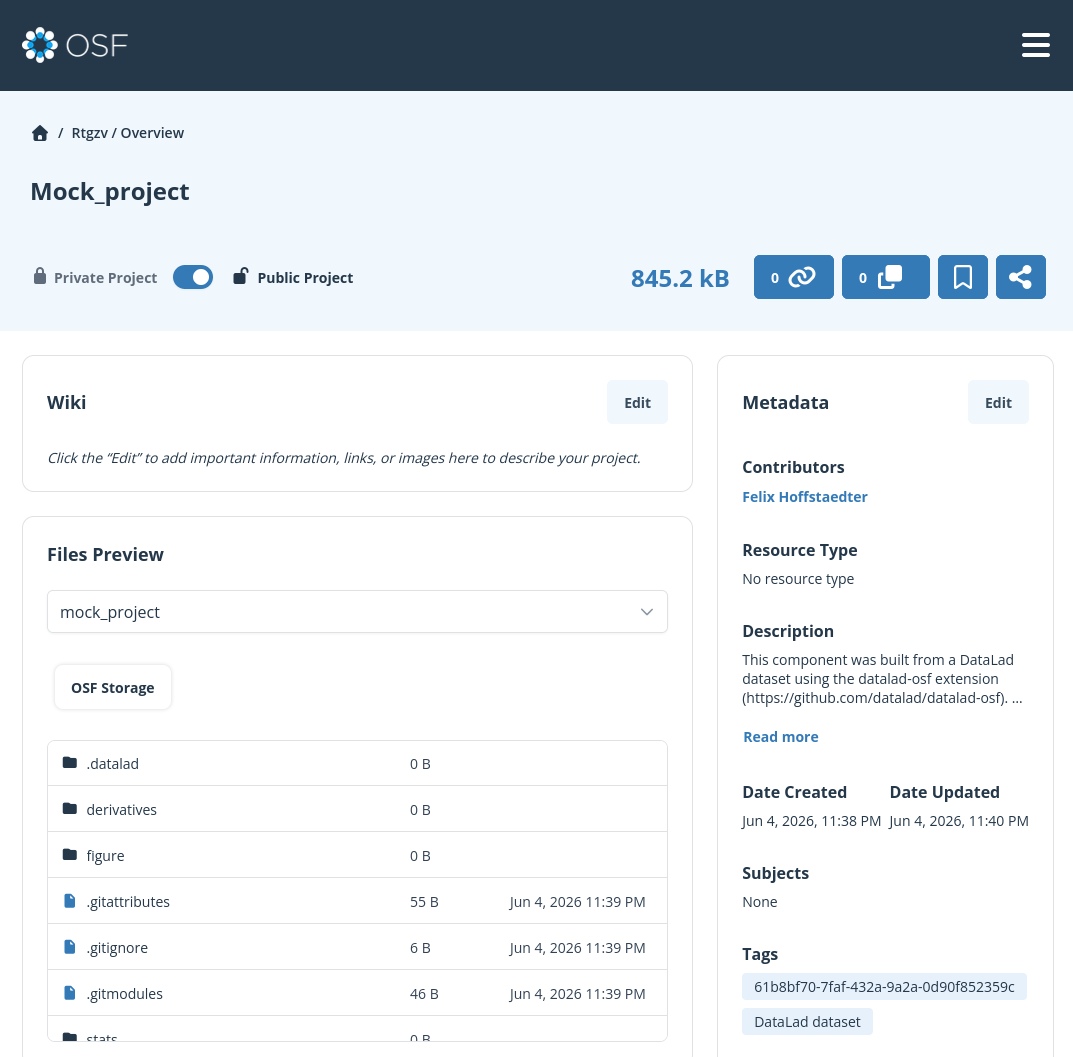
- interact with data via website
- download single files
- clone whole dataset with Datalad
# run fsl robust field of view
$ robustfov -i input/sub-01_T1w.nii.gz -r derivatives/sub-01_fov_T1w.nii.gz
Final FOV is:
0.000000 208.000000 0.000000 240.000000 66.000000 170.000000
# save changes of file
$ datalad save -m "robust field of view" derivatives/sub-01_fov_T1w.nii.gz
# make file editable
$ dl unlock input/sub-01_T1w.nii.gz
unlock(ok): input/sub-01_T1w.nii.gz (file)
# swap left right dimensions of input and save
$ fslswapdim input/sub-01_T1w.nii.gz -x y z input/sub-01_T1w.nii.gz
WARNING:: Flipping Left/Right orientation (as det < 0)
$ datalad save -m "swap wrong left right orientation" input/sub-01_T1w.nii.gz
add(ok): input/sub-01_T1w.nii.gz (file)
save(ok): . (dataset)
action summary:
add (ok: 1)
save (ok: 1)
2. Step-wise State Capture
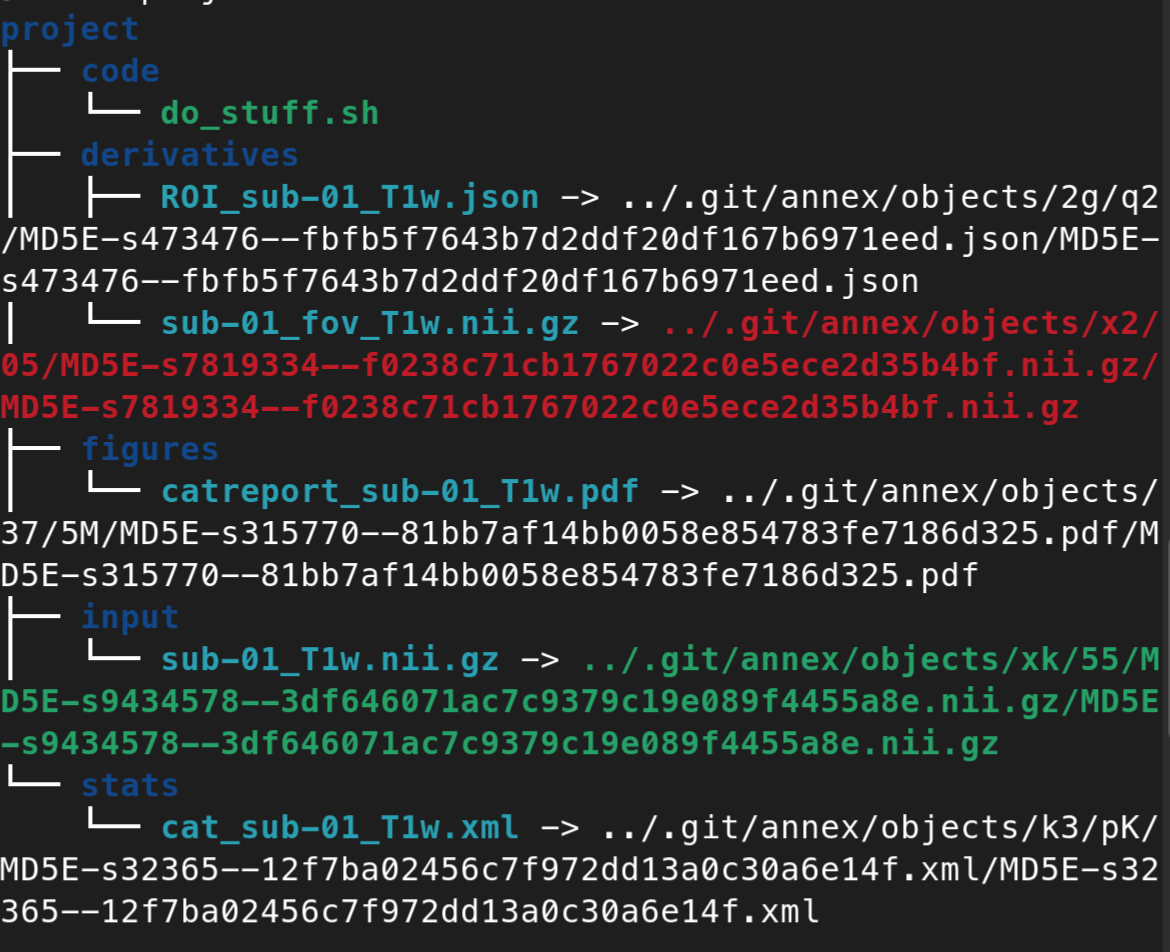
2. Step-wise State Capture
Work in a Datalad dataset
# run fsl robust field of view
$ robustfov -i input/sub-01_T1w.nii.gz -r derivatives/sub-01_fov_T1w.nii.gz
Final FOV is:
0.000000 208.000000 0.000000 240.000000 66.000000 170.000000

# save changes of file
$ datalad save -m "robust field of view" derivatives/sub-01_fov_T1w.nii.gz

# make file editable
$ dl unlock input/sub-01_T1w.nii.gz
unlock(ok): input/sub-01_T1w.nii.gz (file)

# swap left right dimensions of input
fslswapdim input/sub-01_T1w.nii.gz -x y z input/sub-01_T1w.nii.gz
WARNING:: Flipping Left/Right orientation (as det < 0)

datalad save -m "swap wrong left right orientation" input/sub-01_T1w.nii.gz
add(ok): input/sub-01_T1w.nii.gz (file)
save(ok): . (dataset)
action summary:
  add (ok: 1)
  save (ok: 1)
2. Step-wise State Capture
# go back to original image
$ git reset 5aef1b0320b61080c6b558b4e4cea0ac70f31159 --hard

# swap left right dimensions of input
fslswapdim input/sub-01_T1w.nii.gz -x y z input/sub-01_T1w.nii.gz
WARNING:: Flipping Left/Right orientation (as det < 0)

datalad save -m "swap wrong left right orientation" input/sub-01_T1w.nii.gz
add(ok): input/sub-01_T1w.nii.gz (file)
save(ok): . (dataset)
action summary:
  add (ok: 1)
  save (ok: 1)

$ robustfov -i input/sub-01_T1w.nii.gz -r derivatives/sub-01_fov_T1w.nii.gz
Final FOV is:
0.000000 208.000000 0.000000 240.000000 66.000000 170.000000

# save changes of file
$ datalad save -m "robust field of view" derivatives/sub-01_fov_T1w.nii.gz
Work in a Datalad dataset
2. Step-wise State Capture
Project: work in a Datalad dataset
- run computations and save results successively
- work savely, everything is backed up
- git style workflow = history of changes
- run computations
- datalad save results + scripts
- push to repository
- Allows to go back to any state of the project
- git reset #hash of commit
3. Re-executable workflow
# use datalad run to capture the command
$ datalad run -m "robust field of view" \
	robustfov -i input/sub-01_T1w.nii.gz -r derivatives/sub-01_fov_T1w.nii.gz

[INFO   ] == Command start (output follows) =====
Final FOV is:
0.000000 208.000000 0.000000 240.000000 66.000000 170.000000

[INFO   ] == Command exit (modification check follows) =====
run(ok): /home/fhoffstaedter/TMP_DATA/OHBM-Edu_research-life-cycle/project (dataset) [singularity exec -B /home/fhoffstaedter/...]
add(ok): derivatives/sub-01_fov_T1w.nii.gz (file)
save(ok): . (dataset)
Use Datalad run to capture full provenance
3. Re-executable workflow
$ git log
commit 468b478d748c7ec8c41be8cf265443fbdd967e37 (HEAD -> main)
Author: Felix Hoffstaedter <f.hoffstaedter@fz-juelich.de>
Date:   Fri Jun 5 03:15:28 2026 +0200

    [DATALAD RUNCMD] robust field of view

    === Do not change lines below ===
    {
     "chain": [],
     "cmd": "robustfov -i input/sub-01_T1w.nii.gz -r derivatives/sub-01_fov_T1w.nii.gz"
     "dsid": "f69b6283-0352-4894-9d44-a1c84fc48484",
     "exit": 0,
     "extra_inputs": [],
     "inputs": [],
     "outputs": [],
     "pwd": "."
    }
    ^^^ Do not change lines above ^^^
Use Datalad run to capture full provenance
Research Data Management - the Tools
extensions:
-
datalad-osf : use OSF as remote
-
datalad-next : performance boost & helpers
-
datalad-containers : organize and run containers
-
datalad-slurm : slurm integration
OHBM - edu
By Felix Hoffstaedter