






AWS Elastic Container Service 101


+

=

Matt Gowie (@Gowiem)

Presented By

  • Owner of Masterpoint Consulting (masterpoint.io)
  • @Gowiem on the internet
  • AWS + Hashicorp Certified
  • Use ECS for multiple client and open source projects

What're we Talking about Today?

  1. Intro to Core Concepts
  2. What is ECS?
  3. Prerequisites
  4. Terminology and Hierarchy
  5. Task Definition Breakdown
  6. Launch types
  7. Placement Strategy and Constraints
  8. Auto Scaling
  9. Demo
  10. Tips + Tricks + Tools
  11. Resources + Questions

Core Concepts

  • Docker concepts
    • What is Docker?
    • What is a Container?
  • AWS Concepts
    • What is an EC2 instance?
    • What is an Auto Scaling Group (ASG)?

What is ECS?

  • ECS stands for Elastic Container Service.
  • ECS is a Container Orchestration Service.
  • In other words: ECS is responsible for managing the lifecycle, scaling, scheduling, monitoring, and underlying compute resources (EC2 instances) of your containerized applications.
  • Competing services include Kubernetes (AWS EKS, GCP's GKE, Azure's AKS, Self-Hosted, ect.), AWS Elastic Beanstalk, Docker Swarm, and others
  • Best option for easily shipping container applications on AWS

Prerequisites

  • What do you need to run Containers on ECS?
    • AWS Account
    • AWS IAM Account with adequate permissions
    • VPC, Subnet, Security Group
    • A Docker image pushed to a container repo (Docker Hub, AWS ECR, etc.)
  • Optional:
    • EC2 Instance using the AWS ECS-optimized AMI

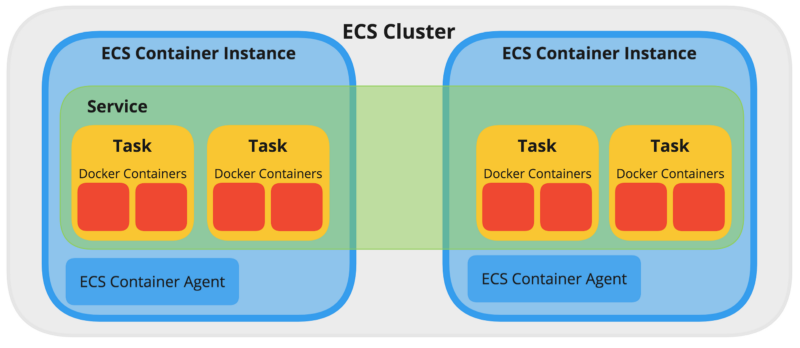
Terminology + Hierarchy

  • Cluster
  • Task Definition
  • Task 
  • Service
  • ECS Container Instance + Agent
  • Scheduled Tasks
  • Elastic Container Registry (ECR)
  • Capacity Providers

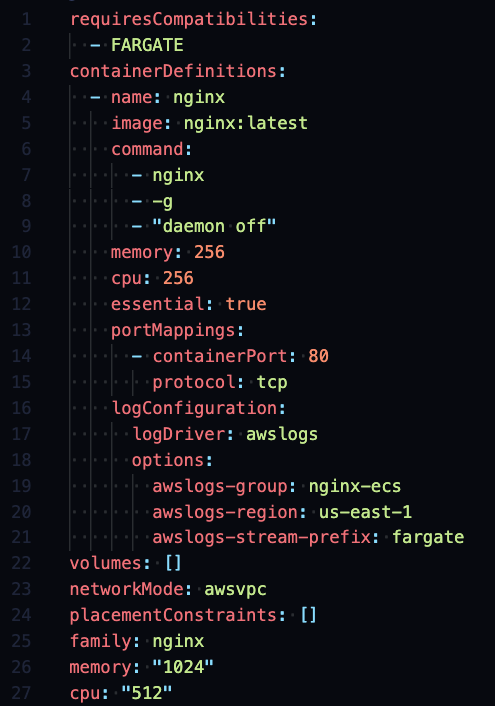
Task Def. Breakdown

  • A Task Definition is the Configuration for "how" your containers run.
  • Overlaps configuration with Services
  • Allow you to specify the following:
    • Family
    • Container images
    • Command
    • Exposed ports
    • Log configuration
    • Resource Limits (CPU / Memory)
    • Launch Type
    • Network configuration
    • Volumes / mounting config
    • Environment variables / secrets
    • Healthcheck configuratio
    • And any other Docker related config (ulimits, labels, linux params, etc etc.)

Launch Types

EC2 Fargate
Model You manage the underlying EC2 Instances Serverless
Pricing Less expensive
Instance Cost
(i.e. 2 x m5.xlarge @ $0.19 / hour)
More expensive
Per Task
$0.04 / vCPU Hour
$0.004 /  Mem. GB Hour
Data Volume Options Docker Volumes, Bind Mounts, EFS Ephemeral Storage, EFS
Networking Types bridge, host, awsvpc awsvpc
Operational Overhead High Very Low
Debugging SSH / Docker Exec No direct access

+ Fargate Spot! (possible 70% discount)

Placement Strategy + Constraints - #1

  • These settings only apply to EC2 launch type.
  • The Fargate launch type spreads out tasks across AZs.
     
  • Placement Strategy: *how* you want ECS to manage placing your tasks on your EC2 Cluster
  • 3 Types: BinPack, Spread, Random
  • Can be combined.
  • Example:
placementStrategy:
  - field: attribute:ecs.availability-zone
    type: spread
  - field: memory
    type: binpack

Placement Strategy + Constraints - #2

  • Placement Constraints: *where* you want ECS to place your tasks on your Cluster
  • Allows you to specify the instance to run the tasks on based on built-in ECS attributes, custom attributes, task "groups", and distinct instances
  • Accomplished through "ECS Cluster Query Language" (expression)
  • Useful for ensuring tasks run on specific EC2 instance types for GPU workloads or memory optimized workloads
  • Example:
placementConstraints:
  - expression: attribute:ecs.instance-type =~ g4.*
    type: memberOf

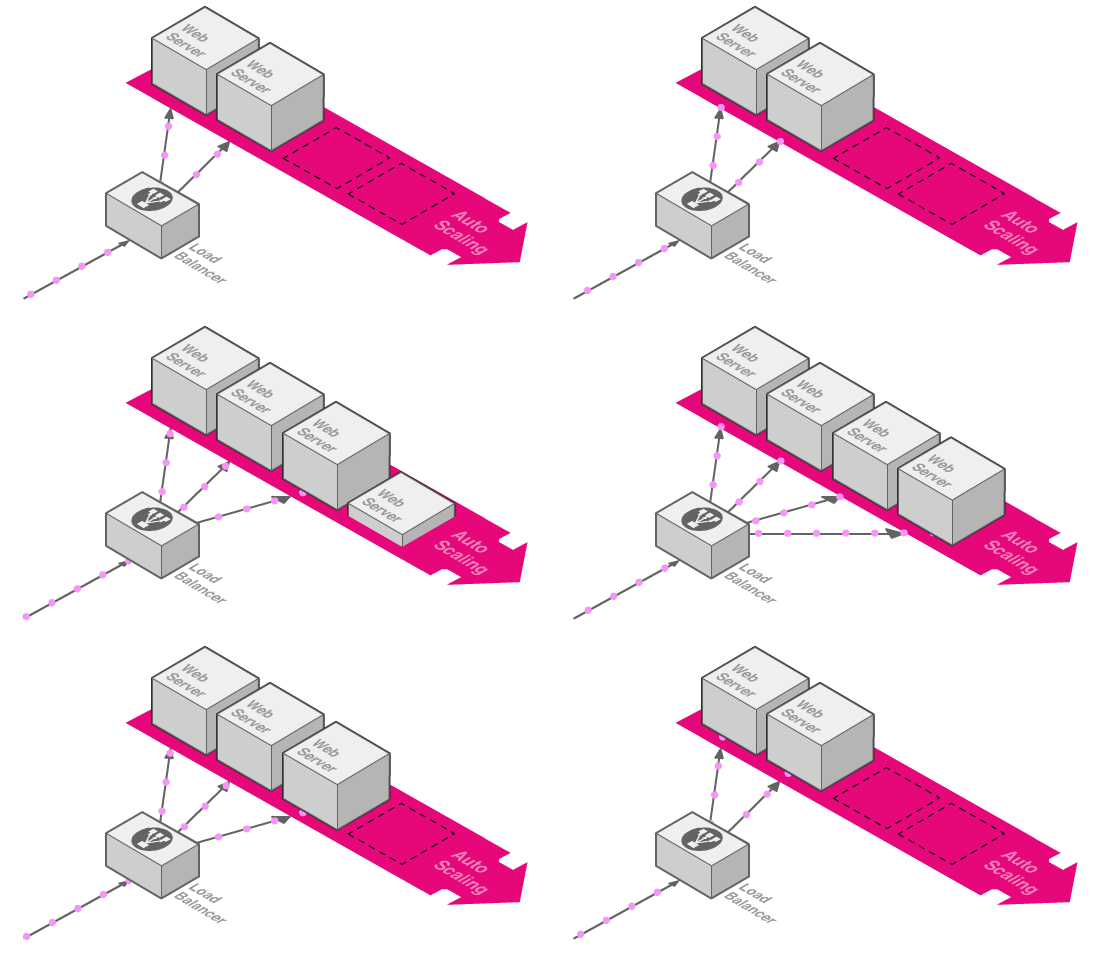
Auto Scaling

  • ECS Auto Scaling has two parts: Service Auto Scaling and Capacity Providers.
  • Service Auto Scaling (EC2 + Fargate)
    • Responsible for scaling the number of running tasks according to CPU, Memory, or associated ELB Request Counts
    • Supports both Target and Step scaling policies
  • Custom Capacity Providers (Just EC2)
    • Responsible for scaling the EC2 instances running your tasks by managing an associated EC2 Auto Scaling Group (ASG)
    • Associated with a Cluster as the default or individual Services
    • Can combine multiple Capacity Providers
      to create complex scaling workflows.
    • Does a poor job of scaling in (decreasing
      capacity)

Demo Time!

Tips and Tricks

  • Unless cost is ultra critical, use Fargate whenever possible.
    • Keep EC2 as an option for tricky debugging.
  • Always Update Account Settings for Long ARN Formats - Commands:


  • Use Docker CMD + RunTask for your administrative benefit
    • Run tasks like migrations, seeding your DB, or one-off jobs
  • Skip on using Task Definition environment variables / secrets - Just find another way.
    • ​Makes changing Env configuration painful.
    • One option: AWS Parameter Store + Segment.io's Chamber CLI Tool
  • Docker's `latest` tag is an anti-pattern, avoid it!
    • Each time you build a new image, update the associated Task Definition.
  • ​Know that ECS isn't perfect. There are rough edges as AWS is trying to keep up with Kubernetes and similar offerings.
aws ecs put-account-setting-default --name serviceLongArnFormat --value enabled
aws ecs put-account-setting-default --name taskLongArnFormat --value enabled
aws ecs put-account-setting-default --name containerInstanceLongArnFormat --value enabled

Tools

Where to Learn more

Finn.

Questions?

ECS 101 Slidedeck

By Matt Gowie

ECS 101 Slidedeck

Come learn the basic and not-so-basic details of the AWS Container Orchestration platform: Elastic Container Service (ECS). In this talk, you’ll get an introduction to the AWS ECS domain hierarchy, Task Definition configuration breakdown, and tips and tricks to help you better build Container applications on AWS.
  • 378