管伟
Web developer
wikipedia:领域特定语言指的是专注于某个应用程序领域的计算机语言。又译作领域专用语言。
太抽象?
徐克导演得《智取威虎山》中就有很典型的DSL使用描述 - -:
土匪:蘑菇,你哪路?什么价?(什么人?到哪里去?)

杨子荣:哈!想啥来啥,想吃奶来了妈妈,想娘家的人,孩子他舅舅来了。(找同行)

杨子荣:拜见三爷!

土匪:天王盖地虎!(你好大的胆!敢来气你的祖宗?)

杨子荣:宝塔镇河妖!(要是那样,叫我从山上摔死,掉河里淹死。)

土匪:野鸡闷头钻,哪能上天王山!(你不是正牌的。)

杨子荣:地上有的是米,喂呀,有根底!(老子是正牌的,老牌的。)- 面向对象的编程语言
- 脚本语言
- Groovy ===编译器===> Java字节码
- 运行在JVM
- 可以与Java混编
class Foo {
  doSomething() {
    data = ["name": "James", "location": "London"]
    for (e in data) {
      println("entry ${e.key} is ${e.value}")
    }
  }

  closureExample(collection) {
    collection.each { println("value ${it}") }
  }

  static void main(args) {
    values = [1, 2, 3, "abc"]
    foo = new Foo()
    foo.closureExample(values)
    foo.doSomething()
  }
}Gradle 和 Android 插件可帮助您完成以下方面的构建配置:
- 构建类型
- 产品风味
- 构建变体
- 清单条目
- 依赖项
- 签署
- ProGuard
- APK 拆分
一个简单的HelloWorld:
println "hello Groovy!!!"变量定义
def var1 = 1  // 可以不使用分号结尾
def var2 = 'abc'
def var3 = "def"
def int var4 = 2

println var1 + var2 + var3 + var41abcdef2输出
函数定义
//无需指定参数类型
String testFunction(arg1, arg2){
  // ...
}

// 除了变量定义可以不指定类型外,Groovy中函数的返回值也可以是无类型的。比如:
// 无类型的函数定义,必须使用def关键字
def nonReturnTypeFunc(){
  // last_line //最后一行代码的执行结果就是本函数的返回值
  1000 // 返回1000
}

//如果指定了函数返回类型,则可不必加def关键字来定义函数
String getString(){
   return "I am a string"
}字符串处理
def placeHoder = 'groovy'

// 单引号不转义
def str1 = 'abc $placeHoder'

// 双引号转义
def str2 = "mnp $placeHoder"

println str1 // 输出“abc $placeHoder”
println str2 // 输出“mnp groovy”容器类 - List
class testClass {
    @Override
    String toString() {
        return 'testClass oh yeah'
    }
}

def aList = ['hello', 10, false, true, new testClass()]

println aList.size()  // 5
println aList[4].toString()  // testClass oh yeah

aList[100] = 'world'
println aList.size() // 101容器类 - Map
def myMap = [key1: 'abc', key2: 2]

println myMap.key1  // abc
println myMap.key2  // 2
println myMap.keySet()  // [key1, key2]

def key3 = 'ooxx'
def myMap2 = [(key3): 'you are right', opq: 900]

println myMap2.opq   // 900
println myMap2.key3  // null
println myMap2.get('ooxx')  // you are right
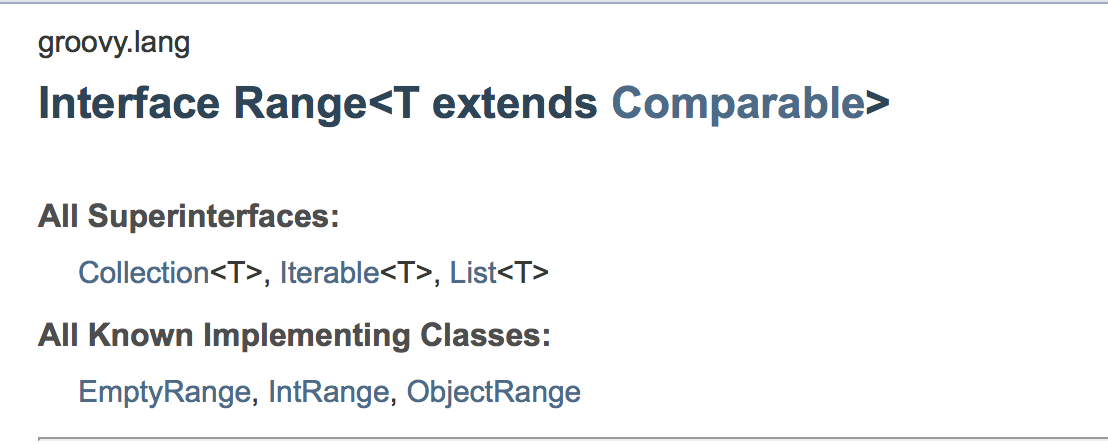
println myMap2['ooxx'] // you are right容器类 - Range
def aRange = 1..5
def bRange = 1..<5

println aRange  // [1, 2, 3, 4, 5]
println bRange  // [1, 2, 3, 4]

println aRange.from  // 1
println aRange.to    // 5

println aRange.getFrom()  // 1
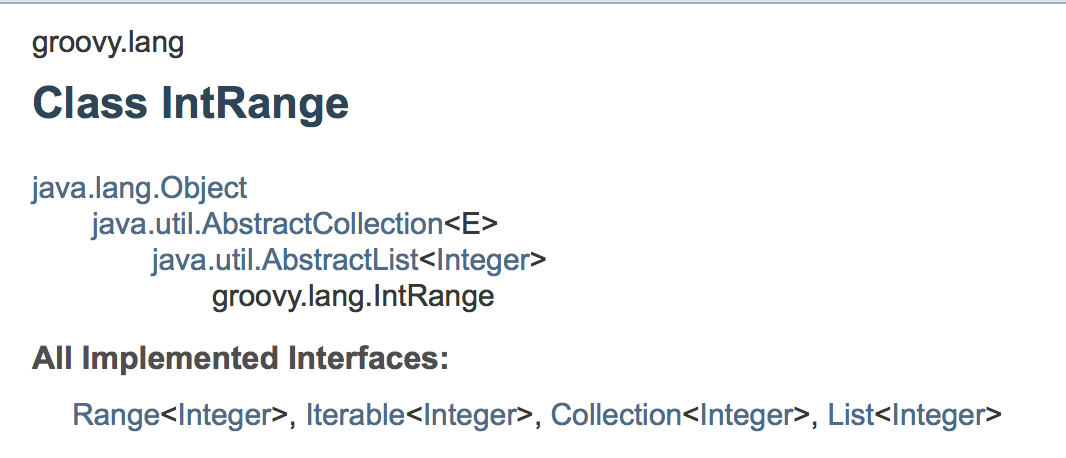
println aRange.getTo() // 5容器类 - Range
aRange.getFrom() <==> aRange.from
aRange.getTo() <==> aRange.toFrom wikipedia:
在计算机科学中,闭包(英语:Closure),又称词法闭包(Lexical Closure)或函数闭包(function closures),是引用了自由变量的函数。这个被引用的自由变量将和这个函数一同存在,即使已经离开了创造它的环境也不例外。所以,有另一种说法认为闭包是由函数和与其相关的引用环境组合而成的实体。闭包在运行时可以有多个实例,不同的引用环境和相同的函数组合可以产生不同的实例。
闭包一词经常和匿名函数混淆。这可能是因为两者经常同时使用,但是它们是不同的概念。
// Return a list of all books with at least 'threshold' copies sold.
function bestSellingBooks(threshold) {
  return bookList.filter(
      function (book) { return book.sales >= threshold; }
    );
}
// Return a function that approximates(近似) the derivative(衍生) of f
// using an interval of dx, which should be appropriately(适当地) small.
function derivative(f, dx) {
return function (x) {
return (f(x + dx) - f(x)) / dx;
};
}在没有闭包的语言中,变量的生命周期只限于创建它的环境。但在有闭包的语言中,只要有一个闭包引用了这个变量,它就会一直存在。
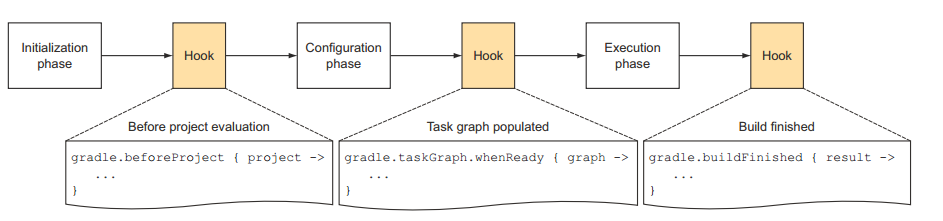
因为闭包只有在被调用时才执行操作,即“惰性求值”,所以它可以被用来定义控制结构,或者Hook生命周期节点(Gradle)。
Text
//fn 是一个闭包,指向那个匿名函数。
void G(void){
    const std::wstring wstr=L"Hello, world!";
    std::function<wchar_t(size_t)> fn=[&wstr](size_t ui)->wchar_t{
        return wstr[ui%wstr.length()];
    };
    std::wcout<<fn(3)<<std::endl;//'l'
}Text
def aClosure = {
    // 这个箭头很关键。箭头前面是参数定义,箭头后面是代码
    String param1, int param2 ->
    // 这是代码,最后一句是返回值
    // 也可以使用return,和Groovy中普通函数一样
    println "this is code: $param1, $param2"
}

aClosure.call('abc', 2) // this is code: abc, 2
aClosure('defff', 6)    // this is code: defff, 6

// it
def greeting = { "Hello, $it!" }
def greeting2 = {
    it ->
    "Hello, $it!"
}
println greeting("world") // Hello, world!
println greeting2("tony") // Hello, tony!

def iAmList = [1, 2, 3]
iAmList.each {
    println it // 逐行输出1,2,3
}Text
class MyClass {
    def outerClosure = {
        println this.class.name      // outputs MyClass
        println owner.class.name     // outputs MyClass
        println delegate.class.name  // outputs MyClass
        def nestedClosure = {
            println this.class.name      // outputs MyClass
            println owner.class.name     // outputs MyClass$_closure1
            println delegate.class.name  // outputs MyClass$_closure1
        }
        nestedClosure()
    }
}

def closure = (new MyClass()).outerClosure
closure()Text
def myclosure = {
    println a
    println b
}

def map = [a:"A value", b:"B value"]

myclosure.delegate = map

myclosure.run()

//输出
A value
B value
- The this value always refers to the instance of the enclosing class.
- The owner is always the same as this, except for nested closures.
- The delegate is the same as owner by default. It can be changed and we will see that in a sec.
this,owner,delegate涉及到Groovy中Closure的变量查找
class MyClass {
  String myString = "myString1"
  def outerClosure = {
    println myString;     // outputs myString1
    def nestedClosure = {
       println myString;  // outputs myString1
    }
    nestedClosure()
  }
}

MyClass myClass = new MyClass()
def closure = new MyClass().outerClosure
closure()

println myClass.myString
current closure -> this -> owner -> delegate -> upper owner -> (upper delegate) -> upper owner -> ...
class MyClass {
  def outerClosure = {
    def myString = "outerClosure";
    def nestedClosure = {
       println myString;  // outputs outerClosure
    }
    nestedClosure()
  }
}

MyClass myClass = new MyClass()
def closure = new MyClass().closure
closure()
current closure -> this -> owner -> delegate -> upper owner -> (upper delegate) -> upper owner -> ...
class MyOtherClass {
  String myString = "I am over in here in myOtherClass"
}

class MyClass {
  def closure = {
    println myString
  }
}


MyClass myClass = new MyClass()
def closure = new MyClass().closure
closure.delegate = new MyOtherClass()
closure()   // outputs: "I am over in here in myOtherClass"
current closure -> this -> owner -> delegate -> upper owner -> (upper delegate) -> upper owner -> ...
class MyOtherClass {
  String myString = "I am over in here in myOtherClass"
}

class MyOtherClass2 {
  String myString = "I am over in here in myOtherClass2"
}

class MyClass {
  def closure = {
    println myString
  }
}


MyClass myClass = new MyClass()
def closure = new MyClass().closure
closure.delegate = new MyOtherClass()
closure()     // outputs: I am over in here in myOtherClass

closure = new MyClass().closure
closure.delegate = new MyOtherClass2()
closure() // outputs: I am over in here in myOtherClass2class Author {
String name
static constraints = {
name(size: 10..15)
}
}class Author {
String name
static constraints = {
name size: 10..15
}
}// Set the constraints delegate
// delegate is assigned before the closure is executed.
constraints.delegate = new ConstraintsBuilder();
class ConstraintsBuilder = {
//
// ...
// In every Groovy object methodMissing() is invoked when a
// method that does not exist on the object is invoked
// In this case, there is no name() method so methodMissing will be invoked.
// ...
def methodMissing(String methodName, args) {
// We can get the name variable here from the method name
// We can get that size is 10..15 from the args
...
// Go and do stuff with hibernate to enforce constraints
}
}/**
* 快捷发版任务
*/
task ACustomReleaseNewVersion {
println "配置阶段:ACustomReleaseNewVersion\n" +
"this: " + this.toString() + "\n" +
"owner: " + owner.toString() + "\n" +
"delegate: " + delegate + "\n" +
"delegate instanceof Task: " + (delegate instanceof Task)
doLast {
description = '\n\n==========\n\n开始更新版本号...'
println(description)
// println("Current work dir: ${rootProject.getRootDir()}")
// 修改app中的AndroidManifest.xml中的版本号
checkAndModifyVersion()
}
}输出:
配置阶段:ACustomReleaseNewVersion
this: script
owner: DynamicObject for task ':ACustomReleaseNewVersion'
delegate: task ':ACustomReleaseNewVersion'
delegate instanceof Task: trueAdds the given closure to the end of this task's action list. The closure is passed this task as a parameter when executed
// build.gradle from android-client
buildscript {

    println "--- buildscript outer this: ${this}"
    println "--- buildscript outer owner: ${owner}"
    println "--- buildscript outer delegate: ${delegate}"

    repositories {

        println "--- buildscript inner this: ${this}"
        println "--- buildscript inner owner: ${owner}"
        println "--- buildscript inner delegate: ${delegate}"

        gradle.getBuildScriptRepositories(delegate)
    }

. . .
android-client: build.gradle
// settings.gradle
@Field List repositories4BuildScript = [
    'https://maven.byted.org/nexus/content/repositories/ss_app_android',
    // ...
];

def realGetRepositories(RepositoryHandler rh, List list) {
    println "--- RepositoryHandler size(): " + rh.size()
    rh.with {
        maven {
            list.each {
                println "--- deps: $it"
                url "$it"
            }
            jcenter()
            mavenCentral()
        }
    }
}

def getBuildScriptRepositories(RepositoryHandler rh) {
    println "--- getBuildScriptRepositories $rh"
    realGetRepositories(rh, repositories4BuildScript)
}// settings.gradle
// export
gradle.ext.getBuildScriptRepositories = this.&getBuildScriptRepositories--- buildscript outer this: root project 'android-client'
--- buildscript outer owner:
DynamicObject for org.gradle.api.internal.initialization.DefaultScriptHandler@153cd708
--- buildscript outer delegate:
org.gradle.api.internal.initialization.DefaultScriptHandler@153cd708
--- buildscript inner this: root project 'android-client'
--- buildscript inner owner: DynamicObject for repository container
--- buildscript inner delegate:
[org.gradle.api.internal.artifacts.repositories
.DefaultMavenArtifactRepository_Decorated@705f74dd]
--- getBuildScriptRepositories
[org.gradle.api.internal.artifacts.repositories
.DefaultMavenArtifactRepository_Decorated@705f74dd]
--- RepositoryHandler size(): 1
--- deps: https://maven.byted.org/nexus/content/repositories/ss_app_android
--- deps: https://maven.byted.org/nexus/content/repositories/ss_app_android_snapshots/
--- deps: https://maven.byted.org/nexus/content/repositories/central
--- deps: https://plugins.gradle.org/m2/There is a one-to-one relationship between a Project and a build.gradle file. During build initialisation, Gradle assembles a Project object for each project which is to participate in the build, as follows:
Create a Settings instance for the build.
Evaluate the settings.gradle script, if present, against the Settings object to configure it.
Use the configured Settings object to create the hierarchy of Project instances.
Finally, evaluate each Project by executing its build.gradle file, if present, against the project. The projects are evaluated in breadth-wise order, such that a project is evaluated before its child projects.
- 初始化阶段:构建Settings对象并解析settings.gradle
- 配置阶段:通过settings.gradle构建出Project对象并且解析每一个build.gradle文件
- 解析完毕之后,Tasks的DAG(Directed acyclic graph)就会确立
- 某个任务开始执行(与具体task相关的钩子就会执行:doFirst, doLast)
settings.gradle:

println 'This is executed during the initialization phase.'build.gradle:
println 'This is executed during the configuration phase.'
task configured {
println 'This is also executed during the configuration phase.'
}
task test {
doLast {
println 'This is executed during the execution phase.'
}
}
task testBoth {
doFirst {
println 'This is executed first during the execution phase.'
}
doLast {
println 'This is executed last during the execution phase.'
}
println 'This is executed during the configuration phase as well.'
}Adds the given listener to this build. The listener may implement any of the given listener interfaces:
- 一个自定义的gradle文件即可作为插件
- 插件是task的集合
- 扩展DSL
- 如果需要独立发布则需要单独抽出插件module
如何创建自己的DSL
// build.gradle
myArgs {
	sender='Micky Liu'
	message='Gradle is so simple.'
}如何创建自己的DSL
package com.micky.gradle;

import org.gradle.api.*;

class MyCustomPluginExtension {
	def message = "From MyCustomPluginExtention"
	def sender = "MyCustomPluin"
}

class MyCustomPlugin implements Plugin<Project> {
	void apply(Project project) {
		project.extensions.create('myArgs', MyCustomPluginExtension)
		project.task('customTask', type: MyCustomTask)
	}
}如何创建自己的DSL
package com.micky.gradle;

import org.gradle.api.DefaultTask
import org.gradle.api.tasks.TaskAction

class MyCustomTask extends DefaultTask {
	@TaskAction
	void output() {
		println "Sender is ${project.myArgs.sender} \nmessage: ${project.myArgs.message}"
	}
}
如何创建自己的DSL
:customTask
Sender is Micky Liu
message: Gradle is so simple.

BUILD SUCCESSFUL
如何创建自己的DSL
如何创建Task
关注createdsl和helloworld这两个插件
如何创建Task
打开AndroidStudio的Gradle Console你就会看到一堆的UP-TO-DATE,这就是Incremental Build,为了加快构建的速度,Gradle每次执行一个task之前就会检查task的输入和输出,如果和上次的相比都没没有变化,那么Gradle就会认为这个task是up to date的,从而跳过这个task,以此来加快构建的速度。这也就是在Gradle Console中出现的UP-TO-DATE。
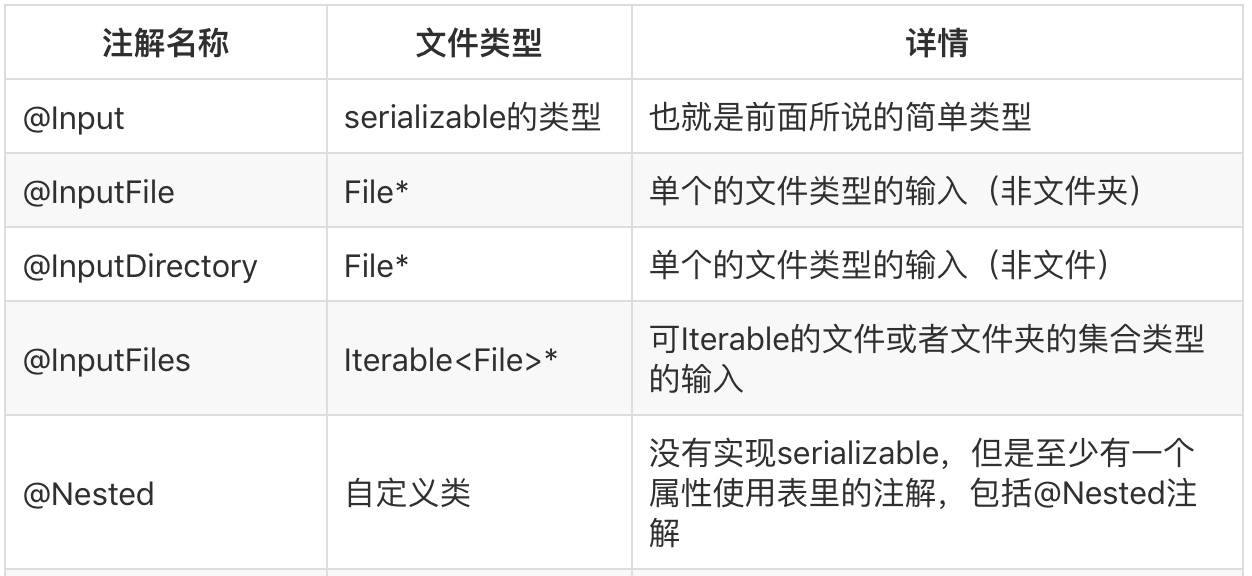
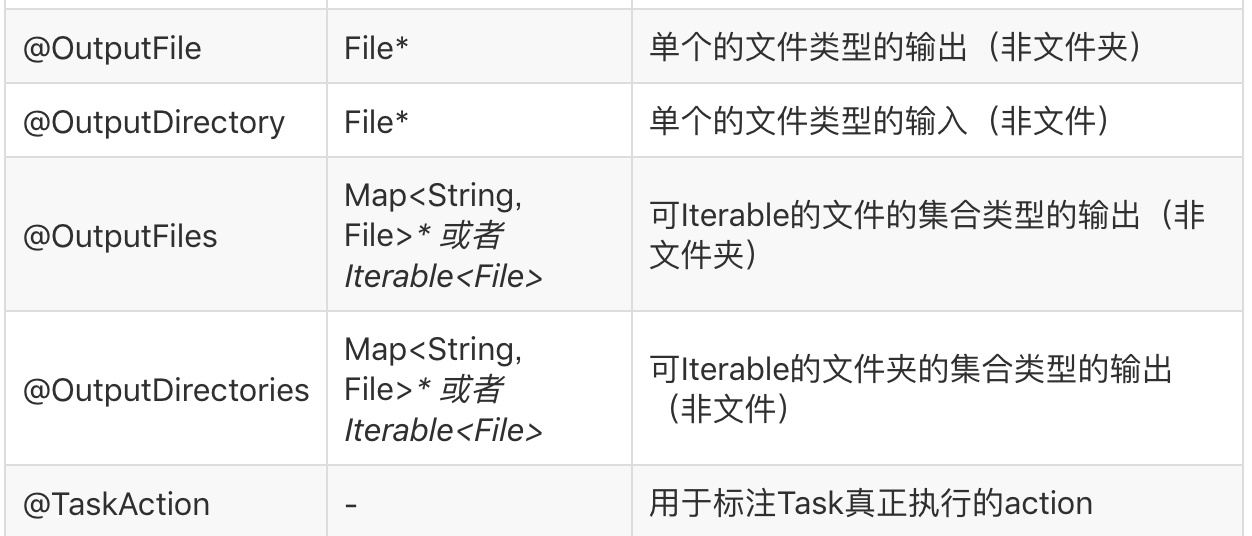
如何创建Task - Task的输入输出类型
- 简单类型
String,int几种简单类型必须是可以的,但这里只是的任何实现了Serializable的类
- 文件类型
包括java中的File和Files以及Gradle中的FileCollection类型
- Nested类型
自定义的类型,不属于上面两种,但是类型里的属性都属于上面两种
如何创建Task - 注释
如何创建Task - 注释
如何使用gradle listener
void apply(Project project) {
   project.gradle.addListener(new TimeListener())
}class TimeListener implements TaskExecutionListener, BuildListener {
private Clock clock
private times = []
@Override
void beforeExecute(Task task) {
clock = new org.gradle.util.Clock()
}
@Override
void afterExecute(Task task, TaskState taskState) {
def ms = clock.timeInMs
times.add([ms, task.path])
task.project.logger.warn "${task.path} spend ${ms}ms"
}
@Override
void buildFinished(BuildResult result) {
println "Task spend time:"
for (time in times) {
if (time[0] >= 50) {
printf "%7sms %s\n", time
}
}
}
. . .
}修改class文件
参看上次分享的SuperAnnotation工程的buildsrc中的插件逻辑实现
修改class文件
修改class文件
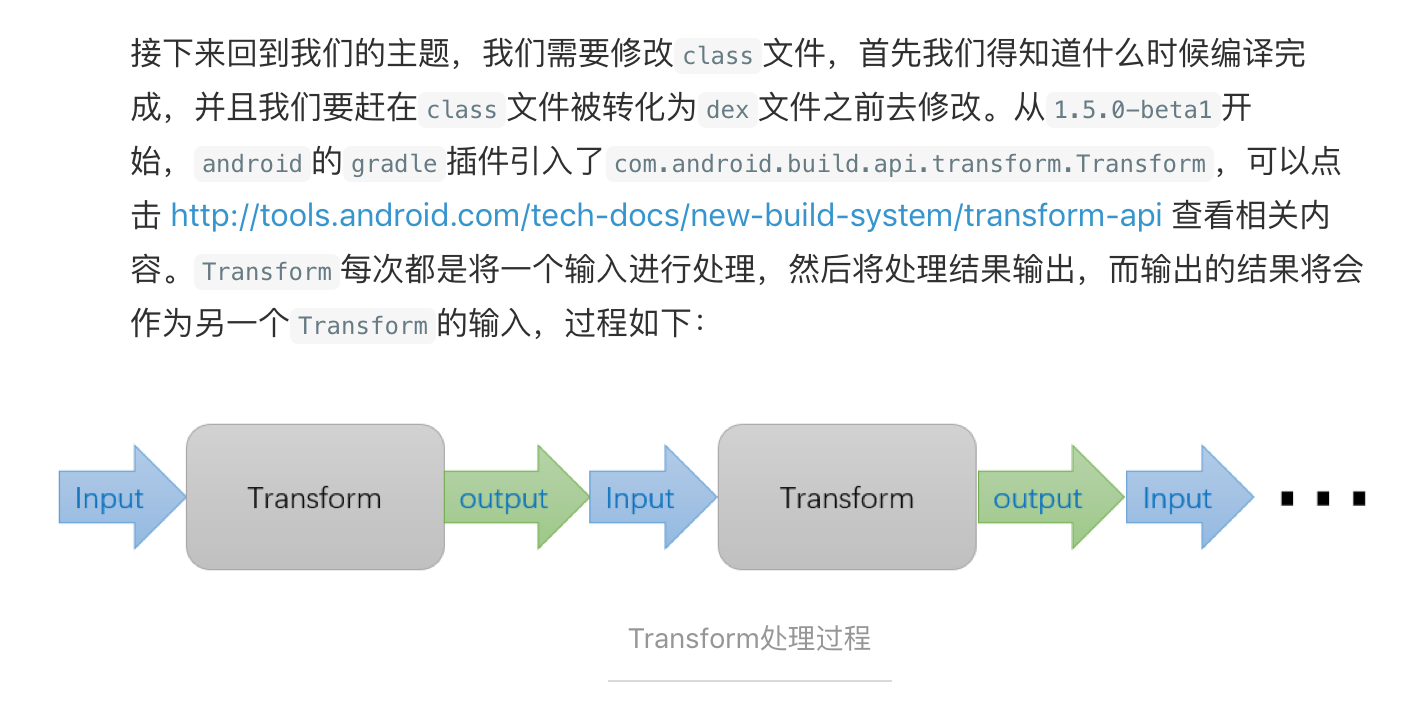
Starting with 1.5.0-beta1, the Gradle plugin includes a Transform API allowing 3rd party plugins to manipulate compiled class files before they are converted to dex files.
(The API existed in 1.4.0-beta2 but it's been completely revamped in 1.5.0-beta1)
The goal of this API is to simplify injecting custom class manipulations without having to deal with tasks, and to offer more flexibility on what is manipulated. The internal code processing (jacoco, progard, multi-dex) have all moved to this new mechanism already in 1.5.0-beta1.
Note: this applies only to the javac/dx code path. Jack does not use this API at the moment.
修改class文件
Q&A
By 管伟
Gradle && Groovy