GIRLSCRIPT EDUCATION OUTREACH PROGRAM
Programming fundamentals in JS
Day - 2
Variables
So, what are variables?
Variables are used to store values (name = "John") or expressions (sum = x + y).
Declare
Variables!
Not War!
Types of Variables in JS
- undefined
- null
- boolean
- number
- string
- object
All other types of values are objects
let p = undefined;
let q = null;
let x = true;
let y = 10;
let z = "Hello"
let obj = {name: "Rick", lastName: "Sanchez", age: 80, isDead: false};
null vs undefined
myVar; // ReferenceError: myVar is not defined

var myVar;
myVar; //undefined

myVar = 'mine!';
myVar; // 'mine!'

myVar = null;
myVar; // null
Objects
- Property Access
- Bracket Notation
- Dot Notation
- Dot vs Bracket
- Nested Objects
- Object Literals
- Iteration
They are mutable keyed collections.
Arrays, functions, regular expressions, and of course, objects are objects.
Objects can contain other objects.
Assignment
var newObject = new Object();
var anotherObject = Object.create(null);

var empty_object = {};

var flight = {
        airline: "Oceanic",
        number: 815,
        departure: {
            IATA: "SYD", time: "2004-09-22 14:55", city: "Sydney"
        },
        arrival: {
            IATA: "LAX",
            time: "2004-09-23 10:42",
            city: "Los Angeles"
        }
    };
Assignment
with dots
var box = {};

box.material = "cardboard";
with brackets
var box = {};

box["material"] = "cardboard";
Access
with dots
var box = {};

box.material = "cardboard";

let cb = box.material; //cardboard
with brackets
var box = {};

box["material"] = "cardboard";

let cb = box["material"]; //cardboard
Question?
What is the output?
var box = {};

box["material"] = "cardboard";


var key = "material";

box[key]; //What will it return?
Delete
It will remove a property from the object if it has one.
var obj = {name: "myName"};
obj.name; // "myName"
obj.name = null;
obj.name // null
delete obj.name;
obj.name; // undefined
Reference
Objects are passed around by reference. They are never copied.
var stooge = {nickname: "Moe"}
var x = stooge;
x.nickname = 'Curly';
stooge.nickname;
// Curly' because x and stooge are references to the same object
Do's && Don'ts
var box = {};


box['material'] = "cardboard";

var key = 'material';


box['key']; //undefined
box.key; //undefined
box[key]; //"cardboard"
Dots
- strings
numbersquotationsweird charactersexpressions
The Rules
Brackets
- strings
- numbers
- variables
- weird characters
- expressions
Iteration
var box = {};

box['material'] = "cardboard";
box[0] = 'meow';
box['^&*'] = "testing 123";


for(var key in box){
  console.log(key); //??
}
var box = {};
box['material'] = "cardboard";
box[0] = 'meow';
box['^&*'] = "testing 123";
for(var key in box){
console.log(box[key]); //??
}Arrays
- Arrays vs Objects
- Access && Assignment
- Native Methods && Properties
- Iteration
Arrays vs Objects
Access and Asignment
Array
var box = [];

box[0] = true;
box[1] = 'meow';
box.push({'hello' : 'goodbye'});


var i = 0;

box[i]; // Returns the data stored at 0th index which is -> true
box[1];
box.pop() // Removes the last element in the array
Object
var box = {};

box['size'] = 9;

box['0'] = 'meow';


box['size']; // 9

box[0]; // 'meow'
The
Rules Don't
Change
Iteration(for loop)
Indexes
var box = [];

box['size'] = 9;
box['0'] = 'meow';
box.push('Whoohoo!');

for(var i = 0; i < box.length; i++){
  console.log(i); //??
}
Values
var box = [];

box['size'] = 9;
box['0'] = 'meow';
box.push('Whoohoo!');


for(var i = 0; i < box.length; i++){
  console.log(box.i); //??
}
Iteration(for each loop)
Indexes
var box = [];

box['size'] = 9;

box['0'] = 'meow';

for(var k in box){

  console.log(k); // ??

}
Values
var box = [];

box['size'] = 9;

box['0'] = 'meow';


for(var k in box){

  console.log(box.k); // ??

}
Native Properties
var box = [];

box['size'] = true;

box['0'] = 'meow';


box.length; //??
var box = [];
box['0'] = 'meow';
box[3] = {'babyBox': true};
box['length']; //??var box = [];
box['0'] = 'meow';
box[1] = 'Whoohooo!';
box[3] = {'babyBox': true};
box[box.length]; //??var box = [];
box['0'] = 'meow';
box[1] = 'Whoohooo!';
box[box.length - 1]; //??Nesting
first initialize
var box = {};

box['innerBox'] = {};
then assign
var box = {};

box['innerBox'] = {};

box['innerBox']['full'] = true;
var box = {};
box.innerBox = {};
box.innerBox.full = true;
var myInnerBox = box.innerBox;
myInnerBox; //??var box = {};
box.innerBox = {};
box.innerBox.babyBox = {};
box.innerBox['babyBox']; //??
box.innerBox['babyBox'].says = "What's up!?";Control Flow
Block
{
  first statement;
  second statement;
  ...
}
The block statement per se doesn’t change the control flow but is used to group statements. The block is set by a pair of curly brackets.
Break
for (let i = 0; i < 5; i++) {
  if (i === 3) {
    break;
  }
  console.log(i);
}
//excepted output : 0,1,2
Break as the name implies, breaks. Breaks what? Breaks the statement or in normally the cases break the loop.
Output?
for (let i = 0; i < 10; i++) {
  if(i === 5){
    continue;
  }
  console.log(i);
}
Continue
for (let i = 0; i < 10; i++) {
  if(i === 5) {
    continue;
  }
  console.log(i);
}
/*excepted output:
0
1
2
3
4
6
7
8
9*/
So if break, ends the loop what the continue statement does? That’s right, it jumps the loop in that iteration and continues to the next iteration.
In other words, when the continue condition is met, it will not run or print it and it goes straight to the next iteration.
Output?
var music = [
"placebo",
"smashing Pumpkins",
"pearl jam",
"ornatos violeta",
"feromona"
];
for (var i = 0; i < music.length; i++) {
  if (music[i] === "ornatos violeta") {
    continue;
  }
console.log(music[i]);
}
if-else
var music = [
"placebo",
"smashing Pumpkins",
"pearl jam",
"ornatos violeta",
"feromona"
];
if (music.includes("placebo")) {
  console.log(true);
} else if (music[0] === "feromona") {
  console.log(false);
} else {
  console.log(okay);
}
switch - case
let name = "professor"
switch (name){
    case "professor":
      console.log("you teach well");
      break;
    case "artist":
      console.log("I like your painting");
      break;
    case "singer":
      console.log("I love your voice");
      break;
    default:
      console.log("what you do?");
  }
So a switch statement is used when you have to use many if statements in the same function for example.
Loops
Iterative Method
for loop
for loop provides a concise way of writing the loop structure. Unlike a while loop, a for statement consumes the initialization, condition and increment/decrement in one line thereby providing a shorter, easy to debug structure of looping.
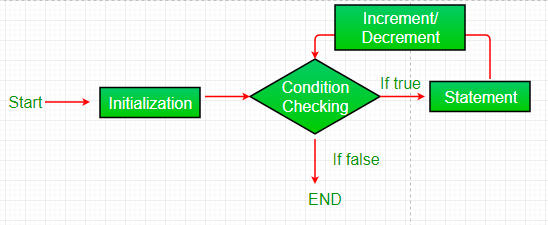
for (i = 0; i < 10; i++) {
    condole.log(i);
}
for-in loop
JavaScript also includes another version of for loop also known as the for..in Loops. The for..in loop provides a simpler way to iterate through the properties of an object. This will be more clear after leaning objects in JavaScript. But this loop is seen to be very useful while working with objects.
var box = {};

box['material'] = "cardboard";
box[0] = 'meow';
box['^&*'] = "testing 123";


for(var key in box){
  console.log(key); //??
}
while loop
A while loop is a control flow statement that allows code to be executed repeatedly based on a given Boolean condition. The while loop can be thought of as a repeating if statement.
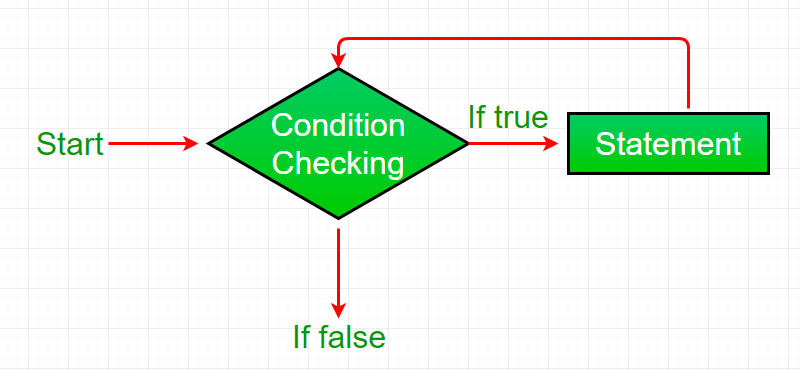
var x = 1;


while (x <= 4) {
  console.log(x);
  x++;
}
do-while loop
do while loop is similar to while loop with only difference that it checks for condition after executing the statements, and therefore is an example of Exit Control Loop.

var x = 1;


do {
  console.log(x);
  x++;
} while (x <= 4);
Infinite loop
for (var i = 5; i != 0; i -= 2) {
  console.log(i);
}
Error handling
try-catch
The try statement allows you to define a block of code to be tested for errors while it is being executed.
The catch statement allows you to define a block of code to be executed, if an error occurs in the try block.
The JavaScript statements try and catch come in pairs
try {
  Block of code to try
}
catch(err) {
  Block of code to handle errors
}
try {
alert('Start of try runs'); // (1) <--
// ...no errors here
alert('End of try runs'); // (2) <--
} catch(err) {
alert('Catch is ignored, because there are no errors'); // (3)
}try {
alert('Start of try runs'); // (1) <--
lalala; // error, variable is not defined!
alert('End of try (never reached)'); // (2)
} catch(err) {
alert(`Error has occurred!`); // (3) <--
}try {
lalala; // error, variable is not defined!
} catch(err) {
alert(err.name); // ReferenceError
alert(err.message); // lalala is not defined
alert(err.stack); // ReferenceError: lalala is not defined at (...call stack)
// Can also show an error as a whole
// The error is converted to string as "name: message"
alert(err); // ReferenceError: lalala is not defined
}Functions
A JavaScript function is a block of code designed to perform a particular task.
A JavaScript function is executed when "something" invokes it (calls it).
function name(parameter1, parameter2, parameter3) {
  // code to be executed
}

function myFunction(p1, p2) {
  return p1 * p2;   // The function returns the product of p1 and p2
}


var x = myFunction(4, 3); // 12

function toCelsius(fahrenheit) {
  return (5/9) * (fahrenheit-32);
}

console.log(toCelsius(43)); // 6.11
Classes
// Initializing a class definition
class Hero {
    constructor(name, level) {
        this.name = name;
        this.level = level;
    }

    // Adding a method to the constructor
    greet() {
        return `${this.name} says hello.`;
    }
}

const hero1 = new Hero('Varg', 1);

console.log(hero1.name); // Varg
Object Oriented Approach VS Functional
OOPS
Object-oriented programming based on the main features that are:
- Abstraction: It helps in letting the useful information or relevant data to a user, which increases the efficiency of the program and make the things simple.
- Inheritance: It helps in inheriting the methods, functions, properties, and fields of a base class in the derived class.
- Polymorphism: It helps in doing one task in many ways with the help of overloading and overriding which is also known as compile-time and run-time polymorphism respectively.
- Encapsulation: It helps in hiding the irrelevant data from a user and prevents the user from unauthorized access.
Functional
The function can be easily invoked and reused at any point. It also helps the code to be managed and the same thing or statements does not need to write again and again.
Thank
You!
EOP JS Day - 2
By Harsh Jobanputra