Monitoring iRODS Zones


Jason Coposky, Chief Technologist
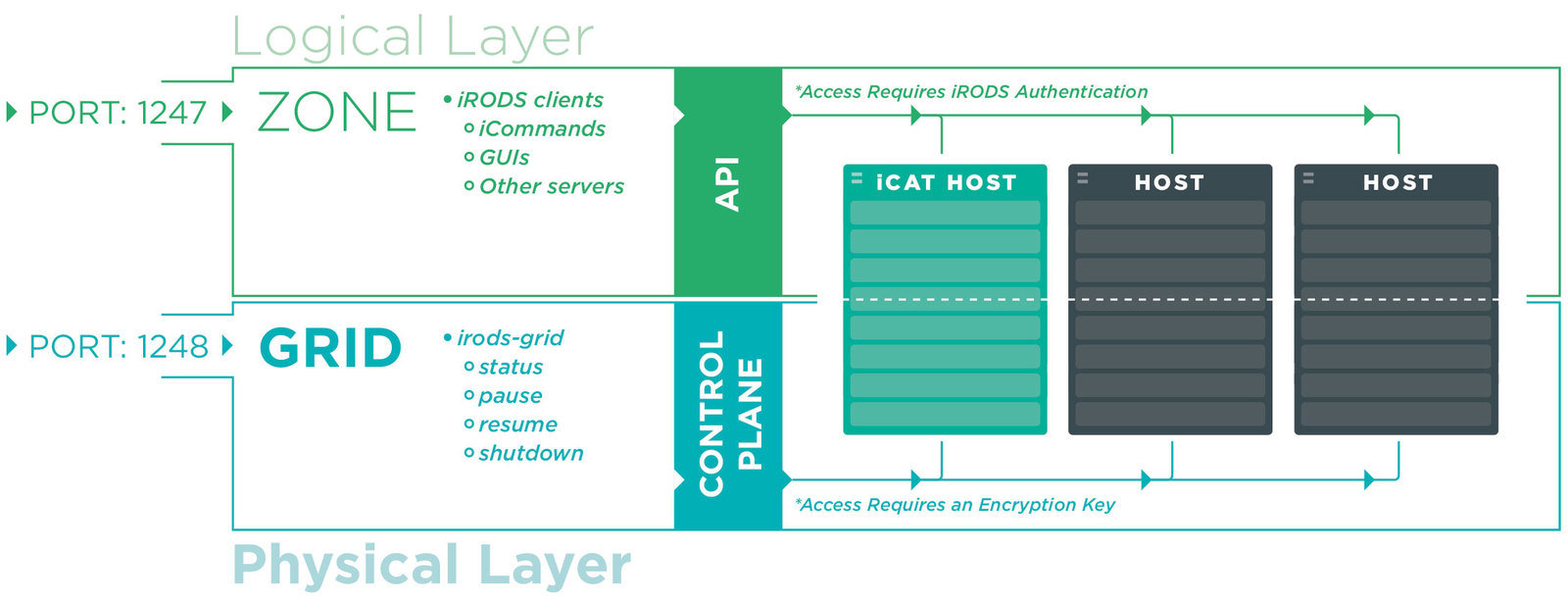
The Zone vs. The Grid


Zone Introspection - izonereport
Configuration management for iRODS -
A new icommand which executes a new API call
across all servers within a Zone
- maintain snapshots of Zone state over time
- a remote debugging tool
- allow for validation of Zone integrity
- can be used to dynamically deploy a zone in cloud infrastructure
A Zone Report
Creates validated json document which includes:
- iRODS version information
- Host system information
- Sanitized json configuration files
- Configuration files from /etc/irods - base64 encoded
- Listing of installed plugins
Schemas can be found at https://schemas.irods.org
Using izonereport
Run only as a 'rodsadmin' user with output to stdout:
izonereport > report.json
Investigate with your favorite editor or the 'less' command
The iRODS Control Plane
A control channel which speaks directly to the iRODS Server -- allows for grid-wide operations
- graceful shutdown
- pause & resume
- grid status information
Accessed via a separate client command: irods-grid
Check out the March iRODS Development Update:
http://irods.org/post/irods-development-update-march-2015/
The irods-grid Command
irods-grid --help
usage: 'irods-grid action [option] target'
action: ( required ) status, pause, resume, shutdown
option: --force-after=seconds or --wait-forever
target: ( required ) --all, or --hosts=", , ..."
irods-grid status
Returns a status of the server, or servers requested in a validated json document which includes:
- Agent PIDs and their age
- XMessage server PID
- Rule Engine server PID
- iRODS Server PID
- Hostname of the server
- Server status
irods-grid status --all
irods-grid pause and resume
Pause - suspend all incoming connections while allowing existing connections to complete
irods-grid pause --all
Resume - allow incoming connections from new clients
irods-grid resume --all
irods-grid shutdown
Gracefully shutdown an iRODS server or servers allowing existing client connections to complete
irods-grid shutdown --all
Option --force-after=seconds -
kill any existing connections after N seconds
Option --wait-forever -
do not kill existing connections, allowing them to finish
irods-grid shutdown --force-after=5 --all
irods-grid shutdown --wait-forever --all
Questions?
Monitoring iRODS Zones
By iRODS Consortium
Monitoring iRODS Zones
Overview of the izonereport and irods-grid commands used to introspect and control an iRODS grid