You GIT
Introduction
Merge Strategy
Rebase Strategy
Squash Strategy
DEMO
Choosing the Right Strategy
QUESTIONS
Intro
- Git is a powerful tool for version control
- When pulling, there are several strategies to consider.
- Each strategy has its own pros and cons,
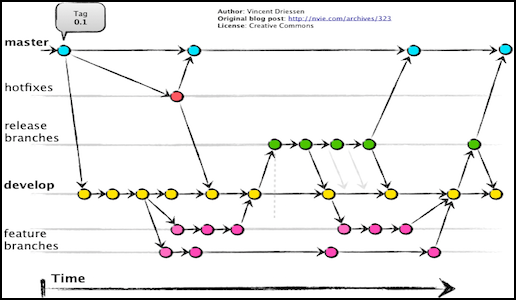
- merge, rebase, squash.
$ git pull
what happens next...?
Merge Strategy
- Default option
- Creates a new merge commit that combines the changes from the remote branch with your local changes.
- Shows the history of both branches.
Pro
- Preserves the full history of both branches, making it easy to trace the evolution of the code.
Con
- Cluttered commit histories and conflicts if multiple developers are working on the same file.
Merge Strategy
Rebase Strategy
- Applying your local changes on top of the changes from the remote branch
- Rewrites the history of your local branch.
- Creates a linear commit history that is easier to read and follow.
Rebase Strategy
Pro
- Keeps the commit history clean and easy to understand.
Con
- More complex to resolve conflicts, especially if you have made many local changes that conflict with the remote branch.
Squash Strategy
- Combines all your local commits into a single commit before merging
- Does not merge, left as staged changes
Squash Strategy
Pro
- Keeps the commit history simple and easy to follow
Con
- Difficult to trace the evolution of the code, as individual changes are not preserved in the commit history.
Demo
Questions

Choosing the Right Strategy
To pull updates from your own branch
$ git pull --rebase
$ git push --force-with-lease
To pull updates from mainline
$ git fetch --all
$ git rebase origin/mainline
$ git push --force-with-lease
Start new feature branch
$ git fetch --all
$ git checkout mainline
$ git checkout -b feature/ABC-123
You GIT
By Jack McNicol