The path to knowing Angular 2
Faster
Angular now watches for data change instead of DOM change. This is a reactive data flow or one-way binding. Angular can still do two-way binding if needed
Nitro
-
Server-side rendering
-
Web workers
-
Smooth UI
1
Flexible
Supports both object-style data structure and functional reactive style with unidirectional data flow and support for observables and immutable data structures.
1
TypeScript is a superset of JavaScript
Hello Angular 2
<label>Name:</label>
<!-- data-bind to the input element; store value in yourName -->
<input type="text" [(ngModel)]="yourName" placeholder="Enter a name here">
<hr>
<!-- conditionally display `yourName` -->
<h1 [hidden]="!yourName">Hello {{yourName}}!</h1>
component.html
import {Component} from 'angular2/core';
@Component({
  // Declare the tag name in index.html to where the component attaches
  selector: 'hello-world',
  // Location of the template for this component
  templateUrl: 'app/hello_world.html'
})
export class HelloWorld {
  // Declaring the variable for binding with initial value
  yourName: string = '';
}
component.ts
import {bootstrap}  from 'angular2/platform/browser';
import {HelloWorld} from './hello_world';
bootstrap(HelloWorld);
main.ts
<!DOCTYPE html>
<html>
  <head>
    <title>Angular 2 Hello World</title>
    <meta name="viewport" content="width=device-width, initial-scale=1">
    <!-- 1. Load libraries -->
    <!-- IE required polyfills (from CDN), in this exact order -->
    <script src="https://cdnjs.cloudflare.com/ajax/libs/es6-shim/0.33.3/es6-shim.min.js"></script>
    <script src="https://cdnjs.cloudflare.com/ajax/libs/systemjs/0.19.16/system-polyfills.js"></script>
    <script src="https://code.angularjs.org/tools/system.js"></script>
    <script src="https://code.angularjs.org/tools/typescript.js"></script>
    <script src="https://code.angularjs.org/2.0.0-beta.3/angular2-polyfills.js"></script>
    <script src="https://code.angularjs.org/2.0.0-beta.3/Rx.js"></script>
    <script src="https://code.angularjs.org/2.0.0-beta.3/angular2.dev.js"></script>
    <!-- 2. Configure SystemJS -->
    <script>
      System.config({
        transpiler: 'typescript',
        typescriptOptions: { emitDecoratorMetadata: true },
        packages: {'app': {defaultExtension: 'ts'}}
      });
      System.import('app/main')
            .then(null, console.error.bind(console));
    </script>
  </head>
  <!-- 3. Display the application -->
  <body>
    <hello-world>Loading...</hello-world>
  </body>
</html>
index.html
Concepts
- Components control a block of UI
- Components are view and business logic
- Directives modify elements and components
- Services still exist for abstracting out data and logic
- You import and export classes and dependencies
The Upgrade Path
Angular 1 Directive
export function heroDetailDirective() {
  return {
    scope: {},
    bindToController: {
      hero: '=',
      deleted: '&'
    },
    template: `
      <h2>{{ctrl.hero.name}} details!</h2>
      <div><label>id: </label>{{ctrl.hero.id}}</div>
      <button ng-click="ctrl.onDelete()">Delete</button>
    `,
    controller: function() {
      this.onDelete = () => {
        this.deleted({hero: this.hero});
      };
    },
    controllerAs: 'ctrl'
  }
}
Angular 1.5 Directive
export const heroDetail = {
  bindings: {
    hero: '=',
    deleted: '&'
  },
  template: `
    <h2>{{heroDetail.hero.name}} details!</h2>
    <div><label>id: </label>{{heroDetail.hero.id}}</div>
    <button ng-click="heroDetail.onDelete()">Delete</button>
  `,
  controller: function() {
    this.onDelete = () => {
      this.deleted({hero: this.hero});
    };
  }
};
Angular 1 & 2 Synergy
Angular 1 Prep Work
<!DOCTYPE HTML>
<html>
<head>
</head>
<body ng-app="heroApp" ng-strict-di>
  <div ng-view></div>
  <script src="https://ajax.googleapis.com/ajax/libs/angularjs/1.5.0-rc.0/angular.js"></script>
  <script src="js/1-ng-app/app.module.js"></script>
</body>
</html>
<!DOCTYPE HTML>
<html>
<head>
</head>
<body>
<div ng-view></div>
<script src="https://ajax.googleapis.com/ajax/libs/angularjs/1.5.0-rc.0/angular.js"></script>
<script src="js/1-ng-app/app.module.js"></script>
<script> angular.bootstrap(document.body, ['heroApp'], {strictDi: true}); </script>
</body>
</html>From
To
Upgrade.ts
    <script src="node_modules/angular2/bundles/angular2-polyfills.js"></script>
    <script src="node_modules/systemjs/dist/system.src.js"></script>
    <script src="node_modules/rxjs/bundles/Rx.js"></script>
    <script src="node_modules/angular2/bundles/angular2.dev.js"></script>

    <!-- 2. Configure SystemJS -->
    <script>
      System.config({
        packages: {
          app: {
            format: 'register',
            defaultExtension: 'js'
          }
        }
      });
      System.import('app/main')
            .then(null, console.error.bind(console));
    </script>
import {UpgradeAdapter} from 'angular2/upgrade';
/* . . . */
const upgradeAdapter = new UpgradeAdapter();
upgradeAdapter.bootstrap(document.body, ['heroApp'], {strictDi: true});Index.html
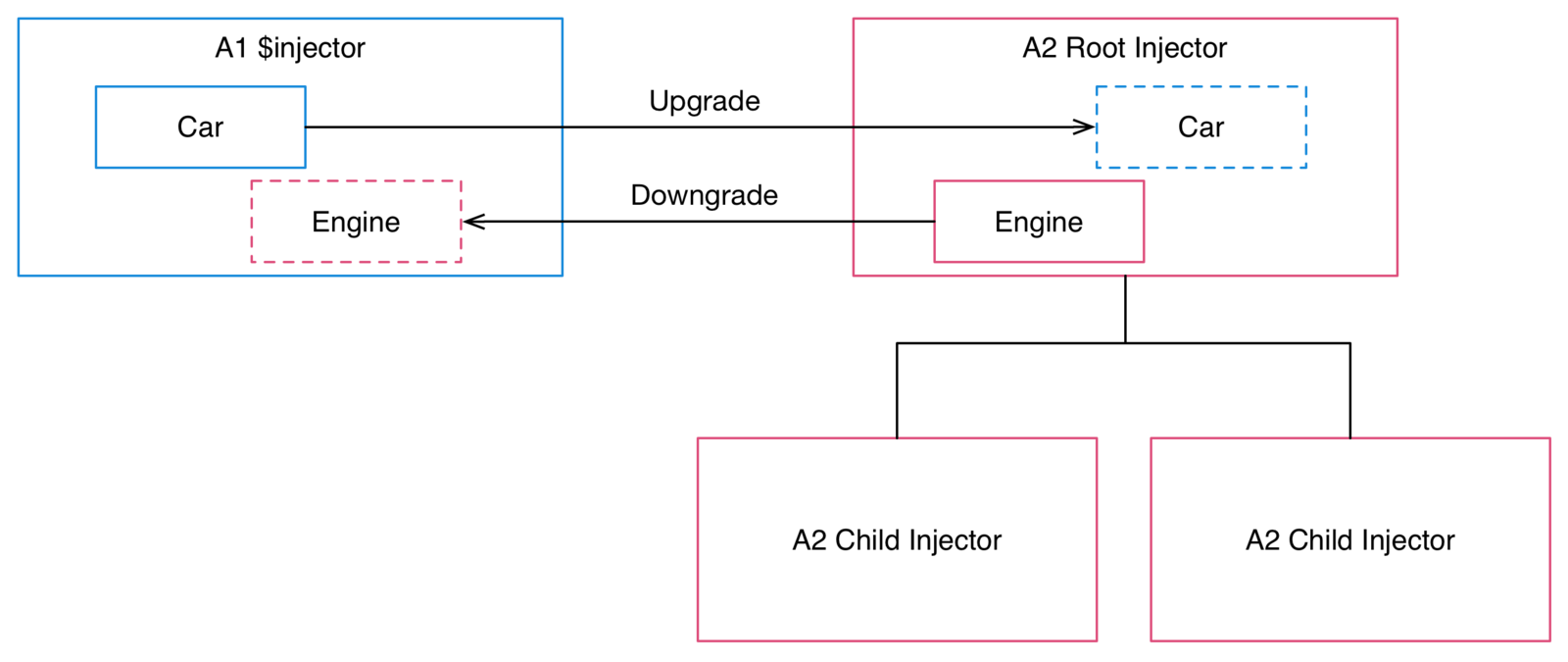
Downgrade
import {angular1Component} from './angular1.component';  //directive
import {upgradeAdapter} from './upgrade_adapter';

const HeroDetail = upgradeAdapter.upgradeNg1Component(angular1Component);

//Component code
import {Angular2Component} from './angular2.component';
angular.module('heroApp', [])
.directive('directiveName', upgradeAdapter.downgradeNg2Component(Angular2Component));Upgrade
deck
By James Brinkerhoff