{Let's learn!}
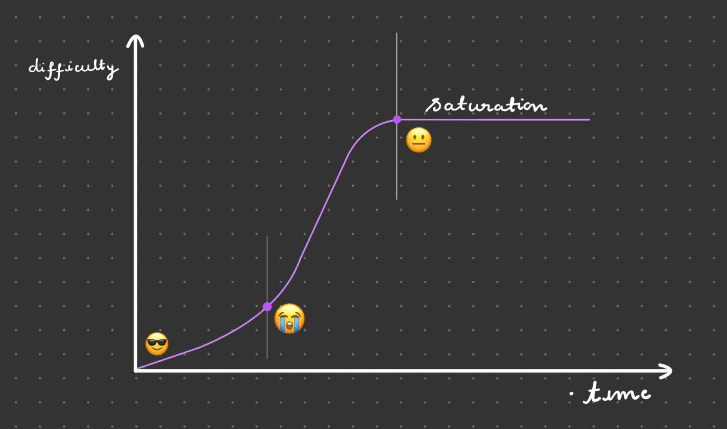
The web development learning curve
The web development reality
4 years of knowledge and experience
packed in 1 year
The web development hope
share screen (always)
ask questions
do homework
even when no homework, code
when not coding, watch coding videos
# Code
Stay
Curious

{What is JavaScript!}
.js
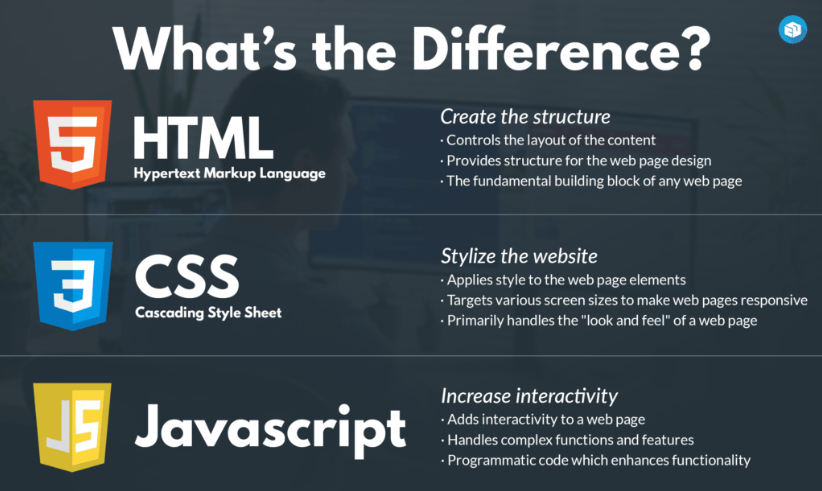
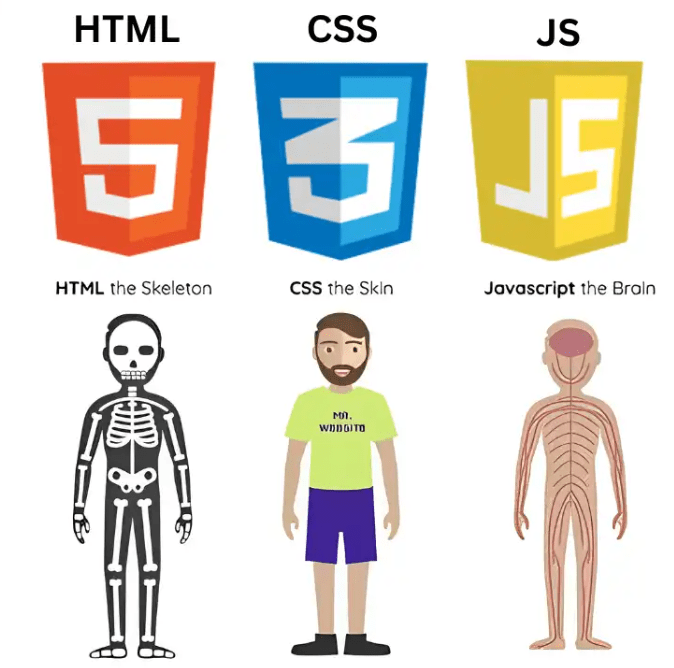
# JS
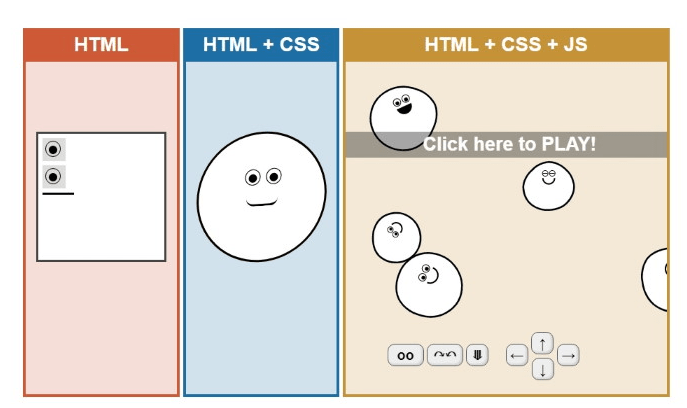
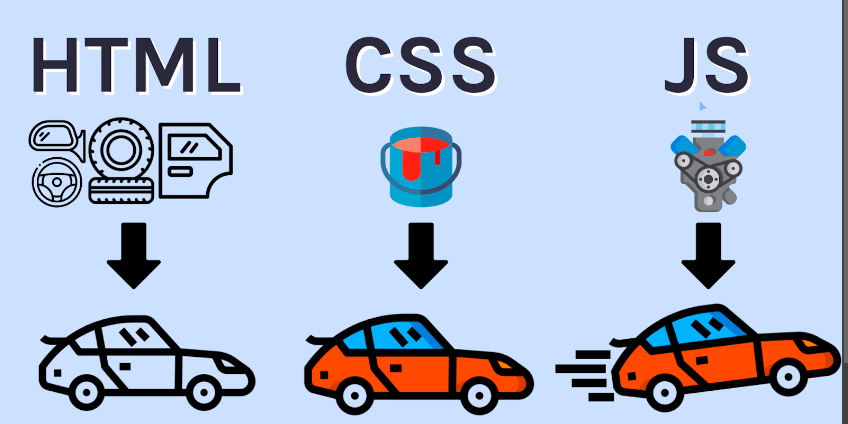
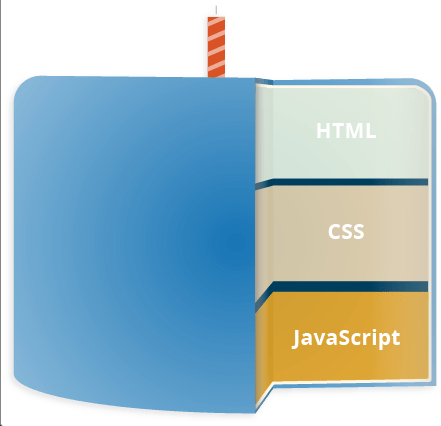
JavaScript is a scripting or programming language that allows you to implement complex features on web pages — every time a web page does more than just sit there and display static information for you to look at — displaying timely content updates, interactive maps, animated 2D/3D graphics, scrolling video jukeboxes, etc. — you can bet that JavaScript is probably involved.






{Hello World!}
`World: Hello ${firstName}!`
console.log('Hello World!');# PRESENTING CODE
First Line
prompt("Please enter your name");# PRESENTING CODE
First Input
const name = prompt("Please enter your name");
console.log(name);
# PRESENTING CODE
First Input
{Variables}
Variables
 // Automatically
x = 3;

// Using var
var y = 5;

// Using let
let z = 'Hello';

// Using const
const s = 'Hello world!';
# VARIABLES
Variables are Containers for Storing Data
It is considered good programming practice to always declare variables before use.
The var keyword was used in all JavaScript code from 1995 to 2015.
The let and const keywords were added to JavaScript in 2015.
The var keyword should only be used in code written for older browsers.

const myVariable = 3;

const myVariable = 2; // ERROR - variable cannot be redeclared

const myvariable = 3; // allowed - indentifiers are case-sensitive, the V is lowercase

const 2variable = 2; // ERROR - variable cannot start with a number

const _variable = 2; // allowed

const let = 2; // ERROR - cannot use reserved words as indentifier for a variable
# VARIABLES
Variable identifiers
Always use const if the value should not be changed
Only use let if you can't use const
Only use var if you MUST support old browsers.
let x = 5;
let y = 6;

let z = x + y;
// In JavaScript, the equal sign (=) is an "assignment" operator,
// not an "equal to" operator.
// z now contains the value of x + the value of y,
// which in this case is the value 11
# VARIABLES
Just Like Algebra
Always use const if the value should not be changed
Only use let if you can't use const
Only use var if you MUST support old browsers.
const pi = 3.14; // it's a number
let person = "John Doe"; // it's a string
let answer = 'Yes I am!'; // it's a string
let number = '2'; // it's a string
let theNumberTwo = 2; // it's a number
# VARIABLES
JavaScript Data Types
JavaScript can handle many types of data, but for now, just think of numbers and strings.
Strings are written inside double or single quotes. Numbers are written without quotes.
If you put a number in quotes, it will be treated as a text string.
var carName;
// or
let carName;
# VARIABLES
Declaring a JavaScript Variable
After the declaration, the variable has no value (technically it is undefined).
To assign a value to the variable, use the equal sign:
carName = "Volvo";let person = "John Doe", carName = "Volvo", price = 200;You can declare many variables in one statement.
Start the statement with let and separate the variables by comma:
var carName = "Volvo";
var carName;
# VARIABLES
Re-Declaring JavaScript Variables
If you re-declare a JavaScript variable declared with var, it will not lose its value.
The variable carName will still have the value "Volvo" after the execution of these statements:
let carName = "Volvo";
let carName;
You cannot re-declare a variable declared with let or const.
This will not work:
let x = 5 + 2 + 3;

let x = "John" + " " + "Doe";

let x = "5" + 2 + 3;
# VARIABLES
Arithmetic
5 == 5
3 < 5
2 > 5
# VARIABLES
Booleans
Very often, in programming, you will need a data type that can only have one of two values, like
- YES / NO
- ON / OFF
- TRUE / FALSE
5 == 5 // true
3 < 5 // true
2 > 5 // false
# VARIABLES
Booleans
Very often, in programming, you will need a data type that can only have one of two values, like
- YES / NO
- ON / OFF
- TRUE / FALSE
100

3.14

-15

"Hello"

"false"

7 + 1 + 3.14
# VARIABLES
Everything With a "Value" is True
0

-0

""

undefined

null

false
# VARIABLES
Everything Without a "Value" is False
{if statements}
if this then that else this
Taking Decisions
== // еднакво на
=== // еднакво во вредност и во податочен тип
!= // не еднакво на
!== // не еднакво во вредност и во податочен тип
> // поголемо од
< // помало од
>= // поголемо или еднакво на
<= // помало или еднакво на
# if statements
Comparison and Logical Operators
const x = 5;
== // еднакво на
x == 5 // true
x == 9 // false
x == "5" // true

=== // еднакво во вредност и во податочен тип
x === 5 // true
x === 9 // false
x === "5" // false

!= // не еднакво на
x != 8 // true

!== // не еднакво во вредност и во податочен тип
x !== 5 // false
x !== "5" // true
x !== 9 // true

> // поголемо од
x > 8 // false
x > 4 // true

< // помало од
x < 5 // false
x < 7 // true

>= // поголемо или еднакво на
x >= 5 // true
x >= 4 // true
x >= 6 // false

<= // помало или еднакво на
x <= 5 // true
x <= 3 // false
x <= 7 // true
if (age < 18) text = "Too young to buy alcohol";
Usage
# if statements
&&
||
!
Logical Operators
# if statements
const x = 5;
&&
x > 3 && x < 6;
// 1, 2, 3, `4`, '5', 6, 7

||
x > 3 || x < 6;
// '1', '2', '3', '4', '5', '6', '7'

!
!(x > 3);
// '1', '2', '3', 4, 5, 6, 7
Logical Operators
# if statements
if (condition) {
  //  block of code to be executed if the condition is true
}
The if statement - Syntax
# if statements
if (hour < 18) {
  greeting = "Good day";
}
The if statement - Syntax e.g
# if statements
if (condition) {
  //  block of code to be executed if the condition is true
} else {
  //  block of code to be executed if the condition is false
}
The else statement - Syntax
# if statements
if (hour < 18) {
  greeting = "Good day";
} else {
  greeting = "Good evening";
}
The else statement - Syntax e.g
# if statements
if (condition) {
  //  block of code to be executed if the condition is true
} else if (condition) {
  //  block of code to be executed if the condition is true
} else {
  //  block of code to be executed if the condition is false
}
The else-if statement - Syntax
# if statements
if (hour < 18) {
  greeting = "Good day";
} else if (hour > 23) {
  greeting = "Why are you up so late?";
} else {
  greeting = "Good evening";
}
The else-if statement - Syntax e.g
# if statements
switch(expression) {
  case x:
    // code block
    break;
  case y:
    // code block
    break;
  default:
    // code block
}
The switch statement - Syntax
# switch statements
let day;
switch (new Date().getDay()) {
  case 0:
    day = "Sunday";
    break;
  case 1:
    day = "Monday";
    break;
  case 2:
     day = "Tuesday";
    break;
  case 3:
    day = "Wednesday";
    break;
  case 4:
    day = "Thursday";
    break;
  case 5:
    day = "Friday";
    break;
  case 6:
    day = "Saturday";
}
The switch statement - Syntax e.g
# switch statements
{Data structures}
...
const cars = ["Opel", "Volvo", "BMW"];Arrays
An array is a special variable, which can hold more than one value:
vs
let car1 = "Opel";
let car2 = "Volvo";
let car3 = "BMW";
# Arrays
const cars = ["Opel", "Volvo", "BMW"];

cars[0] // "Opel"
cars[1] // "Volvo"
cars[2] // "BMW"
cars[3] // undefined
Arrays - indexing
# Arrays
const cars = ["Opel", "Volvo", "BMW"];

cars[0] = "Mustang"

cars // ["Mustang", "Volvo", "BMW"]
Arrays - indexing
# Arrays
const cars = [1, "Volvo", null];

cars[0] // 1
cars[1] // "Volvo"
cars[2] // null
# Arrays
Arrays - types
const cars = [1, "Volvo", null];

cars.length // 3
cars.toString() // '1,Volvo,'
cars.at(1) // 'Volvo'
cars.join('^') // '1^Volvo^'
cars.pop()
cars // [1, 'Volvo']
cars.push('McQueen')
cars // [1, 'Volvo', 'McQueen']

const cars2 = ['Citroen']
cars.concat(cars2) // [1, 'Volvo', 'McQueen', 'Citroen']
cars // [1, 'Volvo', 'McQueen']
cars2 // ['Citroen']
# Arrays
Arrays - methods
const numbers = [1, 2, 3, 4, 5, 6];

numbers.slice(1) // [2, 3, 4, 5, 6]
numbers.slice(4) // [5, 6]

numbers // [1, 2, 3, 4, 5, 6]

numbers.slice(2, 4) // [3, 4]
// indexes are 0 based!, so from position 2 (including) to position 4 (excluding)

// The slice() method creates a new array.

// The slice() method does not remove any elements from the source array.
# Arrays
Arrays - methods - slice
const fruits = ["Banana", "Orange",  "Mango"];

fruits.splice(2, 0, "Lemon", "Kiwi")
fruits //  ['Banana', 'Orange', 'Lemon', 'Kiwi', 'Mango']
// The first parameter (2) defines the position where
// new elements should be added (spliced in).
// The second parameter (0) defines how many
// elements should be removed.
// The rest of the parameters ("Lemon" , "Kiwi") define
// the new elements to be added.
# Arrays
Arrays - methods - splice
const numbers = [4, 5, 7, 3, 2, 1, 6, 9, 8];

numbers.sort()
numbers // [1, 2, 3, 4, 5, 6, 7, 8, 9]
# Arrays
Arrays - methods - sort
const numbers = [4, 5, 7, 3, 2, 1, 6, 9, 8];

numbers.reverse()
numbers // [8, 9, 6, 1, 2, 3, 7, 5, 4]
# Arrays
Arrays - methods - reverse
{to be continued...}
{loops}
i'm stuck in a loop, i'm stuck in a loop...
let text;
text += "I want a " + cars[0] + " and ";
text += "I want a " + cars[1] + " and ";
text += "I want a " + cars[2] + " and ";
text += "I want a " + cars[3] + " and ";
text += "I want a " + cars[4] + " and ";
text += "I want a " + cars[5];
# loops
JavaScript Loops
Loops are handy, if you want to run the same code over and over again, each time with a different value.
Often this is the case when working with arrays:
let text;
for (let i = 0; i < cars.length; i++) {
  text += "I want a " + cars[i] + "and";
}
# loops
JavaScript Loops
Loops are handy, if you want to run the same code over and over again, each time with a different value.
Often this is the case when working with arrays:
# loops
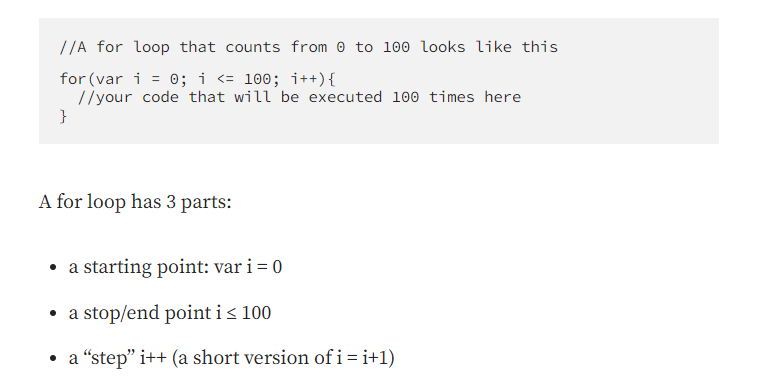
Different Kinds of Loops
JavaScript supports different kinds of loops:
-
for- loops through a block of code a number of times -
for/in- loops through the properties of an object -
for/of- loops through the values of an iterable object -
while- loops through a block of code while a specified condition is true -
do/while- also loops through a block of code while a specified condition is true

while (condition) {
  // code block to be executed
}
# loop
The While loop
let i = 0;
while (i < 10) {
  text += "The number is " + i;
  i++;
}
If you forget to increase the variable used in the condition, the loop will never end. This will crash your browser.
for (let i = 0; i < 10; i++) {
  text += "The number is " + i
}
{functions}
function move(direction) {
}
# func
What is a function?
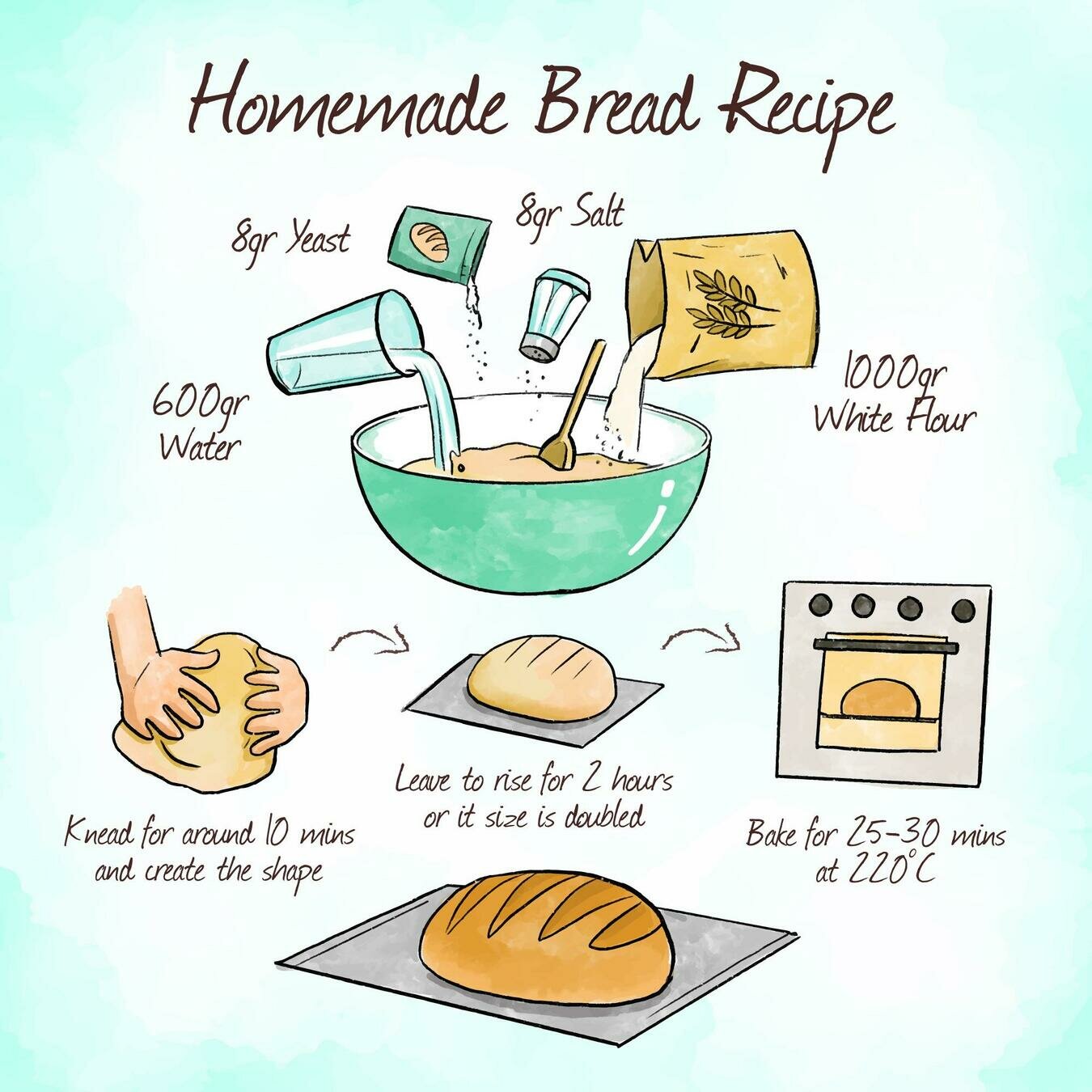
Let's think about the general concept of cooking with a recipe first. Using a recipe means that:
- You start with a specific set of ingredients
- You perform a specific procedure using those ingredients
- You will get a reliable product at the end
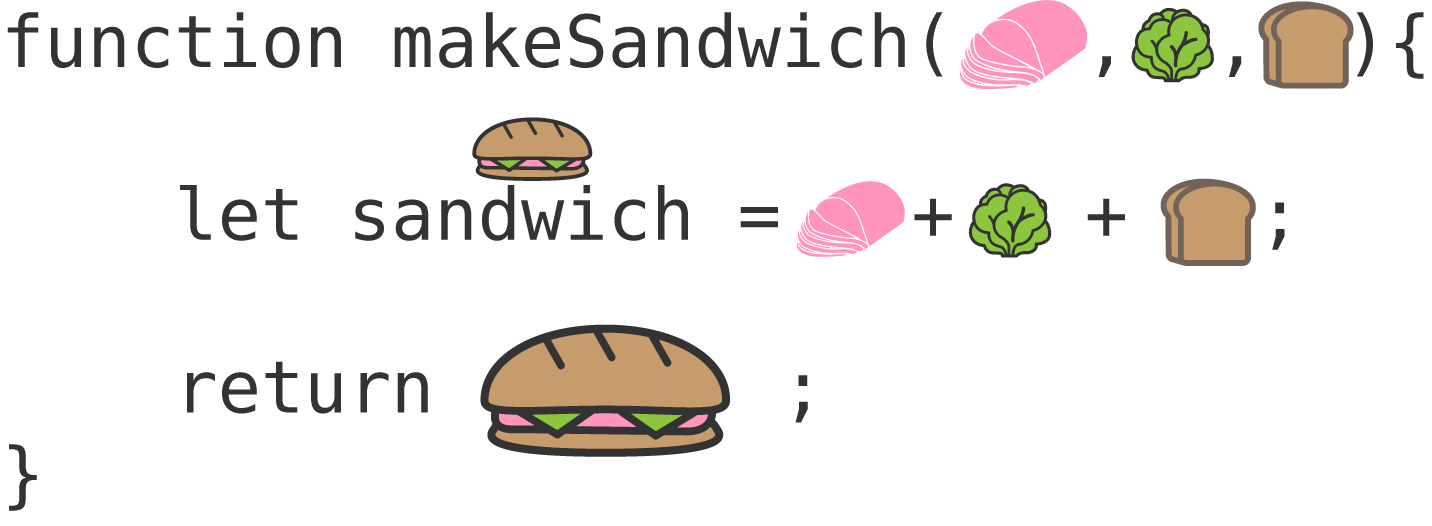
A function is also a reusable recipe that performs the same set of actions over and over again on a set of ingredients.
// Function to compute the product of p1 and p2
function myFunction(p1, p2) {
  return p1 * p2;
}
# Functions
JavaScript Functions
A JavaScript function is a block of code designed to perform a particular task.
A JavaScript function is executed when "something" invokes it (calls it).
function name(parameter1, parameter2, parameter3) {
  // code to be executed
}
# Functions
JavaScript Functions - Syntax
- A JavaScript function is defined with the function keyword, followed by a name, followed by parentheses ().
- Function names can contain letters, digits, underscores, and dollar signs (same rules as variables).
- The parentheses may include parameter names separated by commas:
- (parameter1, parameter2, ...)
- The code to be executed, by the function, is placed inside curly brackets: {}
# Functions
JavaScript Functions - Syntax
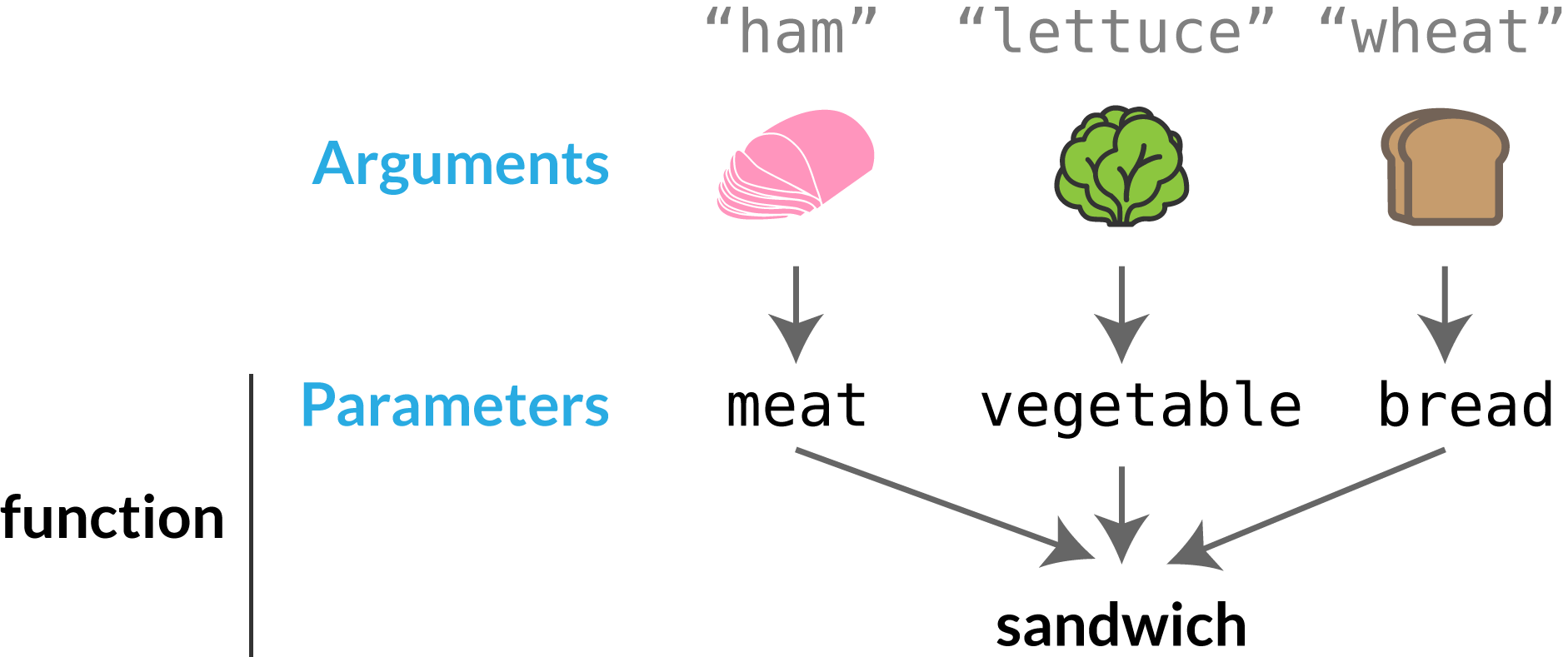
- Function parameters are listed inside the parentheses () in the function definition.
- Function arguments are the values received by the function when it is invoked.
- Inside the function, the arguments (the parameters) behave as local variables.
function name(parameter1, parameter2, parameter3) {
  // code to be executed
}
# Functions
The () Operator
The () operator invokes (calls) the function.
function toCelsius(fahrenheit) {
  return (5/9) * (fahrenheit-32);
}

let value = toCelsius(77);
# Functions
The () Operator
Accessing a function with incorrect parameters can return an incorrect answer
function toCelsius(fahrenheit) {
  return (5/9) * (fahrenheit-32);
}

let value = toCelsius();
# Functions
The () Operator
As you see from the examples above, toCelsius refers to the function object, and toCelsius() refers to the function result.
function toCelsius(fahrenheit) {
  return (5/9) * (fahrenheit-32);
}

let value1 = toCelsius();
let value2 = toCelsius;
# Functions
Functions Used as Variable Values
Instead of using a variable to store the return value of a function:
let x = toCelsius(77);
let text = "The temperature is " + x + " Celsius";
let text = "The temperature is " + toCelsius(77) + " Celsius";You can use the function directly, as a variable value:
# Functions
Local Variables
Variables declared within a JavaScript function, become LOCAL to the function.
Local variables can only be accessed from within the function.
// code here can NOT use carName

function myFunction() {
  let carName = "Volvo";
  // code here CAN use carName
}

// code here can NOT use carName
# Functions
Local Variables
Since local variables are only recognized inside their functions, variables with the same name can be used in different functions.
Local variables are created when a function starts, and deleted when the function is completed.
// code here can NOT use carName

function myFunction() {
  let carName = "Volvo";
  // code here CAN use carName
}

// code here can NOT use carName
{Data structures}
v2.0
# Objects
Objects
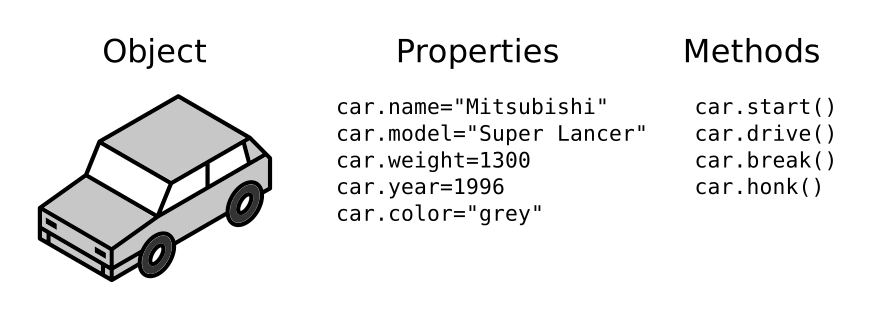
In real life, a car is an object.

A car has properties like weight and color, and methods like start and stop.
let car = "Fiat";# Objects
Objects
You have already learned that JavaScript variables are containers for data values.
This code assigns a simple value (Fiat) to a variable named car:
Objects are variables too. But objects can contain many values.
This code assigns many values (Fiat, 500, white) to a variable named car:
const car = {
  type:"Fiat",
  model:"500",
  color:"white",
};
# Objects
Accessing Object Properties
You can access object properties in two ways:
objectName.propertyNameobjectName["propertyName"]person.lastName;person["lastName"]E.g:
# Objects
Object Methods
Objects can also have methods.
Methods are actions that can be performed on objects.
Methods are stored in properties as function definitions.
const person = {
  firstName: "John",
  lastName : "Doe",
  id       : 5566,
  fullName : function() {
    return this.firstName + " " + this.lastName;
  }
};
In the example above, this refers to the person object:
this.firstName means the firstName property of person.
this.lastName means the lastName property of person.
# Objects
What is this?
In a function definition, this refers to the "owner" of the function.
In the example above, this is the person object that "owns" the fullName function.
In other words, this.firstName means the firstName property of this object.
# Objects
Calling methods
You can access object properties in two ways:
objectName.methodName()name = person.fullName();E.g:
// Combine arrays
const numbersOne = [1, 2, 3];
const numbersTwo = [4, 5, 6];
const numbersCombined = [...numbersOne, ...numbersTwo];
# Data Structures
The Spread Operator
The JavaScript spread operator (...) expands an iterable (like an array) into more elements.
// extract just what is needed
const numbers = [1, 2, 3, 4, 5, 6];

const [one, two, ...rest] = numbers;
let a, b, rest;
[a, b] = [10, 20];
console.log(a);
// Expected output: 10
console.log(b);
// Expected output: 20
[a, b, ...rest] = [10, 20, 30, 40, 50];
console.log(rest);
// Expected output: Array [30, 40, 50]
# Data Structures
Destructuring assignment
The destructuring assignment syntax is a JavaScript expression that makes it possible to unpack values from arrays, or properties from objects, into distinct variables.
const myVehicle = {
  brand: 'Ford',
  model: 'Mustang',
  color: 'red'
}

const updateMyVehicle = {
  type: 'car',
  year: 2021,
  color: 'yellow'
}

const myUpdatedVehicle = {...myVehicle, ...updateMyVehicle}
# Data Structures
The Spread Operator
We can use the spread operator with objects too:
const myVehicle = {
  brand: 'Ford',
  model: 'Mustang',
  color: 'red'
}
myVehicle.hasOwnProperty('brand'); // => true
myVehicle.hasOwnProperty('carName'); // => false

'brand' in myVehicle; // => true
'carName' in myVehicle; // => false

Object.keys(myVehicle); // => ['brand', 'model', 'color']
# Data Structures
Helpful checks & tricks
const myVehicle = {
  brand: 'Ford',
  model: 'Mustang',
  color: 'red'
}
// for..of is used on arrays
for (const property of Object.keys(myVehicle)) {
  console.log(`${property}: ${myVehicle[property]}`);
}

// for..in is used on objects
for (const property in myVehicle) {
  console.log(`${property}: ${myVehicle[property]}`);
}
# Data Structures
Iterating object
const myVehicle = {
  brand: 'Ford',
  model: 'Mustang',
  color: 'red'
};
delete myVehicle.color;
console.log(myVehicle);
/*
 * {
 *     brand: 'Ford',
 *     model: 'Mustang',
 * }
 * /
# Data Structures
Deleting properties
{let's code}
// This slide uses Auto-Animate to animate between
// two different code blocks
const distanceBetween = ( p1, p2 ) => {
 // TODO
}

distanceBetween([10,10], [50,50])
# PRESENTING CODE
Code Transitions
{Functional Programming}
filter().map().reduce().flat()
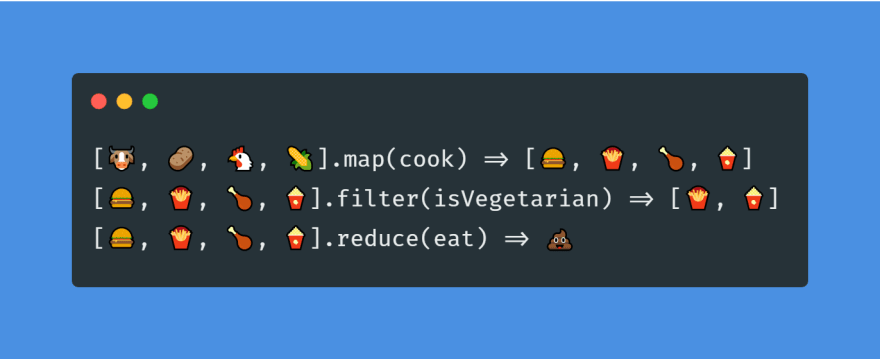
Functional Programming is a programming paradigm that emphasizes functions as the building blocks of software. Functions are treated as first-class citizens and can be passed around as arguments or returned as values.
Introduction to Functional Programming
// Functional programming example
const numbers = [1, 2, 3, 4, 5];

const square = x => x * x;

const squaredNumbers = numbers.map(square);

console.log(squaredNumbers); // [1, 4, 9, 16, 25]
# Functional programming
Functional programming

// Higher-order function example
const numbers = [1, 2, 3, 4, 5];

const square = x => x * x;

const map = (array, fn) => array.map(fn);

const squaredNumbers = map(numbers, square);

console.log(squaredNumbers); // [1, 4, 9, 16, 25]
# Functional programming
Higher-order Functions
A higher-order function is a function that takes another function as an argument or returns a function as a result. Higher-order functions are a fundamental concept in functional programming.
// Pure function example
const add = (a, b) => a + b;

console.log(add(2, 3)); // 5
console.log(add(2, 3)); // 5
# Functional programming
Pure Functions
A pure function is a function that has no side-effects and always returns the same output given the same input. Pure functions are a key concept in functional programming.
// Immutable data example
const numbers = [1, 2, 3];

const doubledNumbers = numbers.map(x => x * 2);

console.log(numbers); // [1, 2, 3]
console.log(doubledNumbers); // [2, 4, 6]
# Functional programming
Immutable Data
Immutable data is data that cannot be changed after it is created. Immutable data is a core concept in functional programming and helps to prevent bugs and make programs easier to reason about.
{
How to Think Like a Developer: Become a Problem Solver!
}
Learning How to Code
Using Google, StackOverflow and MDN
Debugging (Fixing Errors)
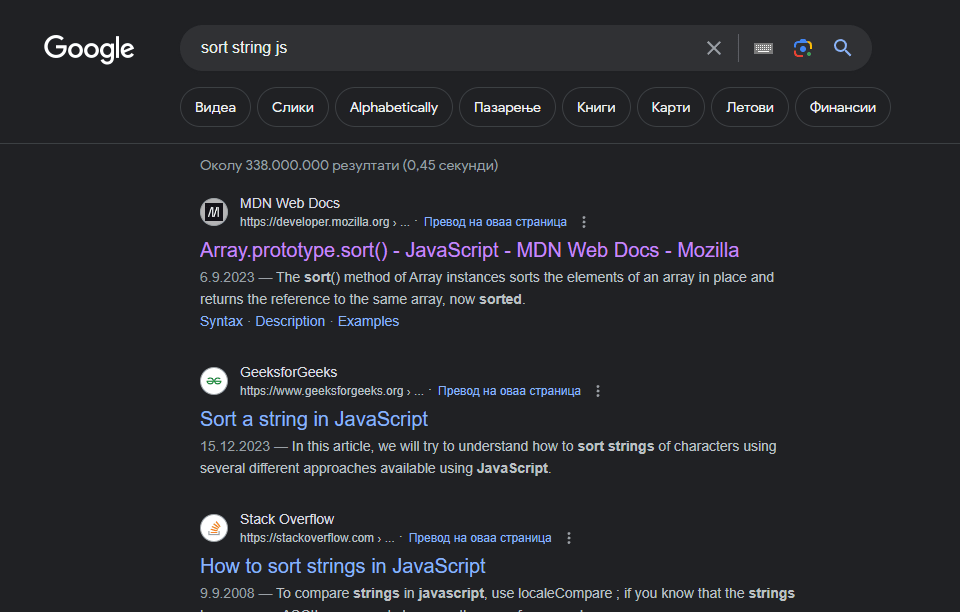
Good search
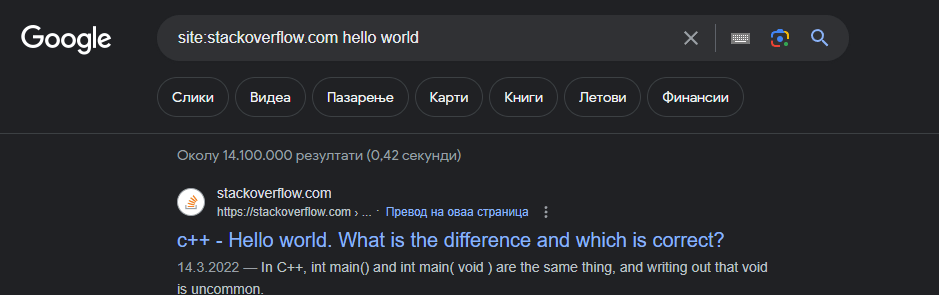
Specific site searching
{SHORTCUTS}
CTRL C - CTRL V === copy - paste
CTRL X - CTRL V === cut - paste
{SHORTCUTS}
F2 - Context aware rename
(file, folder, variable name, function name)
{SHORTCUTS}
Splitting editor
{DOM}
Document Object Model
Introduction to the DOM
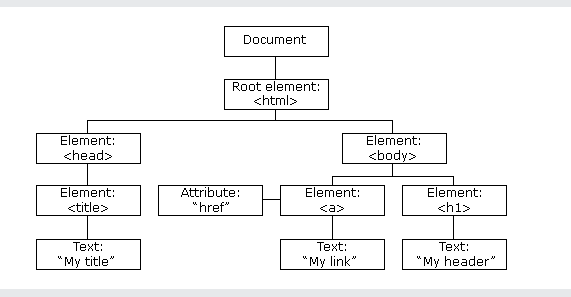
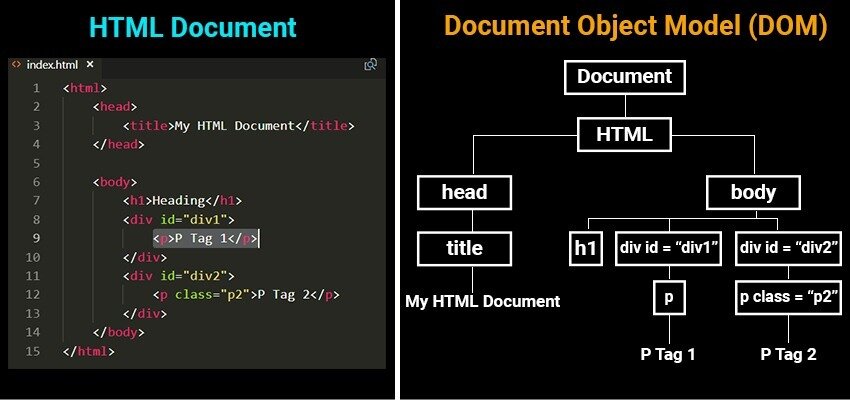
With the object model, JavaScript gets all the power it needs to create dynamic HTML:
- JavaScript can change all the HTML elements in the page
- JavaScript can change all the HTML attributes in the page
- JavaScript can change all the CSS styles in the page
- JavaScript can remove existing HTML elements and attributes
- JavaScript can add new HTML elements and attributes
- JavaScript can react to all existing HTML events in the page
- JavaScript can create new HTML events in the page
There are many ways to access elements in the DOM, including:
document.getElementById()- finds an element with a specific IDdocument.getElementsByClassName()- finds all elements with a specific classdocument.getElementsByTagName()- finds all elements with a specific tag namedocument.querySelector()- finds the first element that matches a specific CSS selector-
document.querySelectorAll()- finds all elements that match a specific CSS selector
Accessing Elements
// Accessing DOM elements example
const element1 = document.getElementById('myId');
const elements2 = document.getElementsByClassName('myClass');
const elements3 = document.getElementsByTagName('div');
const element4 = document.querySelector('#myId');
const elements5 = document.querySelectorAll('.myClass');
Once you have accessed an element, you can modify its attributes and contents using various properties and methods. Some common properties and methods include:
element.innerHTML- sets or gets the HTML content of an elementelement.textContent- sets or gets the text content of an elementelement.style- sets or gets the inline style of an elementelement.setAttribute()- sets the value of an attribute on an elementelement.removeAttribute()- removes an attribute from an element
Modifying Elements
// Modifying DOM elements example
const element = document.getElementById('myId');
element.innerHTML = '<b>Hello world!</b>';
element.style.color = 'red';
element.setAttribute('data-my-attribute', 'my value');
document.addEventListener('click', () => {
  alert('stop clicking!!!');
});
# PRESENTING CODE
Events
{JS & OOP}
JavaScript & Object Oriented Programming
Object-Oriented Programming is a programming paradigm based on the concept of objects. An object is an instance of a class that has properties and methods. OOP focuses on modeling real-world entities as objects.
Introduction to Object-Oriented Programming (OOP)
// OOP example
class Car {
  constructor(make, model, year) {
    this.make = make;
    this.model = model;
    this.year = year;
  }

  getAge() {
    return new Date().getFullYear() - this.year;
  }
}

const myCar = new Car('Toyota', 'Corolla', 2015);
console.log(myCar.getAge()); // 8
# OOP
OOP Code
Javascript supports several OOP concepts, including encapsulation, inheritance, and polymorphism. Encapsulation is the practice of hiding implementation details and providing a public interface. Inheritance is the mechanism by which a class can inherit properties and methods from another class. Polymorphism is the ability of an object to take on many forms.
OOP concepts in Javascript
// OOP concepts example
class Animal {
  constructor(name) {
    this.name = name;
  }

  makeSound() {
    console.log('Generic animal sound');
  }
}

class Dog extends Animal {
  makeSound() {
    console.log('Woof!');
  }
}

const myDog = new Dog('Rufus');
console.log(myDog.name); // Rufus
myDog.makeSound(); // Woof!
# OOP
Javascript classes are defined using the class keyword. Classes can have a constructor method, which is called when an instance is created and can have methods and properties defined inside the class body.
Defining classes in Javascript
// Class definition example
class Person {
  constructor(name, age) {
    this.name = name;
    this.age = age;
  }

  sayHello() {
    console.log(`Hello, my name is ${this.name}`);
  }
}

const john = new Person('John', 30);
john.sayHello(); // Hello, my name is John
# OOP
Defining classes in Javascript
// Prototypal inheritance example
function Animal(name) {
  this.name = name;
}

Animal.prototype.makeSound = function() {
  console.log('Generic animal sound');
};

function Dog(name) {
  Animal.call(this, name);
}

Dog.prototype = Object.create(Animal.prototype);

Dog.prototype.constructor = Dog;

Dog.prototype.makeSound = function() {
  console.log('Woof!');
};

const myDog = new Dog('Rufus');
console.log(myDog.name); // Rufus
myDog.makeSound(); // Woof!
# OOP
Prototypal Inheritance in Javascript
In Javascript, objects inherit properties and methods from their prototypes. Every object has a prototype object, which it inherits from.
// Prototypal inheritance example
function Animal(name) {
  this.name = name;
}

Animal.prototype.makeSound = function() {
  console.log('Generic animal sound');
};

function Dog(name) {
  Animal.call(this, name);
}

Dog.prototype = Object.create(Animal.prototype);

Dog.prototype.constructor = Dog;

Dog.prototype.makeSound = function() {
  console.log('Woof!');
};

const myDog = new Dog('Rufus');
console.log(myDog.name); // Rufus
myDog.makeSound(); // Woof!
# OOP
Interfaces
JavaScript uses what's called duck typing. (If it walks like a duck, and quacks like a duck, as far as JS cares, it's a duck.) If your object has quack(), walk(), and fly() methods, code can use it wherever it expects an object that can walk, quack, and fly, without requiring the implementation of some "Duckable" interface. The interface is exactly the set of functions that the code uses (and the return values from those functions), and with duck typing, you get that for free.
{Promises}
async await
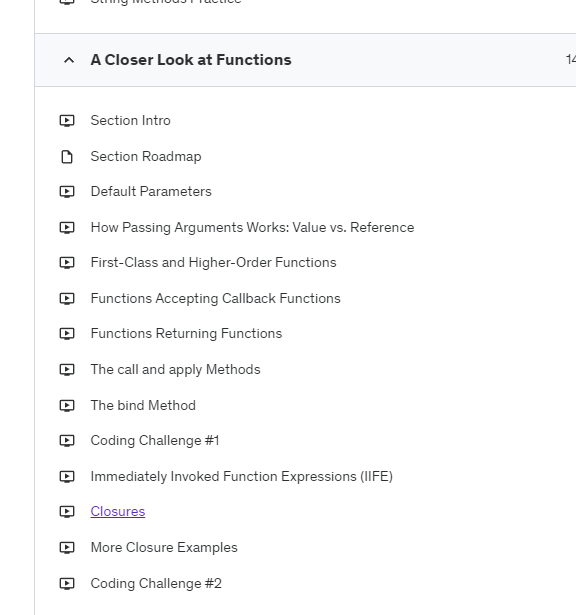
{Closer look @ functions}
...
// This slide uses Auto-Animate to animate between
// two different code blocks
const distanceBetween = ( p1, p2 ) => {
 // TODO
}

distanceBetween([10,10], [50,50])
# PRESENTING CODE
Code Transitions
{Algorithms}
Only the parts that matter
const sum = (n) => {
  let total = 0;
  for (let i = 1; i <= n; i++) {
    total += i;
  }
  return total;
};

console.log(sum(10)); // 55
console.log(sum(100)); // 5050
console.log(sum(1000)); // 500500
# Algorithms
Big O Notation
Big O notation is a way of describing the time complexity of an algorithm. It is a way of measuring how much time an algorithm takes to run as the size of the input grows.
The time complexity of the sum function is O(n), because the time it takes to run the function grows linearly with the size of the input.
// Sorting algorithm example - Bubble sort
const bubbleSort = (arr) => {
  const n = arr.length;
  for (let i = 0; i < n - 1; i++) {
    for (let j = 0; j < n - i - 1; j++) {
      if (arr[j] > arr[j + 1]) {
        const temp = arr[j];
        arr[j] = arr[j + 1];
        arr[j + 1] = temp;
      }
    }
  }
  return arr;
};

console.log(bubbleSort([3, 1, 4, 1, 5, 9, 2, 6, 5, 3, 5]));
// [1, 1, 2, 3, 3, 4, 5, 5, 5, 6, 9]
# Algorithms
Sorting Algorithms
Sorting algorithms are algorithms that put elements in a list in a particular order. There are many different sorting algorithms, each with its own time complexity.
The time complexity of the Bubble sort algorithm is O(n^2) in the worst case, because it has to compare every pair of elements in the list.
{Regular Expressions}
/hello/g
A regular expression is a pattern that can be used to match text. Regular expressions are used in many programming languages and are a powerful tool for searching and manipulating text.
Introduction to Regular Expressions
// Regular expression example
const pattern = /hello/g;

const text = 'hello world, hello universe!';

const matches = text.match(pattern);

console.log(matches); // ["hello", "hello"]
# RegEx
RegEx
Regular expressions have their own syntax for defining patterns. Some common syntax elements include:
-
.- matches any character -
^- matches the beginning of a line -
$- matches the end of a line -
[]- matches any character in a set -
|- matches either one expression or another -
()- groups expressions together
Syntax
// Regular expression syntax example
const pattern = /a.c/;

console.log(pattern.test('abc')); // true
console.log(pattern.test('axc')); // true
console.log(pattern.test('adc')); // true
console.log(pattern.test('a\nbc')); // false

const pattern2 = /^[a-z]+$/;

console.log(pattern2.test('hello')); // true
console.log(pattern2.test('hello123')); // false
console.log(pattern2.test('Hello')); // false
# RegEx
RegEx syntax examples
// Regular expression flags example
const pattern = /hello/gi;

const text = 'Hello world, hello universe!';

const matches = text.match(pattern);

console.log(matches); // ["Hello", "hello"]
# RegEx
Flags
Regular expressions can also have flags that modify their behavior. Some common flags include:
-
g- global - matches all occurrences, not just the first one -
i- case-insensitive - matches regardless of case -
m- multiline - treats beginning and end characters (^ and $) as the beginning and end of each line, rather than the beginning and end of the whole string
JavaScript - SMX Academy - 2024
By jeger12345