Jakub Jirůtka | InstallFest 2026
Image source: OpenAI gpt-image-1
System engineer and developer
Works at FEE CTU in Prague
FOSS developer & contributor
Alpine Linux developer
$~ whoami


Source: https://lezebre.lu/en/sticker-simons-cat-claws/

@jirutka
@jakub@jirutka.cz
jakub@jirutka.cz



In ancient times…
…2 years ago
Source: OpenAI gpt-image-1
Updating zone files manually

SSH
edit zone file
bump serial
reload
check logs
Primary DNS
BIND

BIND
Secondary DNS
NOTIFY/AXFR
Image source: OpenAI gpt-image-1
What if something goes wrong…?
Primary DNS
BIND
BIND
Secondary DNS
NOTIFY/AXFR


- syntax error
- bad serial
- invalid SOA
- cyclic CNAME
- broken NS
- …
- zone partially or completely unavailable
- primary/secondary returns different data
- zone expiry on secondaries
It may take several hours for errors to manifest!
; DAKIZ, FJFI Martincik
dakiz-fw    IN    A    147.32.191.121
;
;; tov - Slackware u Andrejovice v kancelari (snad 148B3) - Karel Julis
; tov    IN    A    147.32.193.94
;; semik - docasne SSL telnetd server 147.32.193.35 zruseno 22.6.07
;; ivr - Bezpalec, B3-619, 2093
; ivr    IN    A    147.32.193.35
;;
;; intercom CIIRC
ic-ciirc-5np-sever    IN    CNAME    voip-135-201-32-147.feld.cvut.cz.
ic-ciirc-5np-jih    IN    CNAME    voip-198-201-32-147.feld.cvut.cz.
;;
;;    sitovy hw
;bs115-1    IN    A    147.32.193.96
;bs115-2    IN    A    147.32.193.97
;bs301-1    IN    A    147.32.193.98
;bs450-test    IN    A    147.32.193.99
;
;bs301-3    IN    A    147.32.193.100
;
; Armada1
;xxx	IN	A	147.32.193.77
;xxx	IN	CNAME	aladdin.ten.cz.
;yyy	IN	CNAME	jerry.ten.cz.
;zzz	IN	A	147.32.193.76
;qqq	IN	A	147.32.193.75
;ttt	IN	A	147.32.193.74
Legacy zone files
Legacy zone files
Many semantic errors
- dangling references (e.g. CNAME pointing to a non-existent domain)
- duplicate IP usage / PTR ambiguity
- PTRs not matching A/AAAA
- invalid rrdata in TXT, SRV, …
- conflicting records
BIND mostly checks just syntax, not semantic/logical errors.
Legacy zone files
No versioning and no metadata
- Who is the owner and who added it?
- What is it used for and what is it related to?
- When was it created?
- Why was it created (ticket/request)?

Who knows…?
Is this record still needed?
Image source: OpenAI gpt-image-1
PowerDNS WebUI
Mostly the same problems.
Even less comments (0).

Source: https://deaftogether.org.uk/wp-content/uploads/2023/09/deaftogether_hero_img.jpg

In present time
Source: OpenAI gpt-image-1
DNS FEL
28
5896
6285
zones
domains names
res. records
Numbers without reverse zones.
All records are signed with DNSSEC.
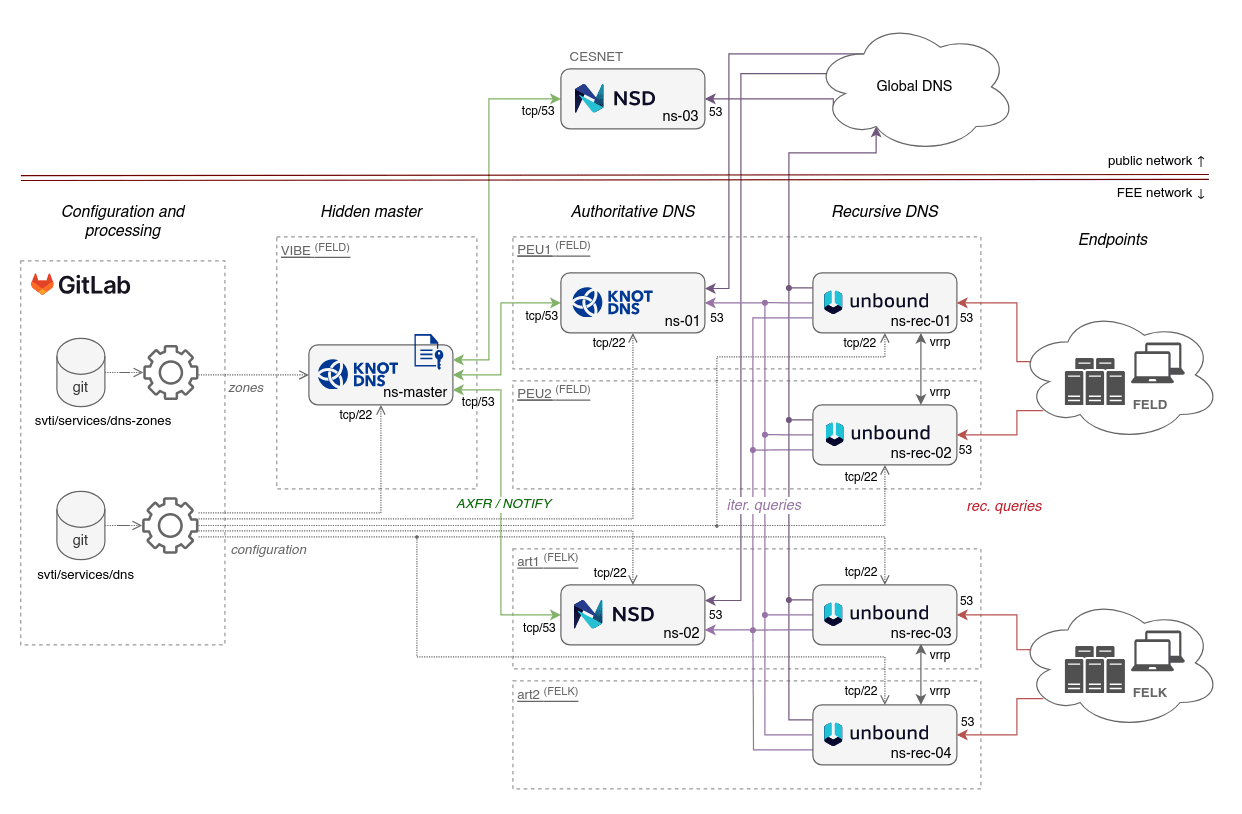
DNS FEL infra


YAML zone
# yaml-language-server: $schema=../schemas/zone.json
$extends: ./_soa.yml
$ORIGIN: example.cz.
$default:
  tenant: 13373

"@":
  ALIAS: wproxy
  MX:
    - 10 smtp.prg
    - 20 smtp.example.org.

smtp.prg:
  //: The primary inbound SMTP relay.
  A: 203.0.113.25
  AAAA: 2001:db8:113::25

wproxy:
  //: The central web reverse proxy.
  owners: flynnkev
  tags: [ HTTP ]
  A: 203.0.113.80
  AAAA: 2001:db8:113::80
  subdomains:
    dev:
      CNAME: wproxy
; Build-Date: 2026-03-19T17:13:59.857Z
; Git-Revision: 5e00c8c6d40af5751e290782f5eea1d39be401c1

$ORIGIN example.cz.
$TTL 3600

@             SOA     ns1.example.cz. hostmaster.example.cz. (0 900 300 1209600 600)

; zones/example.cz.yml:7-12
@             NS      ns1.example.cz.
@             NS      ns2.example.org.
@             NS      nsa.ces.net.
@             MX      10 smtp.prg
@             MX      20 smtp.example.org.
@             A       203.0.113.80
@             AAAA    2001:db8:113::80

; zones/example.cz.yml:13-17
smtp.prg      A       203.0.113.25
smtp.prg      AAAA    2001:db8:113::25

; zones/example.cz.yml:18-27
wproxy        A       203.0.113.80
wproxy        AAAA    2001:db8:113::80
dev.wproxy    CNAME   wproxy
YAML files structure
zones/
├── _soa.yml
├── brian.cvut.cz.yml
├── example.cz.yml
├── fel.cvut.cz.d/
│   ├── 13101.yml
│   ├── 13102.yml
│   ├── ...
│   ├── 13373-SVTI.d/
│   │   ├── 13373-printers.yml
│   │   └── 13373-classrooms.yml
│   └── 13373-SVTI.yml
├── fel.cvut.cz.yml
zones:
- brian.cvut.cz
- example.cz
- fel.cvut.cz

YAML zone structure
- //:
(string)(description) - $extends:
(string)(aka include) - $ORIGIN:
(string) - $TTL:
(number) - $default:
(object)(for metadata) - <domain-name>:
(object)
YAML zone structure
- <domain-name>
- //:
string– description - tenant:
number - owners:
(string | string[]) - tags:
(string[]) - requests:
(string | string[]) - ptr:
(boolean) - <record-type>: – e.g. A, AAAA, CNAME, ALIAS, …
(string | string[])({ttl, rdata, ptr}[])
- subdomains:
(object)
- //:
Range patterns
pc-[9-10,12]:
  owners: flynnkev
  A: 147.32.209.$


vm-38[4-5]-[100-101]:
  A: 10.38.$1.$2


pc-[01-03]:
  A: 10.3.45.(($1 + 99))
pc-9:
  owners: flynnkev
  A: 147.32.209.9
pc-10:
  owners: flynnkev
  A: 147.32.209.10
pc-12:
  owners: flynnkev
  A: 147.32.209.12

vm-384-100:
  A: 10.38.4.100
vm-384-101:
  A: 10.38.4.101
vm-385-100:
  A: 10.38.5.100
vm-385-101:
  A: 10.38.5.101

pc-01:
  A: 10.3.45.100
pc-02:
  A: 10.3.45.101
pc-03:
  A: 10.3.45.102
Updating zones
Edit zone
(YAML)
Open MR
OK?
Automated checks
Review
Edit zone
(YAML)
Generate
zone files


request
changes
git push
git push
merge
Deploy

Image source: OpenAI gpt-image-1
- check code-style (yamllint)
- check against JSON schema (AJV)
- normalise and convert to JSON
- fetch zones from NetBox
- check semantic/consistency
- generate reverse zones
- convert to plain zone files
- check zones using kzonecheck
- deploy zones to hidden master (Knot)
- deploy JSON zones to Sites FEL for Domain Viewer
Automation – CI pipeline
1. Check code style (yamllint)
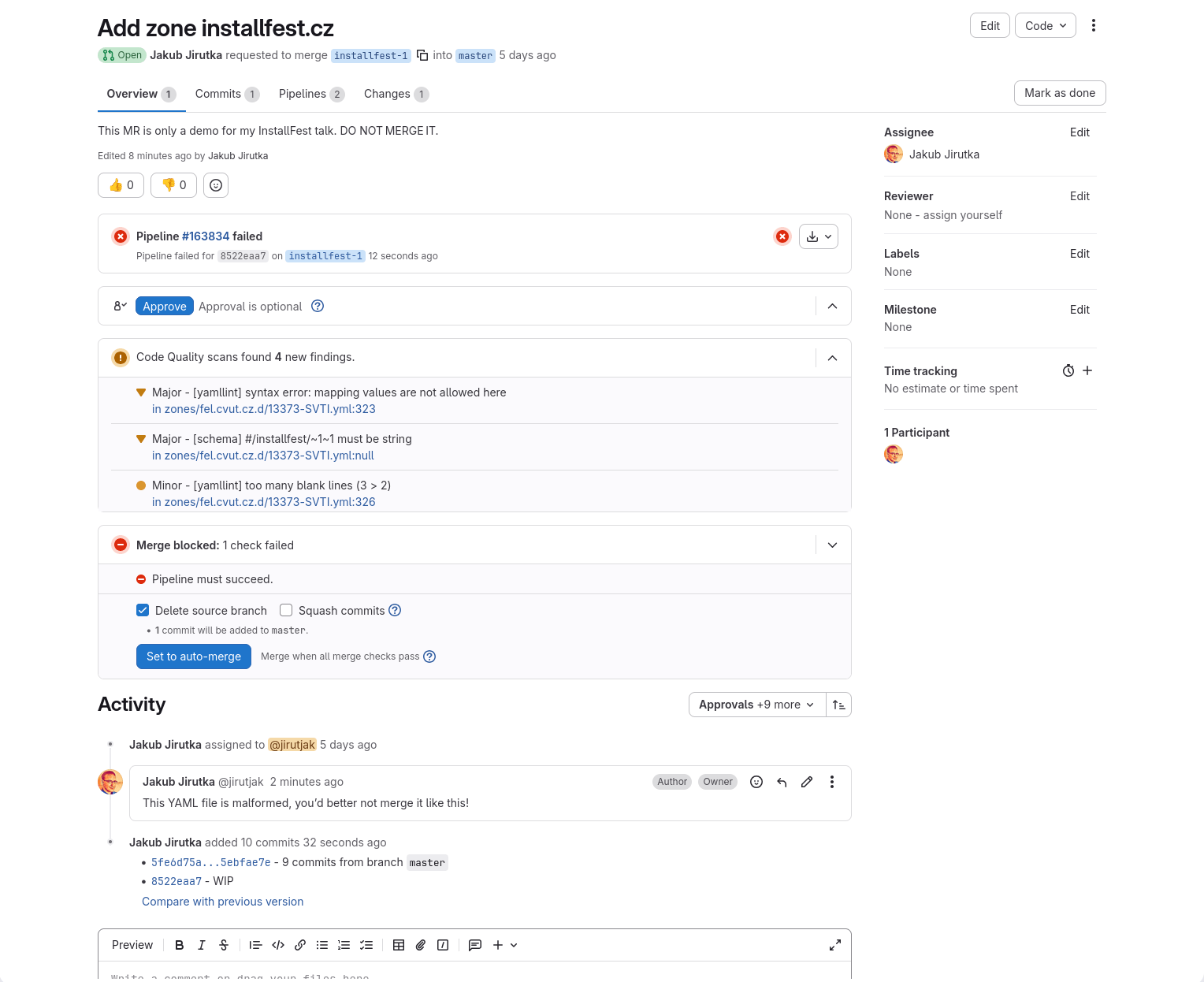
❯ make check-style
zones/fel.cvut.cz.d/13373-SVTI.yml
  322:121   warning  line too long (137 > 120 characters)  (line-length)
  326:1     warning  too many blank lines (3 > 2)  (empty-lines)
  323:6     error    syntax error: mapping values are not allowed here (syntax)
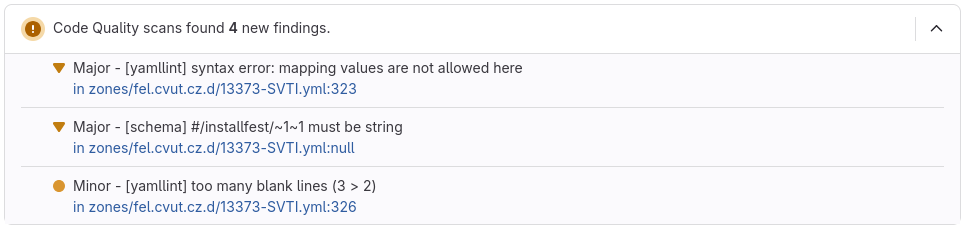
Terminal
Merge request in GitLab
2. Check YAMLs against JSON schema
{
  "$schema": "https://json-schema.org/draft/2020-12/schema",
  "type": "object",
  "additionalProperties": false,
  "patternProperties": {
    "^(@|\\*|(\\*\\.)?(\\.(?=[^.])|[a-z0-9_-]|\\[([0-9]+(-[0-9]+)?,?)+\\])+)$": {
      "type": "object",
      "properties": {
        "//": { "description": "A comment.", "type": "string" },
        "owners": {
          "description": "CTU username of one or more people responsible for this domain.",
          "anyOf": [
            { "type": "string", "pattern": "^[a-z0-9_@.+~-]+$" },
            { "type": "array", "items": { "type": "string", "pattern": "^[a-z0-9_@.+~-]+$" } }
          ]
        },
        "A": {
          "anyOf": [
            { "$ref": "#/$defs/IPv4Address" },
            {
              "type": "object",
              "required": ["rdata"],
              "properties": {
                "rdata": { "$ref": "#/$defs/IPv4Address" },
                "ttl": { "description": "Time to Live (in seconds) for this record.", "type": "number" },
                "ptr": { "description": "Set to false if this record should not be used to generate the PTR (reverse record).", "type": "boolean" }
              }
            },
            {
              "type": "array",
              "items": {
                "anyOf": [
                  { "$ref": "#/$defs/IPv4Address" },
2. Check YAMLs against JSON schema
- Validates both JSON and YAML files.
- Several output formats:
- pretty print,
- Code Climate JSON (used in GitLab),
- …
- Supports modeline:
-
# yaml-language-server: $schema=<path>
-
- Merges related errors per instance path.
ajv-cli is CLI for Ajv JSON schema validator
See more at https://github.com/jirutka/ajv-cli

❯ make check-schema
--> zones/fel.cvut.cz.d/13373-SVTI.yml:323:11
    #/installfest/owners

    |
    | installfest:
    |   //: Website for the InstallFest conference.
323 |   owners: Kevin Flynn
    |           ^^^^^^^^^^^ must match pattern '^[a-z0-9_@.+~-]+$'
    |   A: 203.0.113.80
    |   AAAA: 2001:db8:113::80
    |

--> zones/fel.cvut.cz.d/13373-SVTI.yml:328:3
    #/pretalx.installfest

    |   AAAA: 2001:db8:113::80
    |
    | pretalx.installfest:
328 |   owners: flynnkev
329 |   A: 203.0.113.20
330 |   AAA: 2001:db8:113::20
    |   ^ must not include property 'AAA'
    |
    | intranet:
2. Check YAMLs against JSON schema
3. Convert YAMLs to JSON
- Zone’s YAMLs → single object.
- Normalizes domain & record objects into canonical model.
- Normalizes FQDN/PQDN.
- Expands ranges (“macros”).
{
  "origin": "example.cz.",
  "ttl": 3600,
  "soa": { … },
  "domains": [
    {
      "name": "wproxy.example.cz.",
      "owners": [ "flynnkev" ],
      "tenant": 13373,
      "tags": [ "HTTP" ],
      "records": [
        { "type": "A", "rdata": "203.0.113.80" },
        { "type": "AAAA", "rdata": "2001:db8:113::80" }
      ],
      "@source": "zones/example.cz.yml:18-26",
    }
  ]
}
5. Check semantic/consistency errors
- Invalid resource record data
- format of A, AAAA, CAA, MX, SRV
- Missing target domains
- ALIAS/CNAME/MX/SRV pointing to non-existent domain within all our zones.
- Non-exclusive CNAMEs*
- Another record exists beside CNAME for the domain.
- CNAME pointing to CNAME
- Multiple domain names with A/AAAA pointing to one IP address
* checked also by kzonecheck
❯ make check-schema
1) ERROR: A record "203.0.113.666" is invalid.

    zones/installfest.cz.yml:8
       5 | "@":
       6 |   //: Website for the InstallFest conference.
       7 |   owners: flynnkev
       8 >   A: 203.0.113.666
       9 |   AAAA: 2001:db8:113::80

2) ERROR: CNAME target "pretalx-01.apps.fel.cvut.cz." was not found.

    zones/installfest.cz.yml:15
      12 | pretalx:
      13 |   //: A conference planning tool for InstallFest.
      14 |   owners: flynnkev
      15 >   CNAME: pretalx-01.apps.fel.cvut.cz.

3) WARNING: CNAME pretalx-dev.installfest.cz. points to CNAME pretalx.installfest.cz..

    zones/installfest.cz.yml:16
      16 | pretalx-dev:
      17 |   //: A conference planning tool for InstallFest (dev instance).
      18 |   owners: flynnkev
      19 |   CNAME: pretalx
5. Check semantic/consistency errors
6. Generate reverse zones
- Generated PTR from all A/AAAA records that point to our subnets.
- It can be disabled per domain or record.
- Generates JSON.
7. Convert to standard zone format
Convert zones in JSON to the standard zone format for the DNS server.
; Build-Date: 2026-03-19T17:13:59.857Z
; Git-Revision: 5e00c8c6d40af5751e290782f5eea1d39be401c1

$ORIGIN example.cz.
$TTL 3600

@             SOA     ns1.example.cz. hostmaster.example.cz. (0 900 300 1209600 600)

; zones/example.cz.yml:7-12
@             NS      ns1.example.cz.
@             NS      ns2.example.org.
@             NS      nsa.ces.net.
@             MX      10 smtp.prg
@             MX      20 smtp.example.org.
@             A       203.0.113.80
@             AAAA    2001:db8:113::80

; zones/example.cz.yml:13-17
smtp.prg      A       203.0.113.25
smtp.prg      AAAA    2001:db8:113::25

; zones/example.cz.yml:18-27
wproxy        A       203.0.113.80
wproxy        AAAA    2001:db8:113::80
dev.wproxy    CNAME   wproxy
8. Check zone files using kzonecheck
Knot utility that checks zone file syntax and runs semantic checks on the zone content.
- Missing SOA record at the zone apex
- An extra record exists together with a CNAME record except for RRSIG and NSEC
- Multiple CNAME records with the same owner exist
- NS record exists together with a DNAME record
- Missing NS record at the zone apex
- … and 6 more
See https://www.knot-dns.cz/docs/3.5/singlehtml/#semantic-checks
9. Deploy zones to hidden master
deploy-dns:
  stage: deploy
  only:
    - master
  environment:
    name: ns-master
  # Ensures that only one instance of this job can run at a time.
  resource_group: ns-master
  script:
    - rsync --dirs --delete -i output/zones/ user@host:/etc/knot/zones/
    - ssh user@host doas zone-reload
#!/bin/sh
set -eu
knotc zone-check
knotc zone-reload
timeout 5 tail -f /var/log/messages \
| sed -En 's/.*daemon\.\w+ knot\[\d+\]: (.*)$/\1/p' || truezone-reload
.gitlab-ci.yml
Zones deployment

hidden master
ssh+rsync
checks
DNSSEC signing

GitLab CI/CD
YAML→JSON
JSON→.zone
checks
rev. zones
NOTIFY/AXFR
primary
secondary
tertialy (external)
Sites FEL
ala GitLab Pages
zone files
zones
git repo
YAMLs
Domain
Viewer
JSONs
webhook HTTP
What about SOA serial number?
template:
  - id: public
    storage: "/var/lib/knot"
    file: "/etc/knot/zones/%s.zone"
    notify: ns-public
    semantic-checks: true
    journal-content: all
    zonefile-sync: -1
    zonefile-load: difference-no-serial
    serial-policy: unixtime
    module: mod-queryacl/default
(7) Keep full zone content (and history) in journal.
(8) Treat zone files as input only.
(9) Compare file vs in-memory, load only differences, ignore serial.
(10) Set serial to the current unix time.
Automatically managed by
knot.conf
NetBox Integration
- Selected zones are generated from NetBox.
- For technical zones with only A/AAAA records.
- IP Address objects – source of truth for A/AAAA records + metadata.
- NetBox Custom Script as the interface:
- produces records in our JSON zone format,
- called via HTTP API from the dns-zones CI pipeline.
- The same checks are applied as for the zones defined in YAMLs!

Other CLI tools
- Custom formatter:
- formats YAML to the preferred style,
- sorts keys.
- Zone converter:
- convert YAML zone file to CSV,
- update YAML zone file from CSV.
- Refactoring:
- move domains between YAML files.
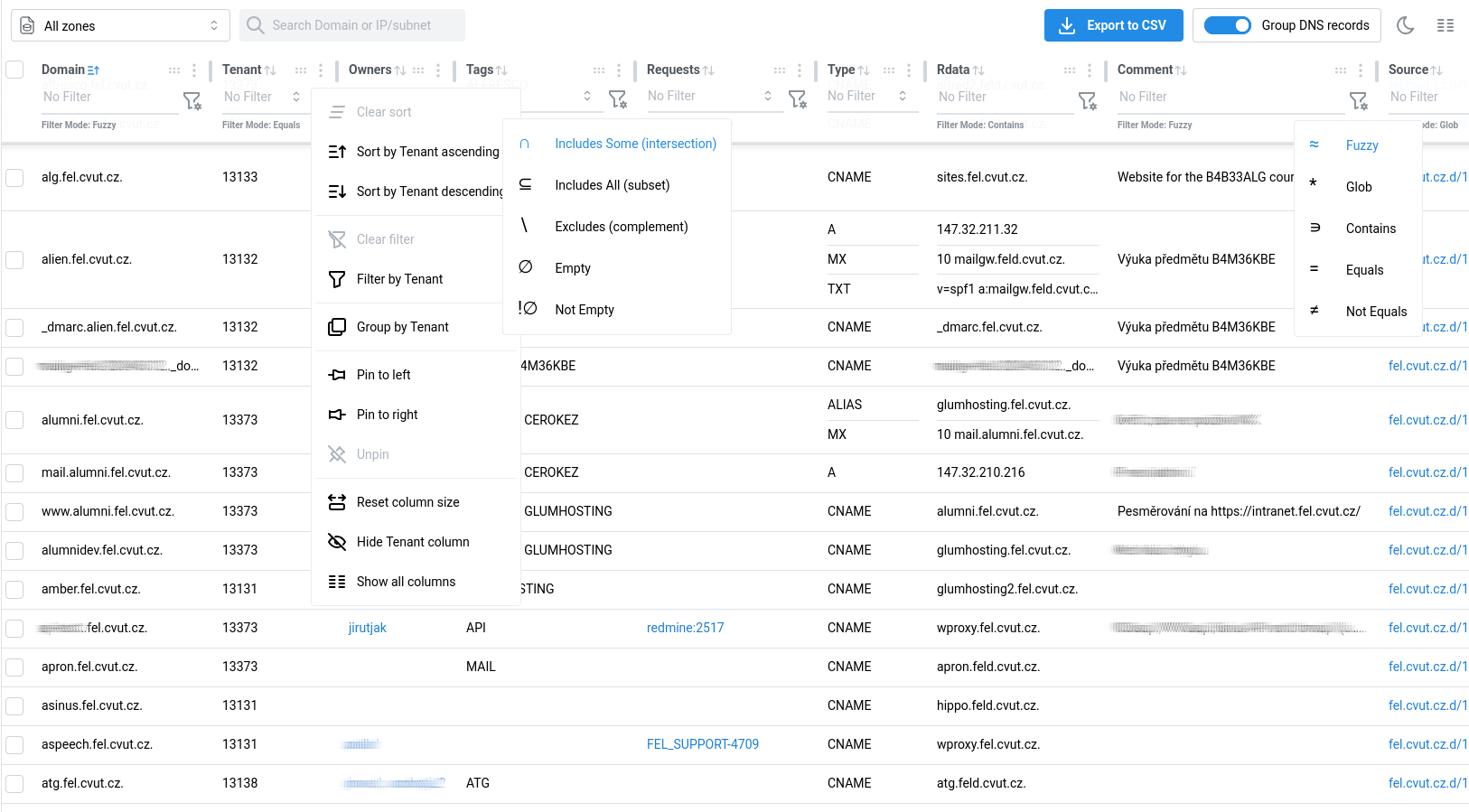
Domain Viewer
- React application built using mantine-react-table.
- Interactive table for viewing DNS records.
- Consumes zones in JSON.
- Deployment, OIDC and role-based authorization via Sites FEL.
GitLab Quality Report in MR
[
  {
    "description": "[yamllint] syntax error: mapping values are not allowed here",
    "check_name": "yamllint:syntax",
    "fingerprint": "5213eb1df4235eb980b8fdc604d34f5aaa06138d",
    "severity": "major",
    "location": {
      "path": "zones/feld.cvut.cz.d/13373-SVTI.yml",
      "lines": {
        "begin": 323,
        "end": 6
      }
    }
  }
]
test:
script:
- ...
after_script:
- make gl-cq-report.json
artifacts:
reports:
codequality: gl-cq-report.json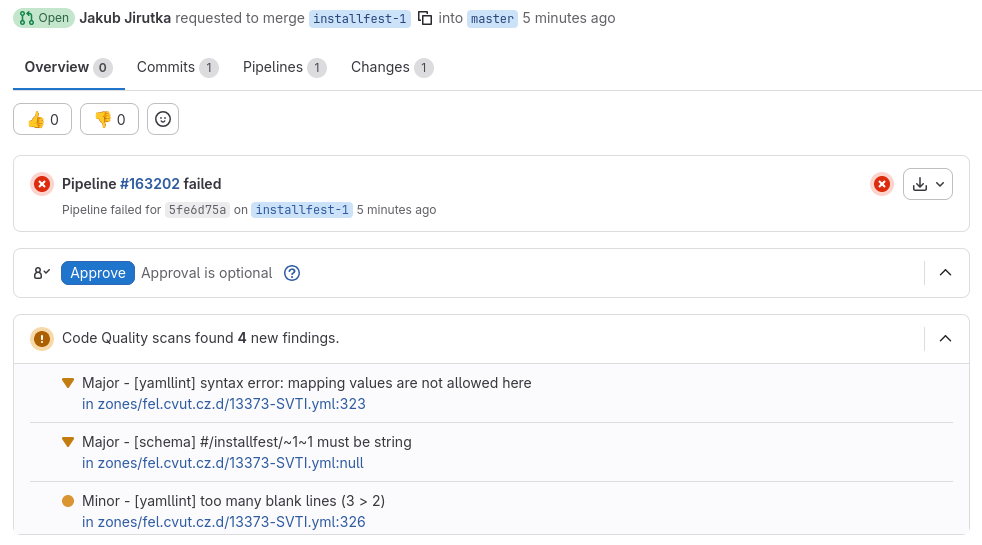
.gitlab-ci.yml
gl-cq-report.json
https://docs.gitlab.com/ci/testing/code_quality/


VSCodium
VS Code
IDE support
and
YAML Language Support in VS Code
https://open-vsx.org/extension/redhat/vscode-yaml
https://github.com/redhat-developer/yaml-language-server
JSON schema powered:
- autocompletion
- validation
- inline documentation
modeline to specify JSON schema
yaml-language-server can be used even in Emacs, vim and other editors with LSP.
Problem Matcher in VS Code
{
  "tasks": [
    {
      "label": "Check semantics (opened files)",
      "group": { "kind": "test", "isDefault": false },
      "type": "process",
      "command": "make",
      "args": [ "check-data", "CHECK_ZONES_FORMAT=basic" ],
      "problemMatcher": {
        "owner": "check-zones",
        "fileLocation": ["relative", "${workspaceFolder}"],
        "applyTo": "openDocuments",
        "pattern": [
          {
            "regexp": "^\\d+\\) (ERROR|WARNING): (.*)$",
            "severity": 1,
            "message": 2,
          },
          {
            "regexp": "^\\s+.*? in (\\S+):(\\d+)$",
            "file": 1,
            "line": 2,
            "loop": true,
          },
        ],
      },
    },
  ],
}
2) WARNING: Found 2 domains without ptr:false pointing to IP 2001:db8:113::80: courses.example.cz, wproxy.example.cz.
courses.example.cz. in zones/example.cz.yml:15
wproxy.example.cz. in zones/example.cz.yml:27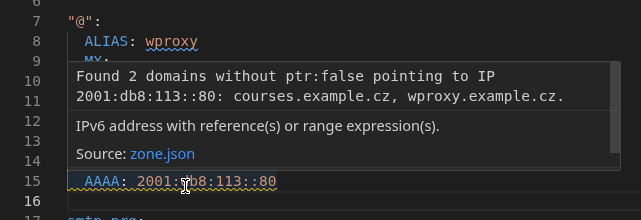
Ctrl+Shift+P > Tasks: Run Task > [Task]
.vscode/tasks.json

Custom Code Formatter in VS Code
https://open-vsx.org/extension/webfreak/advanced-local-formatters
{
  "advancedLocalFormatters.formatters": [
    {
      "languages": ["yaml"],
      "command": ["./scripts/zoneyml-fmt"],
    },
  ],
  "[yaml]": {
    // XXX: This is applied on all yaml files, not just in zones/, but there's
    // nothing we can do about it (see microsoft/vscode#32693). :(
    "editor.defaultFormatter": "webfreak.advanced-local-formatters",
    "editor.formatOnSave": true,
  },
}
.vscode/settings.json
Why YAML?
-
Readable and familiar
-
easy to write, easy to understand
-
-
Structured
-
clear hierarchy, no ambiguity
-
machine-readable and machine-writeable
-
AI-friendly
-
-
Strong tooling
-
schema validation, autocomplete, linter, formatters
-
-
Git-friendly
-
clean diffs, easy reviews
-
Do you know a better format?
Why not some DNS web UI?
A web UI looks simple at first — until you need versioning, diffs, reviews, bulk changes, validation, automation.…
We get all of that for free by treating DNS as code and leveraging decades of SW development ecosystem. It gives us powerful capabilities that are hard and expensive to build in a UI.
This solution is simple, very flexible, easy to maintain and extend.
| Component | Lines of code | npm dependencies |
|---|---|---|
| core tools | ~1500 | 7 (19) |
| aux tools | ~1500 | 11 (23 total) |
| Domain Viewer | ~2000 | 15 (125 total) |

Image source: OpenAI gpt-image-1
- Any text editor (or text manipulation tool)
- Fast editing & navigation
- Bulk changes & refactoring
- Git
- Version history – who changed what, when and why
- Branching & merging – isolated changes, conflict resolution
- Diffs – precise visibility of changes
- Commits – reversible change units (needed for rollbacks)
- Distributed model – no single point of failure, local work
- GitLab
- Merge requests – review, discussion, approvals
- CI/CD pipelines – automatization, validations, deployment
- Access control – permissions
- Code quality reports – structured feedback in UI
- Web UI & integrations – browsing, editing, linking to issues
What exiting tools provide you…
Downsides
- Limited access control – only per repository.
- Can be worked around using multiple repos and some CI magic.
- Requires some elementary knowledge of git, GitLab, YAML, text editing.
- It’s not BFU-friendly… but DNS is not for BFUs…
- Assumes a non-trivial infrastructure – GitLab (or similar) and CI.
- It can be used without it, but you’ll miss some features.
Q&A
Source: OpenAI gpt-image-1 trained on art stolen from the Internet

DNS as a Code: Managing Large DNS Zones in Git
By Jakub J.
DNS as a Code: Managing Large DNS Zones in Git
In this presentation, I will show you how we manage tens of DNS zones with several thousand records at the Faculty of Electrical Engineering (FEL) of the Czech Technical University (ČVUT) using the “DNS as a Code” and “GitOps” approaches. We define DNS records in structured YAML files alongside organisational metadata, validation using JSON Schema, and a set of checks that catch logical errors across zones before deployment. Every change goes through a merge request and CI checks. The definitions are compiled into classic zone files for authoritative servers, and selected zones are generated from data in NetBox. A simple web application for convenient viewing and searching of records is also included.