ORM
with
Entity Framework
Core
ADO.NET Example
List<Customer> Customers = new List<Customer>();

string conntionStr = "Data source=localhost; initial catalog=SubwayDB; integrated security=true";
SqlConnection sqlConn = new SqlConnection(connectionStr);

string Query = "Select * from Customers where FirsName=@FN";
SqlCommand sqlComm = new SqlCommand(Query, sqlConn);
sqlComm.CommandType = System.Data.CommandType.Text;
sqlComm.Parameters.AddWithValue("@FN", "test").DbType = System.Data.DbType.Int16;

sqlConn.Open();
SqlDataReader reader = sqlComm.ExecuteReader();
while (reader.Read())
{
    Customers.Add(new Customer(){
        FirstName = reader["FirstName"].ToString(),
        LastName = reader["LastName"].ToString(),
        Email = reader["Email"].ToString(),
    });
}
reader.Close();
sqlConn.Close();
What are the problems?
Problems of prev Example
•SQL Code
•Vendor dependent
•Not compiled & Runtime errors
•SQL is a string
•Connection/resource management
•Manual conversion to object instances
•Conversion of datatypes
•SQL Types != C# Types
•Labour intensive
•Errors
•Changes in database or C# code
•Database dependent (C#)
Entity Framework (EF) Core
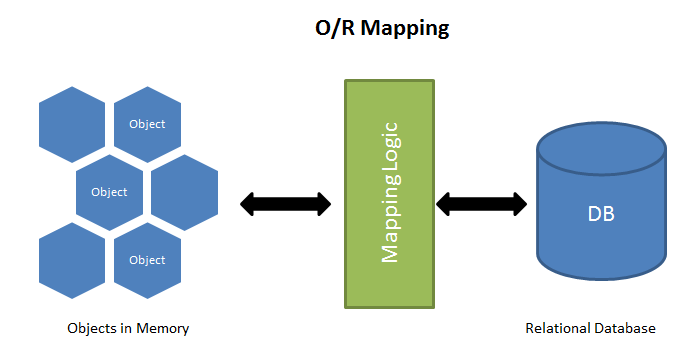
- ORM = Object Relational Mapping
- Layer between C# & Database
- Store C# Objects (instances) into a database
- Retrieve C# Objects (instances) from a database
- And much more features
- Layer between C# & Database
- Objects (class) that can be stored (and retrieved) in a database are called entities!
Entity Framework (EF) Core
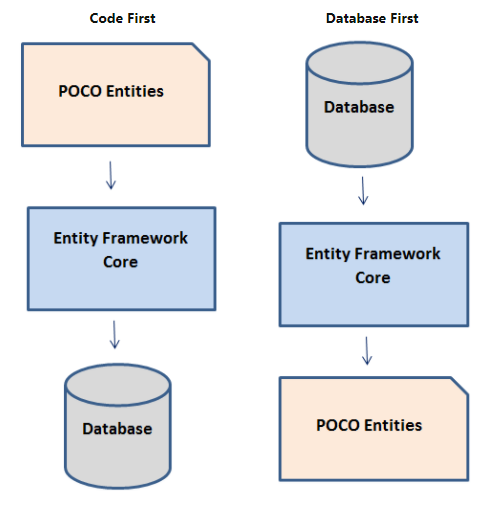
- Workflows:
- Code First
- Main focus in this
- Code First
course
- Database First
Entity Framework (EF) Core
- Build on .NET Core
- Cross Platform (Linux, Mac, Windows)
- Open Source
- Easy to use
- EF Core != Not EF6
- New implementation, not all features of EF6 :-(
- New features
- Easier to use
Week 1
- Why ORM
- EF Core = ORM framework/library
- Benefit & problems that ORM solves
- First Example with Entity Framework Core (EFCore)
- Getting started
- Required Libraries
- Model (Entities)
- DbContext
- Insert & Query
- Getting started
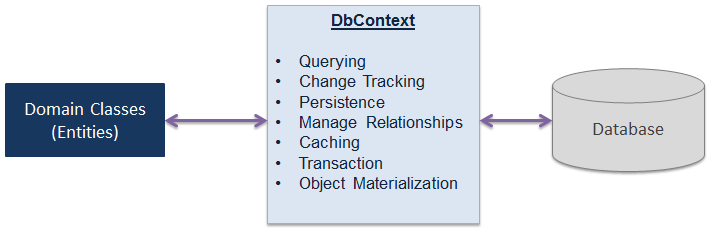
EF Architecture
- Domain classes (conceptual model / entities)
- Mapping between database structure and domain classes (DataModel)
- EF Api's to define datamodel from Domain Classes (mapping)
- Convention based
- Interaction with database
- Provider
- Queries (LINQ to entities)
- Update C# object(s) in memory
- Tracking Changes
- SaveChanges()
- Tracking Changes


EF Architecture
Mapping
- conventions
- can be changed by API
- or annotations
- can be changed by API
- Take a look at
- Data Types
- Primary key
- Foreign keys
- Index
- Naming convention
- Table Name
- FK's, PK
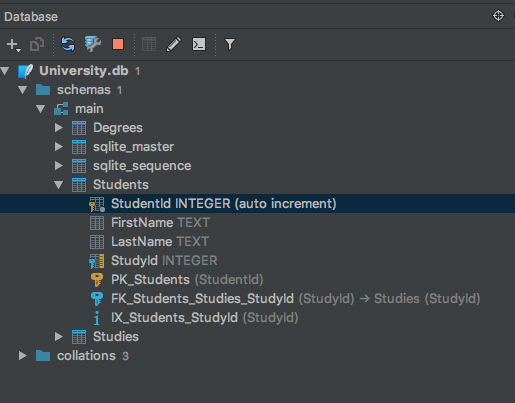
public class Student
{
    public int StudentId { get; set; }
    public string FirstName { get; set; }
    public string LastName { get; set; }

    public Study Study { get; set; }

    public List<Degree> Degrees { get; set; }
}
Example - Install
- Install Entity Framework Core
- NuGet packages
- Microsoft.EntityFrameworkCore
- Choose a Provider
- MySql.EntityFrameworkCore
- Npgsql.EntityFrameworkCore.PostgreSQL
- or
- Microsoft.EntityFrameworkCore.SqlServer
- etc
- NuGet packages
SQL Lite has some drawbacks, it's better to choose a real relational database!
Example - Domain Model
public class Student
{
    public int StudentId { get; set; }
    public string FirstName { get; set; }
    public string LastName { get; set; }

    public Study Study { get; set; }

    public List<Degree> Degrees { get; set; }
}

public class Study
{
    public int StudyId { get; set; }
    public string UniversityName { get; set; }
    public string Name { get; set; }
    public DateTime Completion { get; set; }
}

public class Degree
{
    public int DegreeId { get; set; }
    public string Name { get; set; }
    public DateTime Received { get; set; }
}
Example - DbContext
public class UniversityDbContext : DbContext
{
    public DbSet<Student> Students { get; set; }
    public DbSet<Study> Studies { get; set; }
    public DbSet<Degree> Degrees { get; set; }

    protected override void OnConfiguring(DbContextOptionsBuilder optionsBuilder)
    {
        base.OnConfiguring(optionsBuilder);
        optionsBuilder.UseSqlite("Data Source=University.db");
    }
}
using (var db = new UniversityDbContext())
{
db.Database.EnsureDeleted();
db.Database.EnsureCreated();
} - Create the database in code or use Migrations
Model = Domain Model (entities) + DabaseContext
Example - Add Data
using (var db = new UniversityDbContext())
{
    db.ConfigureLogging(s => Console.WriteLine(s), LoggingCategories.SQL);

    var cs = new Study() {
        Name = "Computer Science"
    };

    db.Students.Add(new Student() {
        FirstName = "Jan",
        LastName = "Hendriks",
        Study = cs,
        Degrees = new List<Degree>() {
            new Degree() {
                Name = "bachelor computer science",
                Received = new DateTime(2011, 6, 1)
            }
            //... add more data
        }
    });

    //add more data

    db.SaveChanges();
}- Enable Logging, let's take a look at the documentation
Week 2
-
Constraints
- Required, Length,
Email
- Required, Length,
- Modelling different type of relations
- one-to-one (reference)
- one-to-many (collections)
- many-to-many (collection on both ends)
- Query's
- Changing Data
Basic Mapping
- Pay attention
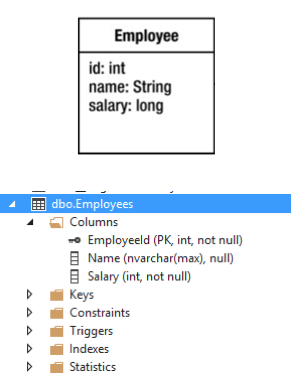
- Naming conventions
- Basic Type mapping
- Primary Key
- Null, Not Null
-
Nullable reference types —
string?, Person? -
Nullable value types —
int?,bool?,DateTime?

Change Basic Mapping
- Model Attributes
public class Employee
{
    public int EmployeeId { get; set; }

    [Required, MinLength(3), MaxLength(50)]
    public string FirstName { get; set; }
    [Required, MinLength(3), MaxLength(50)]
    public string LastName { get; set; }

    [NotMapped]
    public string FullName {
        get { return $"{FirstName} {LastName}"; }
    }

    [Required, EmailAddress]
    public string Email { get; set; }

    [Phone]
    public int Phone { get; set; }

    [Range(1, 5)]
    public int WorkdayCountInWeek { get; set; }

    [Required, Range(0, 5000)]
    public int Salary { get; set; }

    [Url]
    public string IntranetPage { get; set; }
}
Problem is:
- Email, Phone, URL, Range? Not used by database!
Change Basic Mapping
public class EmployeeContext : DbContext
{
    public DbSet<Employee> Employees { get; set; }

    protected override void OnModelCreating(ModelBuilder modelBuilder)
    {
	    base.OnModelCreating(modelBuilder);

        modelBuilder.Entity<Employee>()
            .ToTable("Emp");

        modelBuilder.Entity<Employee>()
            .Property(x => x.FirstName)
            .IsRequired().HasMaxLength(50);

        modelBuilder.Entity<Employee>()
            .Property(x => x.Phone)
            .HasColumnName("Phone Number");
    }
}- Fluent API (method chaining)
- Overlap with Annotations
One to One Relation
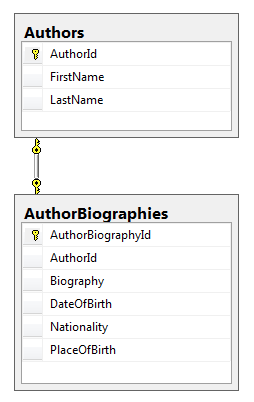
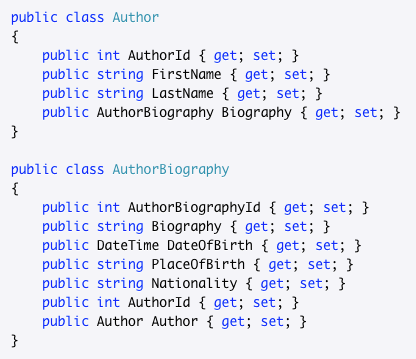
- Optional Relation, use AuthorId?
One to One Relations
- Requires FK (StudentId) on Child (Dependent)
- Navigation Property on (Principle) not required on (Dependent)
        public class Student
        {
            public int StudentId { get; set; }
            ....
            public ContactInfo ContactInfo { get; set; }

            public int StudyId { get; set; }
            public Study Study { get; set; }

            ...
       }

        public class ContactInfo
        {
            public int ContactInfoId { get; set; }

            public int StudentId { get; set; }
            public Student Student { get; set; }

            ...
        }
Principle
Dependent
One to Many Relation
-
ICollection<T>, let's take a look at the documentation
- List if ordering is important
- FK is in book (AuthorID)
- AuthorId is not required (EF will then generate it in the database) --> It's a good idea to include the FK's. Later on some libraries (mappers) depend on them!!!
public class Author
{
    public int AuthorId { get; set; }
    public string FirstName { get; set; }
    public string LastName { get; set; }
    public List<Book> Books { get; set; } = new();
}

public class Book
{
    public int BookId { get; set; }
    public string Title { get; set; }
    public int AuthorId { get; set; }
    public Author Author { get; set; }
}
Many to Many Relations
- Specify the Primary Key
- use HasKey method
public class CourseStudent
{
    public int CourseId { get; set; }
    public Course Course { get; set; }

    public int StudentId { get; set; }
    public Student Student { get; set; }
}

protected override void OnModelCreating(ModelBuilder modelBuilder)
{
    base.OnModelCreating(modelBuilder);

    modelBuilder.Entity<CourseStudent>()
        .HasKey(x => new {x.CourseId, x.StudentId});
}Example - Delete a student
using (var db = new UniversityDbContext())
{
    Student student = db.Students.Find(1);

    db.Students.Remove(student);
    db.SaveChanges();
}- SQLite Error 19: 'FOREIGN KEY constraint failed'. Solution:
using (var db = new UniversityDbContext())
{
    Student student = db.Students
        .Include(x => x.Degrees)
        .Single(x => x.StudentId == 1);

    foreach (var degree in student.Degrees)
    {
        db.Degrees.Remove(degree);
    }
    db.Students.Remove(student);
    db.SaveChanges();
}- There are other methods to delete related entities, cascade delete
Delete Entities
- Load entity (tracked by context)
- Delete
- If related entities must be deleted, do it manually or use cascade!
Query: load Entities with Projection
- Select(x=> new ...)
var studentDegrees = db.Students.Where(x => x.StudentId == 1)
    .Select(x => new
    {
        x.LastName, x.FirstName,
        x.Degrees,
        DegreeBefore2014 = x.Degrees.Where(d => d.Received < new DateTime(2014, 1, 1))
    })
    .ToList();
in EFC 6+
Eager Loading: load related entities, multiple levels
- Include(x=> ....).ThenInclude(x => ...)
var students = db.Students.Where(x => x.StudentId == 1)
                        .Include(x => x.CourseStudents)
                        	.ThenInclude(x => x.Course)
                        .ToList();
foreach (var student in students)
{
    Console.WriteLine(new string('-', 20));
    Console.WriteLine($"{student.LastName}, {student.FirstName.First()} ");
    foreach (var cs in student.CourseStudents)
    {
        Console.WriteLine(cs.Course.Name);
    }

    Console.WriteLine(new string('-', 20));
}- The SQL has multiple Queries, it is more efficient than one big query --> EF Core constructs relationships
The prefered way to work (my opinion)!!!!
Explicit loading: load related entities, after the query
- Reference(), Collection(), Load()
var students = db.Students;
foreach (Student student in students)
{
    if (student.LastName == "Hendriks")
    {
        db.Entry(student).Reference<Study>(x => x.Study).Load();

        if (student.Study.Name == "Computer Science")
        {
            Console.WriteLine($"{student.LastName}");

            db.Entry(student).Collection(x => x.Degrees)
                .Query()
                .Where(x => x.Received < new DateTime(2014, 1, 1))
                .Load();

            foreach (var degree in student.Degrees)
            {
                Console.WriteLine($"{degree.Name}");
            }
        }
    }
}
!!!!Be careful, can be expensive!!!! N+1 Query Problem!
Lazy loading
- Is supported in EF Core 2.1+
- I'm not a fan of lazy loading
- n+1 problem
- I'm not a fan of lazy loading
- Lazy loading: data is retrieved from database when needed, automatically.
- Pro:
- easy to program for connected context
- Cons:
- potential performance problem
- can't be used in disconnected scenario (webapi)
- Pro:
- https://docs.microsoft.com/en-us/ef/core/querying/related-data
Query: load related entities
- Projection (not recommended, n+1 problem?)
-
Eager Loading Include()
- ThenInclude() multi-level relationship
- Lazy loading (not recommended, n+1 problem is lurking)
- Explain n+1 problem.
SELECT * FROM Students /* return n records */

SELECT * FROM Degrees WHERE StudentId = 1
SELECT * FROM Degrees WHERE StudentId = 2
...
SELECT * FROM Degrees WHERE StudentId = n
Queries - Deferred Execution
- Deferred execution
- Query is executed when iterated over query or when an LINQ method is called that forces it to load results into memory, such as ToList()
- load data in memory: ToList(), Find(), First(), FirstOrDefault(), Single(), SingleOrDefault(), Count(), Min(), Max(), etc.
var csStudents = db.Students.Where(x => x.Study.Name == "Computer Science");
foreach (var csStudent in csStudents)
{
    Console.WriteLine($"Name: {csStudent.LastName}, {csStudent.FirstName.First()}");
}
var csStudents2 = db.Students.Where(x => x.Study.Name == "Computer Science").ToList();Solution to open connection!
- During deferred execution, connection is open all the time, this can be expensive
- Solution:
var csStudents = db.Students.Where(x => x.Study.Name == "Computer Science")
foreach (var csStudent in csStudents)
{
    //Do lots of work
}
var csStudents = db.Students.Where(x => x.Study.Name == "Computer Science").ToList();
foreach (var csStudent in csStudents)
{
//Do lots of work
}Queries: Single() or SingleOrDefault()
- Defaults: return null if the result is empty
- No default: throw an exception if the result is empty
Student s1 = db.Students.Single(x => x.LastName == "Lops");
//exception if no student exists with Lastname equals "Lops"

Student s2 = db.Students.SingleOrDefault(x => x.LastName == "Lops");
if (s2 == null)
{
    //do something
}- First() or FirstDefault()
- Single() or SingleDefault()
- Last() or LastDefault()
ChangeTracker
- Entities are tracked by default (by the ChangeTracker)
- Property level (for updates)
- SaveChanges() --> Updates/Inserts
- ChangeTracker is expensive: add .AsNoTracking() to queries when you only display the data!
- Please watch the video below:
Some mistake:
Week 3
- Queries
- Extension methods, lambda
- Fake/Dummy Data
- Migrations
- Homework
Queries
- Extension Methods
- LINQ --> Extension Methods
- Anonymous Type
- new { StudentName = s.StudentName, .... }
- Can only be used inside the "function"
var studentNames = studentList.Where(s => s.Age > 18)
                              .Select(s => s)
                              .Where(st => st.StandardID > 0)
                              .Select(s => s.StudentName);
var teenStudentsName = from s in studentList
where s.age > 12 && s.age < 20
select new { StudentName = s.StudentName };Extension Methods
- Extension Method 101
- add new functionality (extension methods)
- static class, static method
- this-keyword in the parameter list
public static class ExtensionMethodsExamples
{
    public static string UppercaseFirstLetter(this string value)
    {
        if (value?.Length > 0)
        {
            return char.ToUpper(value[0]) + value.Substring(1);
        }
        return value;
    }
}


Console.WriteLine("aap noot mies".UppercaseFirstLetter());
Lambda
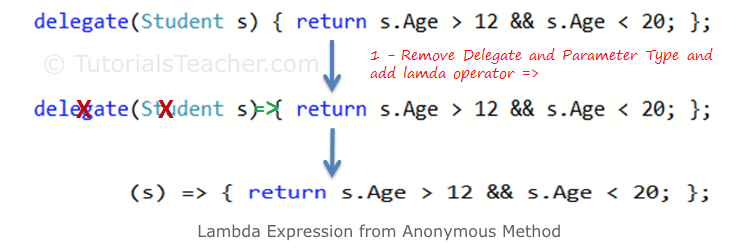
Take a look at all the different syntaxis!
Lambda: short way to represent an anonymous method
Extension Methods
- IEnumerable
- base for most collections in .NET
- predicate is a condition
public static IEnumerable<string> UppercaseFirstLetter(this IEnumerable<string> values)
{
    foreach (var value in values) {
        yield return value.UppercaseFirstLetter();
    }
}

"aap noot mies".Split(" ").UppercaseFirstLetter()
    .ToList().ForEach(x => Console.WriteLine(x));

public static IEnumerable<TSource>
    Where<TSource>(this IEnumerable<TSource> values, Predicate<TSource> predicate)
{
    foreach (var value in values) {
        if (predicate(value)) {
            yield return value;
        }
    }
}

"Aap noot Mies".Split(" ")
    .Where(x => x.Length > 0 && char.IsUpper(x[0]))
    .ToList()
    .ForEach(x => Console.WriteLine(x));
Extension Methods
- Calling Extension Methods
- Take a look at some overloads
- Where
- Func<string, bool>
- Notation Func<T1, T2, TResult>
public static IEnumerable<TSource> Where<TSource>
    (this IEnumerable<TSource> source, Func<TSource,int,bool> predicate);

int[] numbers = { 0, 30, 20, 15, 90, 85, 40, 75 };

IEnumerable<int> query =
    numbers.Where((number, index) => number <= index * 10);


public static IEnumerable<TSource> Where<TSource>
    (this IEnumerable<TSource> source, Func<TSource,bool> predicate);

List<string> fruits =
    new List<string> { "apple", "passionfruit", "banana", "mango",
                    "orange", "blueberry", "grape", "strawberry" };

IEnumerable<string> query = fruits.Where(fruit => fruit.Length < 6);
Linq Extension Methods
Example - Query data with LINQ
using (var db = new UniversityDbContext())
{
    var csStudents = db.Students.Where(x => x.Study.Name == "Computer Science");
    foreach (var csStudent in csStudents)
    {
        Console.WriteLine($"Name: {csStudent.LastName}, {csStudent.FirstName.First()}");
    }
}- LINQ Extension methods (my preference)
using (var db = new UniversityDbContext())
{
    var csStudents = from s in db.Students
        where s.Study.Name == "Computer Science"
        select s;
    foreach (var csStudent in csStudents)
    {
        Console.WriteLine($"Name: {csStudent.LastName}, {csStudent.FirstName.First()}");
    }
}- LINQ (Language Integrated Query)
Example - Migrations
- Modified DbContext or Data Model
- Depends on NuGet Package/Tool:
-
Microsoft.EntityFrameworkCore.Design
-
dotnet tool install --global dotnet-ef
-
- Demonstration add Email
- Commands
- ef migration
-
dotnet ef migrations add init
-
dotnet ef migrations add emailToStudent
-
dotnet ef database update
-
- add-migration (PowerShell, NuGet console)
- ef migration
Example - Migrations
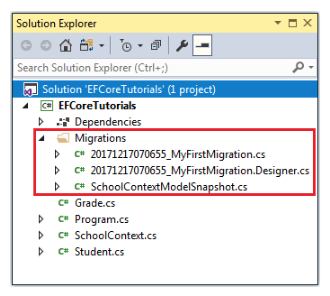
Add Email
Required!
Fake Data
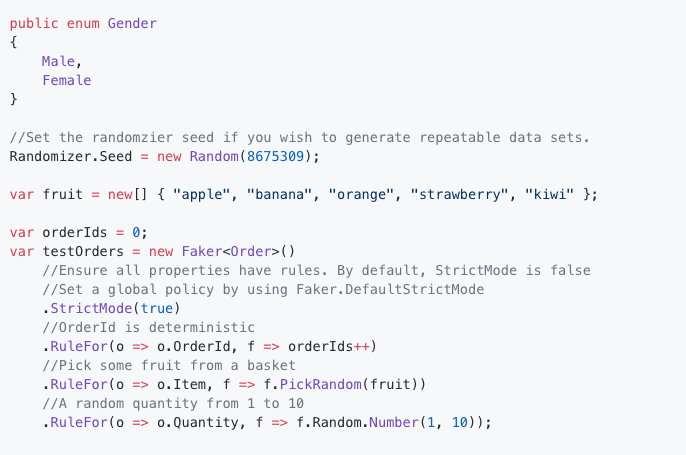
Week 4
- Queries
- Homework
- Migration
- Disconnected vs connected
Migrations
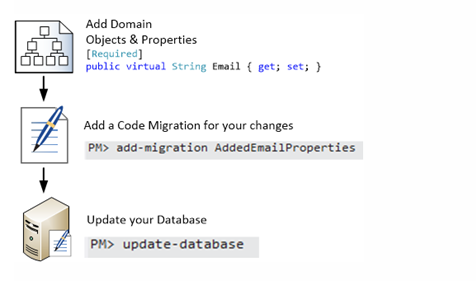


Reverse Engineerng
From database to domain classes (Entities)
Connected
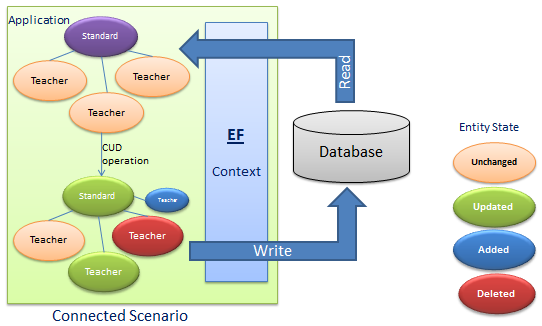
Connected vs Disconnected
- Disconnected Scenario
- web application
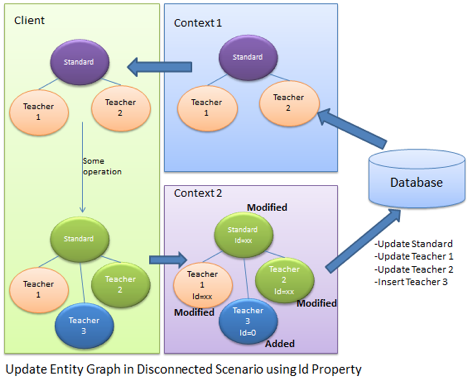
Connected vs Disconnected
- Disconnected Scenario, all fields (properties) are updated in SQL Query
- Connected Scenario, only changed fields are updated by SQL Query
public static void ConnectedObjectUpdate()
{
    Student studentToUpdate = null;
    using (var db = new UniversityDbContext())
    {
        studentToUpdate = db.Find<Student>(1);
        studentToUpdate.FirstName += studentToUpdate.FirstName.First();
        db.SaveChanges();
    }
}

public static void DisconnectObjectUpdate()
{
    Student studentToUpdate = null;
    using (var db = new UniversityDbContext())
    {
        studentToUpdate = db.Find<Student>(1);
    }
    studentToUpdate.FirstName += studentToUpdate.FirstName.First();
    using (var db = new UniversityDbContext())
    {
        db.Students.Update(studentToUpdate);
        db.SaveChanges();
    }
}
Entity States
EntityState: Unchanged, Added, Modified, Delete, Detached
private static void DisplayStates(IEnumerable<EntityEntry> entries)
{
    foreach (var entry in entries)
    {
        Console.WriteLine($"Entity: {entry.Entity.GetType().Name},
                             State: {entry.State.ToString()} ");
    }
}- Attach() to "connect object" to context

Entity State
- Attach() to "connect object" to context
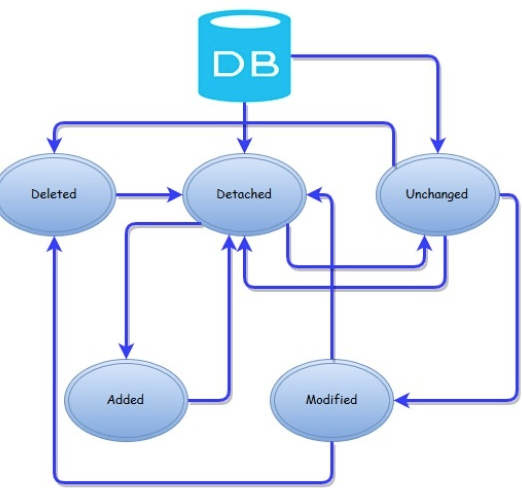
Deletes / Updates Disconnected
- https://stackoverflow.com/questions/27176014/how-to-add-update-child-entities-when-updating-a-parent-entity-in-ef
- https://stackoverflow.com/questions/17723626/entity-framework-remove-vs-deleteobject
- Trackable Entities or Breeze
- https://docs.microsoft.com/en-us/ef/core/saving/disconnected-entities
- IPropertyChangeNotification?
Raw SQL
- https://www.learnentityframeworkcore.com/raw-sql
Shadow Properties
protected override void OnModelCreating(ModelBuilder modelBuilder)
{
    modelBuilder.Entity<Student>().Property<DateTime>("LastModified");

    foreach (var entityType in modelBuilder.Model.GetEntityTypes())
    {
        modelBuilder.Entity(entityType.Name).Property<DateTime>("LastModified");
    }
}
Query of shadow properties
public override int SaveChanges()
{
    foreach (var entry in ChangeTracker.Entries()
        .Where(x => x.State == EntityState.Added || x.State == EntityState.Modified))
    {
        entry.Property("LastModified").CurrentValue = DateTime.Now;
    }

    return base.SaveChanges();
}
No Tracking
- Can be used in disconnected scenario
- Web Api
//disable tracking for all operations on context
db.ChangeTracker.QueryTrackingBehavior = QueryTrackingBehavior.NoTracking;

//no tracking for one query
db.Students.AsNoTracking();
Testing with EF
[Fact]
public void TestSQLiteOk()
{
    //SETUP
    //Here create the options using SQLite CreateOptions
    var options = SqliteInMemory
        .CreateOptions<MyContext>();
    //I create an instance of my DbContext
    using (var context = new MyContext(options))
    {
        //You have to create the database
        context.Database.EnsureCreated();
        context.SeedDatabaseFourBooks();

        //ATTEMPT
        context.Books.First().Title = "New Title";
        context.SaveChanges();

        //VERIFY
        context.Books.First().Title.ShouldEqual("New Title");
    }
}
Entity Framework
By Joris Lops