Python的繪圖工具turtle
講者:王婕瑜
2019/10/27
OUTLINE
- 基本功能
- Turtle motion
- Pen control
- Window control
- 實作:皮卡丘的臉
基本功能
Image by David Mark from Pixabay
Turtle motion
| 函式 | 寫法 |
|---|---|
| 畫筆定位到座標(x,y) | turtle.goto(x,y) |
| 向正方向運動 distance 長的距離 | turtle.forward(distance) |
| 向負方向運動 distance 長的距離 | turtle.backward(distance) |
| 向右偏 angle 度 | turtle.right(angle) |
| 向左偏 angle 度 | turtle.left(angle) |
| 函式 | 寫法 |
|---|---|
| 回到原點 | turtle.home() |
| 畫圓形 radius 為半徑,extent 為圓的角度 | turtle.circle(radius, extent=None, steps=None) |
| 以 speed 速度運動 | turtle.speed(speed) |
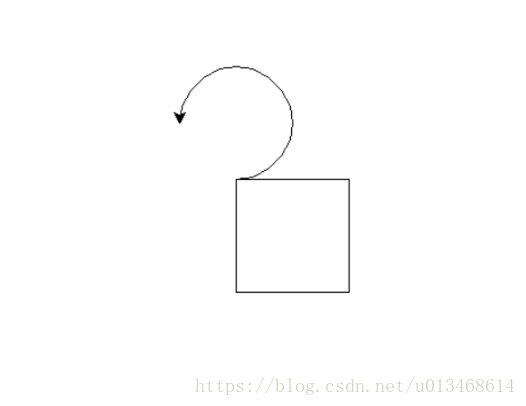
import turtle

turtle.speed(5)

turtle.goto(0,0)

for i in range(4):
    turtle.forward(100)
    turtle.right(90)

turtle.home()
turtle.circle(50,270)
Pen control
| 函式 | 寫法 |
|---|---|
| 落筆 | turtle.pendown() |
| 起筆 | turtle.penup() |
| 畫筆粗細 | turtle.pensize(width) |
| 畫筆顏色 | turtle.pencolor(*args) |
| 筆畫形狀 | turtle.shape() |
| 函式 | 寫法 |
|---|---|
| 填充顏色 | turtle.fillcolor(*args) |
| 開始填充 | turtle.begin_fill() |
| 結束填充 | turtle.end_fill() |
| 寫文字 | turtle.write(arg, move=False, align=”left”, font=(“Arial”, 8, “normal”)) |
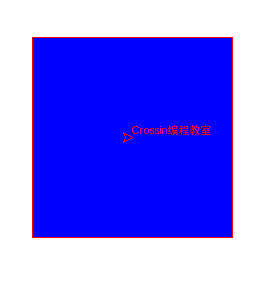
import turtle

turtle.pencolor('red')

turtle.pendown()

turtle.fillcolor('blue')

turtle.begin_fill()

for i in range(4):
    turtle.forward(200)
    turtle.right(90)
turtle.end_fill()
turtle.penup()
turtle.goto(100,-100)
turtle.write('Crossin程式設計教室')
Window control
| 函式 | 寫法 |
|---|---|
| 設定背景顏色 | turtle.bgcolor(*args) |
實作:皮卡丘的臉
import turtle導入
# 畫鼻子
def drawNose():
    turtle.penup()
    turtle.seth(90)
    turtle.fd(100)
    turtle.pendown()
    turtle.begin_fill()
    turtle.fillcolor('black')
    turtle.seth(45)
    turtle.fd(25)
    turtle.seth(135)
    turtle.circle(25, 95)
    turtle.seth(315)
    turtle.fd(25)
    turtle.end_fill()
鼻子

# 畫眼睛
def drawEyes(seth, fd, r):
    turtle.penup()
    turtle.seth(seth)
    turtle.fd(fd)
    turtle.pendown()
    turtle.begin_fill()
    turtle.fillcolor('black')
    turtle.circle(50)
    turtle.end_fill()
    turtle.penup()
    turtle.circle(50, r)
    turtle.pendown()
    turtle.begin_fill()
    turtle.fillcolor('white')
    turtle.circle(20)
    turtle.end_fill()
眼睛

# 畫臉
def drawFace(seth, fd):
    turtle.penup()
    turtle.seth(seth)
    turtle.fd(fd)
    turtle.pendown()
    turtle.begin_fill()
    turtle.fillcolor('red')
    turtle.circle(70)
    turtle.end_fill()
臉

# 畫嘴巴
def drawLip():
    turtle.penup()
    turtle.seth(135)
    turtle.fd(250)
    turtle.pendown()
    turtle.seth(-300)
    turtle.circle(30, -65)
    turtle.begin_fill()
    turtle.fillcolor('Firebrick')
    turtle.seth(165)
    turtle.fd(140)
    turtle.seth(195)
    turtle.fd(140)
    turtle.seth(-360)
    turtle.circle(30, -65)
    turtle.penup()
    turtle.seth(-60)
    turtle.circle(30, 65)
    turtle.pendown()
    turtle.seth(-70)
    turtle.fd(240)
    turtle.circle(55, 140)
    turtle.seth(70)
    turtle.fd(240)
    turtle.end_fill()
    turtle.seth(-110)
    turtle.fd(80)
    turtle.begin_fill()
    turtle.fillcolor('Firebrick')
    turtle.seth(120)
    turtle.circle(120, 123)
    turtle.seth(-70)
    turtle.fd(165)
    turtle.circle(55, 140)
    turtle.seth(72)
    turtle.fd(165)
    turtle.end_fill()
嘴巴

# 主函式
def main():
    turtle.pensize(4)
    turtle.hideturtle()
    turtle.setup(1000, 600)
    turtle.speed(10)
    turtle.screensize(bg='yellow')
    drawNose()
    drawEyes(160, 250, 60)
    drawEyes(-9.5, 530, 230)
    drawFace(195, 600)
    drawFace(-11, 720)
    drawLip()
    turtle.done()


if __name__ == '__main__':
    main()
主函式
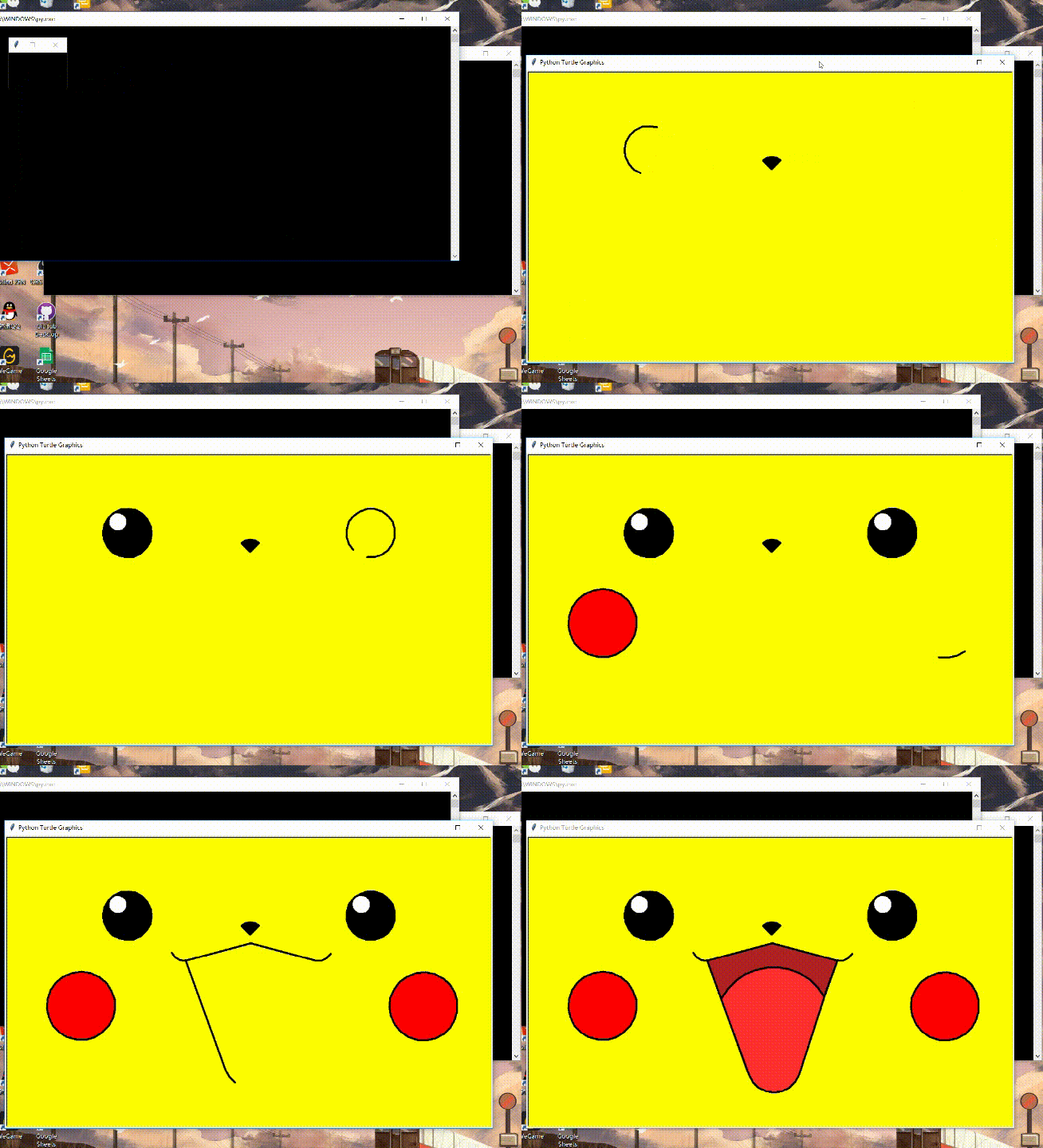
成果
完整程式碼
import turtle


# 畫鼻子
def drawNose():
    turtle.penup()
    turtle.seth(90)
    turtle.fd(100)
    turtle.pendown()
    turtle.begin_fill()
    turtle.fillcolor('black')
    turtle.seth(45)
    turtle.fd(25)
    turtle.seth(135)
    turtle.circle(25, 95)
    turtle.seth(315)
    turtle.fd(25)
    turtle.end_fill()


# 畫眼睛
def drawEyes(seth, fd, r):
    turtle.penup()
    turtle.seth(seth)
    turtle.fd(fd)
    turtle.pendown()
    turtle.begin_fill()
    turtle.fillcolor('black')
    turtle.circle(50)
    turtle.end_fill()
    turtle.penup()
    turtle.circle(50, r)
    turtle.pendown()
    turtle.begin_fill()
    turtle.fillcolor('white')
    turtle.circle(20)
    turtle.end_fill()


# 畫臉
def drawFace(seth, fd):
    turtle.penup()
    turtle.seth(seth)
    turtle.fd(fd)
    turtle.pendown()
    turtle.begin_fill()
    turtle.fillcolor('red')
    turtle.circle(70)
    turtle.end_fill()


# 畫嘴巴
def drawLip():
    turtle.penup()
    turtle.seth(135)
    turtle.fd(250)
    turtle.pendown()
    turtle.seth(-300)
    turtle.circle(30, -65)
    turtle.begin_fill()
    turtle.fillcolor('Firebrick')
    turtle.seth(165)
    turtle.fd(140)
    turtle.seth(195)
    turtle.fd(140)
    turtle.seth(-360)
    turtle.circle(30, -65)
    turtle.penup()
    turtle.seth(-60)
    turtle.circle(30, 65)
    turtle.pendown()
    turtle.seth(-70)
    turtle.fd(240)
    turtle.circle(55, 140)
    turtle.seth(70)
    turtle.fd(240)
    turtle.end_fill()
    turtle.seth(-110)
    turtle.fd(80)
    turtle.begin_fill()
    turtle.fillcolor('Firebrick')
    turtle.seth(120)
    turtle.circle(120, 123)
    turtle.seth(-70)
    turtle.fd(165)
    turtle.circle(55, 140)
    turtle.seth(72)
    turtle.fd(165)
    turtle.end_fill()


# 主函式
def main():
    turtle.pensize(4)
    turtle.hideturtle()
    turtle.setup(1000, 600)
    turtle.speed(10)
    turtle.screensize(bg='yellow')
    drawNose()
    drawEyes(160, 250, 60)
    drawEyes(-9.5, 530, 230)
    drawFace(195, 600)
    drawFace(-11, 720)
    drawLip()
    turtle.done()


if __name__ == '__main__':
    main()
參考資料
- 海龜繪圖簡易教程|Turtle for Python - IT閱讀https://www.itread01.com/content/1542808213.html
- 利用Python繪製萌萌噠的皮卡丘 - IT閱讀https://www.itread01.com/content/1544587997.html
- turtle --- 海龟绘图 — Python 3.7.5 文档https://docs.python.org/zh-cn/3.7/library/turtle.html
- 【工程師的寶可夢魂】PS 弱爆了!我們用 Python 打造屬於自己的皮卡丘 | TechOrangehttps://buzzorange.com/techorange/2019/05/13/draw-a-pikachu-by-python/
THANKS FOR LISTENING
Python的繪圖工具turtle
By juliewah
Python的繪圖工具turtle
SIRLA 108-1 This 15 Speech