React를 활용한 UI 개발
- WITH ES6
ES6
자바스크립트 표준(ECMAScript)
ECMA 국제 표준 단체내에
TC39(Technical Committee)에서 담당.
Javascript는 상표명이기 때문에 상표분쟁 문제로
ECMA에 등록된 자바스크립트 이름은 EcmaScript가 됨.
2012년 ~ 현재, 최신 브라우저는 모두 ECMAScript 5.1을 전부 지원.
ES6
ECMAScript History
| Edition | Date published | Changes |
|---|---|---|
| 1 | 1997년 6월 | First Edition |
| 2 | 1998년 6월 | ISO/IEC 16262 국제 표준 규칙 적용 |
| 3 | 1999년 12월 | 정규표현식, 문자열 처리, try~catch등 |
| 4 | 폐기 | 방대한 명세와 정치적 견해로 사라짐 |
| 5 | 2009년 12월 | strict mode, JSON, V8 지원 등 |
| 5.1 | 2011년 6월 | ISO/IEC 16262:2011 국제 표준 적용 |
| 6 | 2015년 6월 | class, arrow functions, promise 등 |
| 7 | 2016년 6월 | language reform, code isolation 등 |
ES6
ES6 Features
| Feature | Description |
|---|---|
| arrows | C#, Java8에서 지원되는 람다식 표현법(=>) 지원 |
| class | Prototype-based inheritance, super calls, instance, static methods and constructors |
| let | local variable |
| const | single-assignment variable |
| Modules | Language-level에서 모듈화 지원(컴포넌트 정의) |
| Promise | 효율적인 비동기 처리를 위한 Promises 지원 |
ES6
Arrows
// -- 간결한 표현식
var a = [
"Hydrogen",
"Helium",
"Lithium",
"Beryllium"
];
// ES5
var a2 = a.map(
function(s){
return s.length
}
);
// ES6
var a3 = a.map(
s => s.length
);
console.log(a3); // [8, 6, 7, 10]
// 함수처리
var a4 = a.map(
    s => {
        if(s.length >= 8){
            return true
        }else{
            return false;
        }
    }
);
console.log(a4);  // [true, false, false, true]
ES6
Arrows
// -- Lexical this

// ES5 변수에 this를 비전역 변수에 할당하여 처리
function Person() {
    var _this = this; // _this에 this를 할당
    _this.age = 0;

    setInterval(function growUp() {
        _this.age++; // `_this` 변수를 참조.
    }, 1000);
}

// ES6 화살표함수 사용으로 자신을 둘러싼 문맥의 this값을 사용하여 참조.
function Person(){
  this.age = 0;

  setInterval(() => {
    this.age++; // this는 정확히 person 객체를 참조
  }, 1000);
}
ES6
Class
// -- class 선언 (function과의 차이점 : 호이스팅이 되지 않음)
class Polygon{
    constructor(height, width) {
        this.height = height;
        this.width = width;
    }
}

// -- class 표현식
// unnamed
var Polygon = class {
  constructor(height, width) {
    this.height = height;
    this.width = width;
  }
};

// named (클래스 이름이 해당 클래스의 body에 대한 local scope로 유효)
var Polygon = class Polygon {
    // class body 영역
    constructor(height, width) {
        this.height = height;
        this.width = width;
    }
};

// 선언식과 표현식의 차이점
1. 선언식
함수선언은 Function Statement 라고도 하며 말그대로 함수 문장이란 뜻이다. 이는 곧 실행가능한 코드블럭이 아니며 함수의 정의를 나타내는 문장으로 해석되며 따라서 코드해석에 따른 수행결과가 존재하지 않는다는 것을 의미한다.

Statement 라는 개념을 잘 집고 넘어가야 한다. 함수 선언문이 Statement 라고 하는 말은 정의에서 밝힌것 처럼 코드블럭 자체는 실행가능 코드가 아니라는 것이다. 즉 해당 코드블럭을 콘솔에서 실행하여도 어떠한 결과도 return 되지 않는다. 그러한 이유로 함수선언문을 Class와 동일한 개념으로 이해해도 무방하다.

2. 표현식
함수표현은 Function Literal 이다 이는 실행 가능한 코드로 해석 되어지거나 변수나 데이터구조에 할당되어지고 있음을 의미한다. 즉 해당 코드블럭이 실행코드로서 해석되어지며 동시에 코드실행에 따른 결과값을 가지거나 특정 변수에 할당된 값으로 존재한다.

이처럼 함수표현은 함수리터럴로 특정변수에 할당되거나 즉시 실행가능한 코드 블럭으로서 존재하는 함수를 의미하는 것이다. 함수표현이 실행코드로서 해석되기 위해서는 ()를 이용하여 함수를 감싸 주어야 한다. 이를 자기호출함수(self invoking function) 라고도 한다. 자기호출함수는 재귀함수와는 다른 개념이다. 재귀함수는 함수 안에서 자신을 호출하는 형식이지만 자기호출함수는 해석과 동시에 실행되는 코드블럭을 말한다.
ES6
Class
// 상속을 받는 class
class Child extends Super {
    // 생성자
    constructor() {
        super(...arguments);
        this.child = 0;
    }
    // Function 선언
    update() {
        //... 로직처리
    }
    // Getter, Setter
    get child() {
        return this.child;
    }
    set child(child ) {
        this.child = child;
    }
    // Static 함수
    static CHILD_NAME() {
        return "CHILD";
    }
}
ES6
let, const
function f(){
    // 값의 변경이 가능한 지역변수(local variable)이며, local scope내에 한번만 선언이 가능하다.
    let x;
    x = "inner";

    const y = "sneaky";
    // error, const is not override.
    y = "foo";

    let x = "outer";    // error, already been declared.
}
ES6
Modules
Modules 지원으로 export, import를 활용한 javascript 참조

// lib/math.js
export function sum(x, y) {
  return x + y;
}
export var pi = 3.141593;

// app.js
import * as math from "lib/math";
alert("2π = " + math.sum(math.pi, math.pi));
ES6
Promise
// Promise 이전의 비동기 패턴
function async(){
    function callback1(){
        function callback2(){
            function callback3(){
                // 무한한 callback 중첩 케이스
            }
        }
    }
}
// Promise 선언
var _promise = function(param){
    return new Promise(function resolve, reject){
        // 비동기 테스트로 setTimeout 함수를 사용.
        window.setTimeout(function(){
            if(param){
                // 파라미터가 참이면 성공됨
                resolve("성공");
            }else{
                // 파라미터가 거짓이라면 실패
                reject(Error("실패!"));
            }
        }, 3000);
    }
};
// Promise 실행
_promise(true).then(function(text){
        // 성공
        console.log(text);
    }, function(error) {
        // 실패
        console.error(error);
    }
);

// Promise 선언부는 4가지 상태를 가지고 있다.
pending - 아직 약속을 수행 중인 상태
             (fulfilled or reject 되기 이전).
fulfilled - 약속이 지켜진 상태.
rejected - 약속이 어떠한 이유로 못 지켜진 상태.
settled - 약속이 지켜졌든 안지켜졌든 결론이 난 상태.

// 체이닝 중간에 에러가 발생할 경우
_promise(true).then(JSON.parse)
    .catch(function(){
        alert("체이닝 중간에 에러 발생");
    }.then(function(text){
        console.log(text);
    }
);
ES6
Promise
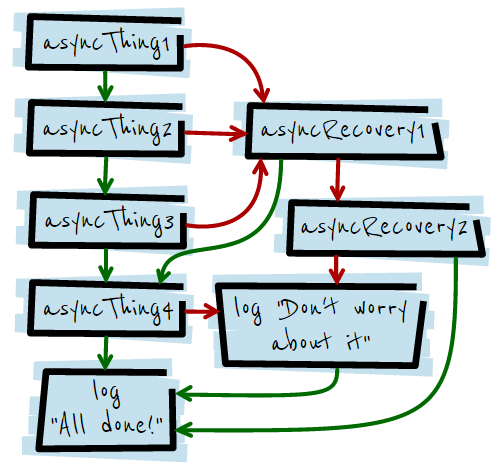
html5Rocks Promise 예제

asyncThing1()
    .then(function() { return asyncThing2(); })
    .then(function() { return asyncThing3(); })
    .catch(function(err) {
        return asyncRecovery1();
     })

    .then(function() { return asyncThing4(); },
        function(err) { return asyncRecovery2();
    })
    .catch(function(err) {
        console.log("Don't worry about it");
    })

    .then(function() { console.log("All done!"); });
ES6
Promise
// 여러개의 비동기 작업이 모두 완료되었을 때 진행하고 싶다면, Promise.all API를 이용.

var promise1 = new Promise(function (resolve, reject){
    // 비동기 처리
    window.setTimeout(function(){
        console.log("1번 Promise 완료");
        resolve("1");
    }, 5000)
});

var promise2 = new Promise(function (resolve, reject){
    // 비동기 처리
    window.setTimeout(function(){
        console.log("2번 Promise 완료");
        resolve("2");
    }, 1000)
});

Promise.all([promise1, promise2]).then(function (values){
    console.log("모두 완료됨", values);
});
React
Facebook에서 만든 View Rendering 중점의 라이브러리.
2013년 최초 발표 후 현재까지도 지속적인 R&D를 하고 있으며,
다양한 레퍼런스 사이트를 보유하고 있다.
React를 활용한 UI 개발 with ES6
React 장점
Module 개념의 Component 개발.
React 단점
ECMAScript6 문법 지원으로 간결하고 명확한 코드 작성 및 개발.
with ES6
Framework가 아닌 라이브러리.
React를 활용한 UI 개발 with ES6
UI Framework 목표
# React + Bootstrap + Puf(Kendo)
# 일관성 있는, 쉽고 빠른 UI 개발.
# 디자인 요소보다는 비지니스 로직에 집중한 코딩
# 다양한 Component 지원(SRP 기반 설계)
# 최소한의 코딩으로 표준화 된 코드 지원.
React를 활용한 UI 개발 with ES6
UI Framework Prototype 시연
React를 활용한 UI 개발 with ES6
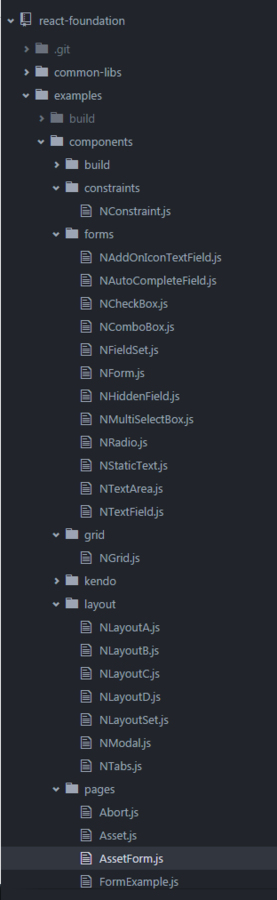
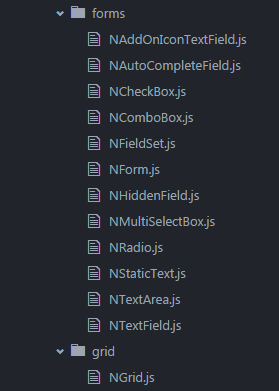
UI Framework 구조
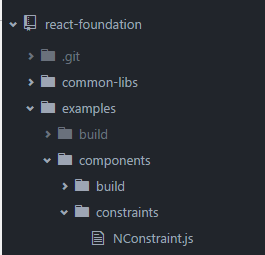
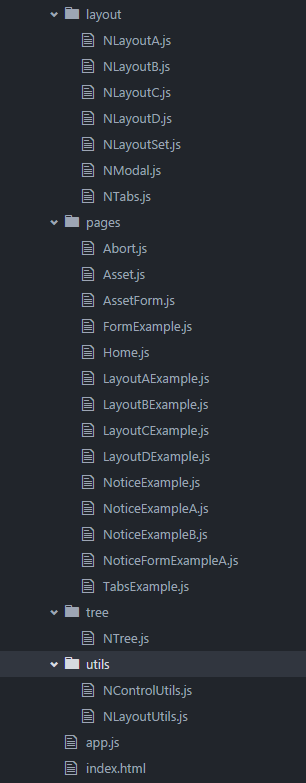
React를 활용한 UI 개발 with ES6
UI Framework 구현 코드
import React, {Component, PropTypes} from 'react';
import ReactDom from 'react-dom';
import { hashHistory } from 'react-router';

import NLayoutSet from '../layout/NLayoutSet';
import NModal from '../layout/NModal';

import NConstraint from '../constraints/NConstraint';
import NControlUtils from '../utils/NControlUtils';

import NLayoutUtils from '../utils/NLayoutUtils';

class NoticeExampleB extends Component {
    // 생성자
    constructor() {
        super(...arguments);

        this.state = {
            updateLayout: false
        };
        this.getRefs = this.getRefs.bind(this);
        this.updateLayout = this.updateLayout.bind(this);

        this.action = null;
    }

    // Refs 정의
    getRefs(type) {
        let ref;
        switch (type) {
            case "grid":
                ref = this.refs.n.refs.notice.refs.theGrid;
                break;
            case "form":
                ref = this.refs.m.refs.modal.refs.theForm;
                break;
            case "modal":
                ref = this.refs.m;
                break;
            default:
        }
        return ref;
    }

    // Compoent Render 이전 이벤트
    componentWillMount() {
        // 최초 초기화 처리
        this.initRender();
    }

    // 렌더 초기화 핸들러
    initRender() {
        const {grid, form} = this.props;

        // 버튼 Event bind
        NControlUtils.bindButtonEvent(this, grid.topButtons);

        // Grid Event bind
        NControlUtils.bindEvent(this, grid, grid.onSelectRowEvent, "onSelectRow");

        // 버튼 Event bind
        NControlUtils.bindButtonEvent(this, form.buttomButtons);

        // visible 제어
        //NControlUtils.setVisible(form.buttomButtons, ["save_btn", "cancel_btn"], false);

    }

    // Compoent Render 이후 이벤트
    componentDidMount() {
        if(this.context.notification === null || this.context.notification == 'null'){
            this.context.notification = NLayoutUtils.Notification("notification");
        }
    }

    // Grid 선택 이벤트
    onSelectRowGrid(dataSet) {
        ... 중략
    }

    // 신규등록
    doNew() {
        ... 중략
    }

    // 엑셀다운로드
    doExcelDownload() {
        ... 중략
    }

    // 저장
    doSave() {
        ... 중략
    }

    // Layout Update
    updateLayout() {
        this.setState({updateLayout: true});
    }

    render() {
        // Render Code
        return (
            <div>
                <NLayoutSet ref="n" layout={this.props.layout} first={this.props.grid} />
                <NModal ref="m" layout={this.props.modal} first={this.props.form} />
            </div>
        );
    }
}

NoticeExampleB.propTypes = {
    layout: PropTypes.object,
    grid: PropTypes.object,
    modal: PropTypes.object,
    form: PropTypes.object
};

NoticeExampleB.contextTypes = {
    notification: React.PropTypes.object
};

NoticeExampleB.defaultProps = {
    layout: {
        id: "notice",
        type: "A"
    },
    modal: {
        id: "modal",
        type: "A",
        title: "공지사항"
    },
    grid: {
        type: "grid",
        id: "theGrid",
        title: "공지사항 목록",
        url: "/itg/system/board/searchNoticeBoardList.do",
        resource: "grid.board.notice",
        paging: true,
        selectable: "row",
        onSelectRowEvent: "onSelectRowGrid",
        topButtons: [
            { id: "new_btn", label: "신규등록", type: "primary", onClickEvent: "doNew" },
            { id: "excel_btn", label: "엑셀다운로드", onClickEvent: "doExcelDownload"}
        ]
    },
    form: {
        type: "form",
        id: "theForm",
        title: "Form Title",
        formType: "editor", // 입력 또는 Search Form 또는 Readonly
        modal: true,
        buttomButtons: [{
            id: "save_btn", label: "저장", type: "primary", onClickEvent: "doSave"
        }],
        fieldSet: [{
            id: "editor_fields",
            columns: 3,
            fieldList: [
                { type: "hidden", id: "no_id" },
                { type: "text", id: "ins_user_nm", label: "작성자", required: true, readonly: true },
                { type: "text", id: "title", label: "제목", placeholder: "제목을 입력해주세요.", required: true },
                { type: "textarea", id: "content", label: "내용", placeholder: "내용을 작성해주세요.", required: true }
            ]
        }]
    }
};

export default NoticeExampleB;
React를 활용한 UI 개발 with ES6
   // Refs 정의
    getRefs(type) {
        let ref;
        switch (type) {
            case "grid":
                ref = this.refs.n.refs.notice.refs.theGrid;
                break;
            case "form":
                ref = this.refs.m.refs.modal.refs.theForm;
                break;
            case "modal":
                ref = this.refs.m;
                break;
            default:
        }
        return ref;
    }

    // Compoent Render 이전 이벤트
    componentWillMount() {
        // 최초 초기화 처리
        this.initRender();
    }

    // 렌더 초기화 핸들러
    initRender() {
        const {grid, form} = this.props;

        // 버튼 Event bind
        NControlUtils.bindButtonEvent(this, grid.topButtons);

        // Grid Event bind
        NControlUtils.bindEvent(this, grid, grid.onSelectRowEvent, "onSelectRow");

        // 버튼 Event bind
        NControlUtils.bindButtonEvent(this, form.buttomButtons);

        // visible 제어
        //NControlUtils.setVisible(form.buttomButtons, ["save_btn", "cancel_btn"], false);

    }

    // Compoent Render 이후 이벤트
    componentDidMount() {
        if(this.context.notification === null || this.context.notification == 'null'){
            this.context.notification = NLayoutUtils.Notification("notification");
        }
    }

    // Grid 선택 이벤트
    onSelectRowGrid(dataSet) {
        ... 중략
    }

    // 신규등록
    doNew() {
        ... 중략
    }

    // 엑셀다운로드
    doExcelDownload() {
        ... 중략
    }

    // 저장
    doSave() {
        ... 중략
    }

    // Layout Update
    updateLayout() {
        this.setState({updateLayout: true});
    }

    render() {
        // Render Code
        return (
            <div>
                <NLayoutSet ref="n" layout={this.props.layout} first={this.props.grid} />
                <NModal ref="m" layout={this.props.modal} first={this.props.form} />
            </div>
        );
    }
}

NoticeExampleB.propTypes = {
    layout: PropTypes.object,
    grid: PropTypes.object,
    modal: PropTypes.object,
    form: PropTypes.object
};

NoticeExampleB.contextTypes = {
    notification: React.PropTypes.object
};

NoticeExampleB.defaultProps = {
    layout: {
        id: "notice",
        type: "A"
    },
    modal: {
        id: "modal",
        type: "A",
        title: "공지사항"
    },
    grid: {
        type: "grid",
        id: "theGrid",
        title: "공지사항 목록",
        url: "/itg/system/board/searchNoticeBoardList.do",
        resource: "grid.board.notice",
        paging: true,
        selectable: "row",
        onSelectRowEvent: "onSelectRowGrid",
        topButtons: [
            { id: "new_btn", label: "신규등록", type: "primary", onClickEvent: "doNew" },
            { id: "excel_btn", label: "엑셀다운로드", onClickEvent: "doExcelDownload"}
        ]
    },
    form: {
        type: "form",
        id: "theForm",
        title: "Form Title",
        formType: "editor", // 입력 또는 Search Form 또는 Readonly
        modal: true,
        buttomButtons: [{
            id: "save_btn", label: "저장", type: "primary", onClickEvent: "doSave"
        }],
        fieldSet: [{
            id: "editor_fields",
            columns: 3,
            fieldList: [
                { type: "hidden", id: "no_id" },
                { type: "text", id: "ins_user_nm", label: "작성자", required: true, readonly: true },
                { type: "text", id: "title", label: "제목", placeholder: "제목을 입력해주세요.", required: true },
                { type: "textarea", id: "content", label: "내용", placeholder: "내용을 작성해주세요.", required: true }
            ]
        }]
    }
};

export default NoticeExampleB;
React를 활용한 UI 개발 with ES6
    // Compoent Render 이후 이벤트
    componentDidMount() {
        if(this.context.notification === null || this.context.notification == 'null'){
            this.context.notification = NLayoutUtils.Notification("notification");
        }
    }

    // Grid 선택 이벤트
    onSelectRowGrid(dataSet) {
        ... 중략
    }

    // 신규등록
    doNew() {
        ... 중략
    }

    // 엑셀다운로드
    doExcelDownload() {
        ... 중략
    }

    // 저장
    doSave() {
        ... 중략
    }

    // Layout Update
    updateLayout() {
        this.setState({updateLayout: true});
    }

    render() {
        // Render Code
        return (
            <div>
                <NLayoutSet ref="n" layout={this.props.layout} first={this.props.grid} />
                <NModal ref="m" layout={this.props.modal} first={this.props.form} />
            </div>
        );
    }
}

NoticeExampleB.propTypes = {
    layout: PropTypes.object,
    grid: PropTypes.object,
    modal: PropTypes.object,
    form: PropTypes.object
};

NoticeExampleB.contextTypes = {
    notification: React.PropTypes.object
};

NoticeExampleB.defaultProps = {
    layout: {
        id: "notice",
        type: "A"
    },
    modal: {
        id: "modal",
        type: "A",
        title: "공지사항"
    },
    grid: {
        type: "grid",
        id: "theGrid",
        title: "공지사항 목록",
        url: "/itg/system/board/searchNoticeBoardList.do",
        resource: "grid.board.notice",
        paging: true,
        selectable: "row",
        onSelectRowEvent: "onSelectRowGrid",
        topButtons: [
            { id: "new_btn", label: "신규등록", type: "primary", onClickEvent: "doNew" },
            { id: "excel_btn", label: "엑셀다운로드", onClickEvent: "doExcelDownload"}
        ]
    },
    form: {
        type: "form",
        id: "theForm",
        title: "Form Title",
        formType: "editor", // 입력 또는 Search Form 또는 Readonly
        modal: true,
        buttomButtons: [{
            id: "save_btn", label: "저장", type: "primary", onClickEvent: "doSave"
        }],
        fieldSet: [{
            id: "editor_fields",
            columns: 3,
            fieldList: [
                { type: "hidden", id: "no_id" },
                { type: "text", id: "ins_user_nm", label: "작성자", required: true, readonly: true },
                { type: "text", id: "title", label: "제목", placeholder: "제목을 입력해주세요.", required: true },
                { type: "textarea", id: "content", label: "내용", placeholder: "내용을 작성해주세요.", required: true }
            ]
        }]
    }
};

export default NoticeExampleB;
React를 활용한 UI 개발 with ES6
    render() {
        // Render Code
        return (
            <div>
                <NLayoutSet ref="n" layout={this.props.layout} first={this.props.grid} />
                <NModal ref="m" layout={this.props.modal} first={this.props.form} />
            </div>
        );
    }
}

NoticeExampleB.propTypes = {
    layout: PropTypes.object,
    grid: PropTypes.object,
    modal: PropTypes.object,
    form: PropTypes.object
};

NoticeExampleB.contextTypes = {
    notification: React.PropTypes.object
};

NoticeExampleB.defaultProps = {
    layout: {
        id: "notice",
        type: "A"
    },
    modal: {
        id: "modal",
        type: "A",
        title: "공지사항"
    },
    grid: {
        type: "grid",
        id: "theGrid",
        title: "공지사항 목록",
        url: "/itg/system/board/searchNoticeBoardList.do",
        resource: "grid.board.notice",
        paging: true,
        selectable: "row",
        onSelectRowEvent: "onSelectRowGrid",
        topButtons: [
            { id: "new_btn", label: "신규등록", type: "primary", onClickEvent: "doNew" },
            { id: "excel_btn", label: "엑셀다운로드", onClickEvent: "doExcelDownload"}
        ]
    },
    form: {
        type: "form",
        id: "theForm",
        title: "Form Title",
        formType: "editor", // 입력 또는 Search Form 또는 Readonly
        modal: true,
        buttomButtons: [{
            id: "save_btn", label: "저장", type: "primary", onClickEvent: "doSave"
        }],
        fieldSet: [{
            id: "editor_fields",
            columns: 3,
            fieldList: [
                { type: "hidden", id: "no_id" },
                { type: "text", id: "ins_user_nm", label: "작성자", required: true, readonly: true },
                { type: "text", id: "title", label: "제목", placeholder: "제목을 입력해주세요.", required: true },
                { type: "textarea", id: "content", label: "내용", placeholder: "내용을 작성해주세요.", required: true }
            ]
        }]
    }
};

export default NoticeExampleB;
React를 활용한 UI 개발 with ES6
NoticeExampleB.defaultProps = {
    layout: {
        id: "notice",
        type: "A"
    },
    modal: {
        id: "modal",
        type: "A",
        title: "공지사항"
    },
    grid: {
        type: "grid",
        id: "theGrid",
        title: "공지사항 목록",
        url: "/itg/system/board/searchNoticeBoardList.do",
        resource: "grid.board.notice",
        paging: true,
        selectable: "row",
        onSelectRowEvent: "onSelectRowGrid",
        topButtons: [
            { id: "new_btn", label: "신규등록", type: "primary", onClickEvent: "doNew" },
            { id: "excel_btn", label: "엑셀다운로드", onClickEvent: "doExcelDownload"}
        ]
    },
    form: {
        type: "form",
        id: "theForm",
        title: "Form Title",
        formType: "editor", // 입력 또는 Search Form 또는 Readonly
        modal: true,
        buttomButtons: [{
            id: "save_btn", label: "저장", type: "primary", onClickEvent: "doSave"
        }],
        fieldSet: [{
            id: "editor_fields",
            columns: 3,
            fieldList: [
                { type: "hidden", id: "no_id" },
                { type: "text", id: "ins_user_nm", label: "작성자", required: true, readonly: true },
                { type: "text", id: "title", label: "제목", placeholder: "제목을 입력해주세요.", required: true },
                { type: "textarea", id: "content", label: "내용", placeholder: "내용을 작성해주세요.", required: true }
            ]
        }]
    }
};

export default NoticeExampleB;
React를 활용한 UI 개발 with ES6
UI Framework 로드맵
표준화 된 UI Framework & Component 개발
설정에 의한 Design Skin 적용
Rendering & Export UI Tools
React를 활용한 UI 개발 with ES6
UI Framework
Prototype Source
Q&A
React를 활용한 UI개발 with ES6
By jungyoungtai
React를 활용한 UI개발 with ES6
연구소 세미나 발표자료