Cordova In's and Out's
Lee Blazek


- What does Cordova Really do?
- Why use Cordova?
- Cordova Apps, native Apps, mobile websites, responsive web sites, WTF? really?
- Performance, what's that?
- Expect the un-expected alot..
- Onsen UI, Intel's Appframework, Zepto, Ionic Oh My!
- Css performance
- Angular specific mobile quirks
- workflows
What does Cordova really do?
"Target multiple platforms with one code base"
Yeah right...
Phonegap's point of existence is to not need to exist..

- Android
- iOS
- windows phone
- Blackberry
- Firefox
- LG web os
- Fire OS
- HTML, CSS, JS
- create/copy into a native project(ios, android, etc)
- Compile and build native app (ipa, apk..)
Cordova is a way that JS can access native device capabilities like push notifications, camera, contacts, etc.
It does this thru plugins - so one JS command is the same in all devices.
BUT
there has to be corresponding native code written per device platform in the native language per platform.
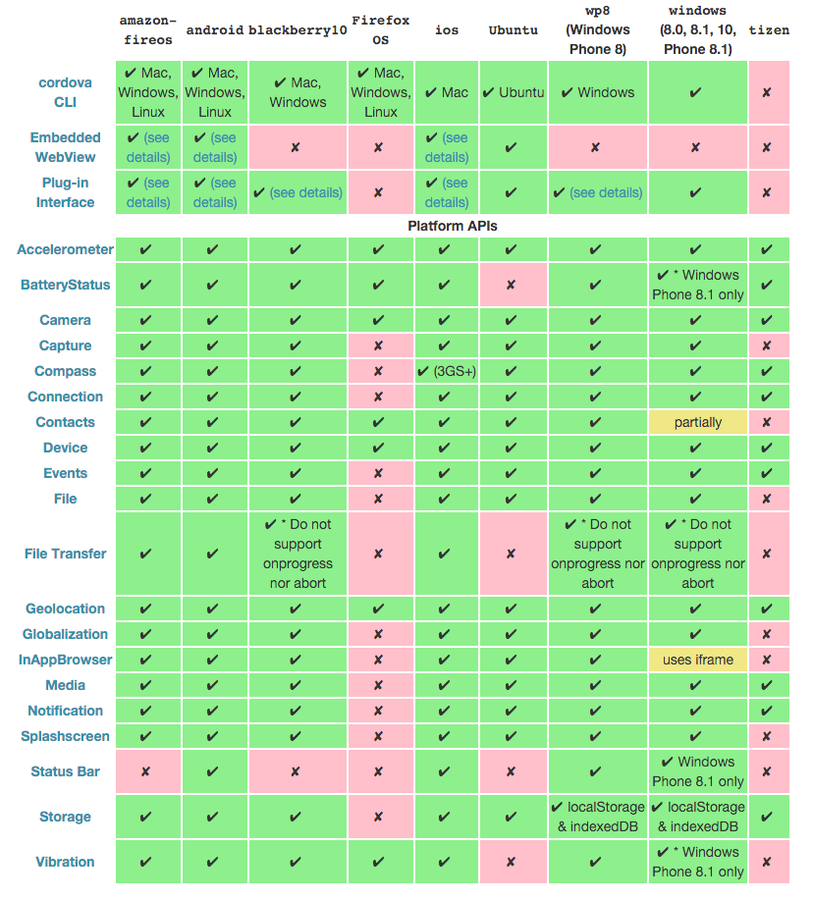
Status Bar Plugin
- iOS
- android
- windows phone
"The StatusBar object provides some functions to customize the iOS and Android StatusBar."
Why use Cordova?
function loadData() { }
function test() {
try {
loadData()
}
catch (error) {
print(error)
}
}
#import "XYZPerson+XYZPersonNameDisplayAdditions.h"
@implementation SomeObject
- (void)someMethod {
XYZPerson *person = [[XYZPerson alloc] initWithFirstName:@"John"
lastName:@"Doe"];
XYZShoutingPerson *shoutingPerson =
[[XYZShoutingPerson alloc] initWithFirstName:@"Monica"
lastName:@"Robinson"];
NSLog(@"The two people are %@ and %@",
[person lastNameFirstNameString], [shoutingPerson lastNameFirstNameString]);
}
@end
@Override
protected void onMeasure(int widthMeasureSpec, int heightMeasureSpec) {
super.onMeasure(widthMeasureSpec, heightMeasureSpec);
int width = MeasureSpec.getSize(widthMeasureSpec);
int height = MeasureSpec.getSize(heightMeasureSpec);
if (0 == mRatioWidth || 0 == mRatioHeight) {
setMeasuredDimension(width, height);
} else {
if (width < height * mRatioWidth / mRatioHeight) {
setMeasuredDimension(width, width * mRatioHeight / mRatioWidth);
} else {
setMeasuredDimension(height * mRatioWidth / mRatioHeight, height);
}
}
}
func loadData() throws { }
func test() {
do {
try loadData()
} catch {
print(error)
}
}
Under the right project/ circumstances you can save time/costs/learning a new language
- design can be the same across platforms
- minimal plugins(<2)
- simple input/output = text + photos
- Don't need custom plugins
- No fancy animations/behaviours/navigation
Out side of those time and costs will probably EXCEED doing it natively
if achievable at all due to:
platform versioning
performance
needing to write custom plugins
excessive platform specific coding
Sidenote: Windows UWP
A UWP app can run on any Windows-based device, including phones, tablets, and PCs.
WinJS supports motion, touch, keyboard and screen reader input. With multiple sources for input, you can go wild with user interaction. It delivers fluid animations and smooth UI rendering. A polished delivery of content makes for a sophisticated interface.
angular-winjs
Project to smooth the AngularJS/WinJS interaction. This code is a shim layer which facilitates usage of WinJS UI controls in an Angular Windows application. It achieves this by creating directives for the various controls which allow them to show up in Angular markup like:
Cordova Apps, native Apps, mobile websites, responsive web sites, WTF? really?
| native apps |
mobile website | responsive website | desktop | |
|---|---|---|---|---|
| initial load | slow | fast | fast | fast |
| subsequent loads | fast | slow | slow | fast |
| gesture nav | yes | yes | no | no(well maybe windows now) |
| offline | yes | possible | no(maybe) | no |
| push notify | yes | no | no | safari only |
| UX | great | better | okay | good on desktop |
| User expectations | high | medium | medium | high |
Resolution Insanity
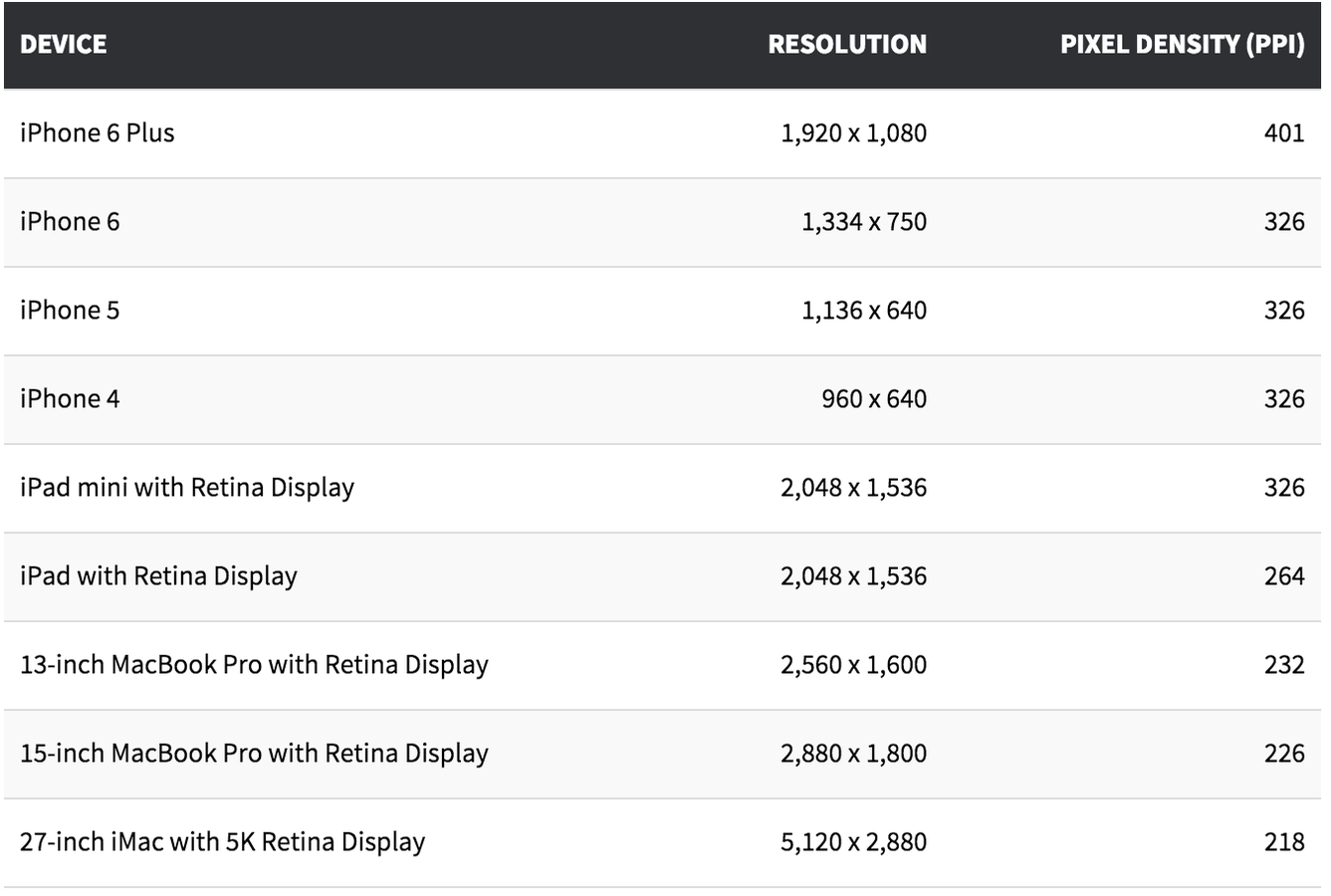
What do you do?
SVG's
Icon fonts
BUT!!
Make sure you design it with flat design so you can do that. And you may have to explain that to clients if they want to influence or provide designs
- font awesome
- material design
- Ico moon
Performance,
Whats that?
- Initial download time / app size(less than 30mb)
- time to navigate between views
- smooth ui
- not freezing
- not crashing
- download times for more data
- no memory leaks
- a good user experience
Apple app store limits
- cellular download < 100mb, previously 30mb
- wireless < 4Gb
Expect the Un-Expected alot!
iOS
android
| 8.0 | September 17, 2014; 13 months ago |
| 8.0.1 | September 24, 2014; 13 months ago |
| 8.0.2 | September 25, 2014; 13 months ago |
| 8.1 | October 20, 2014; 12 months ago |
| 8.1.1 | November 17, 2014; 11 months ago |
| 8.1.2 | December 9, 2014; 10 months ago |
| 8.1.3 | January 27, 2015; 9 months ago |
| 8.2 | March 9, 2015; 8 months ago |
| 8.3 | April 8, 2015; 7 months ago |
| 8.4 | June 30, 2015; 4 months ago |
| 8.4.1 | August 13, 2015; 3 months ago |
| 4.4.2 | December 9, 2013 |
| 4.4.3 | June 2, 2014 |
| 4.4.4 | June 19, 2014 |
| 4.4w | June 25, 2014 |
| 4.4w.1 | September 6, 2014 |
| 4.4w.2 | October 21, 2014 |
| 5 | November 12, 2014 |
| 5.1 | March 9, 2015 |
| 5.1.1 | April 21, 2015 |
| 6.0 | June 30, 2015; 4 months ago |

Text
Android verions
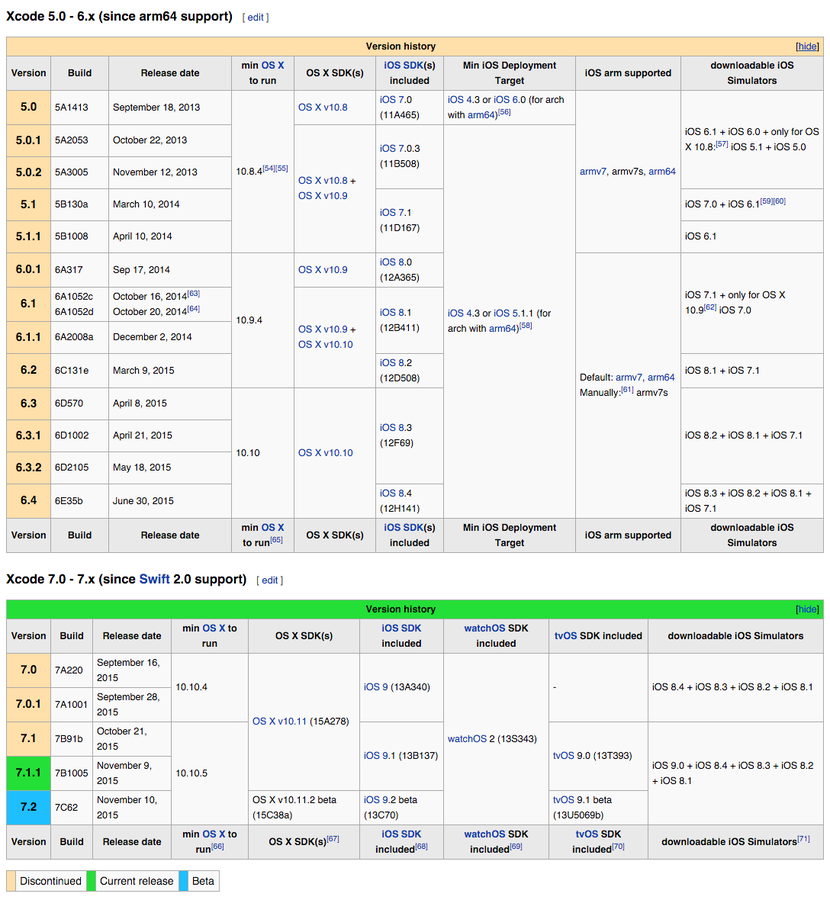
There is almost never a point in a year where you don't have to modify settings/code/build errors/plugins due to versioning issues while you wait for Cordova to catch up
Frameworks
- ionic*
- onsenui*
- intels appframework*
- kendoUI
- jquery mobile(SLOW)
- framework 7*
- sencha touch(SLOW)
- write your own, you don't have to use any of the above
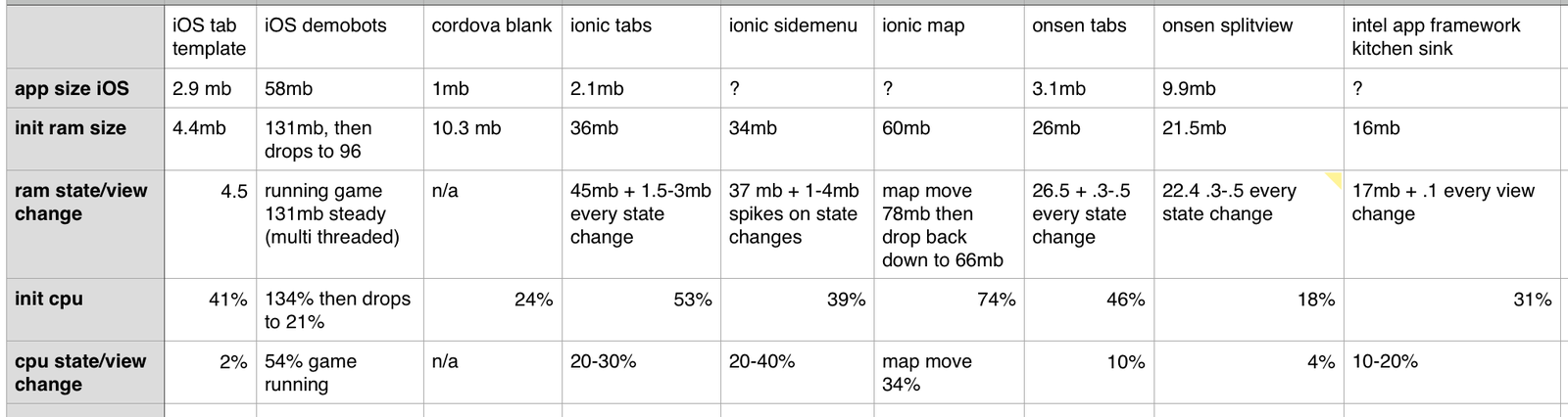
CSS no-no's
- text shadows
- box shadows
- css gradients
- misused transitions
JS
- if you can do it without JS in CSS use css
- less js the better
- HTML is for content
- CSS is for presentation
- JS is for behavior
Less code to start with is best for performance = best for UX
Angular specific notes
resolves
- they do what they are supposed
- BUT that blocks the UI when you are on devices with weaker antennae, and cellular connections
- gives the appearance of crashing or freezing
- Bad User experience
- SOLUTION: istead allow view change to occur, and having loading indicators on individual peices of content, lists, etc
hide/shows/tranistions
- disable animations for most buttons like save/edit
- use background images instead of dynamic ng-src
workflow/project management
- Have a spread of devices iOS, Android, etc
- Test performance of any framework on devices BEFORE you start coding
- Test in devices every half hr, YES EVERY HALF HR if not more
- Emulators are not accurate!!
- Try to limit coding to in the www folder, and use xcode, android studio settings as much as possible BEFORE using plugins
- limit plugins to 2-3 to avoid version problems
- start with a small feature set with initial build all the way thru the app stores
- incrementally release features with successive versions thru the app stores
WARNING!!
The longer you go without testing on devices the longer you will have to spend at the end refactoring once you test on devices
Cordova In's and Out's
By Lee Blazek