Frontend Performance pt2
After first paint
Lee Blazek
2023

Today!
After time to first paint
-
- HTML5
- CSS
- What runs in Browser vs editor
- Bundling
- JS
What to use for what?
HTML -> content
CSS -> presentation ( with limited behavior)
JS -> behavior (with limited presentation)
preprocessors
/super sets
| HTML | Jade, pug, EJS, marko, handlebars, mustache | mostly server side rendered. backbone/marionette, jquery, etc |
|---|---|---|
| CSS | Sass, scss, stylus, less | have their own preprocessor |
| JS | ES, 7, TS, Coffeescript | Usually need bundler (webpack, babel, etc) |
HTML 5 tags
lists (ol, ul, dl) - super useful
| Content sectioning | html, Main, nav, section, aside, footer, header, h1,h2,.. |
| Block level | div, lists(ul, ol, ..), ng component selectors(dps-card) |
| inline | span, b, i, strong, a, small |
Fewer diverse tags, means less CSS, better for SEO and Accessibility, performance, writing e2e tests
in other words no "divitis", "classitis", "span mania"
CSS
CSS Is cached seperately from JS etc. And runs on different threads than JS
CSS in JS makes messy doms and needs to execute JS to render
CSS
- Selectors
- psuedo elements
- SASS
- NG
- ngClass
- ng Styles
- encapsulation per component
CSS selectors
- CSS files
- js
- e2e tests
Use css before JS
pseudo classes / combinators
CSS
| :hover | |
| :first-child | |
| :last-child | |
| :nth-child | https://developer.mozilla.org/en-US/docs/Web/CSS/:nth-child |
| :before | |
| :after | |
| > | The > combinator selects nodes that are direct children of the first element. |
SCSS nesting and parent selector
SCSS SYNTAX
nav {
  ul {
    margin: 0;
    padding: 0;
    list-style: none;
  }

  li { display: inline-block; }

  a {
    display: block;
    padding: 6px 12px;
    text-decoration: none;
    &:hover {
        background: red;
    }
  }
}
nav ul {
margin: 0;
padding: 0;
list-style: none;
}
nav li {
display: inline-block;
}
nav a {
display: block;
padding: 6px 12px;
text-decoration: none;
}
nav a:hover {
background:red;
}
NG styling
- most styles can be added simply to the HTML directly, for those we can simply add them to the class property, and no special Angular functionality is needed
- Many state styles can be used using browser-supported pseudo-class selectors such as :focus, we should prefer those conventional solutions for those cases
- for state styles that don't have a pseudo-class selector linked to it, its best to go with ngClass
- if the ngClass expressions get too big, it's a good idea to move the calculation of the styles to the component class
- only for situations where we have a dynamically calculated embedded style should we use ngStyle, this should be rarely needed
Float's
For simpler peices of layout (bootstrap has them also)
Flex
Better for whole page layout stuff
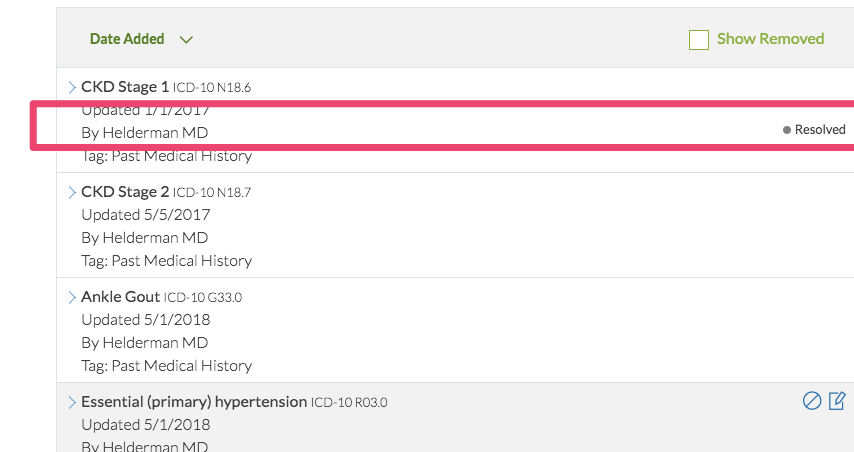
<div class="pl-3 pt-1 font-weight-light">
    By {{problem?.physician}}
    <small class="float-right"
    *ngIf="problem.clinicalStatus == 'Resolved'">
        Resolved
    </small>
</div>
Bundlers / webpack / TS ES6
- Webpack is bundler that is used by angular CLI, and many other Single page apps
- Typscript (TS) is a super set of JS, and plugin for webpack(or other bundlers to process. Basically ES6 with types, BUT NOTE: types DO NOT run in the browser, only in editor or compile time vs other code refs.
- ES6/7/next etc are new features for JS that natively work in browsers. But to support IE usually transpile them back to older versions.
- Bundlers also uglify, minify, concat files, make source maps etc
- Tree shaking - bundler traverses code and drops not reachable code(ex: code that has coditionals on env vars)
Demos
- babel
- typescript
type errors java at runtime?
If an angular app sends a date "1/1/2019" to a java(or other api) typed as Int or number, etc it will throw error?
type errors in browser at runtime?
If a server (java or any) sends a date "1/1/2019" to a typescript app(angular, react, etc) that is typed in typescript as number will it throw error?
NOTE: typescript type checking doesn't work in browser
to typecheck in browser you need to use "typeof" var
But you get these in your editor
- intellisense
- hints
- code completion
- errors against code assuming types
Lee Blazek
- www.berzek.io
- info@berzerk.io
- linkedin: www.linkedin.com/in/leeblazek
- https://github.com/berzerk-interactive

Front End Performance pt2 (2023)
By Lee Blazek