VUE.JS
Up and Running
Lee Blazek

Today!
- About Me
-
- What is:
- VUE
- VUE CLI
- coding
- vueex
- routing
- Current support
- other resources
- What is:
Demo
About Me
React, Angular, JS, Mean Stack, Front-end, Node api's, with a side of iOS
SME Javascript
Started development in 2003 ~ 17 years
Full-stack JS since 2013 ~ 7 years
Since Angular v 0.8
node 0.x
What about you?
Please city, country, and a short description of your job/career/level in chat.
(sorry there's to many people to go thru all in call)
CLI + UI
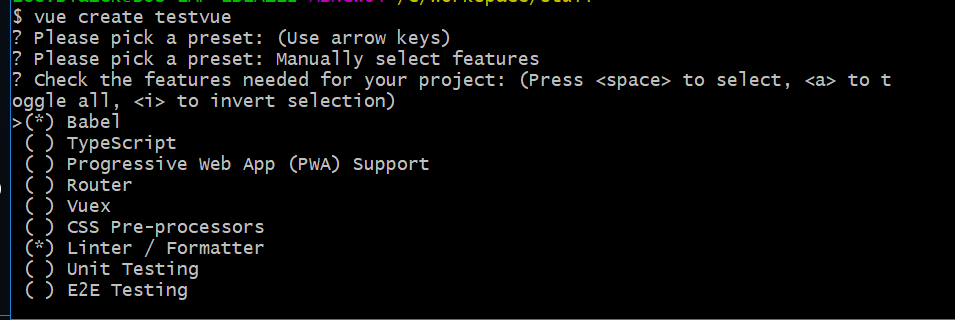
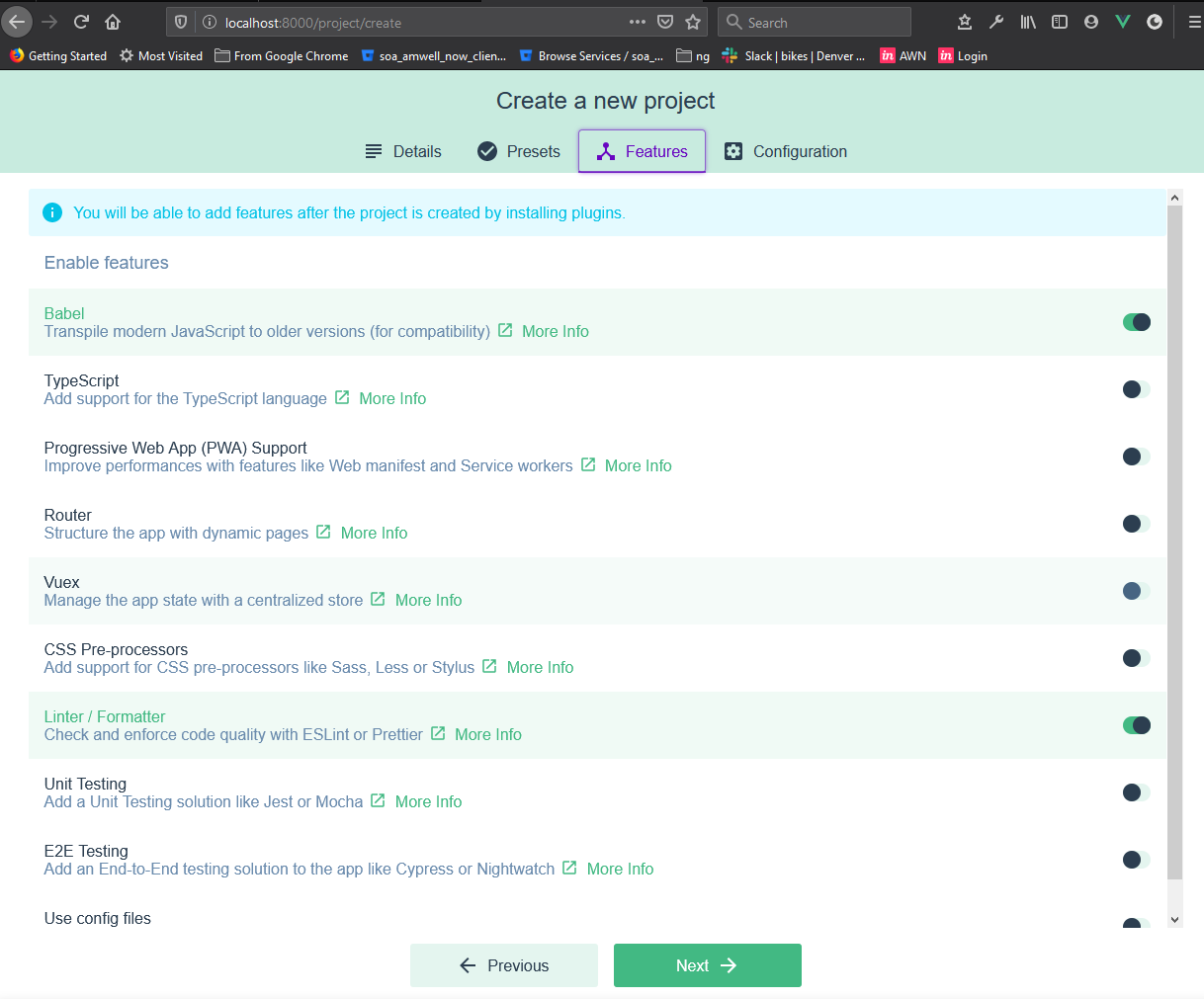
Coding
- templating
- event handling
- computed properties/watchers
- styles
- unit tests
Templating
- {{}} - raw text
- v-bind: or :
- v-html
- directives
- dynamic args
- short hand
# expressions - raw text not HTML
<span>Message: {{ msg }}</span>
<span>number: {{ num + 1  }}</span>
<div v-bind:id="'list-' + id"></div>


# attribute bindings
<div v-bind:id="dynamicId"></div>

# v-html
<span v-html="rawHtml"></span>
# directives
<p v-if="seen">Now you see me</p>
<p v-show="seen">Now you see me</p>
<a v-bind:href="url"> ... </a>


# dynamic args
<a v-bind:[attributeName]="url"> ... </a>

# short hand
<!-- full syntax -->
<a v-bind:href="url"> ... </a>

<!-- shorthand -->
<a :href="url"> ... </a>

<!-- shorthand with dynamic argument (2.6.0+) -->
<a :[key]="url"> ... </a>

v-on Shorthand

<!-- full syntax -->
<a v-on:click="doSomething"> ... </a>

<!-- shorthand -->
<a @click="doSomething"> ... </a>

<!-- shorthand with dynamic argument (2.6.0+) -->
<a @[event]="doSomething"> ... </a>
Template Shorthand
# short hand
<!-- full syntax -->
<a v-bind:href="url"> ... </a>

<!-- shorthand -->
<a :href="url"> ... </a>

<!-- shorthand with dynamic argument (2.6.0+) -->
<a :[key]="url"> ... </a>

#v-on Shorthand

<!-- full syntax -->
<a v-on:click="doSomething"> ... </a>

<!-- shorthand -->
<a @click="doSomething"> ... </a>

<!-- shorthand with dynamic argument (2.6.0+) -->
<a @[event]="doSomething"> ... </a>
Event Handling
<button v-on:click="warn('Form cannot be submitted yet.', $event)">
  Submit
</button>

// ...
methods: {
  warn: function (message, event) {
    // now we have access to the native event
    if (event) {
      event.preventDefault()
    }
    alert(message)
  }
}

// MODIFIERS

<!-- the click event's propagation will be stopped -->
<a v-on:click.stop="doThis"></a>

<!-- the submit event will no longer reload the page -->
<form v-on:submit.prevent="onSubmit"></form>

<!-- modifiers can be chained -->
<a v-on:click.stop.prevent="doThat"></a>

<!-- just the modifier -->
<form v-on:submit.prevent></form>
- v-on
- methods
- modifiers
Computed Properties / Watchers
<div id="example">
  <p>Original message: "{{ message }}"</p>
  <p>Computed reversed message: "{{ reversedMessage }}"</p>
</div>

var vm = new Vue({
  el: '#example',
  data: {
    message: 'Hello'
  },
  // RUNS ONLY ON REACTIVE DEPS
  computed: {
    // a computed getter
    reversedMessage: function () {
      // `this` points to the vm instance
      return this.message.split('')
      	.reverse().join('')
    }
  },
  // RUNS EVERY RENDER
  methods: {
  reverseMessage: function () {
    return this.message.split('')
    	.reverse().join('')
  }
}
})- computed only runs on reactive deps
- methods run on every render regardless
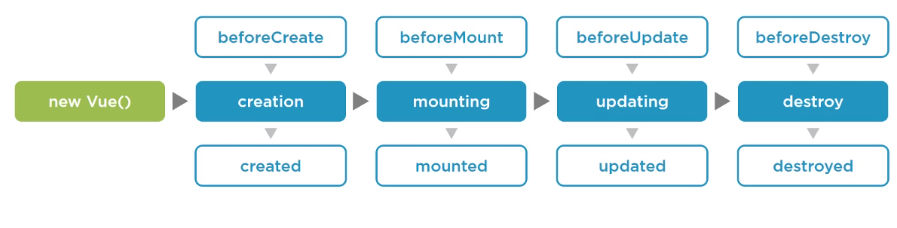
Life Cycle Methods

VUE
Instance
VUEX
State
const app = new Vue({
  data: {},
  methods: {
  	// update data
  },
  computed:{
  	//access data
  }
})
const store = new Vuex.Store({
state: {},
mutations: {
// update state
},
actions:{
// Call mutations
},
getters:{
// access data
}
})DEMO's
- basic project https://github.com/berzerk-interactive/vue-starter
Differences
- VUE is open source, and not backed by a big corporation like google, Facebook
- best cli/project start UI
- not as many plugins/addons as Angular/react
Resources
- https://vuejs.org/
- https://www.vuemastery.com/
-
https://github.com/hasura/awesome-vue-graphql
BERZERK
seminars
conferences
training
consulting
projects
https://www.linkedin.com/company/berzerk-io/
LEE BLAZEK
SME Javascript, Angular, React, Vue, NodeJS, all things in the browser
LEE BLAZEK
info@berzerk.io



Intro to VUE.JS
By Lee Blazek