Frontend stuff pt2
After first paint
Lee Blazek

Today!
After time to first paint
-
- HTML5
- CSS
- What runs in Browser vs editor
- Bundling
- JS
What to use for what?
HTML -> content
CSS -> presentation ( with limited behavior)
JS -> behavior (with limited presentation)
preprocessors
/super sets
| HTML | Jade, pug, EJS, marko, handlebars, mustache | mostly server side rendered. backbone/marionette, jquery, etc |
|---|---|---|
| CSS | Sass, scss, stylus, less | have their own preprocessor |
| JS | ES, 7, TS, Coffeescript | Usually need bundler (webpack, babel, etc) |
HTML 5 tags
lists (ol, ul, dl) - super useful
| Content sectioning | html, Main, nav, section, aside, footer, header, h1,h2,.. |
| Block level | div, lists(ul, ol, ..), ng component selectors(dps-card) |
| inline | span, b, i, strong, a, small |
Fewer diverse tags, means less CSS, better for SEO and Accessibility, performance, writing e2e tests
in other words no "divitis", "classitis", "span mania"
CSS
- Selectors
- psuedo elements
- SASS
- NG
- ngClass
- ng Styles
- encapsulation per component
CSS selectors
- CSS files
- js
- e2e tests
Use css before JS
pseudo classes / combinators
CSS
| :hover | |
| :first-child | |
| :last-child | |
| :nth-child | https://developer.mozilla.org/en-US/docs/Web/CSS/:nth-child |
| :before | |
| :after | |
| > | The > combinator selects nodes that are direct children of the first element. |
SCSS nesting and parent selector
SCSS SYNTAX
nav {
  ul {
    margin: 0;
    padding: 0;
    list-style: none;
  }

  li { display: inline-block; }

  a {
    display: block;
    padding: 6px 12px;
    text-decoration: none;
    &:hover {
        background: red;
    }
  }
}
nav ul {
margin: 0;
padding: 0;
list-style: none;
}
nav li {
display: inline-block;
}
nav a {
display: block;
padding: 6px 12px;
text-decoration: none;
}
nav a:hover {
background:red;
}
NG styling
- most styles can be added simply to the HTML directly, for those we can simply add them to the class property, and no special Angular functionality is needed
- Many state styles can be used using browser-supported pseudo-class selectors such as :focus, we should prefer those conventional solutions for those cases
- for state styles that don't have a pseudo-class selector linked to it, its best to go with ngClass
- if the ngClass expressions get too big, it's a good idea to move the calculation of the styles to the component class
- only for situations where we have a dynamically calculated embedded style should we use ngStyle, this should be rarely needed
Float's
For simpler peices of layout (bootstrap has them also)
Flex
Better for whole page layout stuff
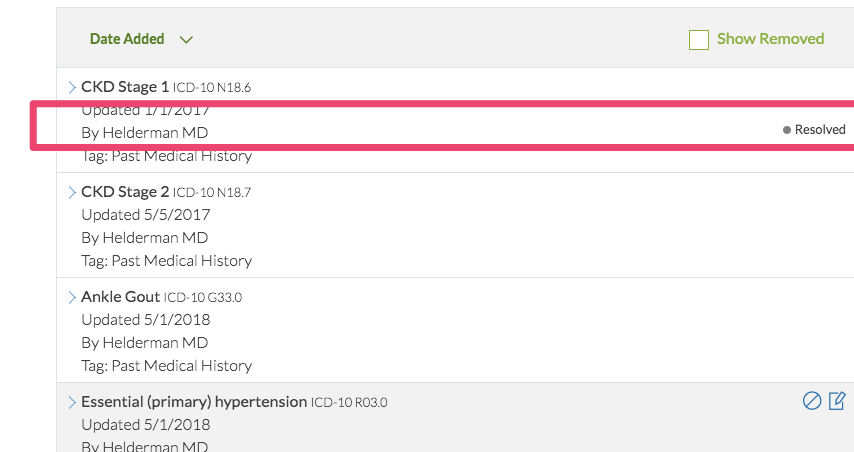
<div class="pl-3 pt-1 font-weight-light">
    By {{problem?.physician}}
    <small class="float-right"
    *ngIf="problem.clinicalStatus == 'Resolved'">
        Resolved
    </small>
</div>
Bundlers / webpack / TS ES6
- Webpack is bundler that is used by angular CLI, and many other Single page apps
- Typscript (TS) is a super set of JS, and plugin for webpack(or other bundlers to process. Basically ES6 with types, BUT NOTE: types DO NOT run in the browser, only in editor or compile time vs other code refs.
- ES6/7/next etc are new features for JS that natively work in browsers. But to support IE usually transpile them back to older versions.
- Bundlers also uglify, minify, concat files, make source maps etc
- Tree shaking - bundler traverses code and drops not reachable code(ex: code that has coditionals on env vars)
Demos
- babel
- typescript
type errors java at runtime?
If an angular app sends a date "1/1/2019" to a java(or other api) typed as Int or number, etc it will throw error?
type errors in browser at runtime?
If a server (java or any) sends a date "1/1/2019" to a typescript app(angular, react, etc) that is typed in typescript as number will it throw error?
NOTE: typescript type checking doesn't work in browser
to typecheck in browser you need to use "typeof" var
But you get these in your editor
- intellisense
- hints
- code completion
- errors against code assuming types
Feature Flags vs keycloak
| code | ||
|---|---|---|
| feature flag / router | prevents user navigation to whole route | not change able after deployed |
| feature flag / dva perm filter | tree shaked out in .ts files. HTML rendering prevented, or controller code exec | not change able after deployed |
| keycloak | all code shipped to browser | can change after deploy |
dvaPermValid
Is a pipe in dps-ui-core.
Router method
Uses a permission trick to block navigation to entire route
<ng-container *ngIf="'insurance' | dvaPermValid : 'FEATURE_INCLUDE' | async">
<!--stuff-->
</ng-container>
// We can't use functions due to aot, can't import the enviroments since ts won't let us...
const jenkinsHostPorts = ['localhost:3000', 'localhost:3001', 'localhost:3002', 'localhost:3003', 'localhost:3004', 'localhost:3005',
'localhost:3006', 'localhost:3007', 'localhost:3008', 'localhost:3009', 'localhost:3010'];
const host = window.location.host.toString();
const isLocalOrCiOrQa = [...jenkinsHostPorts, 'ci.oneviewdps.davita.com', 'qa.oneviewdps.davita.com'].indexOf(host) !== -1;
// NOTE: here is example of how to featureflag routes via environment
{
path: 'profile',
component: ProfileComponent,
data: {
permissions: { // NOTE: delete this line to go past ci with profile
only: isLocalOrCiOrQa ? [] : ['no-one-ever'], // NOTE: delete this line to go past ci with profile
}, // NOTE: delete this line to go past ci with profile
label: 'Patient Profile',
}
},Lee Blazek
- www.berzek.io
- info@berzerk.io
- linkedin: www.linkedin.com/in/leeblazek
- https://github.com/berzerk-interactive
Front End Performance pt2
By Lee Blazek