Intro to Git and Github
Learning Objectives
- Explain basic git commands like init, add, commit, push, pull and clone
- Distinguish between local and remote repositories
- Create, copy, and delete repositories locally, or on Github
- Fork and clone remote repositories

What is Git?
- A distributed version control system
- Manages a set of files as they change over time
- A codebase in Git is referred to as a repository or repo
Why Use Git?
- Reverse and track changes
- Collaborate with others
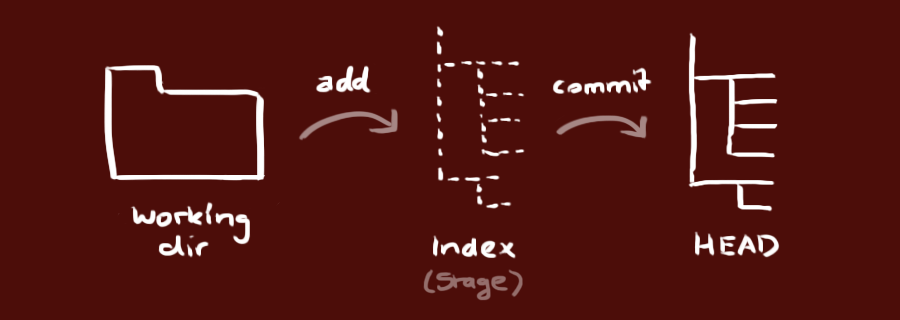
Workflow
- You modify files in your working directory.
- You stage the files, adding snapshots of them to your staging area.
- You do a commit, which takes the files as they are in the staging area and stores that snapshot permanently to your Git directory.
Common Git Commands
- init
- add
- status
- commit
- reset
- checkout
- diff
- merge
- log
- push
- pull
- clone
git init
Creates a new git repository
git add
Add files that have changed to staging area
git status
Shows the tracked files that have changed and files that have been added to staging
git commit
Saves a snapshot of the staged files
git reset
Revert back to a previous commit (snapshot)
git checkout
Switch between commits or branches
git diff
View list of changes between two commits
git merge
Combines two branches together
git log
Displays a list of your commits
List the common Git commands that we've talked about.
Codealong
Activity
- Create a directory called "cheatsheets".
- Initialize the directory as a git repository
- Inside the directory create a file called "git.md".
- Open the file in your text editor and write out all the git commands that we discussed with a brief description of what they do in your own words.
- Commit the changes
What is Github?
- Github is a web-based Git repository hosting service
- It saves your Git repos to the cloud like Dropbox saves your files to the cloud (it doesn't save them automagically though!)
Why Use Github?
- Share and collaborate with others!
- https://github.com/explore
What you need to know
- Fork
- Clone
- Push
- Pull
- Pull Request
Fork
- Create a personal copy of someone else's project

Clone
- Copy a repository to your computer locally

git clone <url>
Push
- Updates your local changes to your remote repository so they are the same.
git push <repo> <branch>
git push origin master
Pull
- Download changes from a remote repository.
git pull <repository> <branch>
git pull upstream master
Pull Request
- Suggest changes to other repos (not the same at git pull)


Separate list of git commands into two groups. Commands used with Github and those that aren't.
Codealong
Activity
- Create a new repository in Github called "cheatsheets"
- Use the code snippet provided by Github to associate your local git repository with the remote repository
- Push your local changes up to Github
Bonus:
- Fork your neighbors cheatsheet
- Clone the repo locally
- Make an update to their file and push it to your fork
- Make a pull request to their repo
Intro to Git and Github
By Matthew Gutierrez