
Michel Ventura
FullStack JavaScript Developer
Cascading Style Sheets
Conjunto de reglas que sirven para crear la presentación de un documento estructurado.
Porque las reglas que definimos modifican la presentación del documento de acuerdo la posición de la regla, por elemplo:
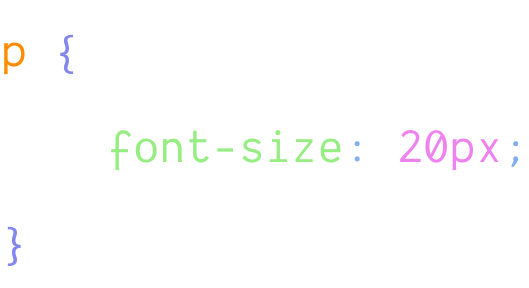
Selector
Inicio de declaración de reglas
Propiedad
Valor
Fin de declaración de reglas
Todas las reglas de CSS constan de 2 partes:
Los selectores básicos son 5:
También tenemos grouping selectors, combinators, pseudo
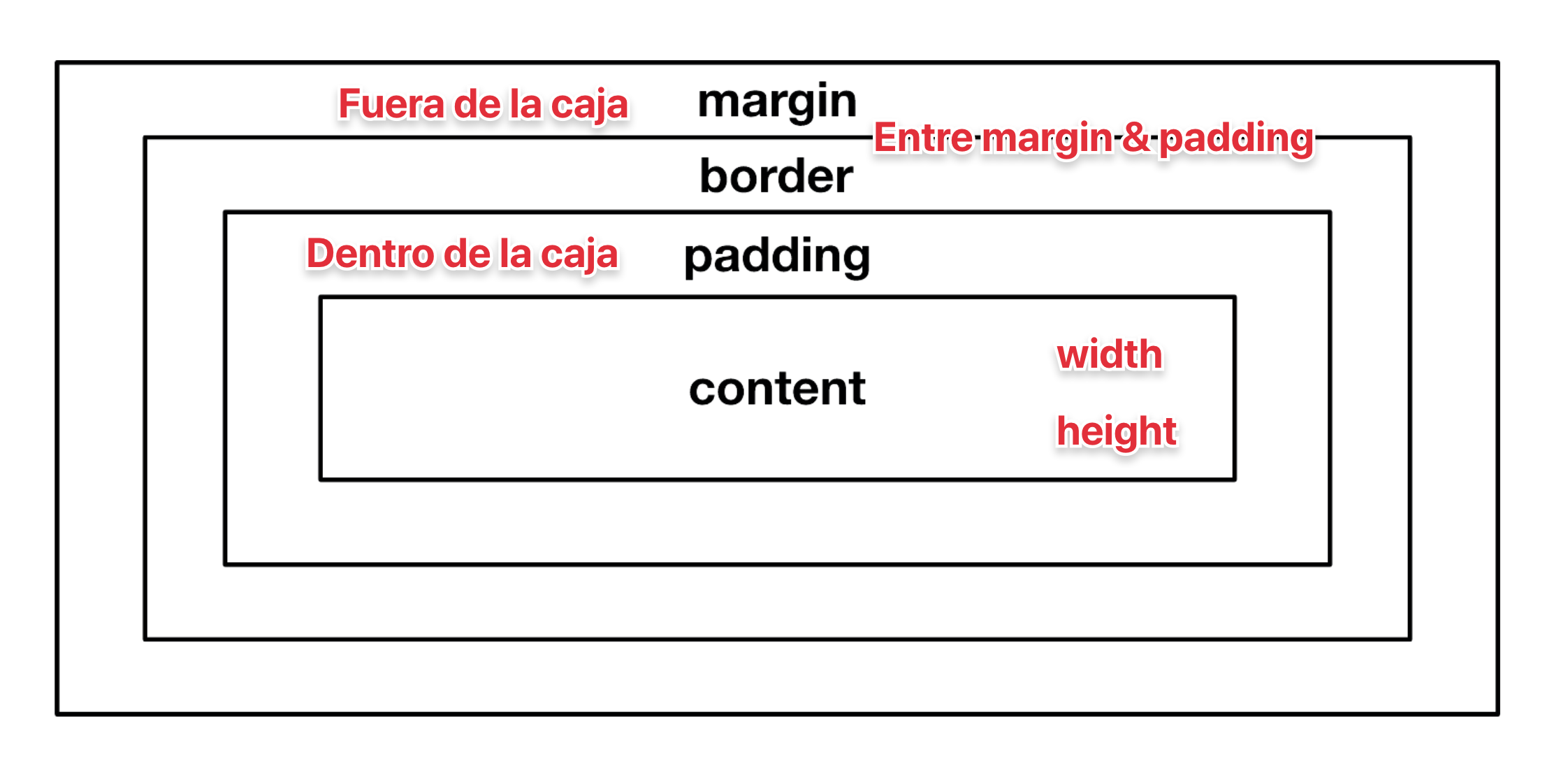
El flujo de display y position de los elementos dentro de un documento web, tambien conocido como "Box Model"
Display Inline
Display block
a, abbr, br, cite, code, em, i, img, input, label, select, span, strong, sub, sup, textarea
blockquote, div, dl, fieldset, form, h1 - h6, hr, ol, p, pre, table, ul, dd, dt, li, td, th, thead, tr
Ejercicio:
Declarar HTML & CSS baseline con styleguide del proyecto.
Ejemplo: HTML baseline
Tipografía
<!DOCTYPE html>
<html lang="es-MX">
<head>
  <meta charset="UTF-8">
  <meta name="viewport" content="width=device-width, initial-scale=1.0">
  <meta http-equiv="X-UA-Compatible" content="ie=edge">
  <link href="https://fonts.googleapis.com/css?family=Montserrat&display=swap" rel="stylesheet">
  <title>Título</title>
</head>
<body>
  <h1>Hola mundo</h1>
</body>
</html>
HTML baseline
CSS link
<!DOCTYPE html>
<html lang="es-MX">
<head>
  <meta charset="UTF-8">
  <meta name="viewport" content="width=device-width, initial-scale=1.0">
  <meta http-equiv="X-UA-Compatible" content="ie=edge">
  <link href="https://fonts.googleapis.com/css" rel="stylesheet">
  <link rel="stylesheet" href="css/style.css"
  <title>Título</title>
</head>
<body>
  <!-- Document body -->
</body>
</html>
CSS Reset & base styles
/* CSS Resets */
html {
  box-sizing: border-box;
}

*,
*::before,
*::after {
  box-sizing: inherit;
}

body,
h1,
h2,
h3,
h4,
h5,
h6,
ul,
ol,
li,
pre,
blockquote,
figure,
hr {
  margin: 0;
  padding: 0;
}

/* No discs from ul */
ul {
  list-style: none;
}

input,
textarea,
select,
button {
  color: inherit;
  font: inherit;
  letter-spacing: inherit;
}

input,
textarea,
button {
  border: 1px solid gray;
}

button {
  border-radius: 0;
  padding: 0.75em 1em;
  background-color: transparent;
}

button * {
  pointer-events: none;
}

embed,
iframe,
img,
object,
video {
  display: block;
  max-width: 100%;
}

table {
  table-layout: fixed;
  width: 100%;
}

[hidden] {
  display: none;
}

/* noscript styles */
noscript {
  display: block;
  margin-bottom: 1em;
  margin-top: 1em;
}

/* Variables */

:root {
  /* Containers */
  --small: 768px;
  --medium: 1024px;
  --large: 1440px;
  /* Colors */
  --background: white;
  --primary-color: #0366EE;
  --secondary-color: #FCB42A;
  /* Typography */
  --font-size: 1rem;
  --body-font-size: 1rem;
  --font-style: normal;
  --font-family: -apple-system, BlinkMacSystemFont, Helvetica Neue, Helvetica, Arial, sans-serif;
  /* Components - Heading */
  --heading-font-color: #404040;
  --heading-font-weight: bold;
  --heading-font-family: -apple-system, BlinkMacSystemFont, Helvetica Neue, Helvetica, Arial, sans-serif;
  /* Components -Heading font size */
  --h1: 2.25rem;
  --h2: 2rem;
  --h3: 1.75rem;
  --h4: 1.5rem;
  /* Components - Footer */
  --footer-font-color: #F4F4F4;
  --footer-bg-color: #000000;
  /* Padding */
  --padding: 1rem;
  --margins: 1.5rem;
}

/* Global */
body {
  background-color: var(--primary-color);
  font-family: var(--font-family);
}

/* Sections */

/* Layouts */
Aplicando variables en CSS
/* Global */

body {
  background-color: var(--primary-color);
}
Declarar baseline del CSS con styleguide del proyecto.
By Michel Ventura
Fundamentos de CSS