




Omar Patel
Software developer/instructor
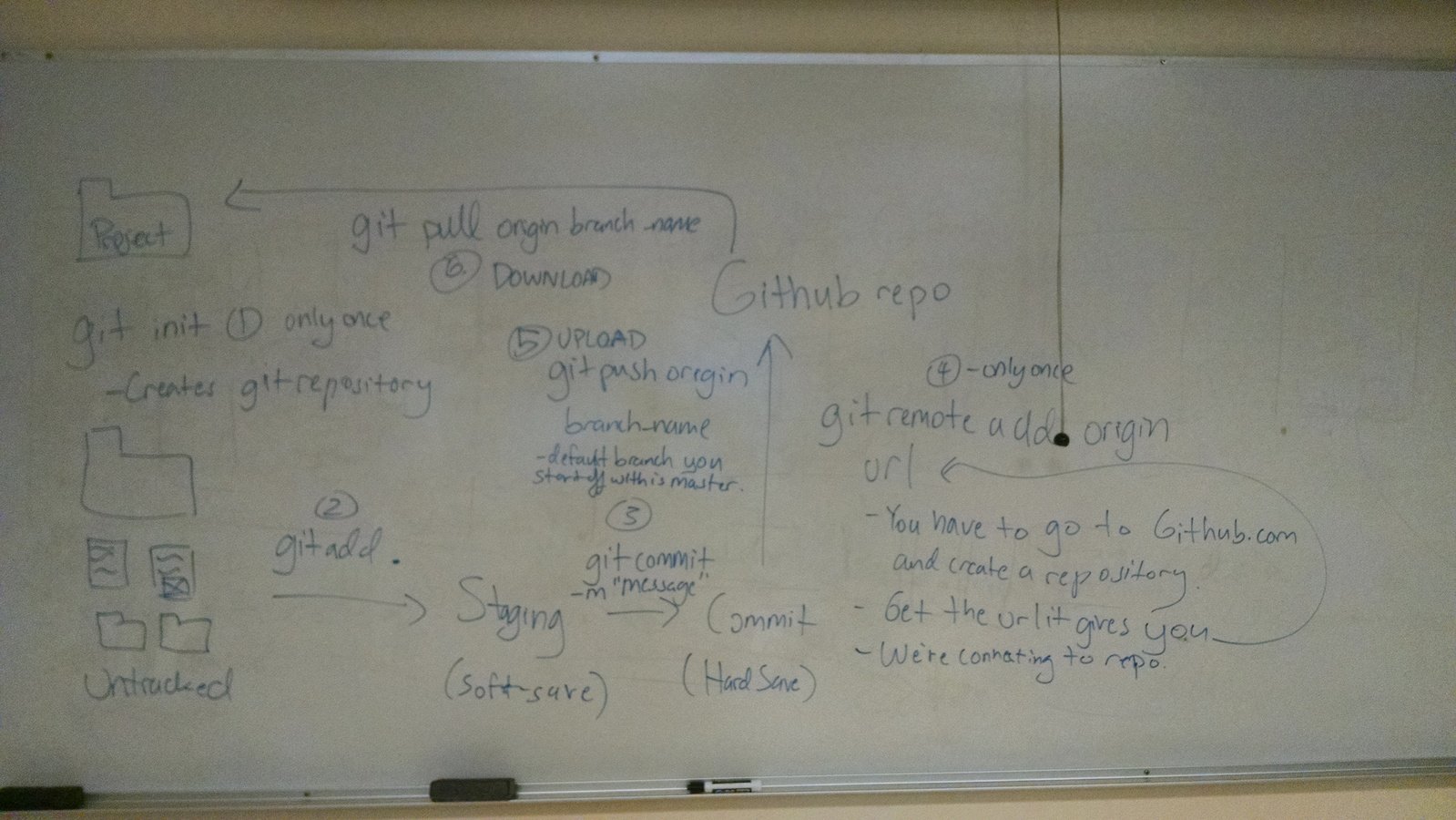
Set up a git repository in your project folder on your local machine and make your first commit. Instructions on how to set up a git repository can be found in the lecture slides for Week 3.
Guidelines:
Install Git on your computer
Initiate a git repository in your project folder
Stage your changes
Git WorkFlow
Notes
Margin
Content
border
padding
Notes
border
padding
p {

padding: 1px;
border: 2px solid black;
margin: 0px 2px;

}
border
padding
jQuery is a Javascript library used to make life with JavaScript easier for developers. This works by creating shortcut methods made using JavaScript.
border
padding
jQuery works by being included as a single file either in your directory or stored on a server. Either way, you must link to the file somewhere in your HTML. Once you link to the file, you'll have access to all that jQuery has to offer. Plus, it's free.
You can download jQuery and check out any of the jQuery documentation (basically, what any of the methods do) at http://jquery.com/
or use the CDN from Google:
<script src="https://ajax.googleapis.com/ajax/libs/jquery/2.2.2/jquery.min.js"></script>
border
padding
https://goo.gl/9Gx802
border
padding
<script src="js/jquery.js"></script>
<script>

var something = 43;

</script>$("p").text("Hey, I'm just some text being added");
$("#some_container").text("Adding some text.");
$(".gato").text("meow");padding
$( document ).ready(function() {

});$("div");$(".someElement");$("#someOtherElement");Try implementing what you learned into your project. That is:
border
padding
$("div").addClass("someClass");$("div").removeClass("someClass");$("div").css("color", "purple");$( "div" ).prop( "disabled", true );Try implementing what you learned into your project. That is, In your existing script.js file:
border
padding
$("div").html("<p>Replacing whatever content that was inside this div with this</p>");$("div").remove();$("p").clone().appendTo("div");$( "div" ).prop( "disabled", true );Try implementing what you learned into your project. That is, In your existing script.js file:
border
padding
$(".someElement").parent().css("color", "purple");$(".someElement").children().css("background", "orange");$(".someElement:nth-child(4)").addClass("someClass");$(".someClass:even").addClass("anotherClass");
$(".someClass:odd").addClass("anotherClass");$("body").css("background", "grey");Try implementing what you learned into your project. That is, In your existing script.js file:
Snippets (jQuery code that you can copy/paste)
Plugins (functionality that you can use)
Continue building the HTML and CSS for your project. Have at least 50% of the styling to your web application using CSS.
By Omar Patel