Angular fxLayout
Peter Malina
CTO @ FlowUp
Installation
/* app.module.ts */

import { FlexLayoutModule } from '@angular/flex-layout';
// other imports
@NgModule({
  imports: [FlexLayoutModule],
  ...
})
export class PizzaPartyAppModule { }
npm i @angular/flex-layout
# or
yarn add @angular/flex-layoutContainer
Item
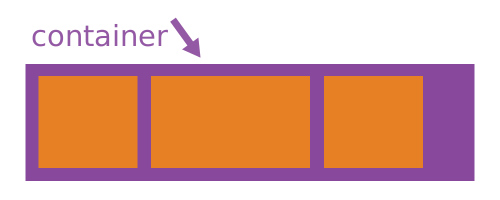
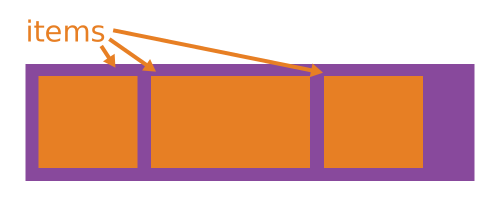
fxLayout
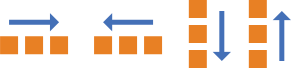
<div fxLayout="row |
               row-reverse |
               column |
               column-reverse">
</div>
fxLayoutAlign

<div fxLayoutAlign="<start | end | center | space-around | space-between>
                    <start | end | center | stretch>">
</div>
<div fxLayoutAlign="center center"></div>fxLayoutGap

<div fxLayoutGap="% | px | vw | vh">
</div>
Item Directives
- fxFlex
- fxFlexOrder
- fxFlexAlign
- fxFlexOffset (margin)
- fxFlexFill (100%wh)
Common Directives
- fxHide
- fxShow
- ngClass (extends core ngClass)
- ngStyle (extends core ngStyle)
<div ngClass.xs="class1 class2"></div>Breakpoints
<api>.<breakpoint alias>="<value>"
[<api>.<breakpoint alias>]="<expression>"
<div fxLayout="column">
<div fxFlex="33" [fxFlex.md]="box1Width"></div>
<div fxFlex="33" [fxLayout]="direction" fxLayout.md="row">
<div fxFlex="22" fxFlex.md="10px" fxHide.lg></div>
<div fxFlex="205px" fxFlex.md="65"></div>
<div fxFlex="30px" fxFlex.md="25" fxShow [fxHide.md]="hideBox"></div>
</div>
</div>
Custom Breakpoints
export const DEFAULT_BREAKPOINTS_PROVIDER = {
  provide: BREAKPOINTS,
  useFactory: DEFAULT_BREAKPOINTS_PROVIDER_FACTORY
};
function updateBreakpoints(bp: BreakPoint) {
switch(bp.alias) {
case 'xs' : bp.mediaQuery = '(max-width: 470px)'; break;
case 'sm' : bp.mediaQuery = '(min-width: 471px) and (max-width: 820px)'; break;
}
return bp;
}
// ngModule
providers: [
{
provide : BREAKPOINTS,
useFactory : function customizeBreakPoints() {
return validateSuffixes(DEFAULT_BREAKPOINTS.map( updateBreakpoints ));
}
}
]Questions?
Angular fxLayout
By Peter Malina