Angular2 + Redux



Live slides
https://slides.com/phra/angular2-redux/live
Preserving mental sanity while developing complex enterprise applications with Angular
Francesco Soncina aka phra
- Bachelor Degree in Computer Science
- Full Stack Developer
- DevOps Addicted
- JavaScript Enthusiast
- BolognaJS Staff Member
- BolognaTechScene Founder
Abstract
- Angular2
- Redux
- ngrx/store
- Demo
Live slides
https://slides.com/phra/angular2-redux/live
Biological Evolution
Mutation
Selection
Inheritance
Software Evolution
Feature
Popularity
Standard
Angular 2
One framework.
Mobile and desktop. "

Features
- Entirely rewritten from scratch
- Written in TypeScript
- Supports JavaScript, TypeScript and Dart languages
- Shorter learning curve than AngularJS 1
- Everything is an ES6 class!
- Pure Dependency Injection / Inversion of Control pattern
Features
- No more $scope.$apply(), yay!
- No more .service(), .factory() and .provider(), yay!
- Supports encapsulation (emulated / shadow DOM)
- Encourages use of modular components
- Encourages use of module loaders
- Encourages use of transpilers
- Based on Zone.js
- Based on Observables
Modules
// app.modules.ts
@NgModule({
  imports: [
    BrowserModule,
    HttpModule,
    FormsModule,
    routing
  ],
  declarations: [
    AppComponent,
    HomeComponent,
    AboutComponent
  ],
  providers: [ApiService],
  bootstrap: [AppComponent]
})
export class AppModule {}
...
Components
// login.ts
import { Component, Inject } from 'angular2/core';
import { User } from '../../services/user';
import { UserApi } from '../../lib/lb-services';

@Component({
    selector: 'login',
    templateUrl: 'src/components/login/login.html',
    styleUrls: ['src/components/login/login.css']
})

...
Components
// login.ts

...

export class Login {
    private email: string;
    private password: string;
    constructor(@Inject(User) public user: User,
                @Inject(UserApi) public userApi: UserApi) {
    }
    public login() {
        this.userApi.login({email: this.email, password: this.password}).subscribe(
            (response: any) => { this.user.user = response.user; },
            (error: any) => { this.user.clearUser();
                                console.error('login KO', error); },
            () => { console.log('Login COMPLETE', this.user); }
        );
    }
    public logout() {
        this.userApi.logout().subscribe(
            (response: any) => { this.user.clearUser(); },
            (error: any) => { this.user.clearUser();
                                console.log('Logout KO'); },
            () => { console.log('Logout COMPLETE'); }
        );
    }
}
Templates
<!-- login.html -->
<input *ngIf="!user.user"
        [(ngModel)]="email"
        placeholder="Email">
<input *ngIf="!user.user"
        [(ngModel)]="password"
        placeholder="Password">
<button *ngIf="!user.user"
        (click)="login()">LOGIN</button>
<button *ngIf="user.user"
        (click)="logout()">LOGOUT</button>
<p *ngIf="user.user">
    Welcome {{user.user.nome}} {{user.user.cognome}}!
</p>
Templates
<!-- items.html -->
<input type="button" value="Load items" (click)="getItems()">
<p>{{ text }}</p>
<table class="table" *ngIf="items.length">
    <thead><tr><td>ID</td><td>NAME</td><td>DESC</td></tr></thead>
    <tbody>
        <tr *ngFor="#item of items">
            <td>
                {{ item.id }}
            </td>
            <td>
                {{ item.name }}
            </td>
            <td>
                {{ item.desc }}
            </td>
        </tr>
    </tbody>
</table>
Providers
import { Injectable } from 'angular2/core';
import { UserModel } from '../models/user';

@Injectable()
export class User {
    private _user: UserModel;

    constructor() {
    }

    set user(user: UserModel) {
        this._user = user;
    }

    get user() {
        return this._user;
    }

    clearUser() {
        this._user = undefined;
    }
}
Inputs
// login.ts
export class Login {
    @Input() input: string;

    printInput() {
        console.log(this.input);
    }
}
<!-- header.html -->
...
<login [input]="parameter"></login>
...Outputs
// login.ts
export class Login {
    @Output() logged: EventEmitter<any>
        = new EventEmitter();
}
<!-- header.html -->
...
<login (logged)="loggedin($event)">
</login>
...Testability
- Everything is an ES6 class
- Usually we do not have to bootstrap the angular application
- We just import the class and instantiate it...
- ... mocking the dependencies of the constructor
Now we are ready to unit test our code!
Redux
Predictable state container for JavaScript apps"
Problems
In complex enterprise application the following problems will emerge soon or after if we not prevent them
- Complex comunication diagrams: components will tend to grow in number so more comunication between them
- Intermediate property passing: the state will flow through components themselves
- Refactoring overhead: components using @Input/Output are coupled together
Problems
In complex enterprise application the following problems will emerge soon or after if we not prevent them
- Mismatch between DOM and AppState trees: only in simpler application there can be a perfect match between trees
- No imposed single source of truth architecture: the framework itself doesn't enforce this pattern
- Moving state from components in services can help: yeah, but it's still a sub-optimal approach because state is splitted across services
Redux Core Concepts
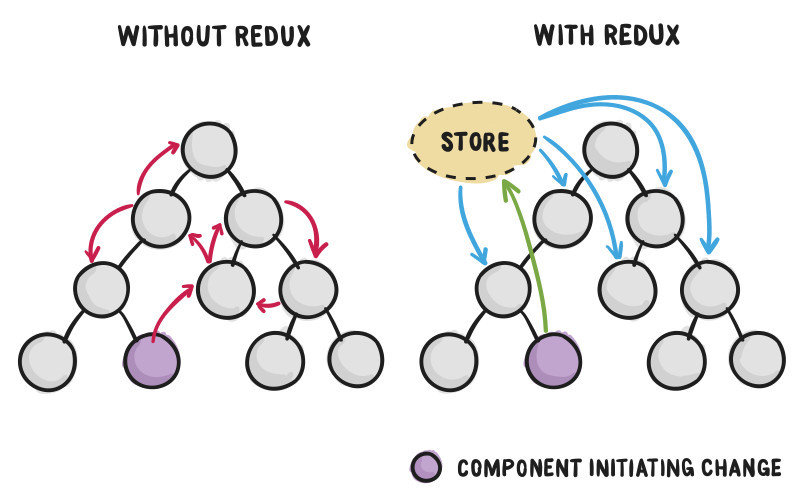
Redux can help us to simplify design and implementation workflow
- Single source of truth by design: the state is all persisted in the store
- Components read from the store: the only way to retrieve data is by subscribing to the store
- Immutable state: when updating the state, we apply changes to new object and leave previous state as is
- State is isolated: components can only fires action and wait for new input values
- State updates are performed by reducers: when dispatching actions, the appropriate reducer will be invoked
Redux Entities
There are three entity tipe in Redux:
- State: it's where all of our data will be stored
- Actions: they are the possibile ways to update the state and they are statically defined
- Reducers: they take in input the previous state and the actual action and return a new updated state
State
Single Source of Truth
- This is the only place where to put data
- Every components read from the store
- Components haven't direct access to state
- Components can only dispatch actions
- Updates are statically prior defined
Actions
Requesting updates to the state
- They are the unique way to update the state
- They are statically declared
- They can have a payload
- The specific reducer will be invoked to handle the situation
- The state changes will be propagated through every affected components
interface Action {
    type: string,
    payload?: any
}
Reducers
Handling changes to the state
- They are pure function
- They only depends on their inputs
- They don't access to external data
- They don't have side effects
- They take the previous state and apply the requested change
interface Reducer<T> {
    (state: T, action: Action) : T;
}
Identity Reducer
The most simple reducer
function(state: T, action?: Action) : T {
    return state;
}- It just returns the previous state!
Visual recap
ngrx/store
RxJS powered state management inspired by Redux for Angular 2 apps"
Features
- It implements Redux on top of RxJS
- It doesn't depend on Redux itself
- Designed from scratch for Angular2
- It offers counterparts of most famous Redux devtool
- It enables powerful debug technique such as Time Travel Debugging
- It encourages to adopt a Smart Containers and Dumb Components design
Reactive Extensions for JavaScript (RxJS)
- They bring Reactive Programming to JavaScript
- Designed to deal with continous asynchronous events
- Everything is a stream
- They extend the idea of Promises
- They provide a bunch of useful operators
Streams
- We can think about events flow like a stream
- We react to changes just when they occur
- Angular2 async pipe to the rescue

Internals
- In origin there were Observables and Observers
- Observables are entities that push values out
- Observers are entities that take values in
- Subjects are entities that are both Observables and Observer
- BehaviourSubject are just like Subject but they always emit their latest value when subscribing
- The dispatcher extends from Subject
- The store extends from BehaviourSubject
Real Example
export const INCREMENT = 'INCREMENT';
export const DECREMENT = 'DECREMENT';
export const RESET = 'RESET';
const INITIAL_STATE = Immutable.from({counter: 0, error: null});
export const counterReducer = (state = INITIAL_STATE, action) => {
  switch (action.type) {
    case 'INCREMENT':
      if (state.counter > 10)
        return state.set('error', 'OVER 10!!!!1!!!1!!');
      return state.set('counter', state.get('counter') + 1);
    case 'DECREMENT':
      return state.set('counter', state.get('counter') - 1);
    case 'RESET':
      return state.set('counter', 0);
    default:
      return state;
  }
};
reducer.ts
Real Example
export class MyComponent {

    state: Observable<State>;
    constructor(public store: Store<State>) {
        this.state
            = <Observable<State>>store.select('counter');
    }
    increment() {
        this.store.dispatch({ type: INCREMENT });
    }
    decrement() {
        this.store.dispatch({ type: DECREMENT });
    }
    reset() {
        this.store.dispatch({ type: RESET });
    }
}
component.ts
Real Example
<button (click)="increment()">
    Increment
</button>
<span>
    Current Count: {{ state.pluck('counter') | async }}
</span>
<span *ngIf="(state | async).error">
    Current Error: {{ state.pluck('error') | async }}
</span>
<button (click)="decrement()">
    Decrement
</button>
component.html
Example App
Available at this URL:

Question time

Angular2 + Redux
By Francesco Soncina