Sencha ExtJS
What is ExtJS?
ExtJS, also referred as EXT, is a cross-browser
JavaScript library for building rich internet
applications, using techniques such as AJAX,
DHTML and DOM scripting
1. It was originally built as an extension of YUI, Ext can now also extend jQuery and Prototype.
2. Browser Compatibility
Internet Explorer 6+
FireFox 1.5+ (PC, Mac)
Safari 3+
Opera 9+ (PC, Mac)
Story behind ExtJS:
-
In early 2006, Jack Slocum began working on a set of extension utilities for the Yahoo! User Interface (YUI) library.
-
These extensions were quickly organized into an independent library of code and distributed under the name "yui-ext”.
-
By the end of the year, the library had gained so much in popularity that the name was changed simply to Ext.
-
The library officially hit version 1.0 on April 1, 2007.
A bird’s-eye view of the framework
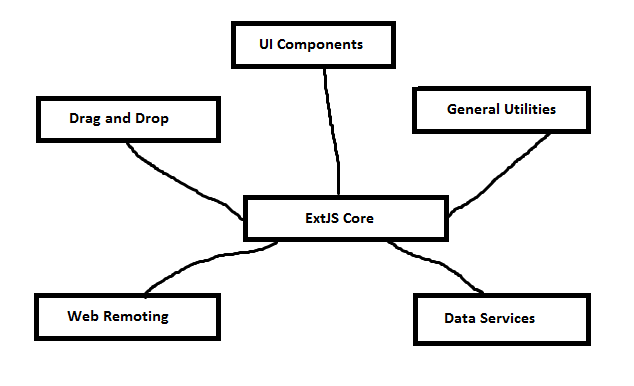
Core:
It comprises of many of the basic features such as
Ajax Communication
DOM Manipulation
Event Management
UI Components:
contain all of the widgets that interface with the user
Web Remoting:
In JavaScript to (remotely) execute method calls that are defined and exposed on the server.
Data Services:
The data services section takes care of all of your data needs, which include fetching, parsing and loading information into stores. And these stores are typically feed UI components.
Drag and Drop:
Drag and drop is like a mini framework inside Ext JS, where you can apply drag-and-drop capabilities to an Ext JS component or any HTML element on the page.
Utilities:
The utilities section comprises cool utility classes that help you perform some of your routine tasks easier.
Components
xtype            Class
-------------    ------------------
box              Ext.BoxComponent
button           Ext.Button
buttongroup      Ext.ButtonGroup
colorpalette     Ext.ColorPalette
component        Ext.Component
container        Ext.Container
cycle            Ext.CycleButton
dataview         Ext.DataView
datepicker       Ext.DatePicker
editor           Ext.Editor
editorgrid       Ext.grid.EditorGridPanel
flash            Ext.FlashComponent
grid             Ext.grid.GridPanel
listview         Ext.ListView
multislider      Ext.slider.MultiSlider
panel            Ext.Panel
progress         Ext.ProgressBar
propertygrid     Ext.grid.PropertyGrid
slider           Ext.slider.SingleSlider
spacer           Ext.Spacer
splitbutton      Ext.SplitButton
tabpanel         Ext.TabPanel
treepanel        Ext.tree.TreePanel
viewport         Ext.ViewPort
window           Ext.Window

Toolbar components
---------------------------------------
paging           Ext.PagingToolbar
toolbar          Ext.Toolbar
tbbutton         Ext.Toolbar.Button        (deprecated; use button)
tbfill           Ext.Toolbar.Fill
tbitem           Ext.Toolbar.Item
tbseparator      Ext.Toolbar.Separator
tbspacer         Ext.Toolbar.Spacer
tbsplit          Ext.Toolbar.SplitButton   (deprecated; use splitbutton)
tbtext           Ext.Toolbar.TextItem

Menu components
---------------------------------------
menu             Ext.menu.Menu
colormenu        Ext.menu.ColorMenu
datemenu         Ext.menu.DateMenu
menubaseitem     Ext.menu.BaseItem
menucheckitem    Ext.menu.CheckItem
menuitem         Ext.menu.Item
menuseparator    Ext.menu.Separator
menutextitem     Ext.menu.TextItem

Form components
---------------------------------------
form             Ext.form.FormPanel
checkbox         Ext.form.Checkbox
checkboxgroup    Ext.form.CheckboxGroup
combo            Ext.form.ComboBox
compositefield   Ext.form.CompositeField
datefield        Ext.form.DateField
displayfield     Ext.form.DisplayField
field            Ext.form.Field
fieldset         Ext.form.FieldSet
hidden           Ext.form.Hidden
htmleditor       Ext.form.HtmlEditor
label            Ext.form.Label
numberfield      Ext.form.NumberField
radio            Ext.form.Radio
radiogroup       Ext.form.RadioGroup
textarea         Ext.form.TextArea
textfield        Ext.form.TextField
timefield        Ext.form.TimeField
trigger          Ext.form.TriggerField
twintrigger      Ext.form.TwinTriggerField

Chart components
---------------------------------------
chart            Ext.chart.Chart
barchart         Ext.chart.BarChart
cartesianchart   Ext.chart.CartesianChart
columnchart      Ext.chart.ColumnChart
linechart        Ext.chart.LineChart
piechart         Ext.chart.PieChart

Store xtypes
---------------------------------------
arraystore       Ext.data.ArrayStore
directstore      Ext.data.DirectStore
groupingstore    Ext.data.GroupingStore
jsonstore        Ext.data.JsonStore
simplestore      Ext.data.SimpleStore      (deprecated; use arraystore)
store            Ext.data.Store
xmlstore         Ext.data.XmlStore
An example:
var btn = new Ext.Button({
    text: ‘Click me!‘,
    width: 200,
    height: 100
});
Here is about event listeners:
var btn = new Ext.Button({
    text: 'Click me!',
    width: 200,
    height: 100,
    listeners: {
        'click': function() {
            alert('Clicked!');
        }
    }
});
btn.on('mouseover', function() {
    alert('Hovered!');
});
Working with Data
Nothing, its about AJAX.
-
Clean separation of presentation and data.
-
Thin client which connects to web services.
-
Data encapsulated in JSON/XML
[LINK: http://docs.sencha.com/extjs/4.2.1/#!/api/Ext.data.Model]
HeLLO World!!
A Simple HelloWorld application in Ext JS
1. Download Ext JS source
http://www.sencha.com/products/extjs/download and unzip it under root of your http Server,
e.g. for JBOSS: $JBOSS_HOME\server\default\deploy\ROOT.war
2. Download Sencha SDK Tools
from http://www.sencha.com/products/sdk-tools/download . Run the executable then put
C:\Program Files (x86)\SenchaSDKTools-1.2.3\command in your class path
3. Create folder “helloWorld” on your root application Server or http Server
We need to create 2 files “myHelloWorld.js” and “index.html”
Index.html:
 <html>
 <head>
 <title>Hello World</title>
 <link rel="stylesheet" type="text/css" href="../extjs/resources/css/ext-all.css">
 <script type="text/javascript"
 src="../extjs/ext-debug.js"></script>
 <script type="text/javascript" src="myHelloWorld.js"></script>
 </head>
 <body></body>
 </html>
myHelloWorld.js
 Ext.application({
 name: 'HelloWold',  launch: function() {
 Ext.create('Ext.container.Viewport', {
 layout: 'fit',
 items: [
 {
 title: 'Hello World',
 html : 'Hello! Welcome to my Hello World implementation in Ext JS.'
 }
 ]
 });
 }
});
Thank You!!
E
By praveen_jegan